






KluthR
Community Developer
-
Joined
-
Last visited
Everything posted by KluthR
-
Seems like an light/dark mode issue from unraid. I can try to work around it.
-
Hm, idk. The file browser is an unraid feature, I just enabled it for some fields. No change which could cause a malfunction or some color change. It did work before? Did you upgraded something else?
-
How did you tried to change it? I dont know if this container requires this strcuture, but I would: create a folder within "/mnt/user/appdata/Grafana-Unraid-Stack" called "config". Then move evyrthing except data to the new config folder. So you end up having: /mnt/user/appdata/Grafana-Unraid-Stack/config:/config/ /mnt/user/appdata/Grafana-Unraid-Stack/data:/data EDIT: You updatedt your debug log file. I see, that you configured each volume as own allowed sources. That not needed, unless you exactly want this. Just put in /mnt/user/appdata. Thats all. It will make no difference though.
-
I noticed, that your grafana volume mapping is: [6] => /mnt/user/appdata/Grafana-Unraid-Stack:/config:rw [7] => /mnt/user/appdata/Grafana-Unraid-Stack/data:/data:rw it seems, that tar has a verification issue with that. While it seems to work, i would rather change the mapping for /config to an own folder. the backup should not take longer but you can test it if you are able to.
-
Did anyone found another issue? Did anyone tested migration?
-
How about: ?
-
Good2know. That could be the cause for similar issues.
-
No, thats nothing I can deal with. So if it does not happens currently is pure luck. latest revision has detailed debug info for that case, so share if it happens again.
-
Is Autoupdate not done within the plugin? I did not know that one can schedule it independently 😅
-
Ok. A new options for allowed appdata paths would fix it. I dont would add a checkbox next to each volume, I believe thats no good practice. I will see.
-
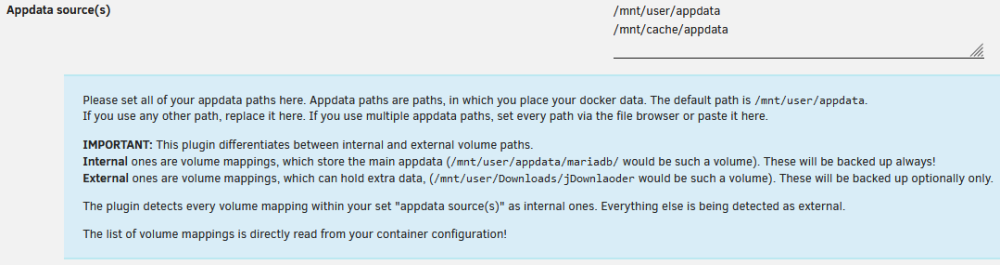
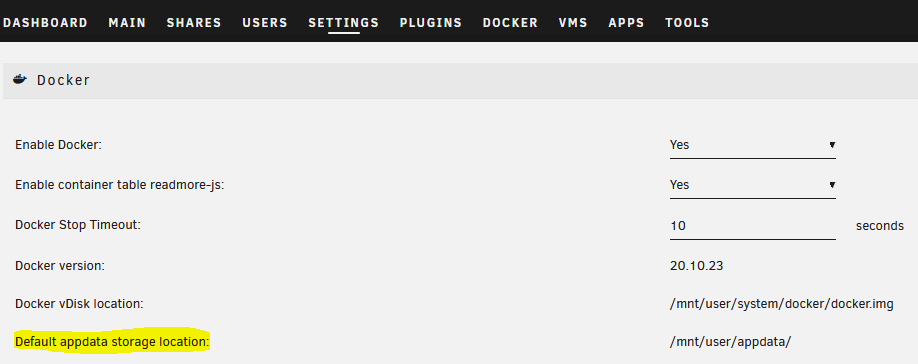
No, the plugin has a list of known appdata paths + the one configured in your docker setting: I believe none of this is applicable? One could have multiple such volumes to store data which should be considered "internal" (sorry if the naming is a but ugly, dont had better idea). What was your source config in the previous plugin? Whats about configurable appdata source(s) which should consider always-to-backup data?
-
Please try the new version ( @craven_moorehead ) .
-
@craven_mooreheadI got you I changed the complete internal/external volume handling! Per default, /mnt/user/appdata and the cache equivalent are allowed to say "its internal" + the configured Appdata path inside the docker settings. Everything else is handled as "extra". Thats done by the cost of tar's -C option. Thats means, that I use absolute paths for the tar creation. I thought a bit about it and I would say, thats no issue. If you recover from those backup, the EXACT SAME paths are being created then. That would also match the containers Volume mapping. If someone wishes to make changes, one must change it after restore or restore by hand. I finalize and test this first "big" change and let you test

-
roonserver/data/RoonServer/Database/Core/e129e95b6f294aa3b3640f06446ede68/broker_4.db/777531.ldb: Contents differ; seems like the old bug: docker container is stopped but something is accessing its files. The detailed debug does not show much, I need to add more environmental info. The next update will include such, then we will try again.
-
Yes. In default config, the path other than /mmt/appdata is seen as „external“. The primary path is examined from the Docker settings page. If that is set to /mnt/bla, then this is the path I work with. combining two appdata sources was not able within the previous plugin either. If such a feature is really wanted, we find a solution EDIT: NOW I understood your concerns: In the unraid world, /mnt/user/appdata and /mnt/cache/appdata would be the same at the end of the day. So if all containers are mapped to /mnt/user/appdata and only your mariadb is linked to /mnt/cache/appdata, it would treat it as external path. Yea, thats strange. Will think about it.
-
But something must happened, because the end-message instantly should turn the status to „stopped“. I will see. @craven_moorehead I see that your container options are set to „Yes/No“ instead of defaults. Was that intended or a leftover from the previous bug?
-
The square icon is part of a hidden setting. Volumes with those icon are „external“ volumes which can be optionally included soon.
-
Thats intereisting, yes. Because the test for a running script is absolutely failsafe. It seems, that something remains running. The started pids are stored within /tmp/appdata.backup.beta/running and extCmd files. I tested it a few hours ago and it brought the desired result. I will test it again, thanks for the input! I also working on a bsaic migration from the old plugin config.
-
No. Any Auto-Update is done via the native unraid way, no other plugins are needed.
-
Released an update, please give it another try. @xaositekSafari should work well now as well
-
For all who are facing issues with too large backups (hey, better than nothing 😞 Stay tuned, Im working on that. You are right, but the setting would have no effect. I just did not disabled the input field yet. The logic is created the right way in the background.
-
Currently it does, yes. But I immediately see what that can cause. I‘ll change that behavior and let the user decide how to handle mappings outside the appdata path. Dont ask me why I did not see/paid attention to it.
-
Yep, I can reproduce this on my iPhone. I'll search a solution.
-
So, you use safari then? Hmm, I cant test that here, maybe my iPhone can shed a light. Let me try. But I dont see any JS errors which could have prevented the process.
-
Thanks for your input Thats smells like an issue during apply settings back to their fields. Thats done via JavaScript. I bet, if you press F12 (browsers dev console) you can see some red errors. Which broser are you using? Just tested with FF and Edge



