






KluthR
Community Developer
-
Joined
-
Last visited
Everything posted by KluthR
-
Good to know. Will catch this hint as well and bring it to users attention.
-
Please post a „ls -la *script*“.
-
Just exclude the .npm folder via containers exclude list for now.
-
Please pay attention to the details: Appdata.backup is available starting with Unraid 6.12+ only. Appdatabackup/Restore 2.5 is deprecated since 6.12+
-
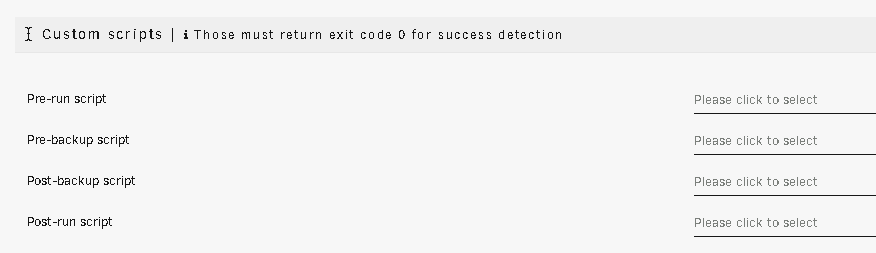
No, you are talking about ca.backup2. I talk abot the new appdata.backup. It has those options. See 1st post.
-
The new appdata.backup plugin has several custom scripts options.
-
Rebooting again after the cache drive removal fixed the issue, maybe worth noting. So something between "Yes, I want to do this" (Remove cache and start Array) and the next reboot, seems to prevent creating a new system share.
-
Greetings! Now it hit me: my cache drive is failing and my btrfs fs for docker got damaged. Since I reinstall the system in the next few weeks, I decided to remove cache and let everything run under the Array. So, my config until now was: appdata and system were Cahe-Only shares. Removing cache removed both folders. I re-created appdata - which worked - but creating system back results in a redirect to the "new share" page with all values zeroed out. The log states: May 10 06:57:51 NAS emhttpd: shcmd (3021): mkdir '/mnt/user/system' May 10 06:57:51 NAS root: mkdir: cannot create directory '/mnt/user/system': No medium found May 10 06:57:51 NAS emhttpd: shcmd (3021): exit status: 1 May 10 06:57:51 NAS emhttpd: shcmd (3022): rm '/boot/config/shares/system.cfg' Any idea what causes it?
-
?? => So, please describe more clear, I dont fully got, what you mean. It creates one folder per found appdata folder NOT PER CONTAINER since the "v2.5" ist not capable of detecting container based folders. The all-new appdata.backup does. Additional to @wgstarks answer: DISabling this can lead to broken backups, because ignoring verification errors could lead to broken data, since any error will be discarded then. The advantage is obvious: A 100% working backup (in matter of valid data) is always our goal, so we have to make sure: * Containers are stopped during their backup, to ensure it does not change data during backup * Verification is an extra layer of certainty: It checks the original data again against the just created archive. If only one bit differs, it throws an error. Sometimes containers share shares between each others, this would bring it up to your attention (in that example case one want to exclude it in one of the containers). A backup while the to backing up files are being modified CAN work, but dont have to. This is up to every user by configuring it as needed. Default settings have all checks enabled. Your post seem to have broken styling - apart from that: The old plugin(s) were backing up folder by folder. The new backup does not: It reads every docker container volume mapping and uses that - and only that information. Please post your debug logfile to get this confimred: It seems you have "Backup external volumes?" disabled, leading to skip any container volume mapping thats outside your configured "Allowed source paths" setting. With no volume left, it skips the backup for that container. Please open the help blocks for "Allowed source paths" to get more infos how the plugin differentiate between Internal and External volumes. EDIT: The last post is about the new plugin, this thread is for the old one. If more help is needed, please switch to the new one (see 1st post)
-
-
Please describe what exactly should be done with your request.
-
Sorry, the old backups are not compatible with the new plugin and therefore not available for restore. If you need something unpack it by yourself. After some time you can discard they.
-
To do what? Transfer the final backup after creation? How about the Post-Backup script option? Already done for the new plugin Thats on my list but I have to play with the tools a bit.
-
Please note: Starting with Unraid 6.12, the support for THIS plugin (ca.backup2 aka Appdata Backup/Restore v2.0 and v2.5) will end! Starting with Unraid 6.12, all users should upgrade to "Appdata Backup" (its the only app with the known icon inside CA Apps in Unraid 6.12). Leave the "old" plugin installed and install the new one next to it: The new plugin will detect the old one and offers a basic configuration migration. If done, uninstall the old plugin.
-
Tdarr and tdarr node sharing (some) same volumes. Backup at tdarr failed because tdarr node wrote to the logfiles. Verification failed. exclude the shared share in one of these two. you should also check your npm mappings, none of these seem to exist??
-
There is already: https://forums.unraid.net/topic/137710-plugin-appdatabackup
-
Auto update is sometimes messing. The issues all are talking about comes, because the „2.0“ is broken and dont inform you about backup errors. 2.5 fixes that and of course report issues if there were some before. since 6.12 is releasing the next days you can wait for it to update straight to Appdata.Backup. V2.5 will be EOL as well then
-
Nö, alles gut. Hab ich nich als Nörgeln verstanden. 😀
-
Its described at the restore page: it only restores the data, any container action (like stopping or creating) must be done by you. Restoring isnt that powerful currently. Maybe I add some logic later to do a full automated container restore.
-
Sorry, I need more infos. What are you trying to do? Are you talking about a restore?
-
Then please post your debug log. I cant tell whats going on without it.
-
Depends. Show a screenshot of your config. Whats set as allowed source paths? What mapping paths are affected?
-
Ahhh. I just remembered our discussion. Ok.
-
How does that work?
-
Currently no.



