





vrsaoc
Members
-
Joined
-
Last visited
-
sorry i didn't send english, i have bound IOMMU and unraid didn't use it
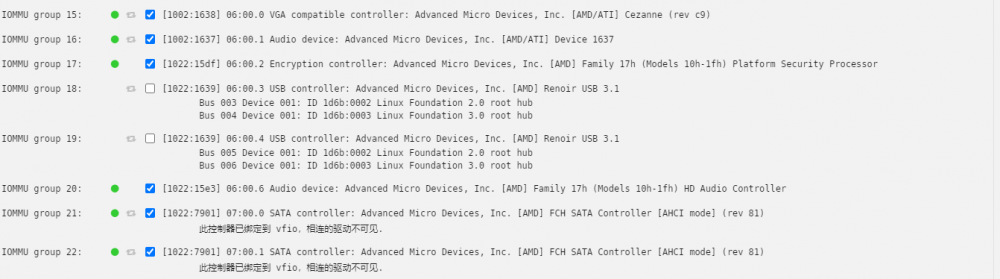
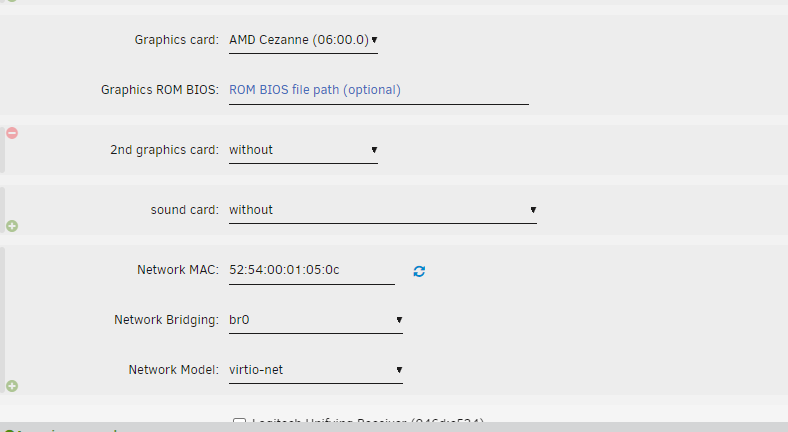
-
你好,想问一下我的AMD5600G,在win10安装显卡驱动,报错43,该如何调整? <?xml version='1.0' encoding='UTF-8'?> <domain type='kvm'> <name>Windows 10 2</name> <uuid>129c1316-3854-61d1-b930-c90312e74e6e</uuid > <metadata> <vmtemplate xmlns="unraid" name="Windows 10" icon="windows.png" os="windows10"/> </metadata> <memory unit='KiB'>5242880</memory> <currentMemory unit='KiB'>5242880</currentMemory> <memoryBacking> <nosharepages/> </memoryBacking> <vcpu placement='static'>9</vcpu> <cputune> <vcpupin vcpu='0' cpuset='0' /> <vcpupin vcpu='1' cpuset='6'/> <vcpupin vcpu='2' cpuset='1'/> <vcpupin vcpu='3' cpuset='2'/> <vcpupin vcpu='4' cpuset ='8'/> <vcpupin vcpu='5' cpuset='3'/> <vcpupin vcpu='6' cpuset='4'/> <vcpupin vcpu='7' cpuset='10'/> <vcpupin vcpu='8' cpuset ='5'/> </cputune> <os> <type arch='x86_64' machine='pc-i440fx-5.1'>hvm</type> <loader readonly='yes' type='pflash'>/usr /share/qemu/ovmf-x64/OVMF_CODE-pure-efi.fd</loader> <nvram>/etc/libvirt/qemu/nvram/129c1316-3854-61d1-b930-c90312e74e6e_VARS-pure-efi.fd</nvram > <boot dev='hd'/> </os> <features> <acpi/> <apic/> <hyperv> <relaxed state='on'/> <vapic state='on'/> <spinlocks state='on' retries='8191'/> <vendor_id state='on' value='none'/> </hyperv> <kvm> <hidden state='on'/> </kvm> <vmport state='off'/> <ioapic driver='kvm' /> </features> <cpu mode='host-passthrough' check='none' migratable='on'> <topology sockets='1' dies='1' cores='9' threads='1'/> <cache mode='passthrough'/> <feature policy='require' name='topoext'/> </cpu> <clock offset='localtime'> <timer name='hypervclock' present='yes'/> <timer name='hpet' present='no'/> </clock> <on_poweroff>destroy</on_poweroff> <on_reboot>restart</on_reboot> <on_crash>restart</on_crash> <devices> <emulator>/usr/local/sbin/qemu</emulator> <controller type='usb' index='0' model='ich9-ehci1'> <address type='pci' domain='0x0000' bus='0x00' slot='0x07' function='0x7'/> </controller> <controller type='usb' index='0' model='ich9-uhci1'> <master startport='0'/> <address type='pci' domain='0x0000' bus='0x00' slot='0x07' function='0x0' multifunction='on'/> </controller> <controller type='usb' index='0'模型='ich9-uhci2'> <master startport='2'/> <address type='pci' domain='0x0000' bus='0x00' slot='0x07' function='0x1'/> </controller> <controller type='usb' index='0' model=' ich9-uhci3'> <master startport='4'/> <address type='pci' domain='0x0000' bus='0x00' slot='0x07' function='0x2'/> </controller> <controller type='pci' index ='0' model='pci-root'/> <controller type='virtio-serial' index='0'> <address type='pci' domain='0x0000' bus='0x00' slot='0x03' function='0x0'/> </controller> <interface type='bridge'> <mac address='52:54:00:e8:c3:fd'/> <source bridge='br0'/> <model type ='virtio-net'/> <地址类型='pci'domain='0x0000' bus='0x00' slot='0x02' function='0x0'/> </interface> <serial type='pty'> <target type='isa-serial' port='0'> <型号名称='isa-serial'/> </target> </serial> <console type='pty'> <target type='serial' port='0'/> </console> <channel type='unix'> <target type='virtio' name ='org.qemu.guest_agent.0'/> <address type='virtio-serial' controller='0' bus='0' port='1'/> </channel> <input type='tablet' bus ='usb'> <address type='usb' bus='0' port='1'/> </input> <input type='mouse' bus='ps2'/> <input type='keyboard' bus ='ps2'/> <hostdev mode='subsystem' type='pci' managed='yes'> <driver name='vfio'/> <source> <address domain='0x0000' bus='0x06' slot='0x00' function='0x0 '/> </source> <address type='pci' domain='0x0000' bus='0x00' slot='0x04' function='0x0'/> </hostdev> <hostdev mode='subsystem' type='pci' managed ='yes'> <driver name='vfio'/> <source> <address domain='0x0000' bus='0x06' slot='0x00' function='0x1'/> </source> <address type=' pci' domain='0x0000' bus='0x00' slot='0x05' function='0x0'/> </hostdev> <hostdev mode='subsystem' type='pci' managed='yes'> <driver name= 'vfio'/> <source> <address domain='0x0000' bus='0x06' slot='0x00' function='0x6'/> </source> <address type='pci' domain='0x0000' bus='0x00' slot= '0x06' 函数='0x0'/> </hostdev> <memballoon model='none'/> </devices> </domain>
-
我这个似乎报错了,并且卡cpu
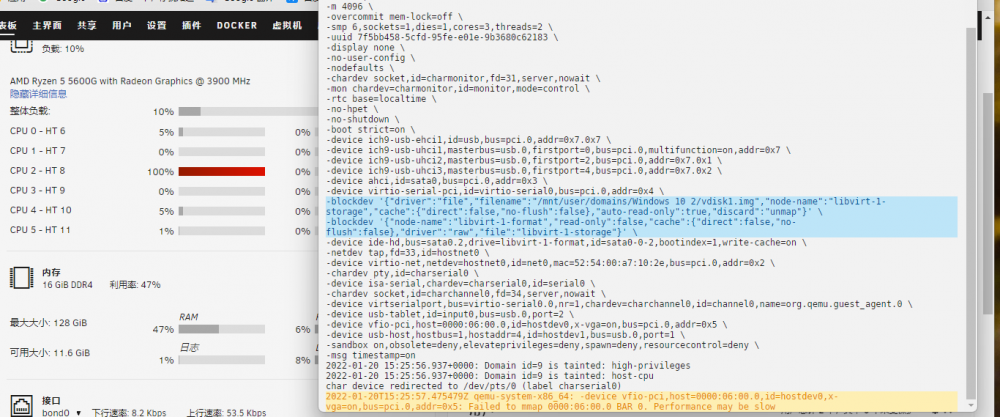
-
AMD5600g不好用~~~安装显卡驱动卡96%,AMD在这方面真的拉胯啊😰
-
是的,我安装的是 AMD 官方很容易推出的自动检测系统安装驱动的软件,我安装 GPU 一直卡在 92%,不知道为什么。。。AMD 的驱动支持太少了,intel 就很简单……
-
-
我现在重新添加了一个win10,也没有设置声卡直通,可是还是不识别,可以把您以前的帖子链接发给我一遍吗?
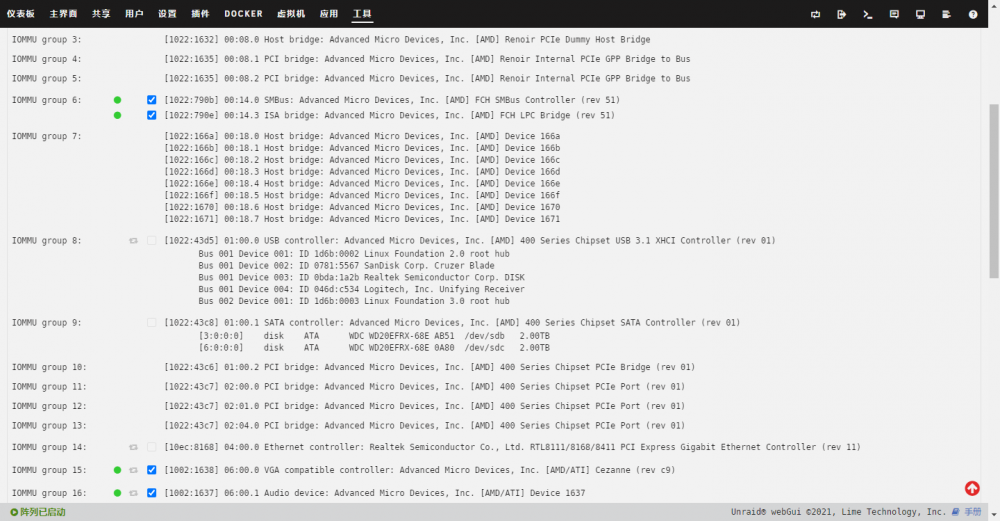
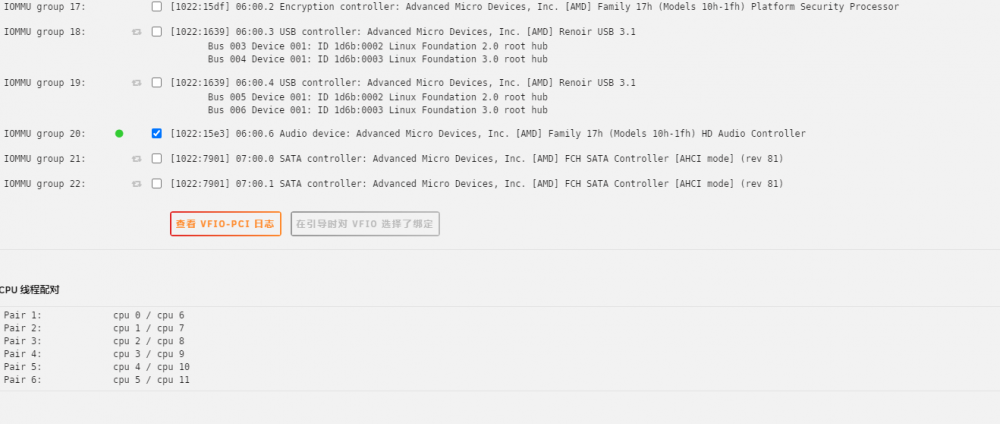
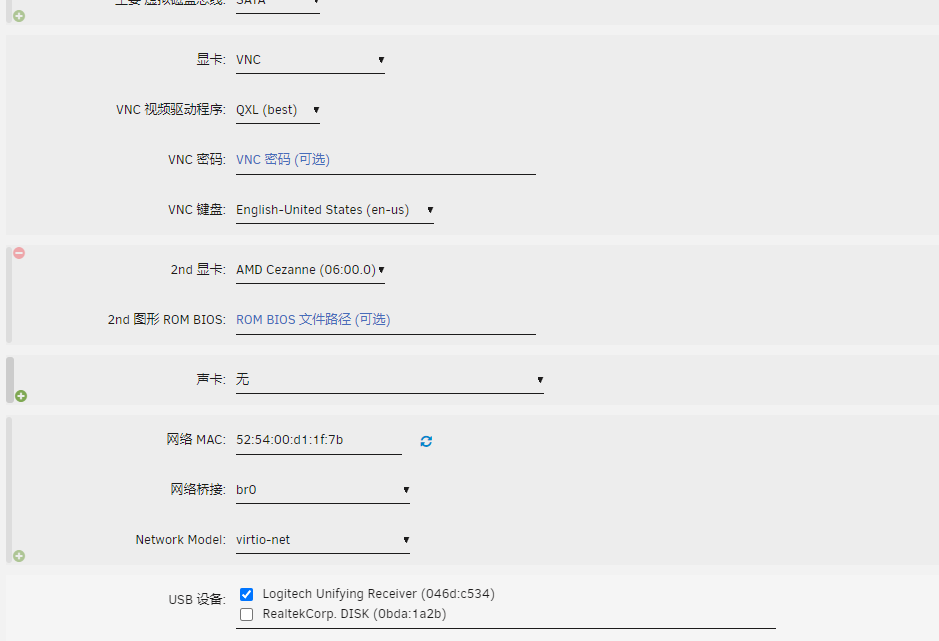
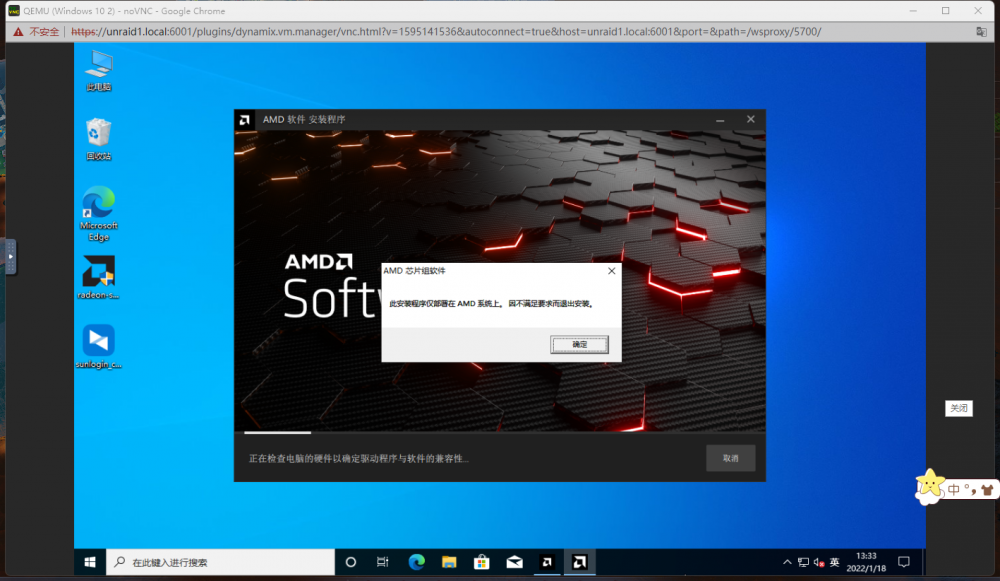
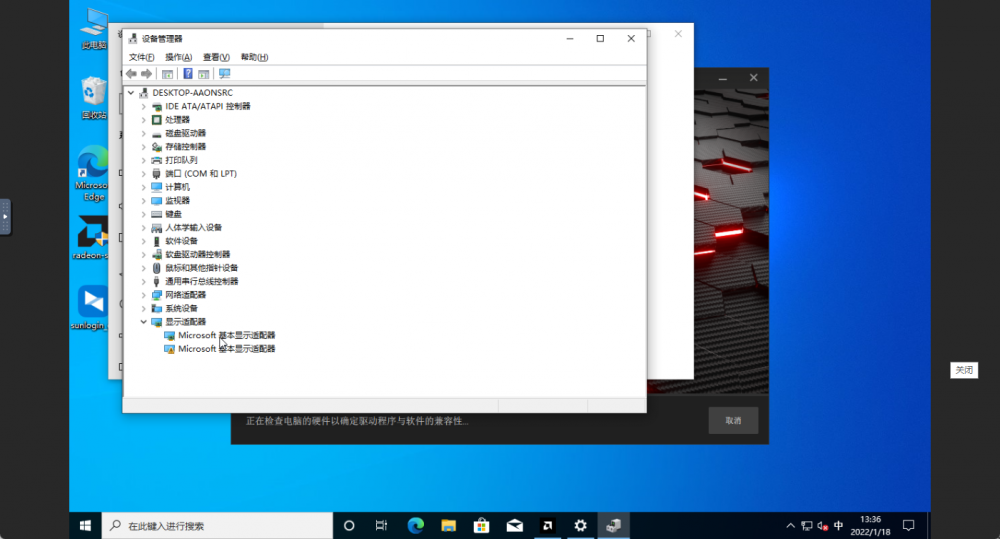
-
Still doesn't work. . .
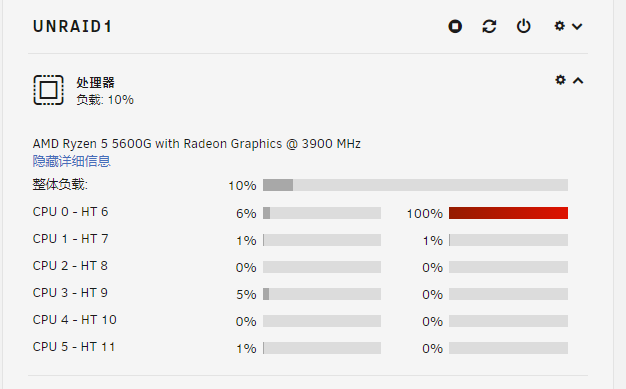 Hello, why did the win10 I installed also adjusted the GPU direct connection, but after installing the graphics card driver, I can't enter the system? In the boot interface does not move, the CPU has a core 100% use. How should I adjust it?
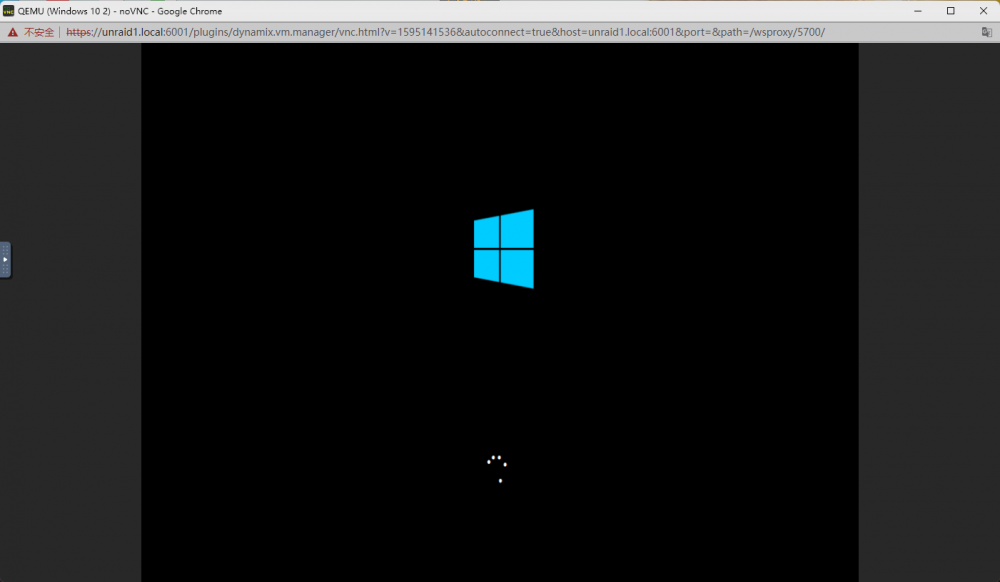 好吧,我的win10安装的一些游戏服务器,为AMD开发的各类生态还是不多啊unraid6.9,AMD5600g的GPU怎么能直接显示核心到win10而不影响emby调用的转码呢?


