





gretachini
Members
-
Joined
-
Last visited
-
Everything is slow. Loading any tab such as VM, Plugins, will at times take 10 to 15 seconds. I had to SSH in to grab a backup in case of having to revert to an older version, and half way through the connection froze and I was disconected. Even when grabbing these diag files, even get smart information like the command below took about 30 seconds for each one. smartctl -x '/dev/sdh' 2>/dev/null|todos >'/chonker-diagnostics-20250510-0123/smart/WDC_WUH721414ALE6L1_X0HJMD1G-2025-02-25 disk2 (sdh).txt' I'm not too concerned about troubleshooting because I'm just going to revert back to 7.0.1, but I thought this info might be useful. edit -- confirmed downgrading to 7.0.1 fixed this issue. I understand that plugins should be disabled / start in safe mode to troubleshoot, but unfortunately I don't have the time to do that at the moment. If this issue needs to be troublshooted because others are having the same issues, I can upgrade to 7.1.1 again and remove plugins to see if that is causing this slowness. chonker-diagnostics-20250510-0123.zip
-
@Rysz, just a huge thank you for developing and maintainig this project. Nerdtools was abandoned, and recently I had to reinstall a package but was getting a nasty error, which I learned was due to having an older version. WARNING: Retrying (Retry(total=4, connect=None, read=None, redirect=None, status=None)) after connection broken by 'SSLError("Can't connect to HTTPS URL because the SSL module is not available.")': /simple/pip/ WARNING: Retrying (Retry(total=3, connect=None, read=None, redirect=None, status=None)) after connection broken by 'SSLError("Can't connect to HTTPS URL because the SSL module is not available.")': /simple/pip/ WARNING: Retrying (Retry(total=2, connect=None, read=None, redirect=None, status=None)) after connection broken by 'SSLError("Can't connect to HTTPS URL because the SSL module is not available.")': /simple/pip/ WARNING: Retrying (Retry(total=1, connect=None, read=None, redirect=None, status=None)) after connection broken by 'SSLError("Can't connect to HTTPS URL because the SSL module is not available.")': /simple/pip/ WARNING: Retrying (Retry(total=0, connect=None, read=None, redirect=None, status=None)) after connection broken by 'SSLError("Can't connect to HTTPS URL because the SSL module is not available.")': /simple/pip/ Could not fetch URL https://pypi.org/simple/pip/: There was a problem confirming the ssl certificate: HTTPSConnectionPool(host='pypi.org', port=443): Max retries exceeded with url: /simple/pip/ (Caused by SSLError("Can't connect to HTTPS URL because the SSL module is not available.")) - skipping Fortunately you made installing Python a literal click of a button and saved myself a great number of hours that would have otherwise been spent on figuring out how to get Python on Unraid. Thanks a ton!
-
I'm getting this error soon after installing: aunchProcess: failed to execvp: xdg-settings [885:0407/022052.035416:ERROR:bus.cc(392)] Failed to connect to the bus: Failed to connect to socket /var/run/dbus/system_bus_socket: No such file or directory [885:0407/022052.036564:ERROR:bus.cc(392)] Failed to connect to the bus: Could not parse server address: Unknown address type (examples of valid types are "tcp" and on UNIX "unix") [885:0407/022052.036587:ERROR:bus.cc(392)] Failed to connect to the bus: Could not parse server address: Unknown address type (examples of valid types are "tcp" and on UNIX "unix") [885:0407/022052.068951:ERROR:bus.cc(392)] Failed to connect to the bus: Could not parse server address: Unknown address type (examples of valid types are "tcp" and on UNIX "unix") (node:885) electron: The default of nativeWindowOpen is deprecated and will be changing from false to true in Electron 15. See https://github.com/electron/electron/issues/28511 for more information. (Use `@joplinapp-desktop --trace-warnings ...` to show where the warning was created) [959:0407/022052.088747:ERROR:viz_main_impl.cc(162)] Exiting GPU process due to errors during initialization [1004:0407/022052.110154:ERROR:gpu_init.cc(441)] Passthrough is not supported, GL is swiftshader [1004:0407/022052.114461:ERROR:sandbox_linux.cc(374)] InitializeSandbox() called with multiple threads in process gpu-process. Gtk-Message: 02:20:53.666: GtkDialog mapped without a transient parent. This is discouraged. Any help would be wonderful
-
Here are the results. Doesn't seem to be too much relative to how much data is residing on it currently. Calculate Occupied Space Name: lost+found Location: disk5 Last modified: 54 minutes ago Total occupied space: 3.48 GB in 4 folders and 6 files
-
I appreciate the followup! Here are the diagnostics. chonker-diagnostics-20250406-2109.zip
-
Went ahead and performed it. It fixed the disk and it's mounted. Thank you so much!
-
@trurl Here is the output upon clicking Fix: Phase 1 - find and verify superblock... Phase 2 - using internal log - zero log... ERROR: The filesystem has valuable metadata changes in a log which needs to be replayed. Mount the filesystem to replay the log, and unmount it before re-running xfs_repair. If you are unable to mount the filesystem, then use the -L option to destroy the log and attempt a repair. Note that destroying the log may cause corruption -- please attempt a mount of the filesystem before doing this.
-
No, nothing irreplaceable. I'll proceed with clicking Fix and get back to you with the output.
-
@trurl Here is the output of the command. It was quite long so I saved it in a text file. After running this in the GUI, a "Fix" button popped up. If it's safe to proceed with clicking that, I will. Thanks for your help. disk5.txt
-
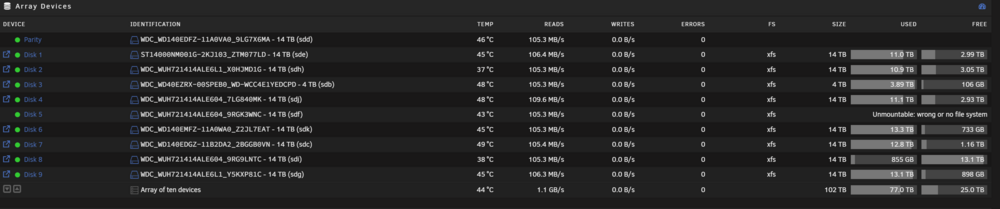
Title says it all. Unraid 7.0.1. I've found a few topics regarding this, but it seemed wise to check with you guys before doing anything that can't be undone. Thanks! chonker-diagnostics-20250406-1944.zip
-
Do you mean physically connecting a monitor/keyboard to my server?
-
Unraid version: 6.12.4 This has happened twice. I'm watching a movie via Plex on my Apple TV, and the movie suddenly stopped. The first time it happened, after an hour or so, I was able to connect to Unraid again. Everything was operational. The second time happened tonight: - I couldn't connect to the Unraid UI nor SSH in. I am on the local network. - I could ping the Unraid server from a local Windows client. I pressed the physical power button, and almost right after I pressed it, I was able to connect to Unraid momentarily until Unraid continued the shut down process. When I did connect, everything seemed fine. All my containers were still up and running. I grabbed the diagnostics zip file after I rebooted. I confirmed the log files contained are both before and after the physical shut down. The physical shut down was performed on 4/6 21:55. I waited over an hour or so, so I assume the connection issue happened around 21:00 or prior. Unfortunately the only thing appearing in the syslog are mover entries. From syslog.txt: Apr 6 20:00:14 chonker root: skip: /mnt/cache/video/tv/Grimsburg/Season 1/Grimsburg.S01E03.1080p.WEB.h264-BAE.mkv [2b,714b4c7] /video/downloads/tv/Grimsburg.S01E03.1080p.WEB.h264-BAE.mkv [-1] Apr 6 20:00:14 chonker root: skip: /mnt/cache/video/tv/The Great North/Season 4/The.Great.North.S04E03.1080p.WEB.h264-BAE.mkv [2b,714b4c6] /video/downloads/tv/The.Great.North.S04E03.1080p.WEB.h264-BAE.mkv [-1] Apr 6 20:00:14 chonker root: skip: /mnt/cache/video/tv/The Daily Show/Season 29/The.Daily.Show.2024.03.27.Byron.Tau.1080p.WEB.h264-EDITH.mkv [2b,714b518] /video/downloads/tv/The.Daily.Show.2024.03.27.Byron.Tau.1080p.WEB.h264-EDITH.mkv [-1] Apr 6 20:00:14 chonker root: skip: /mnt/cache/video/tv/BMF - Black Mafia Family/Season 3/bmf.s03e05.2160p.web.h265-lazycunts.mkv [2b,714b527] /video/downloads/tv/bmf.s03e05.2160p.web.h265-lazycunts.mkv [-1] Apr 6 20:00:14 chonker root: skip: /mnt/cache/video/tv/Loot/Season 2/Loot.S02E01.Space.for.Everyone.2160p.ATVP.WEB-DL.DDP5.1.Atmos.DV.HDR.H.265-FLUX.mkv [2b,714b5bd] /video/downloads/tv/Loot.S02E01.Space.for.Everyone.2160p.ATVP.WEB-DL.DDP5.1.Atmos.DV.HDR.H.265-FLUX.mkv [-1] Apr 6 20:00:14 chonker root: mover: finished Apr 6 21:55:03 chonker elogind-daemon[1260]: Power key pressed. Apr 6 21:55:03 chonker elogind-daemon[1260]: Powering Off... Apr 6 21:55:03 chonker init: Switching to runlevel: 0 Apr 6 21:55:08 chonker elogind-daemon[1260]: Delay lock is active (UID 0/root, PID 16152/libvirtd) but inhibitor timeout is reached. Apr 6 21:55:08 chonker elogind-daemon[1260]: System is powering down.. It seems that the diagnostics info I am attaching may not be sufficient, so if there is anything I can do to set up further tracing the next time this issue happens, I would be happy to do so. Thank you chonker-diagnostics-20240406-2156.zip
-
I did have an empty folder! I deleted it and it and exclusive access turned from no to yes. Thank you!
-
I think this may be causing the issue. I checked my logs and noticed this: Jun 18 02:21:07 chonker root: Fix Common Problems: Warning: Share appdata set to use pool chonkerdata, but files / folders exist on the cache pool Would this be causing the issue? And if it is, how can I resolve it? To my knowledge, I don't have any files on my cache pool corresponding to this share.
-
Thanks for the reply. I enabled this as well as restricting the DHCP pool, as this seemed to help when reading another topic. It's been up for a couple hours so far. Hoping it stays up!



