sgt_spike
Members
-
Joined
-
Last visited
Everything posted by sgt_spike
-
Can I request a mod be added to PHP? getid3 Thanks in advance
-
Duh!!! My bad....I know reading is fundamental! Also, I am trying to setup the mail mod in nginx. In the nginx.conf, I uncommented the mail section and copied/edited the php script from the wiki page. I edited the script to use my IP of my unraid. in the conf file the auth_http is set to the location of the script file. How can I tell if it's working?
-
Is there anything special I need to do in order to send email from the nginx using php's mail() function?
-
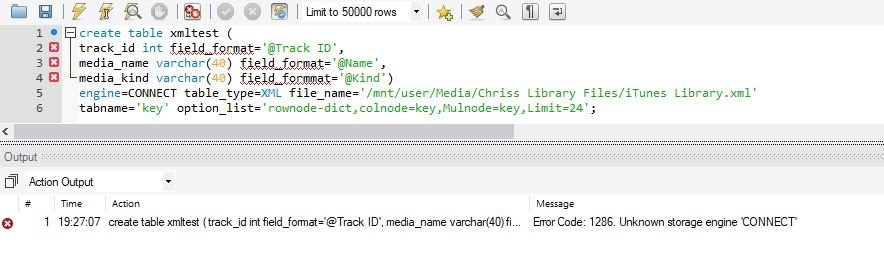
Looking to load an XML file (itunes library.xml) into a database. However it seem this container doesn't have CONNECT installed with mariadb. I am requesting this be added into the container build
-
OK Sorry another novice question. I need to enable intl for php. I can't quite see how to do this
-
Thanks aptalca for the quick reply I figured it out. I had the www folder as read-only in the settings.
-
Please excuse the novice question. I'm trying to setup a store front with opencart and the files needed for the site has to writable. However when the container restarts it sets the permissions to read only. How can I change this for a specific folder/flies?
-
How do I configure multiple domains?
-
How do I connect to a MariaDB Repository? Or how do I install the Connect engine?
-
it should read -p yourunraidip:32400:32400. I switch back to host and still cannot get plex to connect outside my network. Not even at plex.tv. All ports have been forwarded on router. I know at one point I was able to connect outside using plex.tv but for whatever reason went down again.
-
Which server are you referring to; plex, LE, unraid, and where in the proxy config file would I put the server's IP? I have LE and plex running on the same user defined network (172.18.0.0). It's my understanding that plex is then running in bridge mode, at this point. If I'm wrong, please enlighten me !!!! Below is the plex proxy config file I'm using. it's the boilerplate version, I just renamed the file, taking off the .sample server { listen 443 ssl; server_name plex.*; include /config/nginx/ssl.conf; client_max_body_size 0; proxy_redirect off; proxy_buffering off; # enable for ldap auth, fill in ldap details in ldap.conf #include /config/nginx/ldap.conf; location / { # enable the next two lines for http auth #auth_basic "Restricted"; #auth_basic_user_file /config/nginx/.htpasswd; # enable the next two lines for ldap auth #auth_request /auth; #error_page 401 =200 /login; include /config/nginx/proxy.conf; resolver 127.0.0.11 valid=30s; set $upstream_plex plex; proxy_pass https://$upstream_plex:32400; proxy_set_header Upgrade $http_upgrade; proxy_set_header Connection "upgrade"; proxy_set_header X-Plex-Client-Identifier $http_x_plex_client_identifier; proxy_set_header X-Plex-Device $http_x_plex_device; proxy_set_header X-Plex-Device-Name $http_x_plex_device_name; proxy_set_header X-Plex-Platform $http_x_plex_platform; proxy_set_header X-Plex-Platform-Version $http_x_plex_platform_version; proxy_set_header X-Plex-Product $http_x_plex_product; proxy_set_header X-Plex-Token $http_x_plex_token; proxy_set_header X-Plex-Version $http_x_plex_version; proxy_set_header X-Plex-Nocache $http_x_plex_nocache; proxy_set_header X-Plex-Provides $http_x_plex_provides; proxy_set_header X-Plex-Device-Vendor $http_x_plex_device_vendor; proxy_set_header X-Plex-Model $http_x_plex_model; } }
-
Gobs, I had the same issues setting up plex. Here's what I did...... If you are using a user defined network for LE and plex, the plex port must be mapped to the host (unraid). To do this edit the config, Docker->click on edit. Change to Advance mode. In the "Extra Parameters" section add this line (changing info to your info) "-p UnRaidIP:32400:32400" this should look something like -p 192.168.1.10:32400:32400 This will allow the webui to load on local. I have not been able to get plex to load via a custom web address as the proxy.config file instructions seems a bit confusing IMHO.
-
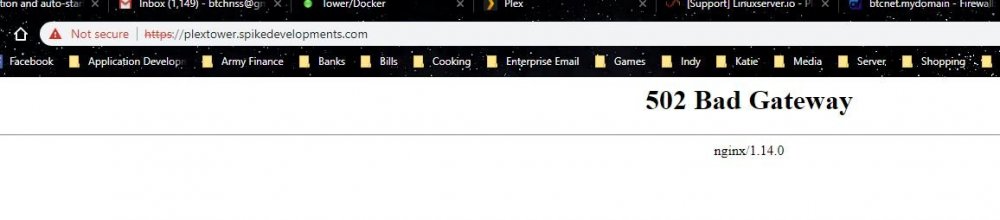
I got the containers port mapped to the host and it connects to the web_ui. However I'm not sure why I keep getting a bad gateway error trying to connect with https://plex.spikedevelopments.com
-
So set network back to the user defined network and add a port setting in the plex setup. The port being 10.20.30.10:32400 to 172.18.0.6:32400. If I have it wrong it's because your last statement is unclear to me. i understand your first statement, is that in addition to your second statement or are they two separate setting types
-
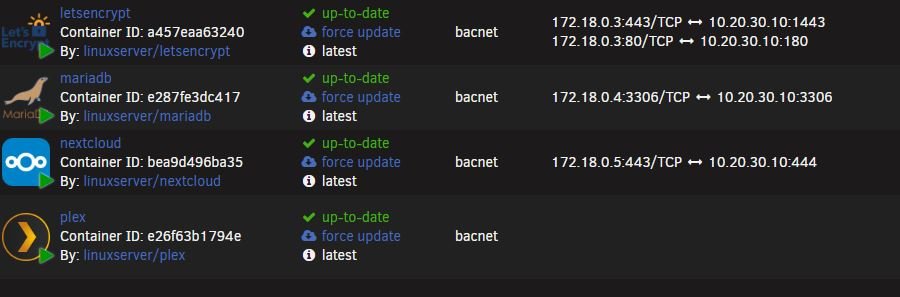
Hello Experts! I have setup LE on a custom network. I'm trying to setup reverse proxy for my plex (linuxserver plex). I set plex up on the same custom network. At this point I cannot reach plex through the web_ui. I get "it's not reachable". Also port mappings don't show like the other linuxserver containers do, is that normal? Also I can't get the plex.subdomain.conf to work. I've tried it with a host setting and can't get it to work. I followed the instructions in the conf file to no avail. server { listen 443 ssl; server_name plextower.*; include /config/nginx/ssl.conf; client_max_body_size 0; proxy_redirect off; proxy_buffering off; # enable for ldap auth, fill in ldap details in ldap.conf #include /config/nginx/ldap.conf; location / { # enable the next two lines for http auth #auth_basic "Restricted"; #auth_basic_user_file /config/nginx/.htpasswd; # enable the next two lines for ldap auth #auth_request /auth; #error_page 401 =200 /login; include /config/nginx/proxy.conf; resolver 127.0.0.11 valid=30s; set $upstream_plex plex; # proxy_pass https://$upstream_plex:32400; # proxy_pass https://172.18.0.3:32400; proxy_pass https://10.20.30.10:32400; proxy_set_header Upgrade $http_upgrade; proxy_set_header Connection "upgrade"; proxy_set_header X-Plex-Client-Identifier $http_x_plex_client_identifier; proxy_set_header X-Plex-Device $http_x_plex_device; proxy_set_header X-Plex-Device-Name $http_x_plex_device_name; proxy_set_header X-Plex-Platform $http_x_plex_platform; proxy_set_header X-Plex-Platform-Version $http_x_plex_platform_version; proxy_set_header X-Plex-Product $http_x_plex_product; proxy_set_header X-Plex-Token $http_x_plex_token; proxy_set_header X-Plex-Version $http_x_plex_version; proxy_set_header X-Plex-Nocache $http_x_plex_nocache; proxy_set_header X-Plex-Provides $http_x_plex_provides; proxy_set_header X-Plex-Device-Vendor $http_x_plex_device_vendor; proxy_set_header X-Plex-Model $http_x_plex_model; } } With the custom network I'm not sure which settings to change, if it's even possible.
-
Didn't see any errors. I modified the fetch key to the following if [[ ! -e /root/keyfile ]]; then mkdir -p /unlock mount -t cifs -o rw,nounix,iocharset=utf8,_netdev,file_mode=0777,dir_mode=0777,,vers=3.0,username=myuser,password=mypassword '//MEDIASERVER/index' '/mnt/disks/MEDIASERVER_index' cp -f /mnt/disks/MEDIASERVER_index/unlock.png /root/keyfile # umount /unlock rm -r /unlock fi restarted the server and got the following Sep 23 17:09:00 Tower emhttpd: shcmd (32): echo 128 > /sys/block/sdb/queue/nr_requests Sep 23 17:09:00 Tower emhttpd: shcmd (33): /usr/local/sbin/set_ncq sdd 1 Sep 23 17:09:00 Tower root: set_ncq: setting sdd queue_depth to 1 Sep 23 17:09:00 Tower emhttpd: shcmd (34): echo 128 > /sys/block/sdd/queue/nr_requests Sep 23 17:09:00 Tower kernel: mdcmd (40): start STOPPED Sep 23 17:09:00 Tower kernel: unraid: allocating 31100K for 1280 stripes (6 disks) Sep 23 17:09:00 Tower kernel: md1: running, size: 3907018532 blocks Sep 23 17:09:00 Tower kernel: md2: running, size: 3907018532 blocks Sep 23 17:09:00 Tower kernel: md3: running, size: 2930266532 blocks Sep 23 17:09:00 Tower kernel: md4: running, size: 1953514552 blocks Sep 23 17:09:01 Tower emhttpd: shcmd (35): udevadm settle Sep 23 17:09:01 Tower emhttpd: Opening encrypted volumes... Sep 23 17:09:01 Tower emhttpd: shcmd (37): /usr/sbin/cryptsetup luksOpen /dev/md1 md1 --key-file /root/keyfile Sep 23 17:09:01 Tower root: Failed to open key file. Sep 23 17:09:01 Tower kernel: device-mapper: ioctl: 4.39.0-ioctl (2018-04-03) initialised: [email protected] Sep 23 17:09:01 Tower emhttpd: shcmd (37): exit status: 1 Sep 23 17:09:01 Tower emhttpd: shcmd (39): /usr/sbin/cryptsetup luksOpen /dev/md2 md2 --key-file /root/keyfile Sep 23 17:09:01 Tower root: Failed to open key file. Sep 23 17:09:01 Tower emhttpd: shcmd (39): exit status: 1 Sep 23 17:09:01 Tower emhttpd: shcmd (41): /usr/sbin/cryptsetup luksOpen /dev/md3 md3 --key-file /root/keyfile Sep 23 17:09:01 Tower root: Failed to open key file. Sep 23 17:09:01 Tower emhttpd: shcmd (41): exit status: 1 Sep 23 17:09:01 Tower emhttpd: shcmd (43): /usr/sbin/cryptsetup luksOpen /dev/md4 md4 --key-file /root/keyfile Sep 23 17:09:01 Tower root: Failed to open key file. Sep 23 17:09:01 Tower avahi-daemon[11634]: Server startup complete. Host name is Tower.local. Local service cookie is 2421470760. Sep 23 17:09:01 Tower emhttpd: shcmd (43): exit status: 1 Sep 23 17:09:01 Tower emhttpd: shcmd (45): /usr/sbin/cryptsetup luksOpen /dev/sdf1 sdf1 --key-file /root/keyfile Sep 23 17:09:01 Tower root: Failed to open key file. Sep 23 17:09:01 Tower emhttpd: shcmd (45): exit status: 1 Sep 23 17:09:01 Tower emhttpd: Missing encryption key Sep 23 17:09:01 Tower kernel: mdcmd (41): stop Sep 23 17:09:01 Tower kernel: md1: stopping Sep 23 17:09:01 Tower kernel: md2: stopping Sep 23 17:09:01 Tower kernel: md3: stopping Sep 23 17:09:01 Tower kernel: md4: stopping Sep 23 17:09:02 Tower avahi-daemon[11634]: Service "Tower" (/services/ssh.service) successfully established. Sep 23 17:09:02 Tower avahi-daemon[11634]: Service "Tower" (/services/smb.service) successfully established. Sep 23 17:09:02 Tower avahi-daemon[11634]: Service "Tower" (/services/sftp-ssh.service) successfully established.
-
Thanks for the guidance. trying it now
-
Can I use a SMB share to access the keyphase?
-
Because I had issues with my docker, I had to delete mariadb (including the container image). I copied my databases to preserve my databases. How do I copy a db folder back into the database folder?
-
I need some assistance getting this to work. I add the two scripts to the flash. the fetch_key doesn't load the key file from my windows 10 computer. I checked the firewalls and that's not an issue. What else could it be? What log should I be referencing to see what happens during the boot?
-
What would the fetch_key (commands) file look like?
-
Thanks Stan, I actually got MYSQL workbench up and running. It seems to be a good fit for me
-
***WARNING*** NEWBIE asking a question I want to install the CONNECT engine. First, is it included in the current build? Second, do I run the sudo command right after getting into the docker? If I'm totally off base please provide assistances Thanks
-
What's the best IDE to use to connect to a mariadb?
-
Got it! That worked. Thx