




Skip to content
View in the app

A better way to browse. Learn more.

Unraid

A full-screen app on your home screen with push notifications, badges and more.

To install this app on iOS and iPadOS
  1. Tap the Share icon in Safari
  2. Scroll the menu and tap Add to Home Screen.
  3. Tap Add in the top-right corner.
To install this app on Android
  1. Tap the 3-dot menu (⋮) in the top-right corner of the browser.
  2. Tap Add to Home screen or Install app.
  3. Confirm by tapping Install.

bwarlick

Members
  • Joined

  • Last visited

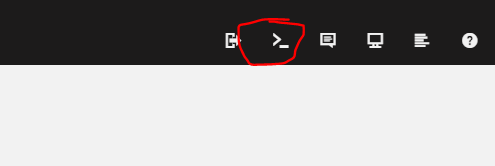
  1. YOU MUST DO THE FOLLOWING IN ORDER TO RUN THIS DOCKER: After installing the docker container, there should be a folder in appdata on the unraid host named pgadmin4. You must change the permissions on this folder: Here's how: On the unraid host, click the terminal button at the top right: When you get a terminal window, set the permissions on the pgadmin4 folder as follows
  2. here is what I am using: rclone mount --max-read-ahead 1024k --umask=0 --vfs-cache-mode writes --allow-other dropbox: /mnt/disks/dropbox With 6.10.0-rc2 it appears that the permissions are incorrect on the mounted folders. When the folders are shared (at least with windows machine), you can read the files but you cannot write. Adding --mask=0 solved the issue for me.

Account

Navigation

Search

Search

Configure browser push notifications

Chrome (Android)
  1. Tap the lock icon next to the address bar.
  2. Tap Permissions → Notifications.
  3. Adjust your preference.
Chrome (Desktop)
  1. Click the padlock icon in the address bar.
  2. Select Site settings.
  3. Find Notifications and adjust your preference.

