





Random Mike
Members
-
Joined
-
Last visited
Everything posted by Random Mike
-
would it be possible for you to share your theme, I would like to give it a go if possible
-
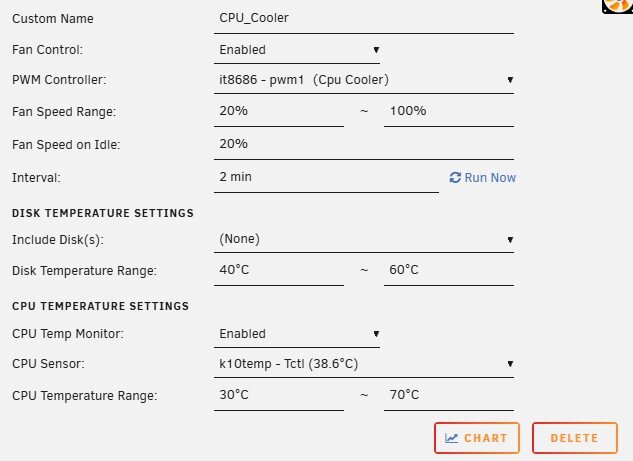
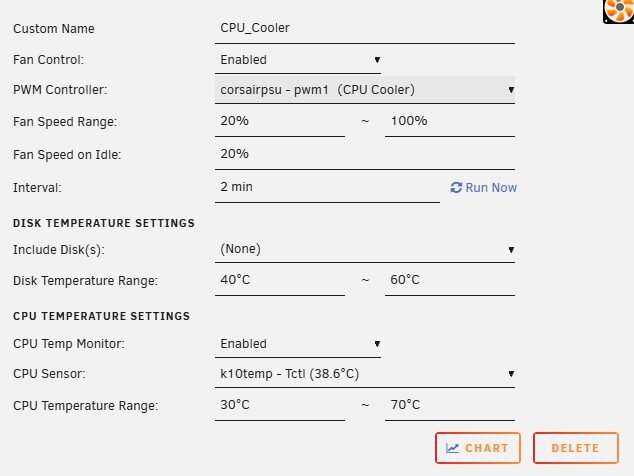
I have a strange issue on one of them on reboot it will change to a diffrent pwm controller. CPU is set and labled to it8686 - pwm1 on reboot it will move to corsairpsu - pwm1 including the label. The fan also are not auto controlled untill the run buttons are presses. Any ideas how to fix this?
-
I keep getting a output message as follows: DEBG 'watchdog-script' stderr output: /usr/lib/python3.13/site-packages/deluge/pluginmanagerbase.py:16: UserWarning: pkg_resources is deprecated as an API. See https://setuptools.pypa.io/en/latest/pkg_resources.html. The pkg_resources package is slated for removal as early as 2025-11-30. Refrain from using this package or pin to Setuptools<81. import pkg_resources
-
Can anyone help with this error that randomly appeared today : 'watchdog-script' stderr output: /usr/lib/python3.13/site-packages/pkg_resources/__init__.py:1490: UserWarning: Extraction path is writable by group/others and vulnerable to attack when used with get_resource_filename (/config/python-eggs). Consider a more secure location (set with .set_extraction_path or the PYTHON_EGG_CACHE environment variable). warnings.warn(msg, UserWarning) If anyone is having the same issue the following worked under docker command line: chmod g-wx,o-wx /config/python-eggs
-
Hi I did, I followed space invaders guide. I tried turning of dns with the button under settings, erased, reset and uninstalled and rebooted about 10 times no change. In the command line I disabled the dns and now its working. Many thanks for your quick response
-
After installing the tailscale plugin my binhex dockers with vpn no longer start unless I disable the tailscale plugin it's there a work around to get them both working?
-
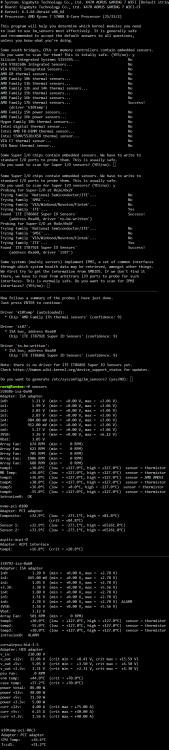
I will try that next, if i cant get it to work ill move it over to the other sensor, just thought it a bit random if its a hardware problem for the fan to run for hours and shut its self down and start again hours later, as mentioned pwmconfig will start it back up again. I have added a screen shot of my sensors for extra information Thanks for your help.
-
Autofan is uninstalled, the fan stopped working again this moring with the sensor showing 0 rpm and just check it started back up again at 15:34. if I restart the server the fan spins up and is shown in bios as well as system temp or I can run pwmconfig and it will spin back up as well.
-
Will do, I removed Dynamix Autofan plugin and still same issue, and also tried with and without the acpi_enforce_resources=lax same issue, I moved my hard drive fans to the CPU OPT header on the other sensor and these all stayed on only the fan on sensor it8792 turned off. I think I may have to move the remaining fan to the working sensor.
-
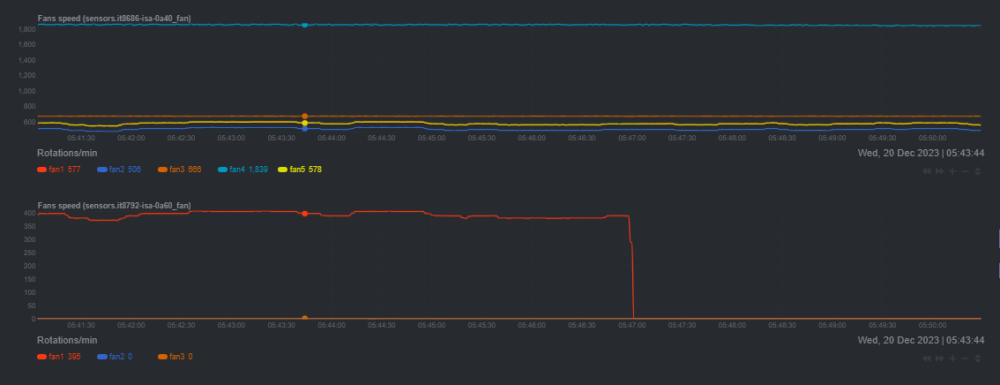
Hi, it happend again this morning I have attached the diagnostics and a screenshot of netdata pin pointing an approx time 05:47am. I hope this helps. random-diagnostics-20231220-0855.zip
-
Apologies I stupidly restarted the server and could not get the diagnostics, I will have to wait a few hours for it to happen again and post back, all the fans are showing and reporting on the dash. I still check the log and used the refrence time from netdata which showed when they turned off with nothing delayed The fans on that particluar sensor have stopped twice in the past couple of days, I have attached my current diagnostic and will report back as soon as I can, Thanks random-diagnostics-20231219-1523.zip
-
just checked the server attached to a monitor is does show a message modprobe could not intert it87
-
there is no errors logged, i install ITE87 drivers and sys temp and since then as mentioned the fans on sensor IT8792 switch of at random hours later
-
I have a issue with systemp fans on IT8792 randomly turn off with no warning messages after a few hours?
-
Hi, ive just installed pwm fans and installed the ITE IT87 Driver as my fans are not shown otherwise Unraid 6.12.6 / Gigabyte x470 gaming 7 wifi / ITE IT8792E / ITE IT8686E The fans and cpu are now displaying. After a while the fans on IT8792 randomly turn off with no warning messages, running pwmconfig turns them back on, System fan was installed but not enabled, so I have uninstalled just in case same problem. Any help would be great.


