jonahgcarpenter
Members
-
Joined
-
Last visited
Everything posted by jonahgcarpenter
-
I have suddenly been unable to access the WebUi for the server. when i try to open it from right clicking the docker container and putting the user and pass, i just get a super long loading screen that ends up on a blank white screen?? Any suggestions?
-
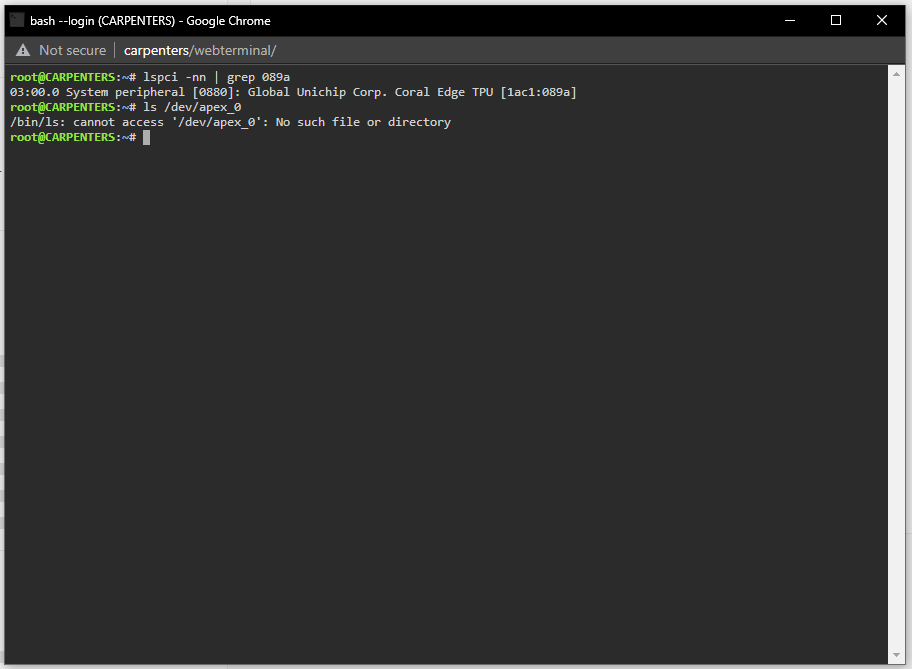
I see the 2 post labeled as answered to this question, but i cannot find a solution to my problem so im asking anyways. My coral pci device is detected by my unraid server, but the drivers will not load as seen by ls /dev/apex_0 and of course my coral device does not show up in the settings -> coral driver tab in unraid. Inside the system devices tab on unraid i get this, when hovering over the "System peripheral: Global Unichip Corp. Coral Edge TPU" kernel driver in use: vfio-pci kernel modules:apex