





morglum
Members
-
Joined
-
Last visited
Everything posted by morglum
-
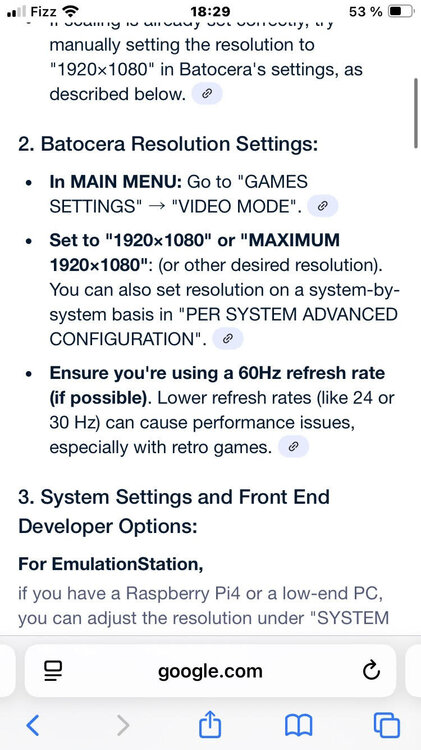
for anyone coming from the future, the main thing to get this working was "sudo fallocate -l 16G batocera.img" to make the image larger. Here are all my notes: setting up the VM that makes the .img larger, allowing batocera to install whatever it needs. here are all the steps I did download batocera extract .img sudo fallocate -l 16G batocera.img (as seen here in method 2 ) THIS IS KEY AND IS USED TO MAKE THE VIRTUAL DRIVE LARGER TO ALLOW BATOCERA TO ISNTALL STUFF. create new windows 10 VM skip the OS drive pass the .img file as a manual vdisk. pass gpu, usb controller if desired: setting up network sharesAlso, since I dont have the img on a usb key, I had to mount the img file to edit the settings when I wanted to read the roms from a share: shut down the vm mount the img on my unraid: mkdir -p /mnt/batocera_img # Create a loop device with partitions losetup -Pf batocera.img # Find out the loop device name (e.g., /dev/loop4) lsblk mkdir -p /mnt/batocera_img mount /dev/loop4p1 /mnt/batocera_img nano /mnt/batocera_img/batocera.conf replace sharedevice=LOCAL with sharedevice=NETWORK setup the shares: ## NETWORK -> Use the network share, requires configuration first. See https://wiki.batocera.org/store_games_on_a_nas sharedevice=NETWORK [email protected]:data/emulation/roms:guest [email protected]:data/emulation/bios:guest [email protected]:data/emulation/batocera/saves:guest umount /mnt/batocera_img unzipping files I had a bunch of PSX roms that needed to be unzipped (7z), so I installed it using nerd tools and ran this script: for file in *.7z; do folder="${file%.7z}" mkdir -p "$folder" 7z x "$file" -o"$folder" done fixing sound Sound worked until I plugged a PS4 controller. To fix it, I did the following from this reddit post (https://www.reddit.com/r/batocera/comments/p5v5zh/no_sound_through_hdmi/) Timmun90 did you go into (From Batocera main MENU ) KODI / setting ⚙️/ System / Audio : In the AUDIO PASSTHROUGH - ENABLE Allow PASSTHROUGH and your TVs or Audio Passthrough DEVICE should be selected. I’m my setup I have a Samsung 57” Shown as HDA INTEL PCH , SAMSUNG on HDMI #0 Lastly make sure that your AUDIO OUTPUT matches KODI. ON BATOCERA / System Settings / Harware Audio Output should be set to same as above HDMI# 0 fixing slow emulation apparently batocera defaults to 4k resolution when plugged into a TV.
-
-
Hey, I know it's 3 years later, but you just helped me. My homeassistant docker is set to network "host" because otherwise it wouldnt be able to discover my AppleHomekit device (in this case, my honeywell T6 Pro thermostat). My Pi-hole is set to br0 to be able to give it an ip address. Altogether, this meant that my homeassistant couldnt integrate the pihole server into the dashboard. This made me sad because I, too, wanted to scream at siri to turn off the pi-hole.
-
this helped me today - thanks! for future googler, my error was : Prowlarr url is invalid, Radarr cannot connect to Prowlarr btw this also solved being unable to connect to deluge.
-
EDIT: never mind, I was running a large rsync script through "community apps user scripts". This morning I can install rclone without issue. ----------------- Hi everyone, I can't install the plugin. I just get a blank screen. How can I troubleshoot this? Other apps from community applications install fine.
