





VergilGao
Members
-
Joined
-
Last visited
Everything posted by VergilGao
-
plugin: installing: unRAIDServer.plg Executing hook script: CA_preHook Clearing Community Applications plugin cache Executing hook script: pre_plugin_checks plugin: downloading: unRAIDServer.plg ... done Executing hook script: CA_preHook Clearing Community Applications plugin cache plugin: downloading: unRAIDServer-7.2.3-x86_64.zip ... done plugin: downloading: unRAIDServer-7.2.3-x86_64.md5 ... done Plugin-Update-Helper for 3rd party driver plugins found, updating... writing flash device - please wait... Archive: /tmp/unRAIDServer.zip extracting: /boot/unRAIDServer/bzfirmware extracting: /boot/unRAIDServer/bzfirmware.sha256 extracting: /boot/unRAIDServer/bzimage extracting: /boot/unRAIDServer/bzimage.sha256 extracting: /boot/unRAIDServer/bzmodules extracting: /boot/unRAIDServer/bzmodules.sha256 extracting: /boot/unRAIDServer/bzroot extracting: /boot/unRAIDServer/bzroot-gui extracting: /boot/unRAIDServer/bzroot-gui.sha256 extracting: /boot/unRAIDServer/bzroot.sha256 extracting: /boot/unRAIDServer/changes.txt extracting: /boot/unRAIDServer/license.txt extracting: /boot/unRAIDServer/make_bootable.bat extracting: /boot/unRAIDServer/make_bootable_linux extracting: /boot/unRAIDServer/make_bootable_mac extracting: /boot/unRAIDServer/memtest extracting: /boot/unRAIDServer/memtest.sha256 extracting: /boot/unRAIDServer/syslinux/syslinux.cfg- plugin: run failed: '/bin/bash' returned 9 Executing hook script: CA_postHook Clearing Community Applications plugin cache Executing hook script: post_plugin_checks
-
我现在不用 libtorrent1.x 了,正在观察
-
用的是 qbittorrent 吗?libtorrent是1.x吗? 我现在高度怀疑是 qbittorrent 或者说 libtorrentv1 的问题。
-
老哥我看了你的文章,关于shfs的,我现在想加一个ssd作为下载缓存,但是不太理解这个下载缓存的工作原理: 假设我通过qb下载了10个文件,在没有下载完成时触发了定时的move操作,这10个文件是否会被移动? 我qb有一个设置,下载完成后自动在另一个文件夹创建下载完成的文件的硬链接,如果此时下载的文件在缓存里,触发move后,另一个文件夹的硬链接文件在缓存里还是阵列里?
-
请问你是不是也在挂PT或者BT?
-
好的,我下次遇到这个问题的时候再把日志发出来。
-
至今,此问题仍然在以每30天至少一次的频率发生……
-
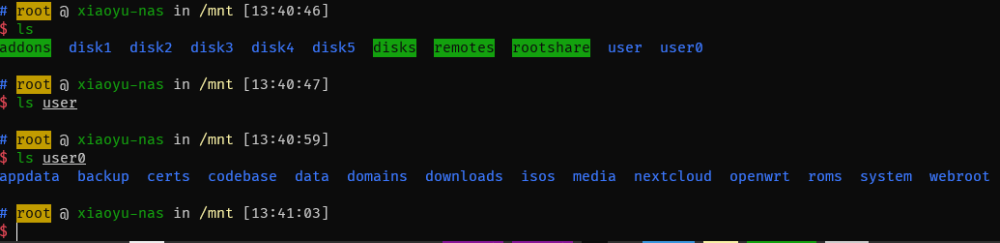
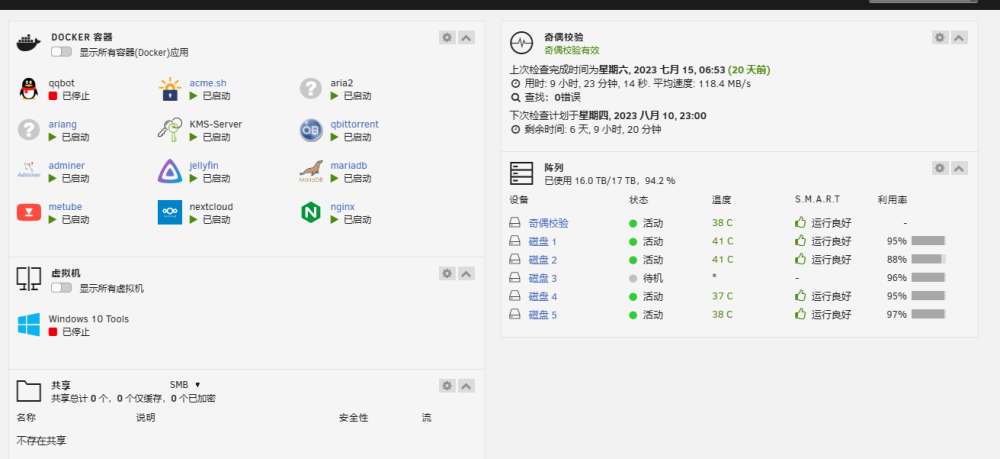
如图,docker正在运行,但是数据已经全部消失了。 /mnt/user 目录下无数据,但是 /mnt/user0 目录下,所有文件都正常。 诊断日志见附件 xiaoyu-nas-diagnostics-20230804-1344.zip
-
那是因为webui在执行探测docker运行状态的命令,而你这个docker应用启动速度太慢了,导致webui阻塞,本质上是unraid目前的webui并不是异步的。
-
不用这么麻烦,你终端里创建一个,然后设置勾选保留用户自定义网络就行了。
-
这个缓存的具体逻辑是什么?我能理解为他只是一个读写加速用的盘,类似阵列卡的缓存吗? 就是我访问 /mnt/user/ 目录时,他会自动将热点数据先拷到缓存里然后给我读,写数据也是先写到缓存里再整块写到阵列里吗? 还是说只是单纯的就是另一个阵列。
-
我现在的配置,unraid专心做docker宿主机和smb,一个树莓派4b做ha主机,专门做家庭自动化,一个小工控机做路由器。
-
the homeassistant use dbus-broker and unraid use dbus-daemon as dbus-service. i tried so other solution, and finally changed my homassistant to a raspberry pie.
-
-
it works, thanks.
-
具体目标是这样的: 切换默认终端到 zsh byobu-enable 开启 byobu 进程 我试过在 go 脚本里写,但是并没有什么卵用。
-
docker network create -d macvlan --subnet=192.168.1.0/24 --gateway=192.168.1.254 -o parent=br0 br0 这句把名字改一下, 不要用 br0 比如改成 docker network create -d macvlan --subnet=192.168.1.0/24 --gateway=192.168.1.254 -o parent=br0 custom0
-
dbus-broker 是一个更现代化的 dbus 实现,目前许多发行版都已经采用了 dbus-broker 作为其默认 dbus 实现
-
出货单应该和发票同等效力的,我司采购teamviewer授权给的就是出货单
-
hi, i found a problem after reboot my unraid server. my compose file is like this : services: ...... networks: host_link: external: true name: br0 some app use the br0 network cant start i think they couldnt find the interface.
-
最近几个月遇到好几次这种情况了,症状就是 /mnt/user 是空的,但是 /mnt/user0 是正常的,在webui上显示没有共享,smb访问不了
-
Thanks for your excellent work! In fact, There are many necessary configuration items missing on the unraid webui, and there is no option for cli running.
-
这个网页显示的有问题,htop命令下看到的负载其实并不高
-
注意此方案只支持unraid 6.10,6.9是肯定不行的,需要改系统文件。 rtl8761buv 是一款蓝牙5.1的usb芯片,奇怪的是在rtl官网没有找到对应的页面 驱动的文件在这里可以找到: https://github.com/Realtek-OpenSource/android_hardware_realtek 下载: https://github.com/Realtek-OpenSource/android_hardware_realtek/blob/rtk1395/bt/rtkbt/Firmware/BT/rtl8761b_fw 重命名为 rtl8761bu_fw.bin 下载: https://github.com/Realtek-OpenSource/android_hardware_realtek/blob/rtk1395/bt/rtkbt/Firmware/BT/rtl8761b_config 重命名为 rtl8761bu_config.bin 放到 /lib/firmware/rtl_bt 目录下 权限改成 644 即可
-
Glad to see that this problem has been fixed in 6.10.0, but because unraid lacks the necessary driver, users using rtl8761bu need to release the driver to the corresponding location by themselves Note that the corresponding files are named as described in this post https://linuxreviews.org/Realtek_RTL8761B#comment-2320


