





FirbyKirby
Members
-
Joined
-
Last visited
-
Just following up. The update works great! No issues. And the ability to auto-create users through OID is just what I needed. Much appreciated.
-
Thanks! I really appreciate it. I'll let you know if I run into any trouble.
-
I'll update my Pelican support thread as I am getting the feeling from those responses that they have nothing to offer in the way of help. Really appreciate your fast support, though! Thanks!
-
I am indeed using Traefik! I had no idea the health check would be related at all, or that. a failed healthcheck would cause traefik not to route (they should really add an option to disable that behavior.) Sorry for any confusion. I was having a tough time trying to figure out what could be the cause of the problem. Especially since dropping to beta23 fixes everything easily.
-
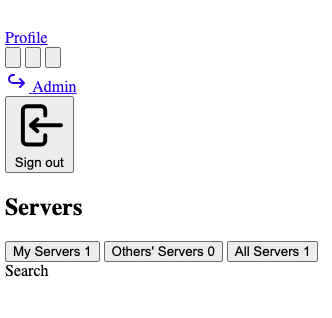
OK, the invalid response error might be because my direct connection keeps forcing to https. Forcing it to http gets me something at least. So, an http://<local unraid ip>:<WebHttp> port shows the panel login page, and I can login, but all the pages are badly formatted and malformed.
-
Thanks. Then I'm not sure what my issue is, then. Using beta23, the panel starts up just fine. Using beta24, I get a 404 page not found error when I attempt to view the panel. only making the change of returning to beta23 gets the panel back. Any thoughts on any other troubleshooting steps to use beta24? Running the log collection script specified in the Discord shows no log created, so I'm assuming the panel isn't starting at all, which would fit the 404 error. I'm not sure where to look for a cause at this point. I'll add that i've got the panel reverse proxied, but even hitting the IP and port directly yield an "invalid response" error. I'll try clearing browser cache just in case it's something completely benign, but so far, the latest beta seems to be complete broken for me and I don't have any leads on why.
-
I recently upgraded to beta24 on the Pelican Panel using @Mainfrezzer 's custom Unraid template and am getting an error on panel startup. I've downgraded to beta23 and the issue goes away, but I need the new OIDC auto-user creation feature. I believe this is a known issue from my search of the Pelican Discord, but I haven't found anyone listing any workarounds to the issue. Thought I would cross post here (also created a support ticket in the Pelican Discord) to see if anyone has developed a workaround to the issue. Here's the error in the container logs on startup: sed: can't create temp file '/usr/local/etc/php/php.ini-productionXXXXXX': Permission denied Based on some chatter in the Pelican discord, this seems to be related to a permissions setting issue in the Dockerfile, and while the downgrade to beta23 makes this less critical, I was hoping there was a workaround to the permission issue that would allow me to continue to use beta24. Happy to post an issue on Github for the problem if that helps as well.
-
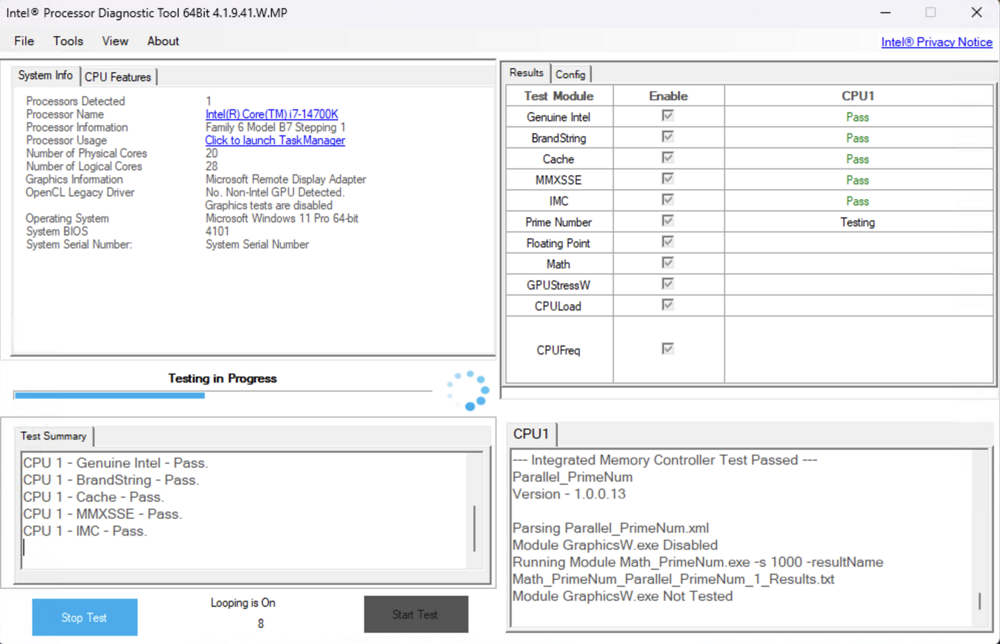
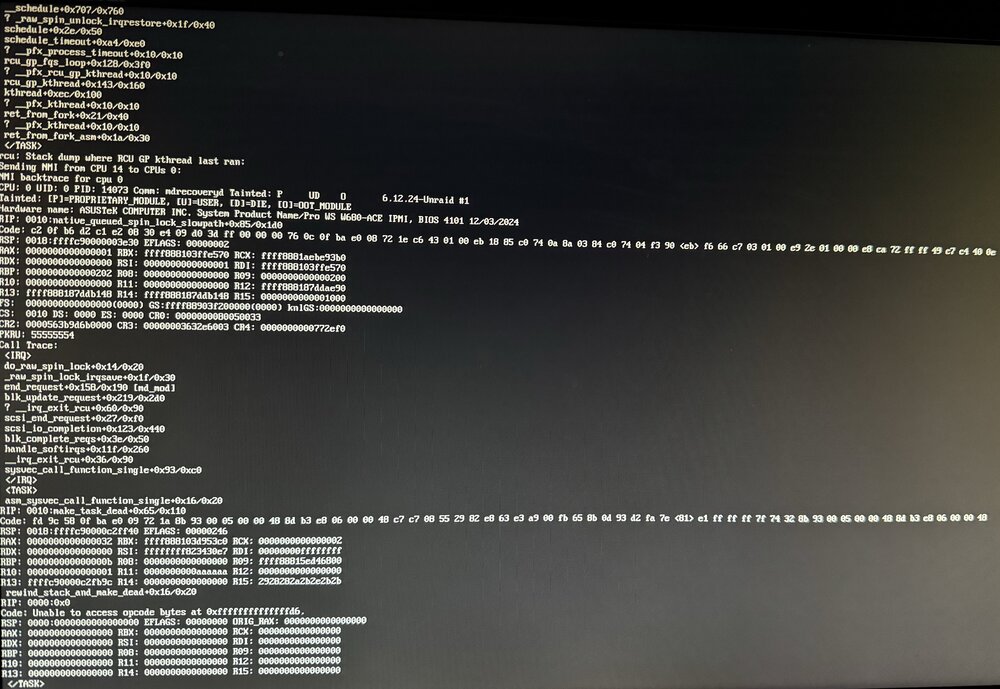
Hmm. That's concerning @JorgeB . But I really appreciate you bringing this to my attention. I sort of assumed I dodged that particular bullet since I built this machine in December 2023 and hadn't had any issues in the first year (or so.) I've mostly forgotten about this reported issue. But based on your note and some frantic research, it sounds like the Vmin shift issues are cumulative and irreparably damaging. So maybe that would explain my ever increasing frequency of crashes in Unraid, and the thread's initial symptom of a USB bz* file corruption (I've decided that was probably a symptom, and not the cause of the crash.) I have been updating my BIOS regularly on this machine, so I've gotten the updated microcode within about 6 months of it's release, but you may be right. So, here's what I did to try and confirm it was a processor issue. I built a Windows 11 machine on a USB drive, and booted into that rather then Unraid. I installed the Intel Processor Diagnostic Tool (for anyone arriving here later and wanting to replicate, I tried installign that tool on Hiren's BootCD PE, but it wouldn't run and was forced to use Rufus to make a Windows 11 bootable USB drive.) I ran the 3 hour CPU burn-in test using this tool on a loop for 24 hours (closer to 30 hours if you ignore some interruption to update drivers before the straight 24 hour run.) I was hoping it would definitively lock-up on Windows doing this burn-in (100% processor usage with intermittent frequency and function checks) but sadly, it was rock solid and never crashed. As proof, here's a screenshot of the test running just past 24 hours. So, that's frustrating. Absolutely no errors and rock solid operation on Windows for absolutely 24 hours of CPU thrashing. I shut that Windows USB drive down and returned to Unraid. And sure enough, just under 24 hours after booting up, it crashed again. But this time, I got a bit more data. In the past, I've never been able to see what was output on the console because of a GPU passthrough/dummy plug. The machine is headless other then the IPMI interface and that was always blank after booting into Unraid with the dummy plug. But this time, I left that off and hooked up a monitor to the iGPU interface. So this time, I captured what looks to me like a CPU crash dump? I'm not sure exactly what I'm looking at here, but it seems like processor register contents and stack contents from the CPU. Here's a literal photo (pardon the quality as this is an absolute cellphone photo since the IPMI interface couldn't catch it.) This log repeats every 2-3 minutes and the machine is completely unresponsive otherwise. Does anyone have familiarity with this type of error? Is this my 13th/14th gen Intel processor Vmin shift smoking gun? Why would I experience this crash so repeatably on Unraid but not on Windows 11 after a much more strenuous CPU test? Inquiring minds (and frustrated admins) want to know.
-
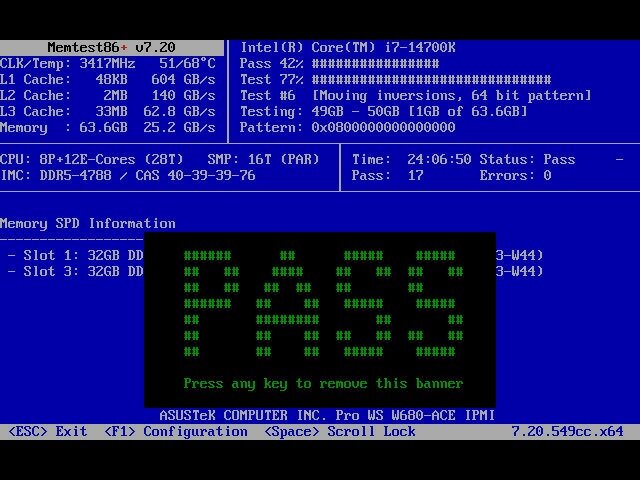
Thanks for the advice. I followed it to the letter and for documentation purposes, I'll post my results. I updated my MB firmware to the latest stable in case there were any issues in the specific BIOS build first. Then I ran Memtest86+ for 24 hours (the one on the Unraid drive wouldn't run, so I grabbed the latest from their website and ran that.) I heard that the SanDisk drives might be suspect and despite running for more then a year, both drives I tried are SanDisk, so I switched to a PNY USB 2.0 32GB drive (I bought a 5 pack of these for spares, and as a pro tip posted elsewhere in the forum, these are marked as 16GB for sale at Best Buy, but they booted as 32GB drives.) I also replaced all the bz* files as recommended. At this time, I have not had this error again (and it's been about 3 days.) However, I am still getting complete lockups of the Unraid machine every few days, to as many as once a day. These lockups are infuriating as my IPMI syslog show no hardware errors, and from a software standpoint, the server is completely unresponsive. No ability to update the web GUI, no ability to SSH into the machine, and no change to the IPMI display output. A hard power cycle is the only recovery, so pulling diagnostics before the power cycle is impossible. I expect this might have caused the bz* file issue in the first place as these lockups have been happening infrequently (but becoming more frequent) for the past month or 2. Parity checks are now frequent as well, but have always come up with zero errors. While this is no longer related to the initial error of this forum thread, I'll post my last 2 diagnostics AFTER the hard power cycle from a lockup. Maybe someone can see an issue/pattern in them that would give me some new troubleshooting steps. For now, I don't think it's a hardware issue since the Memtest86+ came back clean, and the IPMI and BIOS syslog are both empty as well, and parity checks are always clean as well. I think it's something in software. I have a dummy plug on a passthrough GPU that may be preventing me from seeing the IPMI output, so I may take that off to see if I can get any additional data before the lockup occours. But that's the only other idea I have. wondermutt-diagnostics-20250602-1012.zip wondermutt-diagnostics-20250531-0902.zip
-
Was able to pull diagnostics, but of course, this is on new boot, after the past hang, and repeated "decompression errors" when attempting to boot, so I don't think they're ideal. Also, since I've updated the drive, I will need to invalidate the old one and register the new one to get the array started. I'm holding off on that since I'm not at all convinced the drive is the issue and I'd love someone to help me out with some new troubleshooting steps before I chunk the old drive (the new one can be a spare, which I should have had anyway.) wondermutt-diagnostics-20250525-1457.zip
-
Hi community, I've got a serious problem and I don't know what my next step should be. Attempting to boot my Unraid server leads to a repeating error: EFI stub: WARNING: Decompression failed: unexpected EOF This on boot, right after the blue Lime Technology screen, and occurs no mater what option is chosen. The error repeats infinity and immediately, so it's tough to catch what precedes it, but I think it's these 2 lines: Loading /bzimage...ok Loading /bzroot...ok This occoured or twice in the past week or two, infrequently. And in the immortal troubleshooting strategy of "Well, let's just try booting it again," it would resolve and I'd get the system to boot into Unraid. However, I also was getting odd hangs where the system would get unresponsive after a bit of web interface lag. I tried to get diagnostics, but the system pretty much fully locked up, requiring a hard restart. After the last one of these, and this same "decompression failed" error, I suspected I had a bad USB drive, or a corrupted drive. I tried restoring the drive from the Unraid Connect backup taken less then 8 hours ago, but the error persisted. I just replaced the drive with a new one and the error occurred again. After another repeated set of reboots, i think I've finally got it booted up on a new drive, but I an now VERY worried about this system. What would be my proposed next steps to troubleshoot this? Is there perhaps a file in my drive and backup that's corrupted? I'll see if I can get diagnostics posted if the system fully boots (still starting up now.) When this happened in the past and the system would succeed in booting, full parity checks always came back good, and my SMART drive status still shows good on all the drives. Other major errors or notifications are non-existant. For reference, the motherboard I'm using is the ASUS Pro WS W680-ACE IPMI. The original flash drive was a 64 GB SanDisk Cruzer Blade (USB 3.0). The new one is a SanDisk Ultra 32GB (USB 3.0). I believe I was on the latest Unraid version as well, though it was occurring on 7.0.1 as well.
-
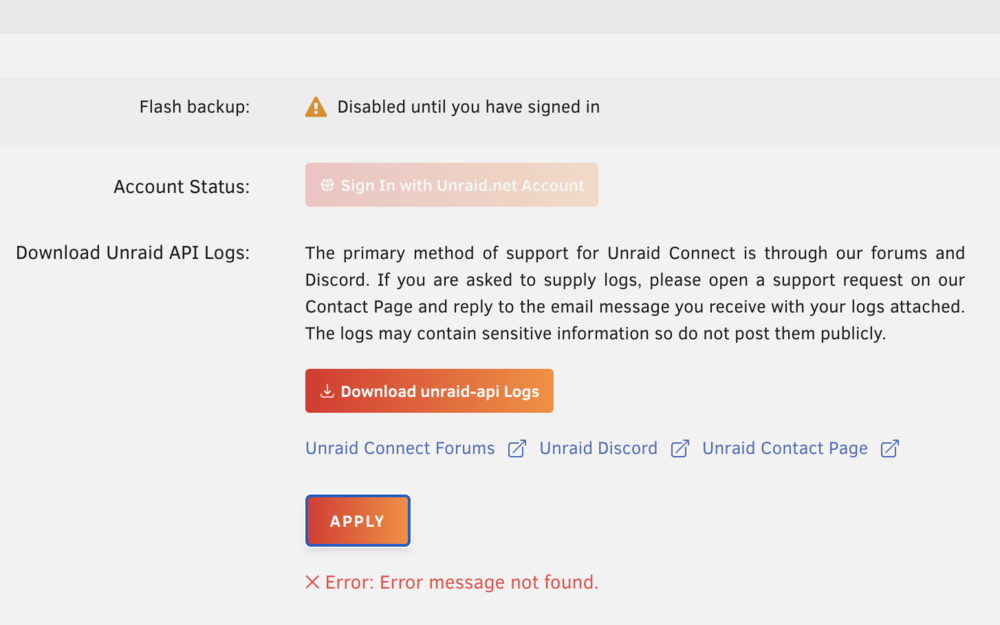
Ditto for me. Tried redownloading, no success. Rebooted and the plugin seemed to be working, but unconfigured. in the process of configuring it, specifically at inserting my user UUID from the online account settings page, it returned to the same "API is offline" error that started my down this path. Also, interestingly, in the settings, it says I am not signed in, but won't let me actually sign in either. It also throws a weird "Error: error message not found" error on that page when I tried to apply the UUID (also does it now whenever I hit apply. After the second error, I also deleted any browser cookies and re-logged in, hoping it was a retained login issue. No help. Here are my logs. logs.json wondermutt-diagnostics-20250426-2127.zip
-
Your logic makes perfect sense to me. No other issues on my side. Great work on maintaining this app.
-
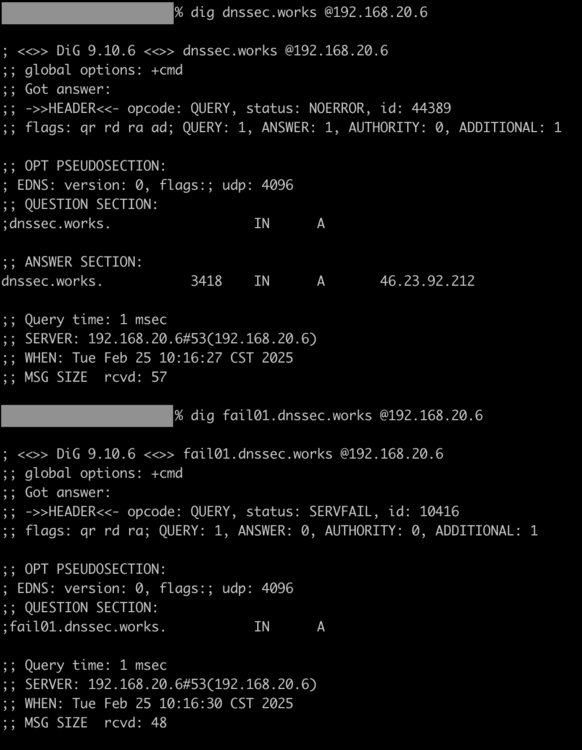
Thanks! Finally had a chance to test the new version and I'm happy to report it works exactly as expected. I also tested with the fail01.dnssec.works and dnssec.works addresses after implementing the new label and config file line pointing to the trust anchor. SERVFAIL is the expected result when resolving the fail01 variant as it won't use DNSSEC. I spent a bit of time doing some research before responding because the docs state that you have to periodically run an unbound-anchor to keep the anchor up to date. I assumed we'd need to update the image to run a cron job. From NLnetlabs: But, I think you actually set it up just right by having unbound-anchor run in the start.sh script. Unless my very amateur docker-fu is way off, that script will run every time the container starts up or is updated, thus achieving what the docs recommend for regular updates since the anchor is managed actively while unbound is running. From NLnetlabs: I would humbly recommend one edit to your README file on GitHub, though. You have this today: But you need to specify the addition of the auto trust anchor file location in the config as well for anyone arriving at the container without this forum as additional documentation. So, something like this maybe? Last, and this is really nit-picky so feel free to ignore it, it would be nice to be consistent with your boolean operator in the Unraid template. For the PROVIDE_CONFIG variable it's "yes" but for the DNSSEC_ENABLE its "1". Might be nice to make the DNSSEC_ENABLE be "yes" as well. I also confirmed the logging recommendation you made. Ultimately, I don't plan to use logging since it doesn't have a good mechanism in the config to limit their size, and it reduces performance, but I get itchy when I can't access logs at all, so this works. For anyone interested, I briefly toyed with redirecting the log file location to /dev/stdout to see if I could get the unbound logs to be available alongside the Adguard logs in the docker logs implementation, but it didn't work. I'm not entirely sure why, but this is good enough for me to be able to review and fix things when needed.
-
I've recently migrated from the Adguard Home implementation in Siwat2545's Repository to Mainfrezzer's Adguard-Home-Unbound implementation to take advantage of Unbound—special thanks for making that migration easy. I'm not sure if that was intentional or not. Still, the directories and files matched up perfectly. All I needed to do was stop one container and start the other, and had absolutely no discontinuity in the database, query log, or operation. However, I do have a few questions about the Unbound implementation I was hoping I could get some help with. What's the best way to view the Unbound logs? I'm no Docker expert, but the only logs I see from the container are from AdGuard Home. I attempted to edit the config file to make them available via the standard docker logs output by switching to stderr log output, but I'm pretty sure that won't work since unbound is running as a daemon. Outputting to a file didn't work, and using syslog as per the default in the config didn't work either (I am not sure syslog is set up correctly in the image.) I'd like to implement DNSSEC for upstream recursive resolution, but I don't think the image is set up for that either. From what I can tell, the unbound configuration is similar to that setup in pi-hole guides, which doesn't have DNSSEC setup for upstream resolution either. I attempted to follow this guide from NLnetlabs but quickly abandoned it because it would require a persistent image change (setting up a reoccurring command to run unbound-anchor to update the trust anchor, just like the reoccurring command to update root-hints.) However, the image does seem to have an initial trust anchor certificate setup at the default location. Was it intended to have DNSSEC setup for upstream resolution? Has anyone been successful in setting up the trust anchor? Generally, though, I want to give a big thank you to @Mainfrezzer for maintaining this excellent app.


