babyhuehnchen
Members
-
Joined
-
Last visited
Everything posted by babyhuehnchen
-
thanks, i got it working, for some reason it bound Container Port 3 to google.com (???) and after removing and re-adding it again it is now working fine
-
Docker Run superversiord Thanks, both attached My Client is on 172.16.17.0/24 My Unraid Server is on 172.16.70.0/24 When I do the container onto the Network Card in my Server, I can access it no problem (in my example 172.16.70.170) but if I do that, apps like Qui can not talk to it when on the same network (in my example 172.16.70.177) due to connection time out. When I do it and Qui on the Docker Bridge, the exact opposite happens, Qui can talk to it no problem but I can not access it anymore from my client. However, I have to use the internal container IP (in my example 172.17.0.5) cause doing localhost:7777 causes a timeout. I also curld all of the above scenarios and whenever the client or a container cant access qbit, curl fails with a timeout also. And on the opposite, when it works, curl also does
-
as soon as i put it back on the docker network that unraid itself is connected to my router through it works fine. it's only unreachable from the bridge setting
-
I can not access the WEBUI when in bridge mode. I added both my Unraids IP Range, my Clients IP Range and 172.17.0.0/16 to the LAN Networks but I still can not access the WEB UI. Other Bridget clients can talk to it when using the internal IP (in that case 172.17.0.5) but ofc I cant use that on my Client. Any idea what I can do to resolve this?
-
same for Andorra
-
I have an issue where both prowlarr and cross-seed are not able to talk to my binhex container resulting in a time out. I've tried curling the webui from some random containers on the same docker network and that times out. Am I missing something, do I need to change anything?
-
I just tried again and its unfortunately still failing
-
Unfortunately, I'm still getting the same error message, I will try again in an hour or so and report back
-
Yes, yesterday while troubleshooting I force-reinstalled the current version once more after the normal reinstall didnt fix it Thank you, attached diag.zip
-
I have been having issues registering my server to my unraid connect account and I'm running out of idea. Whenever I press the register button on the unraid connect account page, I get this error Registration failed [POST] "/api/mothership/connect/register": 400 Steps I have tried to far: Stop and restart unraid api Uninstall and reinstall unraid connect plugin Try different DNS Servers for both the server and client (Quad9, Cloudflare, Google) Restart Server itself Try on a different Browser (Firefox, Vivaldi, Chromium) Try on a different Client (Windows, CachyOS) Try on a different Internet connection It seemed to have stopped working after an update but I cant recall when and only now realized as I wanted to replace my flash backup with an up to date one. The one I had before was from december so an update within the last 6 months must have broken it. Does anyone still have an idea what I could try? Nothing is showing up in the system log about it. (last log event is my user login)
-
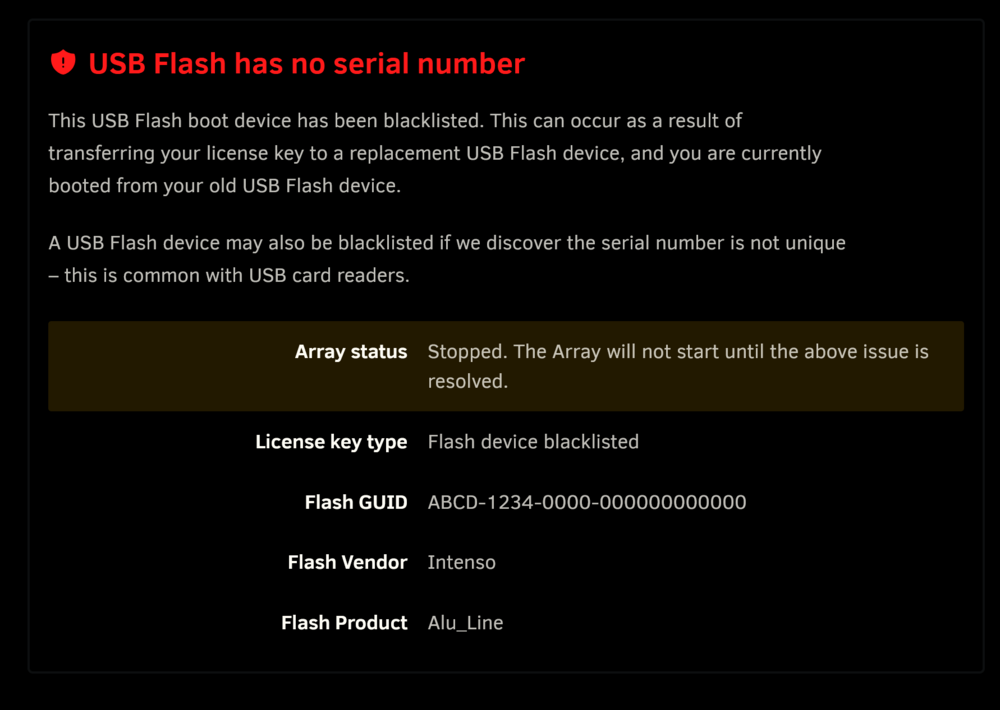
Guess Ill post this here since i didnt find a definitive thread with devices confirmed NOT to work: Intenso ALU Line