





FiNakoma
Members
-
Joined
-
Last visited
-
For anyone who has this issue I spent ages and loads of things to fix it and eventually found this post: https://forums.unraid.net/topic/114864-how-i-lost-my-mental-integrity-about-code-43-gpu-passthrough/?do=findComment&comment=1127751 Removing the following from the VM XML file and boom VM boots absolutely fine and I can see my GPU in device manager: <hyperv> <relaxed state='on'/> <vapic state='on'/> <spinlocks state='on' retries='8191'/> <vendor_id state='on' value='none'/> </hyperv>
-
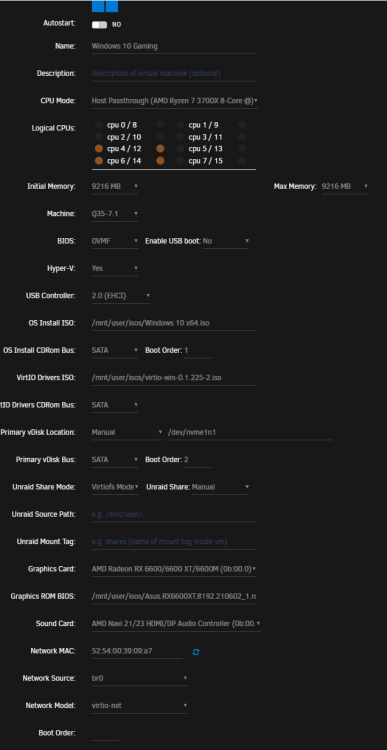
Been having loads of issues getting a Win 10 VM with GPU passthrough for my Asus AMD 6600XT. I had it working on an old VM with virtually identical settings to this one. The only difference is that I'm accessing an NVME directly instead of using a VDISK image. I've since broken that VM completely so can't access it anymore. I can get into Windows if I use the standard VNC driver but I keep running in to the following error: Full logs https://pastebin.com/8CcbDFjX Attached my diagnostics I've tried loads of guides tried about everything I can find on google/unraid forum/reddit. Stepping away before I lost my mind.. Here's my VM config: tower-diagnostics-20221116-1636.zip
-
What do I need to do to change the listening port that I've allocated in Mullvad VPN in rTorrent? Every time I restart it resets the ports in config.
-
Error occurred whilst checking server setup Yeah I'm stuck with this same issue. Fresh install with Postgres14 and NginxProxyManager following SpaceInvaders guide. Anyone got any ideas?

