





BastianBayer
Members
-
Joined
-
Last visited
-
For your information i had configured my SMB exactly like it is discribed here
-
Anyone any ideo how to fix this ? Otherwise i will rollback to 6.12.9 because running the permission tool everyday seems pretty dumb. I have also seen that in my time machine backup share the files that are created after my Unraid OS update are also not owned by nobody. The are owned by the user that i logged in to the smb. There i have done absolutely no changes that has just gone on and on. I am completely at a loss i have checked all release notes again and still dont know what could cause that shit
-
Ive already checked that and the configuration of my docker seems also fine. As I said it worked for nearly 2 years now till the update to 7.1.4 UID 99 and UMASK 000 is set in the config of my dockers and that hasn't changed and was up and running for two years.
-
Don't worry this was just a comment and I will never do something like that. I will have a look on this thanks! That's not a problem thanks for your help. normally I should be writing my bachelor documentation right now :D but that not working anymore is triggering me..
-
Okay guys thanks for your help so far. I Checked your ideas and thought that the machine that I were using caused the ACL problem. So I tried another machine that I use for my server that is my MacBook that is signed in to the smb share with another user just called bastian. Here I also see after the update the same problem with the "+" for ACL. Its the same machines that I used before performing the update and I changed nothing in either configurations.. simply creating a user that is called nobody with access to all shares is no option for me.. For now I have to run the new permissions tool every night.. and that's absolutely disgusting And I also have seen that files in an other share that are created via the UrBackup Docker container are also with the wrong permissions after the update.. There the owner of the files is still nobody but the permissions are now drwxrwx--- Where is this configuration coming from ?
-
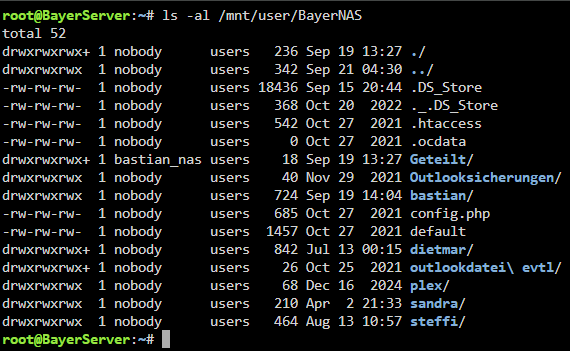
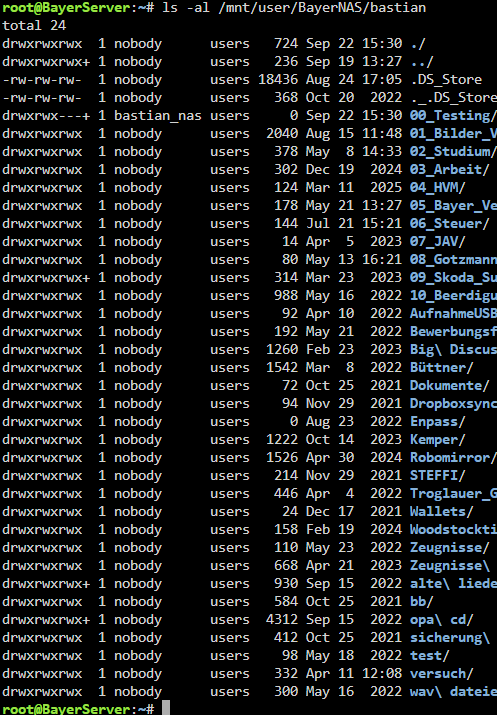
over SMB and the user that i´m logged in with is the user called bastian_nas. and
-
Hey guys, I ran in to a problem with the SMB users in unraid. I recently updated from 6.12.9 to 7.1.4. Till the update every file was registered to the owner nobody. Now all new files are registered to the user that creates them without access for any other user to that file. Am i missing something ? I attach a screenshot of that. All other files were owned by the user nobody and accessable by every user that had access right to that specific share. Do i really have to set the permission by hand each time i create a new folder as a registered user via my windows machine? Or is there a setting that i am missing ? Thanks in advise please let me know if you need more information.

-
Hi ich bin im Moment am selben Problem. Gibt es dazu eine Lösung ? nextcloud und Onlyoffice document Server haben unterschiedliche Domains sind aber beide über die jeweilige erreichbar. Wenn ich nun die onlyoffice Domain in nextcloud eingebe, den secret key eintrage. Erscheint ein Fehler, der wohl auf das zertifikatshandling zurückzuführen ist.
-
Hey Guys, I´ve got the problem, that after installing a cache drive to my unraid server (nvme ssd) my perfectly fine working smb share starts producing errors. I´ve got 4 different users with permission to that share. One of them work with no difference at all but the others won´t have permission to access that share anymore as soon as a File is transferred to tha cache drive. If i disable cache in that Share everything works again as it should work. Unraid Version 6.12.3 Anyone an Idea? Edit: I´ve uploaded the diagnostics file of my server bayerserver-diagnostics-20231012-1400.zip
-
My Server wont boot anymore after i upgraded OS from 6.11.5 wehn everything worked perfectly. While Booting everything seems fine till the Line that starts with i915. Than the Screen disappears and the server wont do anything after that. MSI Z590, 11700K Could anyone help to get the server running to restore to V6.11.5?..
-
I´ve got the Problem that the server won´t boot anymore after the update.. MSI Z590, 11700K. The Last line while booting sequenze befor the display blacks out and is bzfirmware checksum and than a Line that starts with i915 but its to fast i cant read the rest of the line. Has anyone a solution for that maybe just to boot in the gui to restore to 6.11.5 when everything worked perfectly?
-
Hey guys, I have a problem with my unraid smb shares. I´ve mounted a share via external sources as SMB share to nextcloud. Nextcloud is running with a MariaDB. If the Folder is splitted to Disk 2 rather than Disk1 the folder shows in nextcloud but is empty. Is that a problem with MariaDB maybe ? or is that something in the settings of that share. Thanks
-
Wollen eigentlich nicht... ich dachte nur, dass ich das muss. Also zieh mers doch mal gschwind anders auf. Alles auf null. Ich möchte auf meinem unraidserver mehrere shares haben, die ich mir als Netzwerklaufwerk unter windows hinzufügen kann. (Im Heimnetz dann mit voller Gigabitanbindung eben) Auf eines der Shares möchte ich über Nextcloud mit lese und Schreibrechten zugreifen können. Benutzerverwaltung in Nextcloud mal außen vor. Zu was rätst du mir um das umzusetzen?
-
Ich denke ich würde es dann erstmal so versuchen dass ich der Gruppe User überall lese und schreibrechte zuweise. Das funktioniert übers gui vermutlich nicht oder ? sondern nur über einen Konsolenbefehl
-
Vielleicht ist die frage etwas dämlich, aber wäre es nicht möglich bei den Globalen Anmeldeinformationen bei nextcloud einen der user anzugeben? Quasi dass einer der von mir definierten user und nicht nobody aus dem nextcloud docker aus die dateien bearbeitet. Oder wenn ich das richtig verstehe, sollte wenn ich der usergruppe "user" lese und schreibrechte gebe wäre die thematik egal. So korrekt? Mir ist klar, dass man hier abstriche machen muss. Bin nur noch relativ neu mit meinem Unraidserver deshalb hier auf das Forum stark angewiesen
