





Raiever
Members
-
Joined
Everything posted by Raiever
-
Hey JorgeB! Thanks for the tip, let me give that a shot and see what happens. Will rename for now, and if it works I will delete the old copy.
-
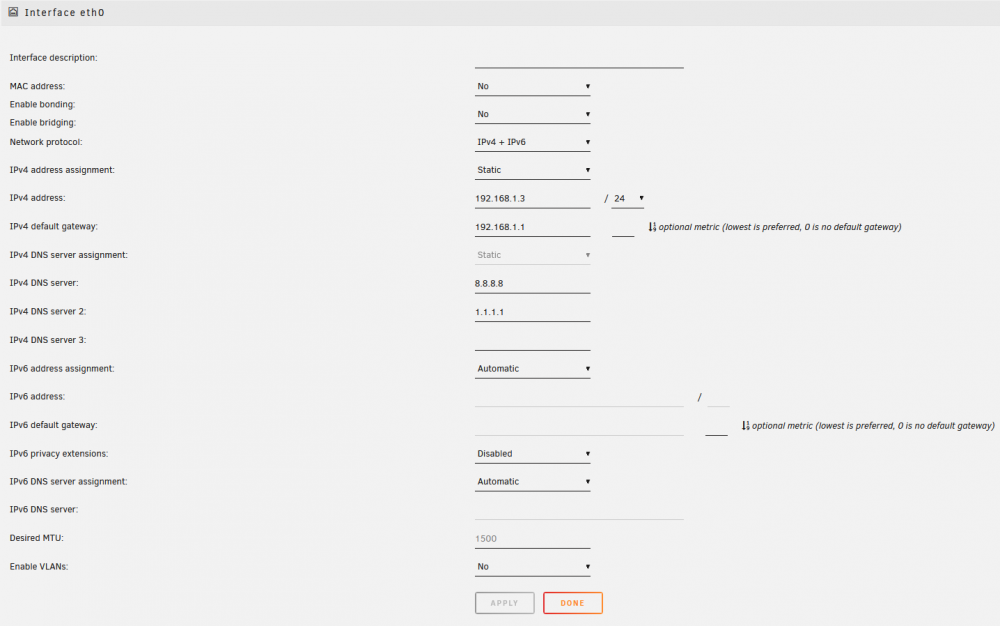
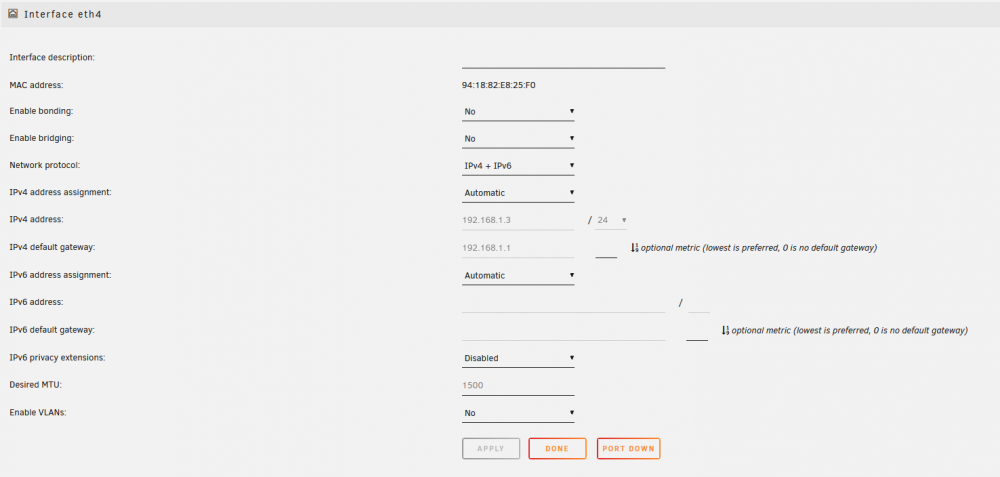
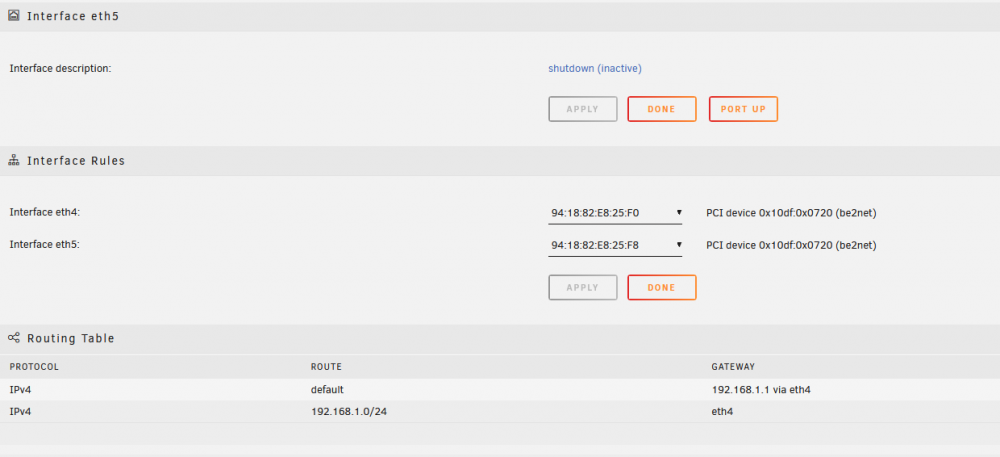
First and foremost, I am sorry even to be asking this. Coming from a networking background, I feel dumb after spending a few hours on this project. Backstory: I upgraded my internal network with new 10G SFP Ethernet modules and Cat7 networking. The new setup is simple: Ubiquity Dream Machine Pro to un-managed switch via SFP, un-managed switch to HP DL360 Gen9 via SFP. I then swapped from 100Mb Ethernet to the SFP port by plugging in the new SFP, hooked up an Ethernet to my router, and then swapped the 192.168.1.3 IP reservation from the old Ethernet to SFP. Rebooted, logged right in, no issues. Once I verified the SFP module and port were working and assigned the 192.168.1.3 in DHCP, I rebooted and disabled the original internal 4x Ethernet ports via the bios, again, logged right back in with no issues. After all this, I had my system running with Eth0, Eth4, and Eth5 (SFP ports). I shut Eth5down, leaving me with Eth0 and Eth4. Issue: Now this is where it gets weird. "ifconfig" shows no Eth0, and "ifconfig eth0." shows "eth0: error fetching interface information: Device not found." I have to manually assign the 192.168.1.3 IP to Eth0 for it not to pull a 169.x.x.x address. I believe I have everything set up correct; attached are pictures of the Network Configuration page. Any help would be appreciated regarding what I may be doing wrong or if I am way over thinking this lol 🙃🙃🙃
-
Hello all, I seem to be unable to pull the latest Mango Docker image. Gets to the setup page, no errors and can't click the apply button for the life of me. No adblocker, tried multiple browsers/system, and still no luck. Any help?
-
This is pretty much where I am at honestly. I have NPM handling all my SSL needs with subdomain/cloudflare type of setup, currently no other port forwards except the NPM ports I selected forwarded for 80/443. I still get hit all the time with automated bots etc scanning my network so its quite fun blocking all of them. I will have to check out Authelia and see if I will benefit from it.. Because in reality, the only public face I have right now is Jellyfin, which all of my users only have basic accounts no admin and a randomly 30 character generated password as well as running over SSL. I imagine for now, I am pretty set.
-
Quick question, I keep seeing folks talking about Argo Tunneling and Media servers having issues such as CF account bans due to certain data that shouldn't be routed through their systems. Do you route your Plex / Media servers through CF Argo personally? Have you had any issues like this? Second, I am guessing you are running SWAG and not NGINX Proxy Manager, do you know of any other way to get something like Fail2Ban running? Or would you just suggest to follow up with Authelia? Thanks in advance for your help!
-
It's funny that you mention this, as I was actually JUST watching the Ibracorp tunnel video and was going to break into setting it up. So it really doesn't make any sense to expose the unraid URL which is fair. I have it turned off for the time being but won't bother reverse proxying. I guess my other question would be.. is there a point to subdomaining my NPM page? I imagine it is the same answer as the unraid login server, because the NPM page brings me to the login page, and can then have the same exploits/login spamming. The only services that should be forwarded obviously are ones that need to be connected to like Plex or Jellyfin, etc. yes? Thanks for the tips!
-
Ah interesting, It's not the end of the world if I have to configure it through the XML for now. For anyone who sees this, and runs into the same problem.. 1. Shut down your VM 2. Left click on the VM, Go to Edit 3. Top right choose the "Form View" button to change it to "XML View" 4. Change the lines <memory unit='KiB'>AMOUNT HERE</memory> <currentMemory unit='KiB'>AMOUNT HERE</currentMemory> 5. Save and close, restart your VM. Thank you I appreciate the response
-
Hello all, I have my server setup with 1.536 TB of DDR4 ECC ram and that is fully available to unraid as viewable on my dashboard, however when setting up VM's I can only allocate 1024mb max. I have verified in my servers BIOS that it is showing the same ram amount as well. edit: I have manually set the KiB to a higher range via XML, but curious if this is normal for the non-XML editing to only show a max of 1024. Any tips on where to start? Thank you!
-
To add on to this, I would like to note that my NPM currently has my login page reverse proxied with full SSL encryption, and the standard 443 port is changed to a much higher, random port but port forwarded.. This *is* causing my router to freak out about port 443 connection attempts, but obviously.. that is pointing to nothing and dropping all connections. I would love to swap to SWAG for Fail2Ban, but I can't be bothered at this time to change over. I wonder if their is an easy to do auto blocking/lockouts without swapping to SWAG? This is truly my biggest question.. Is it *safe* to have the unraid login page; on a random port, with SSL, protected by cloudflare, and a 45 character root password.. public facing? Thanks for any feedback
-
Fair enough, that doesn't exactly answer it so I will await further input but thank you! 🙂 Also for the life of me can't figure out how you split that quote so full response below. 1. I know I could also setup Wire-guard for a VPN connection to remote in, but if public exposure (boy that sounds great doesn't it? lol) with a reverse proxy SSL setup and Cloudflare protecting the direct IP connection, I genuinely wonder if it is an okay alternative to a VPN setup for external access. The thing is that obviously, the more you expose yourself, the more insecure things become. I have logging for every connection to the server in my router and CF, as well as auto-firewall blacklisting for well-known abusive IPs, and country restrictions through CF, on top of all the above security measures. Unsure how much more is needed (the so-called point of diminished returns). 2. This makes sense, I currently don't need ANY of my VM's to actually touch and of my shares.. and the only thing currently touching any share is JellyFin, for its media. Except, it's setup as far as I can tell to ONLY touch the two media folders its assigned to plus its appdata and cache folders. I figured that it's pretty much a VM and VM only, with no direct access to the OS below it.
-
Hello all! Relatively new to Unraid but I have been working my way through lots of guides and security measure practices! Just wanted to ask a few questions and include some background details. Basic details: SMB1 is disabled Flash share is no export, and private I have SSH/FTP/Telnet/UPNP turned off Shares are all turned to no export, and private Unraid Root has a 45 character private password My router has a firewall (UDM) and is configured on high alert for my server I have HTTP/HTTPS set to two custom ports and port forward 80/443 to these in my router I have my own domain name, and use NGINX Proxy Manager with CF Full SSL as my reverse proxy Questions: 1. As stated I use NPM + CF Full SSL for handling SSL on my services like Jellyfin. However out of curiosity, is it *safe* to forward my Unraid server/Unraid login page to a subdomain with SSL? Example being Jellyfin.mydomain.abc for my Jellyfin login, and unraid.mydomain.abc for unraid access. The reason being, I want to have remote access when outside of my network (besides.. well remoting into my desktop and accessing the login). I have the SSL feature turned on, and enforced with the SSL certificate setup via "Management Access" yet still receive the "Insecure" message when going to my login page. I am unsure if I configured something incorrect, or if this is considered safe but figured it was worth asking. 😁 2. My Docker network is setup on its own custom interface, and all of my apps are currently Reverse proxied, is there any further.. "best practice" safety measures that can be implemented to protect my unraid box? 3. For VM's that need to be public facing (such as an Ubuntu host, hosting custom discord bots) does there need to be any type of security implemented besides general practice stuff like username/passwords, no remote services, etc. in order to protect my unraid server? I am sure I will come up with more questions, but this is a good start! Thanks in advance to anyone who offers any guidance!


