




Skip to content
View in the app

A better way to browse. Learn more.

Unraid

A full-screen app on your home screen with push notifications, badges and more.

To install this app on iOS and iPadOS
  1. Tap the Share icon in Safari
  2. Scroll the menu and tap Add to Home Screen.
  3. Tap Add in the top-right corner.
To install this app on Android
  1. Tap the 3-dot menu (⋮) in the top-right corner of the browser.
  2. Tap Add to Home screen or Install app.
  3. Confirm by tapping Install.

Luciano200x

Members
  • Joined

  • Last visited

  1. @Waseh Yeah, I updated the XML script and changed the DNS server to my local Pi-hole address and problem solved after installing. Thanks for heading me in the right direction.
  2. @Waseh I've tried removing and reinstalling without succes before.. I'll try adding a rule to the pihole, that might be it. Tnx so far!
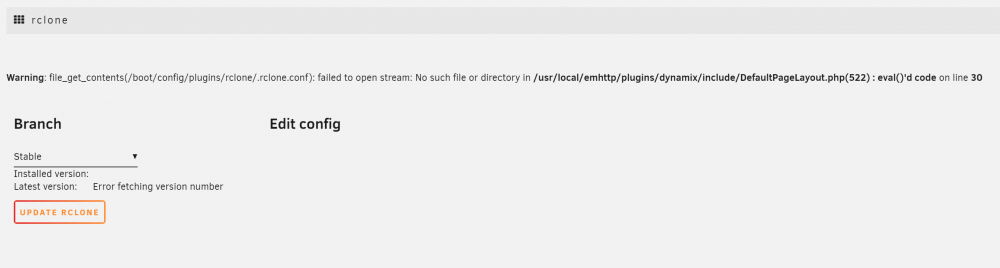
  3. Hey y'all, After installing rclone plugin on Unraid, I get this message when opening Rclone in settings menu: Any idea how to fix this? I'm trying to set up a sync for my Google Photos.
Account

Navigation

Search

Search

Configure browser push notifications

Chrome (Android)
  1. Tap the lock icon next to the address bar.
  2. Tap Permissions → Notifications.
  3. Adjust your preference.
Chrome (Desktop)
  1. Click the padlock icon in the address bar.
  2. Select Site settings.
  3. Find Notifications and adjust your preference.