





martial
Members
-
Joined
Everything posted by martial
-
They merged and improved it by fixing the overall solution and keeping backward compatibility. Thanks for sharing that workflow. I will enjoy testing it and learning from it. Here is one of my fun ones. It is a variation on AlexLai's AtomixFlux (v1.0) workflow and gives me great 4k x 2k results https://geekier.smmall.cloud/MTc0MDI4MjU4Njk2Mg
-
I've looked more into this and decided not to add a new environment variable with features similar to those of an existing one. I understand that some users might want to do this. I prefer to document the process for such users because it is already possible to achieve this by mounting a new path and extending the command line (as you have done). There is a new section on GitHub's README to provide this information: "Specifying alternate folder location (ex: --output_directory) with BASE_DIRECTORY"
-
You are welcome, enjoy
-
Following up 1) comfy_extras should stay within run/ComfyUI; it is is not expected to be within basedir 2) the mikey_nodes custom node is using a variable that does not work with basedir. I have proposed a PR to them that should fix it, we have to wait for them to fix it for a fully functional option. If you are willing to manually replace the python script in the custom_nodes folder, here are the details to get it working (you only need the two first changes in the file) https://github.com/bash-j/mikey_nodes/pull/45 Another option is to copy the content of comfy_extras into basedir until mikey nodes (and potential others are fixed to reflect the use of basedir
-
Hi, the error is at the beginning of your logs: "main.py: error: unrecognized arguments: --base-directory /basedir" This is due to a version of ComfyUI installed in the venv that is older than the end of January 2025 (base-directory is a very recent option) Please see https://github.com/mmartial/ComfyUI-Nvidia-Docker?tab=readme-ov-file#63-using-base_directory-with-an-outdated-comfyui for a couple of options to fix this
-
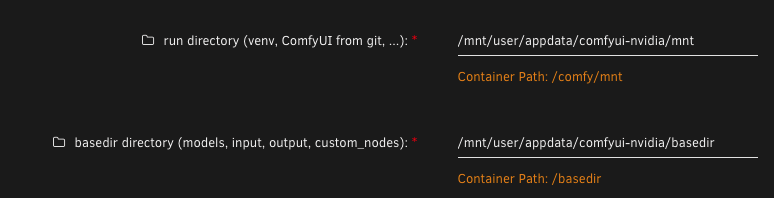
Thanks for the question. I agree about having a separate directory for output. The good news is that at the end of January, the Comfy team integrated a new option to the ComfyUI CLI (--base-directory), and I have integrated it into the container and updated the Unraid template to reflect the change. You can see below a screenshot how what the template should show you at this point. I had to install a second instance of the container (turn off the first one, change the port) and install a new instance with the same parameters (locations) to use the updated template. My recommendation is to FIRST use the old container to update ComfyUI through the Manager so your container supports the new CLI option.. Then, manually create the new "basedir" folder before moving the files (you can do this using an SSH into your Unraid, a terminal from the WebUI, or a File Manager WebUI such as Double Commander). The reason behind this recommendation is that the container, when started, will attempt to MOVE "input, output, ... " (see list in the screenshot) to that location. That process is extremely slow because it will copy one file per file before deleting the folder. Not only is it slow, but if you have a large model collection, it will duplicate all the content on disk before deleting it. That solution also allows you to separate the "run" folder from the "basedir," which can be placed on an alternate disk (let's say you have a Docker Application backup running every day; not having the models as part of that backup is very convenient). Please see the last paragraph of this post for details on installing a second instance.
-
@SeldomNosePicker UPDATE 20250214: I have posted a PR for mikeys_nodes that fixes the issue on their end I have closed the WiP branch as I am not making changes to the code to fix this UPDATE 20250213: I am consolidating updates within this https://github.com/mmartial/ComfyUI-Nvidia-Docker/issues/17 I confirm this appears to be custom nodes specific and comfy_extras should stay within the ComfyUI folder. OLDER: The strange thing is that this might not be correct. When I move comfy_extras into "basedir" every single one fails to load. I expect the reason it is working for you is that you did a `git pull` That pull re-created the content within the source ComfyUI directory, and things worked again. The issue with this is that content is then out of sync (if the git pull brought updated files) I have posted a question in Comfy's Discord; if I do not get feedback on it, I might need to post an issue. My current proposal is NOT to move the content of comfy_extras but at least create the folder in "basedir" so that "custom_nodes" can place content there if needed. That will not solve my "nodes_clip_sdxl.py" error since it is in the "ComfyUI" folder, but --at least for my test install-- it hopefully will not create issues I am not posting a new release until I get clarifications from the Comfy team.
-
Thanks for the kind words, I too am using it a lot, I have I think over 150 custom nodes in there from trying new workflows (and check if they work ... always in search of the best upscale-embedded workflow and such ) Apologies for this issue with basedir. I checked the PR that added it, as seen at https://github.com/comfyanonymous/ComfyUI/pull/6600/files, but I did not see "comfy_extras" as supposedly being in there. But I see the problem in my logs "FileNotFoundError: [Errno 2] No such file or directory: '/basedir/comfy_extras/nodes_clip_sdxl.py'" Apologies, adding a new Issue referencing this and will fix it shortly Once I fix this (hopefully today or tomorrow), I will take a look at the other controller. Got a workflow to test it?
-
@DeusVault just checking if that helped
-
A note of RTX 5080/5090 support: it is still in beta. 1) you will need the latest (very latest) NVIDIA driver (570) 2) you will need to MANUALLY change the container tag from `latest` to `ubuntu24_cuda12.8-latest` For the curious, I posted more details at I will not update this post when the final Torch release supporting 12.8 is out, but it will likely be in the first post of this topic. PS1: no I do not have a 5090 yet (like a lot of people who tried honestly to get one) PS2: if you can help me purchase a 5090 FE so I can test.... -- a man can dream, right
-
This is very strange: "warning: unable to unlink '/comfy/mnt/ComfyUI/.git/HEAD.lock': Transport endpoint is not connected" This looks like a fuse error to me; i.e. you tried to delete the content, but there is still an entry in the OS's internal mount table (bind mount) about this file ... you can not delete it And everything else crashes because of it. I recommend one of two options: 1) do a clean installation in a new "/mnt/user/appdata/nvidia-docker2" folder (note the 2) 2) reboot your host (if you need another reason, there is a new Nvidia driver available). This will clear the bind and you should be able to delete the directories after. I would try 1) first, as it will likely work PS: If you do 1) you can also do a secondary installation (Apps -> Settings -> Allow install of second instance) into that new folder; this will allow you to benefit from the latest "basedir" option to separate the code and venv (10GB or so) from the models and custom nodes, etc (usually WAY bigger); place "basedir" on another disk. This is also useful if you have the appdata backup enabled ... it will lower the size of your backup
-
try with the "ubuntu22_cuda12.3.2-latest" tag? https://hub.docker.com/r/mmartial/comfyui-nvidia-docker/tags
-
Yes you can, when you performed the installation, there should have been a prompt that listed the available versions for the container. One of those was "ubuntu22_cuda12.3.2". Does your "nvidia-smi" show 12.3 or above 12.3.2 (it is likely possible to do a custom build with 12.3.0 as long as the base container is available from Docker Hub)
-
FYSA, a new release of the container (20250202) uses the new command-line option (—-base-directory), which allows the separation of the ComfyUI sources from the user's content (models, input, output, custom_nodes, user). You can use this to place the `basedir` on a separate volume, outside of the `appdata` folder. For new users, this should work out of the box, manually adapt the `basedir` mount location to reflect the preferred location. This option was recently added to ComfyUI. For users with a ComfyUI that was not "git pulled" within the last week, you must upgrade the code using the manager before enabling the variable. If you already have a large model collection, I recommend manually moving the "run/ComfyUI/models" to the new "basedir" as documented at https://github.com/mmartial/ComfyUI-Nvidia-Docker?tab=readme-ov-file#533-base_directory The template has been updated to reflect this change. This is the "basedir" variable (and its matching "BASE_DIRECTORY" hidden value) For people using the "user_script.bash", you need to add "${COMFY_CMDLINE_EXTRA}" to your "python3 ./main.py" line. For details, see https://github.com/mmartial/ComfyUI-Nvidia-Docker?tab=readme-ov-file#52-user_scriptbash
-
For me, it has happened on the Dashboard in the past. I would get the error if it left a page open in a browser on the dashboard (with all the GUI) within hours. This was on Unraid 6.12 using Firefox. I have had the error on 7.0 but not sure which tab I left open (or in which system), but very likely still in Firefox
-
Still in 7 official it appears Jan 20 22:29:07 unraid nginx: 2025/01/20 22:29:07 [error] 2979871#2979871: nchan: Out of shared memory while allocating channel /disks. Increase nchan_max_reserved_memory. Jan 20 22:29:07 unraid nginx: 2025/01/20 22:29:07 [error] 2979871#2979871: *2647614 nchan: error publishing message (HTTP status code 507), client: unix:, server: , request: "POST /pub/disks?buffer_length=1 HTTP/1.1", host: "localhost"
-
My apologies about this. I had done a lot of local testing on that latest update to avoid issues, including filing an error report with ComfyUI Manager because of problems with the cm-cli. During my local testing, using the method described in https://github.com/mmartial/ComfyUI-Nvidia-Docker?tab=readme-ov-file#512-fixing-failed-custom-nodes fixed my issues, which mainly involved "start the Manager -> Custom Nodes Manager, Filter by Import Failed and use the Try fix button as this will download required packages and install those in the used venv." Still, the error you listed appears not to have been fixed by this step. Renaming the run directory is the proper workaround when this does not fix those issues. I am glad to hear it was resolved for you. That new version mainly brought us to an Ubuntu 24 base image (from 22) while updating the core CUDA version, allowing us to be a little ahead of the PyTorch-supporting content.
-
The VM has the passthrough to your GPU. As such, yes, I would recommend running it either from the docker command line or docker compose (or Dockge if you have that running) within the VM as a container For any, you will want to have created a "run" directory owned by the user to place models and others in the ComfyUI/models folder before continuing. For docker (as detailed in the README.md or on DockerHub): docker run --rm -it --runtime nvidia --gpus all -v `pwd`/run:/comfy/mnt -e WANTED_UID=`id -u` -e WANTED_GID=`id -g` -e SECURITY_LEVEL=normal -p 8188:8188 --name comfyui-nvidia mmartial/comfyui-nvidia-docker:latest For docker-compose, see https://github.com/mmartial/ComfyUI-Nvidia-Docker?tab=readme-ov-file#22-docker-compose For Dockge, see https://blg.gkr.one/20240706-dockge/#175c678a0f6980f8bb9bf530abb0b8e6
-
Official release published. Feel free to use the original tag for the container
-
I see the difference. Apologies, I should have mentioned using the value of the "run directory" in my earlier instructions instead of /mnt/user/appdata Nonetheless, thank you for testing the new version
-
Great, enjoy the gguf and let me know how it goes. I will likely make an official release (once I update the unraid template and clean up the readme) this week end. When I do I will post here again, so you will be able to go back to the default ("latest") tag if you prefer
-
That sounds fun, and I will try it, too ... I used Automatic1111 for OpenWebUI in my tests
-
Thanks for the updated log. It shows the "== Checking for user script: /comfy/mnt/user_script.bash" line but not that it found or ran the script (see my above log to see the difference) Do you have multiple version or have you modified the default run directory and placed the script in the alternate version? The default "run directory" should be "/mnt/user/appdata/comfyui-nvidia/mnt" (my screenshot shows my second install with the beta I just shared with you)

-
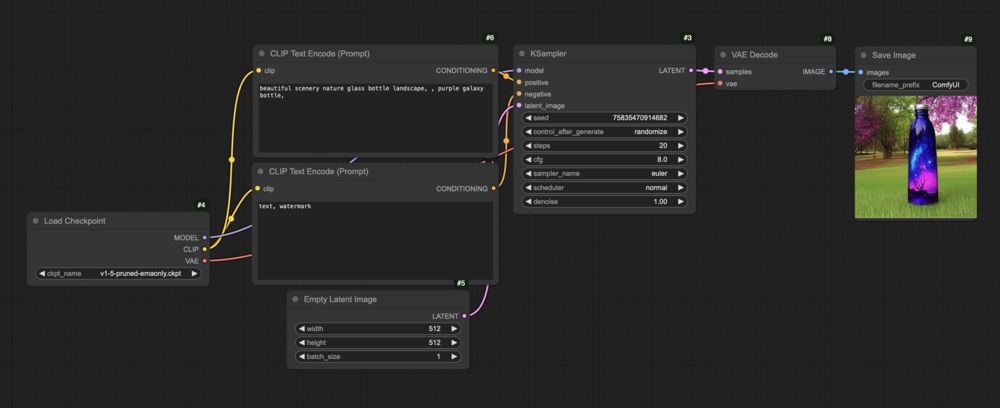
I got the beta on DockerHub; which appears to work for me so far (I get the WebUI) To test it, edit your "Docker" entry and modify the "Repository" line from "mmartial/comfyui-nvidia-docker" to "mmartial/comfyui-nvidia-docker:ubuntu22_cuda12.3" (the attached screenshot is missing the last part of the 12.3) You can rename the user_script.bash as user_script.bash.off to avoid having it run this next time. It loaded the default SD1.5 bottle example, I placed the model there and got the resulting image

-
You are quite welcome; I do this because I enjoy sharing my passion for technology Writing it down also makes it easier for me to reproduce things later; my blog serves me as well I'm glad you are enjoying it, too. I am hoping to make a release tonight which will also be the building block for me being able to make a future ubuntu 24 + CUDA 12.6 update (which will require a different venv but that is going to be later). The branch on GH has my current WiP which so far appears to be working; I generate the demo bottle and can modify the security level as needed. Now to add those 215MB of new packages






