





martial
Members
-
Joined
Everything posted by martial
-
From the `ls -al` I see the same size for the file, so I am still a little confused as to why libgl is missing given that we are "sudo apt install"ing it in the first few lines of the script. Unfortunately, the log is missing some earlier lines that be very useful to debug this mystery, around: == Container directory: /comfy/mnt/ComfyUI == Checking for user script: /comfy/mnt/user_script.bash =================== == Running ComfyUI -- Running: python3 ./main.py --listen 0.0.0.0 --disable-auto-launch I ran a version with only the libgl install lines and I get: == Container directory: /comfy/mnt/ComfyUI == Checking for user script: /comfy/mnt/user_script.bash == Attempting to make user script executable Running user script: /comfy/mnt/user_script.bash [...] The following additional packages will be installed: libdrm-amdgpu1 libdrm-common libdrm-intel1 libdrm-nouveau2 libdrm-radeon1 libdrm2 libelf1 libgl1-amber-dri libgl1-mesa-dri libglapi-mesa libglib2.0-data libglvnd0 libglx-mesa0 libglx0 libicu70 libllvm15 libpciaccess0 libsensors-config libsensors5 libx11-xcb1 libxcb-dri2-0 libxcb-dri3-0 libxcb-glx0 libxcb-present0 libxcb-randr0 libxcb-shm0 libxcb-sync1 libxcb-xfixes0 libxfixes3 libxml2 libxshmfence1 libxxf86vm1 shared-mime-info xdg-user-dirs [...] After this operation, 215 MB of additional disk space will be used.
-
I will also note that I am likely going to release a new version shortly that will 1) fix the security_level issue (ie we will not need this script anymore) 2) will allow the end user to set the security level from the application template (ie it will be a variable in the future Unraid version) [might have to delete and reinstall for it to show up] 3) will install libgl1 because you are not the first person to report it needed by one of their custom nodes (ie here too remove the need for this script).
-
No worries. I am more comfortable with a terminal than a UI, but I will attempt to help. You are going to need the user_script.bash attached to this reply. It contains a slightly modified version of both independent scripts (you can open it with a text editor if you prefer to verify its content). From your Windows file manager, copy the file into a share on your unraid server. If you have shared the "appdata" directory, you can place it in "appdata/comfyui-nvidia/mnt" If you have a different share, it is a matter of knowing which one. Usually, those would be in /mnt/user on Unraid. For example, a "Media" share is likely in "/mnt/user/Media" Once the file is uploaded to the Unraid server, we will need a terminal to place it in the final destination and change its permissions. On your unraid dashboard, the terminal is accessed using the ">_" symbol in the top right of your browser window (see the red circled icon in the "Preliminary Docker Setup" section of my Unraid post at https://blg.gkr.one/20241022-unraid/#128c678a0f698006ad92d61df8e70cb4 ) Once you have the terminal, we will type a few Linux commands (those are consecutive from one another): - let's go to the directory where we will put the user_script.bash file cd /mnt/user/appdata cd comfyui-nvidia/mnt - copy the file from the share into that directory (here I will use Media as the share and consider you placed the file in the base of that share): cp /mnt/user/Media/user_script.bash . - verify the file is present (you will see a list of the directory content) ls we should see something similar to ComfyUI/ HF/ user_script.bash venv/ the important part is that we see user_script.bash - change the permissions on the file so it is owned by the id/gid you set in the WANTED_UID and WANTED_GID of the application template (here we will assume the default of 99:100 chown 99:100 user_script.bash where 99 is the nobody user and 100 is the users group - now if we check again, we see the file is owned by that user and group ls -al should return something similar to drwxr-xr-x 1 nobody users 972 Jan 9 02:04 ComfyUI/ drwxr-xr-x 1 nobody users 6 Aug 24 18:45 HF/ -rwxrwxrwx 1 nobody users 473 Sep 11 22:15 user_script.bash drwxr-xr-x 1 nobody users 66 Aug 24 18:42 venv/ You are done and should be able to restart the Docker container from the Docker page on unraid Hopefully, this helps user_script.bash
-
FYSA, I looked at your error log, and you must have a custom node that uses libGL, which is not installed by default in the container. Can you take a look at https://github.com/mmartial/ComfyUI-Nvidia-Docker?tab=readme-ov-file#532-comfy_cmdline_base-and-comfy_cmdline_xtra where I have included a user_script.bash script that installs the missing package.
-
Figured it out, they moved the config.ini file to be a user configuration. I will make a new release as soon as I can, but for the time being please create this "user_script.bash" in /mnt/user/appdata/comfyui-nvidia/mnt and make sure it is owned by the same user as the mnt directory itself. EDIT: created a GitHub issue for the time being https://github.com/mmartial/ComfyUI-Nvidia-Docker/issues/4#issue-2775729552 user_script.bash
-
I will try reproducing it with a clean install and let you know when a fixed version is available. I hope that for the time being, manually editing /mnt/user/appdata/comfyui-nvidia/mnt/ComfyUI/custom_nodes/ComfyUI-Manager/config.ini to replace the "security_level = " to use "weak" will solve your current problems.
-
The default directory structure should be as follow within mnt (ignore dates or file size) drwxr-xr-x 1 nobody users 972 Jan 7 02:04 ComfyUI/ drwxr-xr-x 1 nobody users 6 Aug 24 18:45 HF/ drwxr-xr-x 1 nobody users 66 Aug 24 18:42 venv/ the settings file should be ComfyUI/custom_nodes/ComfyUI-Manager Did you say the settings.ini was set to "strong"? This is a new value, it used to be "strict" or "high". I need to update the bash script it appears to replace it to "weak" (details at https://github.com/mmartial/ComfyUI-Nvidia-Docker/blob/main/init.bash#L175 ) For the time being, can you manually edit the file and make the change (as listed above)? More details on this at https://github.com/ltdrdata/ComfyUI-Manager?tab=readme-ov-file#security-policy I will attempt to fix this in the coming days (a new release) Please let me know if this helps you in the meanwhile. Thank you for reporting the issue.
-
Thanks for those details. In doubt, I would try to reinstall the "run" directory. First, stop the Docker image. In a shell prompt (if you used the defaults for directory this ought to work): cd /mnt/user/appdata/comfyui-nvidia mv mnt mnt.off this will remove the "run" directory When you restart the container, the content should be generated anew The "mnt" should be owned by nobody / users unless you changed the UID/GID to match any user you would copy data into the folder any models you copied will not have to be re-downloaded as they should be in the corresponding directory in mnt.off If you manually installed custom nodes (not using Comfy Manager), I wonder if the error is a side effect of the file ownership After you restart, does that change the settings? If not, can you share the entire logs for me to take a longer look? Hoping this helps
-
Additional question: are you running it using Docker directly or in Unraid? The fact that you say that you put the files in the correct folder makes me wonder if there is an issue with this step. In general when using Comfy you would need to reload the UI (press r in the WebUI) for newly added files to be recognized by the current workflow
-
Did you just install it by any chance? You will need to install it, let it run the first time so it installs all the required components, and when it is done, it will change the security settings. Once the initial configuration is done, you have to stop and start it again; the security settings should have been changed then.
-
Yes. Place the file in that directory and make it executable. It should work (it should be owned by the same user who owns the other directories there). If you have a tool such as Dozzle installed, you can check the logs to confirm the commands are executed.
-
Thank you for sharing. This is a very cool custom node, I will install it on my local instance I wanted to share that although your solution works, you will have to redo it if I update the container (I will likely do so once a month to apt update the base packages or if some significant base images are needed). I suggest you look at the "user_script.bash" section on the project's GitHub (see the first post for the link). This shell script supports custom installations that will be applied at the container boot time; you could integrate slight variants of those lines there. If you look at the "COMFY_CMDLINE_BASE and COMFY_CMDLINE_XTRA" section, you will see that I wrote a "user_script.bash" that contains those installations (which are also needed by another package I added to my Comfy).
-
Wonderful to hear. I am always curious about the workflows people come up with. I had this `libgl.so.1` issue recently with "AdvancedLivePortrait" and installed it via the `user_init.bash` script #echo "== Adding system package" DEBIAN_FRONTEND=noninteractive sudo apt-get update DEBIAN_FRONTEND=noninteractive sudo apt-get install -y libgl1 libglib2.0-0
-
I am unsure I can help with this question; it is a case-by-case problem. I recommend you ask on their Discord. It is linked at the top of the README on their GitHub repo https://github.com/comfyanonymous/ComfyUI
-
The 3090 is more than enough to train this LoRA. You need a GPU with at least 24GB of memory. Although it takes 4 hours to train on a 3090, the result is stunning. Many people rent a GPU for a few hours to do this training; investing in a 3090 is unnecessary. I ran the training in a Ubuntu 24.04 system, not Unraid, although I believe it could be done using the base container I use for the Comfy and a shell within.
-
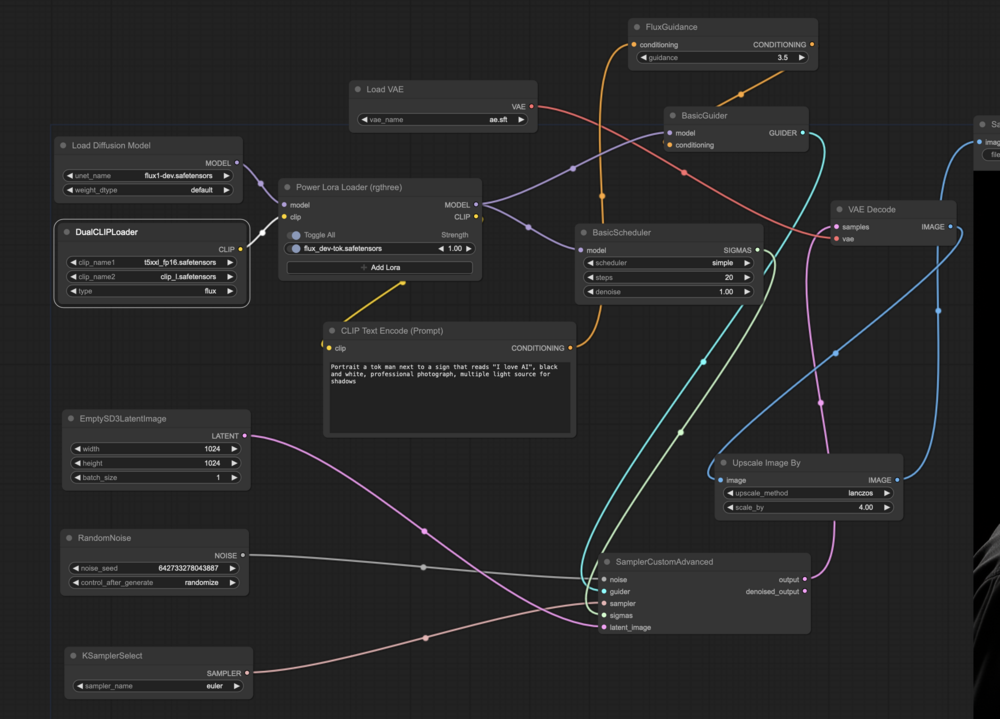
Glad to hear you got NF4 working. I saw on the repo that they recommend people use GGUF, by the way. I used a custom node named "Power Lora" from "rgthree". I am attaching an image of the workflow. The workflow itself is embedded in this image https://raw.githubusercontent.com/mmartial/ComfyUI-Nvidia-Docker/main/workflow/ComfyUI-Flux1Dev-ExtendedWorkflow.png When you drop it in Comfy, the missing node will be displayed, you can use Manager to "Install Missing Nodes" (gotta love Manager) That workflow was used for a Flux LoRA I trained on myself (which is kind of when I started building that container, to gain as much free VRAM as possible ) It is at https://blg.gkr.one/20240818-flux_lora_training/ if you are curious. As for the detailed documentation above, my pleasure. I am never sure what people will try so I can only do so when people ask. I tried to build the container as "recoverable" (at worst, as I mentioned in the FAQ, delete the venv and restart the container; it should redownload-reinstall everything). The "Manager" is a potent tool for performing software installations, especially if the node is in the list found by "Search."
-
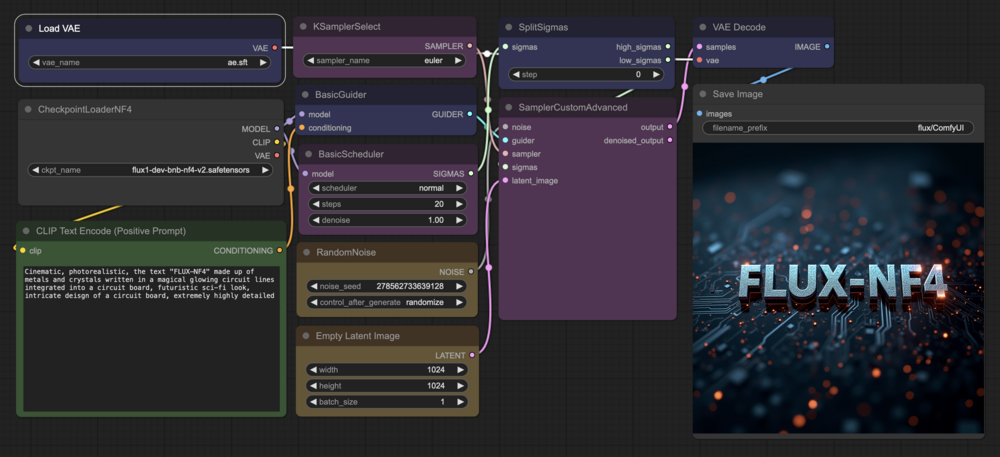
I have confirmed the steps can be done using ComfyUI-Manager directly, no need for the CLI I am going to refer to the steps listed as sections in https://github.com/mmartial/ComfyUI-Nvidia-Docker/blob/main/extras/FAQ.md 1) Update ComfyUI 2) Update ComfyUI-Manager 3) ComfyUI_bitsandbytes_NF4 I also note that NF4 was marked as deprecated in favor of GGUF which can be directly installed using the Manager that is installed with the tool. I made an entry in that FAQ about that if you want to try it OLDER -- still useful but see the FAQ Thanks that does help. I am going to try and will update in this post if/when I get it working but FYSA, the current steps I did: 1) Update Comfy to the latest version - Start ComfyUI - Open "Manager" - use "Update ComfyUI" - check the container's logs, and wait for it to be completed (just to be safe) - reload the webpage - Open "Manager", and check the date of the last pulled git commit (the box on the right with the news, if you scroll down). Mine says 2024-09-03 so the very latest Comfy 1b) Recommended to update ComfyUI-Manager as well from "Manager", select “Custom Nodes Manager”, select “Installed” and “Try Update” on “ComfyUI-Manager” … wait, check logs, restart once prompted and reload the page to be safe [Step 2 is likely optional because I believe it would be done by Manager in 3, but since I tested it, I am keeping it here for other people that would like to add packages] 2) Start installing the NF4 requirements: - Either click on the icon in the Docker tab and use the "> Console" (I recommend making sure the "Shell" is "Bash" from the "Edit" option) before that, or from a shell on your Unraid system find the name of your Comfy container (docker container ls); In general, it should be ComfyUI-Nvidia-Docker. If that is the case you can copy/paste: docker exec -it ComfyUI-Nvidia-Docker /bin/bash - once within the running container, activate the venv: source /comfy/mnt/venv/bin/activate - your terminal will now show a (venv) before the rest of the prompt - we can install everything we want at this point, it will end up in the venv: pip3 install bitsandbytes - verify installation if you want: pip3 freeze | grep bits returns bitsandbytes==0.43.3 on my system 3) Install the node itself (since I did 2 first, mine said bitsandbytes was already installed, but it installed the node): - From Manager, select “Custom Node Manager” - "install from Git" and give it the URL: https://github.com/comfyanonymous/ComfyUI_bitsandbytes_NF4.git - after success, restart and reload page Double-clicking on the canvas and searching for nf4 shows a new entry with NF4 in the title Might have to restart the UI a couple times ... per the log, the first time it was complaining bitsandbytes was missing and after the second ComfyManager restart it installed it 4) Grab weights (they go in checkpoint, not unet) - In the `docker exec` terminal: cd /comfy/mnt/ComfyUI/models/checkpoints wget 'https://huggingface.co/lllyasviel/flux1-dev-bnb-nf4/resolve/main/flux1-dev-bnb-nf4-v2.safetensors?download=true' -O flux1-dev-bnb-nf4-v2.safetensors You will also need the ae.safetensors file I found a test Workflow https://openart.ai/workflows/mentor_ai/flux-nf4-comfyui-basic-workflow/7QgBrjXFKDO57w0orNVc Seems to run at 8GB of VRAM but appears to generate results
-
I have not tried the NF4 node, I tried the FP16 (and FP8, I believe) and they worked out on my GPU. The way the python packages are installed is via a virtual environment, as such it is possible to “activate” it and then any install will be done with the other already installed components. I documented this in the GitHub in https://github.com/mmartial/ComfyUI-Nvidia-Docker?tab=readme-ov-file#51-virtualenv Basically use the menu dropdown to get a shell on the container (making sure it is bash) then source the venv/bin/activate Any “pip3 install” command will add those to the virtual env. The same thing should work from the WebUI with ComfyUI Manager’s “pip install” option. In order to make those change repeatable if you were to update the container, I would also look at the “user_script.bash” section (right after the virtual env one) as this one was made to allow an “at restart” mods, such as pip package install and such. Is there a step by step (text) version by any chance of that NF4 description I can look at so I can try?
-
Thank you for the kind words. I am delighted to hear the tool is useful. I'm sorry to hear about the trouble. If you encounter trouble with this one, I recommend stopping the container, renaming `run` as `run.old`, and re-running the container. It will re-install everything cleanly. You will then have the content of `run.old` for all the models, vae, loras,... and outputs in the `run.old/ComfyUI` base. I was also using a frontend on Windows, but the amount of VRAM used by other tools was killing the performance of any runs. I originally built the container on an Ubuntu system and tested Flux1Dev (full fp16) on a 3090 without any other UI. The speed-up is real; we are talking less than 30 seconds per image generation compared to the minutes I kept reading about. I am familiar with Forge, Invoke, Fooocus, but the nodes/workflows worked best for me.
-
Hello, I have submitted to CA about a week ago. I understand the team has to do a review before allowing new content, so I hope it will be released shortly. The wrapper code is public (make a docker base, pull content from ComfyUI's GH and ComfyUI-Manager GH) on the GH listed in the first post. The template file is public if you know how to add it manually. https://raw.githubusercontent.com/mmartial/unraid-templates/main/templates/ComfyUI-Nvidia-Docker.xml
-
[Reserved Post]
-
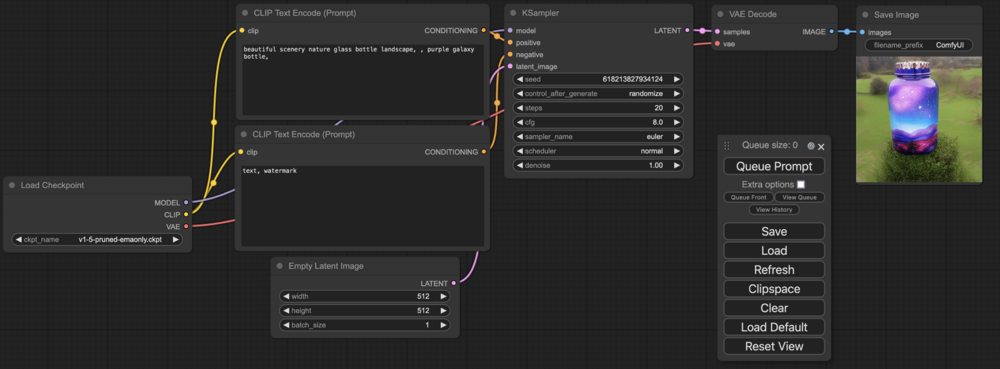
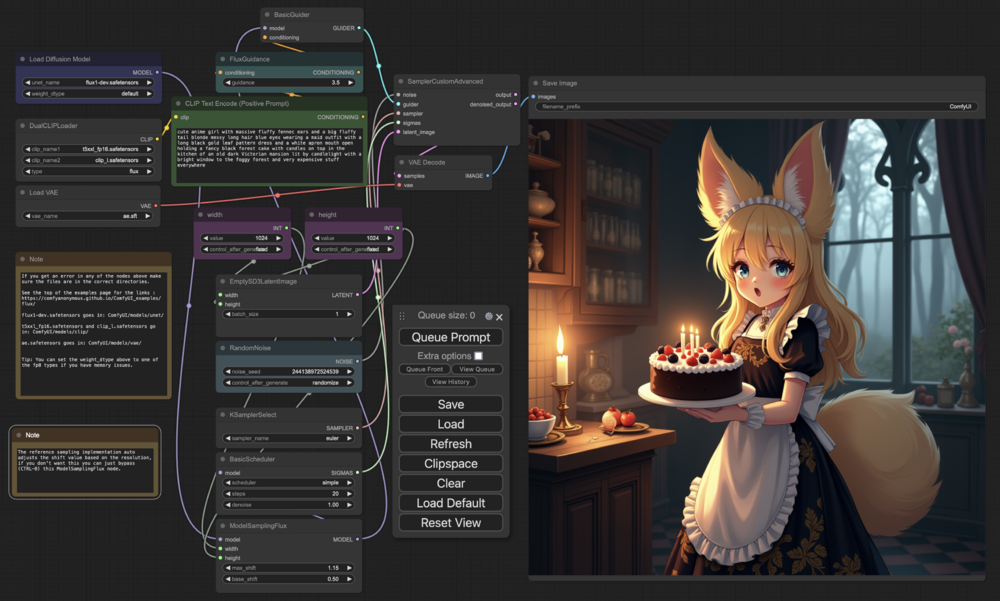
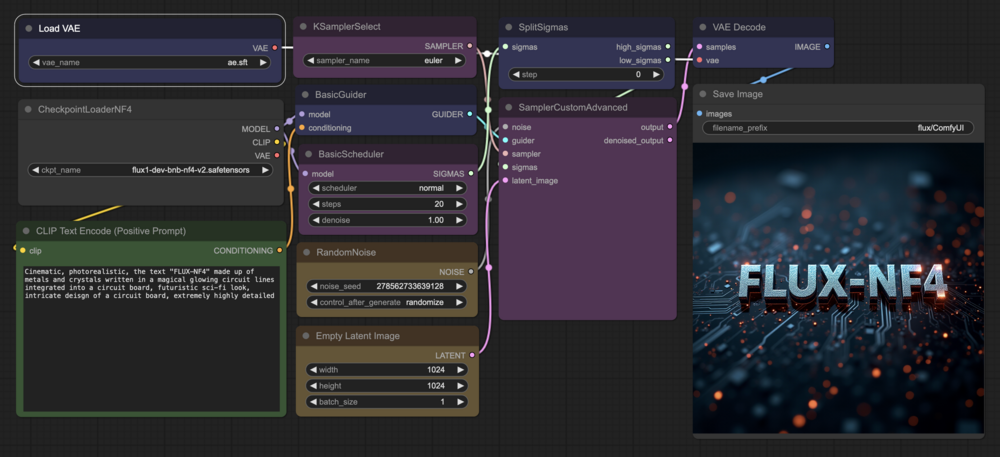
Example runs
-
[FAQ] To avoid having to maintain multiple sources of truth (which will diverge fast from past experience ), I ask that you please check the main README.md at https://github.com/mmartial/ComfyUI-Nvidia-Docker and the Extra FAQ: https://github.com/mmartial/ComfyUI-Nvidia-Docker/blob/main/extras/FAQ.md in addition to this support thread ----- First start The tool will download the latest source code of ComfyUI from Github, install all its requirements in a Python virtualenv, then do the same for the ComfyUI-Manager custom_node. This step will take some time and download all the python packages required. All this installation is done in the "run" directory; "run/venv" is where the Python packages are installed and "run/ComfyUI" is where the ComfyUI sources are installed. You must restart the container after its first start for ComfyUI-Manager to enable custom_nodes installation. Link: Direct link to section on the project's GitHub page ----- Custom init script If you have an RTX 4000 series, you might want to start ComfyUI with --fast Create a "run/user_script.bash" file and alter it following the instructions on the project's GitHub ----- First run The first time you use the WebUI, you should see the bottle example. This example requires the "v1-5-pruned-emaonly.ckpt" file. It is available, for example, at https://huggingface.co/runwayml/stable-diffusion-v1-5/resolve/main/v1-5-pruned-emaonly.ckpt The way to get the WebUI to see if is first to put it in the models/checkpoints folder: cd /YOURLOCATIONFOR/basedir/models/checkpoints wget https://huggingface.co/runwayml/stable-diffusion-v1-5/resolve/main/v1-5-pruned-emaonly.ckpt After the download is complete, click "Refresh" on the WebUI and "Queue Prompt" Link: Direct link to section on the project's GitHub ----- Re-installing ComfyUI or cleaning up virtualenv If you encounter trouble with the container and want to reinstall ComfyUI or cleaning up the python packages installation directory. I recommend stopping the container, renaming `run` as `run.old`, and re-running the container. It will re-install everything cleanly. You will then have the content of `run.old` in case you needed something from it. ----- Updating Comfy ComfyUI-Manager is here to help with this process. The "Manager" button provides a few useful options, among which its "Update All", "Update ComfyUI", "Fetch Updates" buttons. The git commit of your ComfyUI (and its date) will be shown in the info box on the right of the manager UI. Please see ComfyUI-Manager's "How to Use" section for details. ----- RTX 5080/5090 support A note of RTX 5080/5090 support: it is still in beta. 1) you will need the latest (very latest) NVIDIA driver (570) 2) you will need to MANUALLY change the container tag from `latest` to `ubuntu24_cuda12.8-latest`
-
ComfyUI is a Stable Diffusion webUI. Since a Flux example was recently added, I created this container builder to test it. As I built it with support for specifying the UID and GID, I made an Unraid version 2024-09-02: Approved for CA After installing the tool from Community Apps, and letting it run for the first time (to install all the required python packages), please restart it. This is needed to tweak settings for ComfyUI Manager to allow missing nodes installation. The source code is public and can be found at https://github.com/mmartial/ComfyUI-Nvidia-Docker Docker builds are released at https://hub.docker.com/r/mmartial/comfyui-nvidia-docker The "run directory" is where the folders needed will be created (please see the GitHub for up-to-date information): - HF is the expected location of the HF_HOME (HuggingFace installation directory) - ComfyUI is the git clone version of the tool - venv is the virtual environment where all the required python packages for ComfyUI and other additions will be placed. A default ComfyUI package The "basedir" directory is where the end users files are placed. You can place this `basedir` on a separate volume, outside of the `appdata` folder, which will help reduce your appdata backup. "basedir" contains: - custom_nodes for additional support nodes, for example ComfyUI-Manager, - models and all its sub-directories is where checkpoints, clip, loras, unet, etc have to be placed. - input and output are where input images are to be placed and generated images will end up. See this post for additional details on this option installation requires about 5GB of additional installation in addition to the container itself; those packages will be in this venv folder. All those folders will be created with the WANTED_UID and WANTED_GID parameters (by default using Unraid's default of 99:100), allowing the end-user to place directly into the "basedir/models" sub-folders their checkpoints, unet, lora and other required models. Note that the base container does not include weights/models; you must obtain those and install them in the proper directories under the mount you have selected for the "basedir" folder. Output files will be placed into the "basedir/output" folder Hopefully, you will enjoy it. Please share your ideas. FYSA: if interested, the template is available at https://raw.githubusercontent.com/mmartial/unraid-templates/main/templates/ComfyUI-Nvidia-Docker.xml
-
Just a quick note that as long as you can SSH into your system, the above trick still works for me when this problem occurs and will avoid to have to reboot: 1. find the master nginx process' PID (that ps command above) 2. kill -9 PID 3. restart nginx 4. wait a few seconds and your dashboard should be back functional





