





JPDVM2014
Members
-
Joined
-
Last visited
Everything posted by JPDVM2014
-
@CopesaCola REDIS_DB should just be 0. And REDIS_BACKEND should match REDIS_URL. So redis://172.17.0.3:6379/0 I don't see REDIS_URL and REDIS_BACKEND in the sample env file, so you could try removing those if it still doesn't work after the above changes.
-
I was waiting to see if it would pop up somewhere else, so thanks! It shouldn't be too much to change the template around. I'll take a look ASAP. Might not be until the weekend though.
-
Yea, if you need to use a custom config, you need to create tge file from the system terminal first, but I guess it's easier to just give it read/write privileges. I'll change the template!
-
It should be in the template already, but I'll double-check. Glad to hear it is fixed!
-
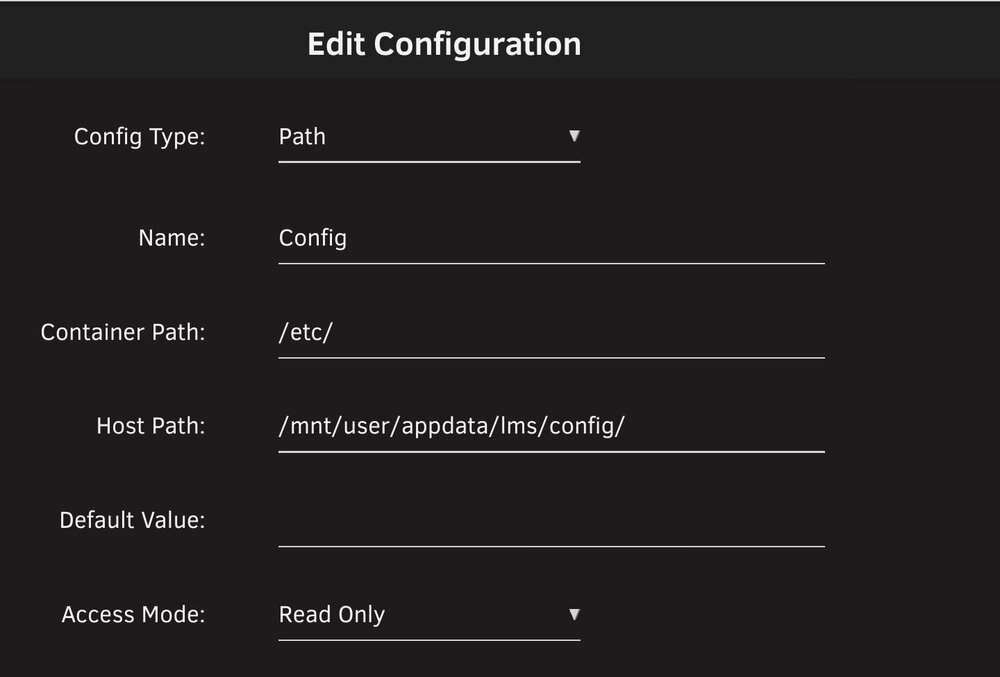
@th3unpleasantpeasant No problem at all! Looks like you need to add the config directory. Click "Add another path..." then set it like in this screenshot. That should, hopefully, get you all squared away.
-
Can you post a screenshot of your template when you can?
-
@th3unpleasantpeasant I took a quick look, and it should still work correctly. Looking at those custom config instructions though, maybe it overwrites with the default config at container start now. I'll have Just to make sure, when you run that wget command, you are in the config directory? Default is /mnt/user/appdata/lms/config. So, from your unraid system terminal, you would do "cd /mnt/user/appdata/lms/config" then the wget command.
-
Yep, the template pulls directly from the upstream docker image. So it will update as long as the LMS maintainer keeps updating.
-
@th3unpleasantpeasant I don't use LMS any longer, so there may have been some changes. I'll take a look and see if I can update the template/instructions. I may not get to it until the weekend though.
-
@codefeetI run it through gluetun with no issue. I have issues occasionally with everything through gluetun where I have to restart the whole stack. If I only restart the one container that needs it, it will go back to not working correctly. So, if you already did the part of adding the gluetun network to the kapowarr container and adding the kapowarr port to gluetun, I'd say restart gluetun then kapowarr and see if that helps.
-
@CopesaCola Sure thing! It's actually been on my to-do list since I saw there was recently a relatively substantial update.
-
Unfortunately, I wasn't able to find any detailed tutorials for it. They all pretty much just walk you through the steps you already know. The hardest part is figuring out the right CSS selector to use. It could be different for every site. That is where a plugin can help. If you want to post the feed you were trying, I can take a look. I think once you see a few sites, you'll get the hang of it.
-
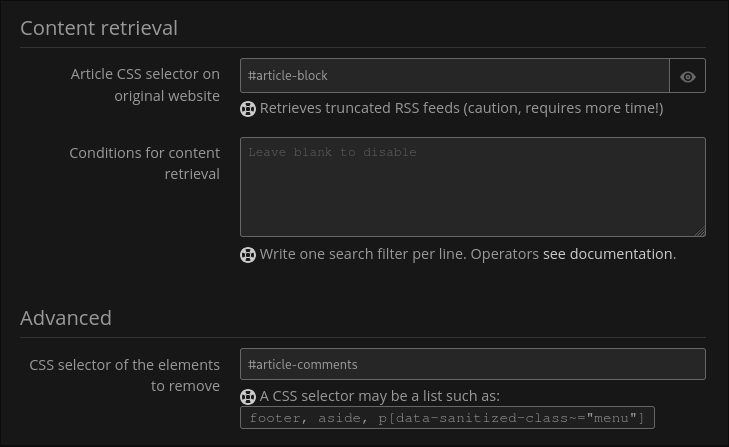
@mjeshurun Sorry, I didn't notice that. I tried finding a github for the original project, and all I could find was site filters. It looks like the apple insider filter hasn't been updated in a while, so I'm assuming they changed something on their end. I actually don't use five filters any more, you can do this right in FreshRSS. Not sure which feed you are using, but I tested out https://appleinsider.com/rss/news. If you go to manage the feed, scroll down to content retrieval. In "Article CSS selector on original website" put #article-block. Then down under Advanced in "CSS selector of the elements to remove" put #article-comments. You don't need this one if you want to see the comments. Once you do that, scroll all the way down and Clear Cache and Reload Articles to refresh the feed. EDIT: If you want to do this for other websites, your browser of choice probably has a plugin to help. I'm on Firefox, and I used https://addons.mozilla.org/en-US/firefox/addon/elempick/
-
@mjeshurun Hi! I actually only maintain the templates, not the apps themselves. I wish I had the skill to help with the apps too. 😁 I'd ask over at the github for the docker image. GitHubGitHub - heussd/fivefilters-full-text-rss-docker: Retriev...Retrieves the full-text of individual Web pages or entire RSS feeds - Unofficial Docker image for fivefilters' Full-Text RSS service - heussd/fivefilters-full-text-rss-docker
-
Is there any workaround to run a script before and after mover runs? Or, is there another way to stop a torrent client when mover runs?
-
Easiest way is probably a screenshot or two. Just redact anything you don't want public.
-
I run into that every once in a while. Usually when editing metadata. I've brought it up to the maintainer, but I think it is something that is also in upstream calibre-web. If you want to post your template, I'll take a look though to see if anything looks out if place.
-
You shouldn't have to set that in Lidarr. Can you go into terminal, and go to where slskd downloads to. Once there, do "ls -la" and see who owns the music files. If that shows root:root, then you will need to make sure permissions get set correctly in slskd.
-
I don't use a kobo unfortunately. It might be worth asking at the project's github.
-
Here is the github if you end up needing it. https://github.com/TheWicklowWolf/BookBounty
-
It doesn't automatically download. It is just to manually fill in the gaps where Readarr isn't able to automatically download a copy.
-
Yea, it was recently updated. For some reason it doesn't show in the CA store. I think because the image isn't on docker hub.
-
Those sound more like questions where the dev may be more help: https://github.com/Xoconoch/spotizerr @NateburMy guess is it's a permission issue. Maybe try removing the UMASK variable? You could also remove PUID and PGID to run as root, just as a test to see if that works.
-
If you have a port other than 6379 mapped to redis, you will need to change that too if you use IP address.
-
That depends on if your redis container is on the same docker network or not. If they share a network, you should be able to use the "redis" hostname. Using your server's IP address instead of redis should work too, and that won't matter if they are on the same network or not. You'll have to change it in all three places: REDIS_HOST, REDIS_URL, and REDIS_BACKEND.



