





JPDVM2014
Members
-
Joined
-
Last visited
Everything posted by JPDVM2014
-
@Nodiaque You only need Calibre-Web-Automated. It duplicates the features of Calibre-Web and adds some functionality.
-
@Trinistan I just saw your edit about the error. So, I think it is a couple things. First, you'll need to edit your slskd.yml to either remove or correct the directories like I mentioned in my other post. If you are going to manually set them, they ahould be the volumes inside slskd, not your Unraid directory. So, most likely "/downloads" and "/incomplete". Then if you are still getting the permission error, you'll have to change a few more things.
-
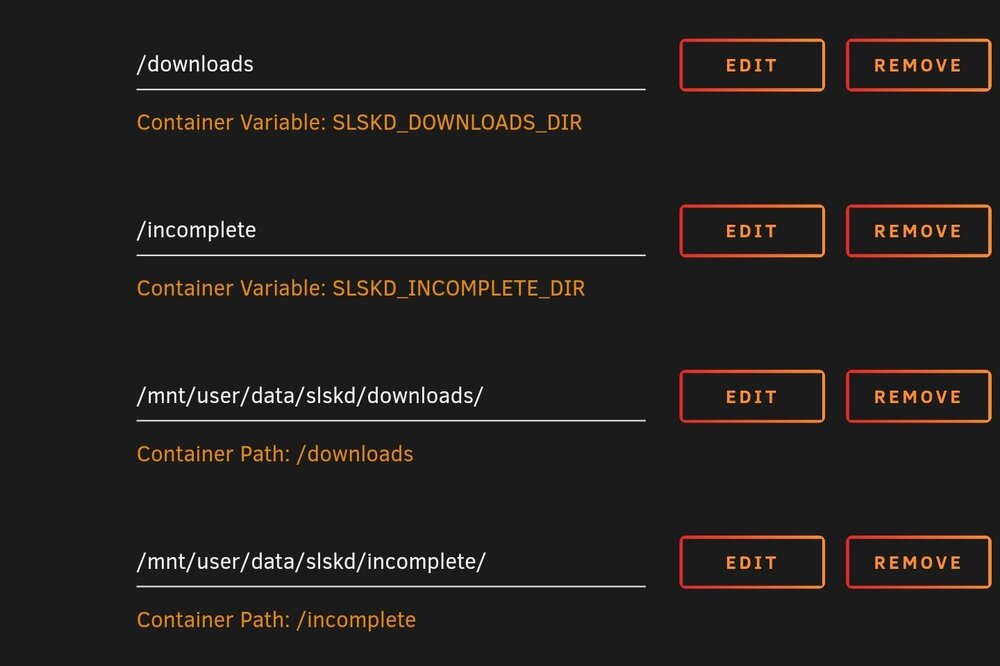
Looks like your slskd config might have an error too. If you are using the CA template, you shouldn't need to manually set the download and incomplete directories. Here is my slskd template for example. The only thing in my slskd.yml is the API key for soularr.
-
@Trinistan In your soularr config.ini, change Slskd's download directory to "/downloads" without the quotes. That should, hopefully, fix it.
-
@EC28 You may have figured it out or given up, but I just went through this. Figured I'd post in case anyone comes across it. You have to add "--user 99:100" into extra parameters, but you also have to chown your appdata folder. So, in my case, I had to run "chown -R 99:100 /mnt/user/appdata/slskd" Then restart the container.
-
I removed the "--user 99:100" from my template. I added it previously because the hardcoded 1000:1000 were causing issues on unraid. Now with the PUID/PGID variables able to be set, it works with them set as variables in the template instead. The template should work again once the Community App store updates. If you don't want to wait, you can remove --user 99:100 from the extra parameters, and add a PUID = 99 and PGID = 100 variables.
-
It doesn't look like anything changed with the installation instructions on the project's github, so it may be worth asking over there to see if the dev has any ideas. https://github.com/Casvt/Kapowarr
-
Did you reinstall from the CA store or do a fresh install of the template? Only other suggestion I have is to completely remove it and start with a fresh template. Other than that, might be worth asking at the creator's github: https://github.com/epoupon/lms I checked to make sure there weren't any recent breaking changes, and I didn't see anything. Sorry I can't help more.
-
I'm not sure then. It really looks like a docker issue instead of the container. The container isn't even getting a chance to startup.
-
I think it is this line. It should be: /mnt/user/Music Complete/':'/music':'ro' You have to keep the container path as /music
-
@Icarium Yea, it should have something in it. Mine is 243B. Next thing I would try is removing the READECK ALLOWED HOSTS and USE X FORWARDED if you aren't using them. My guess is they are what is causing the empty "" in the config. EDIT: It might be obvious, but just in case. Once you remove those entries from the template, delete/renamr the config.toml so it can get recreated again.
-
@Icarium Looks like a typo in your config.toml. Maybe change the filename to config.bak or something, and let Readeck recreate it. See if that helps.
-
@Chrrs Thanks! That must have changed in the most recent update. I'll get the template updated.
-
@BBenja FROM tomsquest/docker-radicale RUN apk add gcompat RUN /venv/bin/pip install git+https://github.com/39aldo39/Radicale-DecSync Looks like I got it working! You have to add one line to your docker file and change the repository on the template to just "radicale" without the quotes. EDIT: Add code block

-
You have to go into your radicale template and change the repo from tomsquest/docker-radicale to just radicale. That should use your local image. However, I still couldn't get it to work. It looks like Radicale 3.2 broke some plugins, so maybe decsync was one of them. Maybe try building from an older radicale 2.* or 3.0 image. EDIT: It looks like 3.1.9.1 is the first image that is extensible, but decsync still doesn't work. The image is missing a dependency for it.
-
This is probably a better question for the maintainer of the image, but my guess is you need to change the image used in the template to your locally extended image. I have yet to try making/extending images, so I'm not sure how to do that though. I will take a look later today to see if I can make any progress.
-
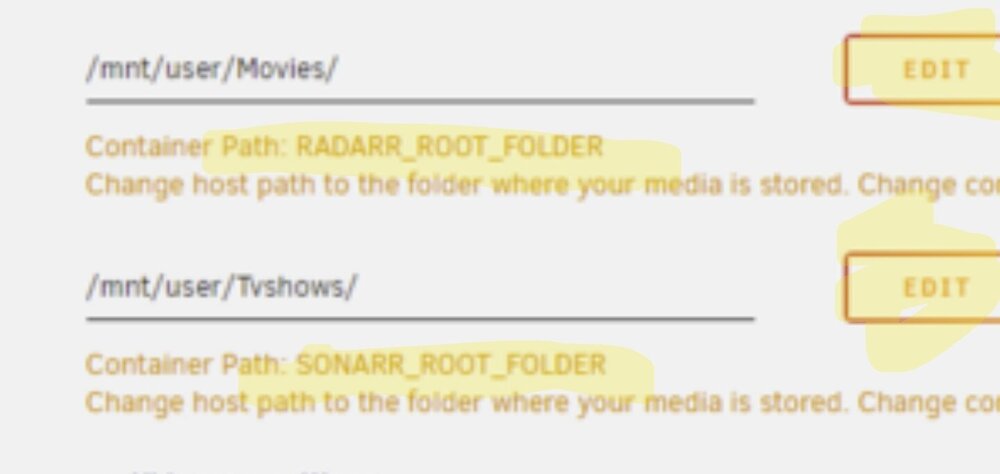
In the trailarr template, you have to hit Edit and change the highlighted part to match your root folders. These two lines should match the lines from your Radarr and Sonarr template. But, it looks like both of your root folders are "/media" so it might not work right now unless you change those in Radarr and Sonarr or run two instances of trailarr. See: https://github.com/nandyalu/trailarr/issues/8#issuecomment-2271712622
-
Your root folders are still wrong. You have to hit Edit. The host path should be your unraid path. Container path needs to match your radarr/sonarr root folders exactly.
-
I know that is a lot of info, so, if you are still having trouble, post a screenshot of your radarr/sonarr root folders and a screenshot of your current template, and I can help out more.
-
I was working with the trailarr creator to adjust the template a little. First thing I would do is remove trailarr and start fresh with the updated template. If you don't want to start fresh, you can adjust the template on your own. You'll have to add a PUID variable and PGID variable. Set PUID to 99, and PGID to 100. It also looks like you need to adjust your root folders. The right side of this line needs to match whatever shows up in your sonarr and radarr instances. -v '/mnt/user/Movies/':'/data/media/movies':'rw' Go into radarr/sonarr, go to settings, and media management. Under root folders, these need to match exactly to the trailarr template. So, mine are "/data/media/movies", but your's may just be "/movies". In the updated template, I removed the default paths so it is hopefully more clear that both sides need to be adjusted. Unfortunately, without the PUID and PGID set, it may have messed up your permissions too, so once you get it setup again, in the unraid command line, you may need to do "chown -R nobody:users /mnt/user/Movies && chown -R nobody:users /mnt/user/Tvshows". Adjust that command to match the host paths to your movies and TV shows. I just took the paths you had set in the template you posted. EDIT: The creator also recently updated to allow the PUID and PGID to work correctly, so make sure to update once you adjust the template to make sure you are on the current version.
-
I think that would have to be implemented in the project itself rather than the unraid template. The dev may be able to help out with your issue too. https://github.com/TheWicklowWolf/BookBounty
-
That's good to hear you solved one issue. I didn't even think about DNS being an issue. For the next problem, the only thing I can think of is trying to set your language to English. See if that works, and at least that can narrow it down. Also, check the logs to see if there is anything in there. I had some problems at first too that were permissions issues.
-
It looks more like libgen won't let you connect at all for some reason. Can you ping libgen.is from your unraid console? I'm not near home, and apparently my vpn isn't working or I'd try mine to see if I'm getting the same error. I know libgen has occasional issues.
-
Yea, your config looks alright. Might just need to see if you can find a different libgen mirror that works. Also, not sure if your Readarr is exposed to the internet, but you may want to take the picture down since your API key is in there.
-
Can you post a screenshot of your template? Also, is there anything in the container logs?





