





firstTimer
Members
-
Joined
-
Last visited
Everything posted by firstTimer
-
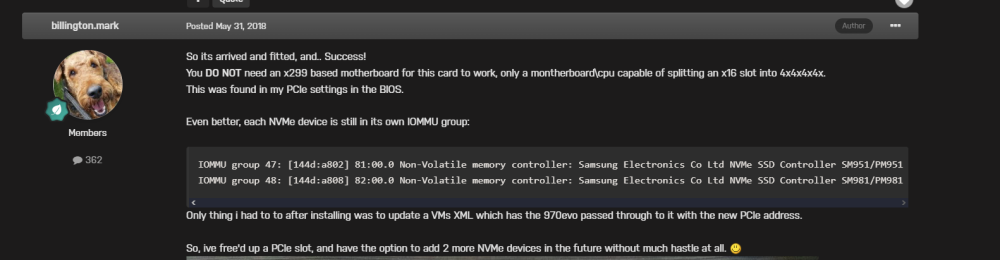
It seems like that the MB has to support the bifurcation to x4,x4,x4,x4. I send you the link to the thread:
-
Ok, when I have some time (probably next weeks) I will update the bios and give it a try. Actually I downgraded because I thought to spare much more energy but in the end, the difference is negligible, but when I found it out, it was too late. At the moment my system is idling at 45w so 10-15w less than before
-
Are you mounting you GPU inside a VM? If yes, keep the VM turned on, so the OS on the VM will lower the GPU state to the miminum, otherwise if you stop the VM the gpu will run with higher P-State since Unraid can't control it though Nvidia Drivers
-
I still am on the previous bios, 2703 if I remember correctly. I could update the bios and give it a check, but did you have to have a Windows 11 on a USB key and update first the intel Engine? On the asus support site it was said to first update the Intel engine and then update the bios accordingly? WHat did you do to update the bios? And as a little side note, I "decreased" my CPU to an intel i5-13400.
-
Hi everyone, as I wrote in the title, whenever I reboot Unraid every time I see an error because the VMs are apparently forcibly closed because they can't shutdown properly. I can post the diagnostics of course
-
HI guys, happy new year everyone. Does anyone has a similar issue like me? Basically when I start the NAS, IF I don't enter the bios, then the usb key (Unraid) does not start (from the IPMI I see only a black screen). If I enter the bios, even if I don't change anything and just exit then Unraid starts as normal. Any idea?
-
Hi everyone, I made a new configuration since 1 month more or less, and I just noticed that my consumption in watts is high. This happens just when docker service is enabled, I am NOT noticing an increase in cpu frequencies in general, just that frequencies do not reduce when docker service is enabled and I can see an increase in idle consumption of 80W-85W to 48W in idle without docker service enabled. Does anyone have a clue?
-
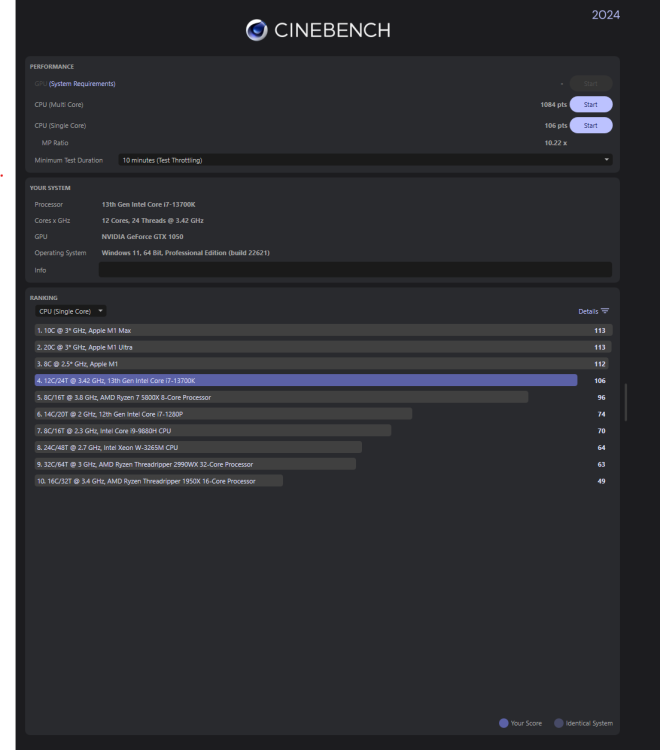
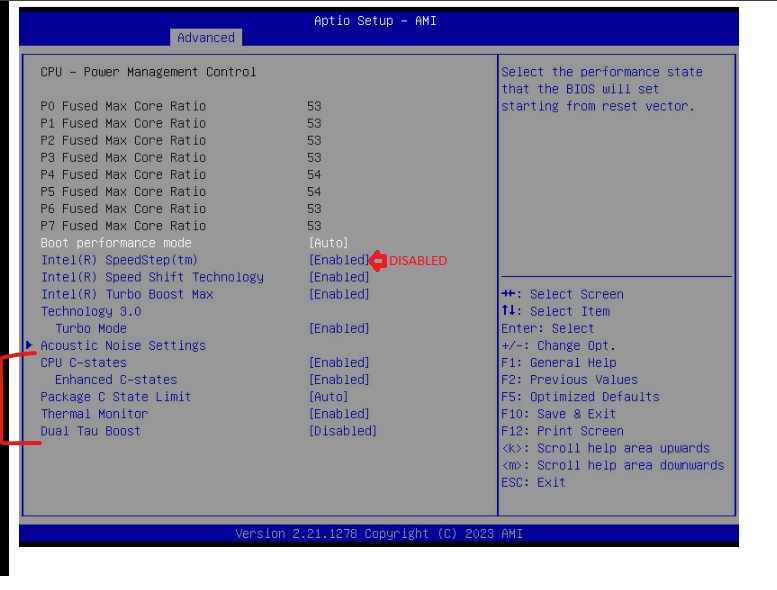
So I got my head around the concepts of PL1 and PL2 parameters aka Short and Long duration Package Power Limit and in the BIOS. With PL1 we have the long duration, so it means for jobs where the cpu will take a long time to do it will apply that power limit to the cpu package. With PL2, if we have a short job on cpu that lasts more than a couple of seconds if I remember then the power limit kicks in and drops the power package of the cpu to PL1. That's why in the first benchmarks I made, during multi-core I saw frequencies of all cores around 2.5GHz, basically the PL1 was enforced. On the other hand during SingleCore test instead, I got those allowed bursts in clocks due to PL2 but that were immediately dropped and upped very quickly because PL1 was enforcing its limit. If we apply the PL1 of 35W and PL2 to 106W as the cousin 13700T it means that for most of the time our cpu will be limited to 35W for long jobs but bursts to 106W (maybe i will up at 120W) are allowed. I think that in the case of Unraid and most users that's a good balance, so that you will have a very low powered cpu, very cool and silent most of the time with occasional (single core) bursts when needed. To check my theory I applied a PL1 = to PL2 at 106w and the multi-core benchmark improved a lot from 600/700 to 1084 (always in a Win 11 VM) Starting from a default 2703 Bios version and try to apply these parameters: Ai Tweaker: Asus Performance enhancement 3.0: Disabled Performance Core Ratio: By Core Usage and for all P-Core apply 49 Efficiency Core Ratio: By Core Usage and for all E-Core apply 36 Max. CPU Cache Ratio: 38 Ai Tweaker --> DIGI+ VRM Cpu Input Voltage Load-Line: Level 2 Sync ACDC Loadline with VRM: enabled Ai Tweaker --> Internal CPU Power Management Long Duration Power Package Limit: 35 Package Power Time Window: 64 Short Duration Power Package Limit: 120 Advanced --> Cpu Configuration --> CPU Power Management Control Intel Speedstep: disabled Intel Speedshift: enabled Intel Turbo boost Max Tech: enabled
-
I did not forget about you. I am trying to fix an issue that came up. Basically Unraid works with not strange or whatever, the only I noticed is that when I reboot Unraid AND I don't access to the BIOS then it just does not boot the USB key. So as soon as I fix this I will make a BIG post with some photos
-
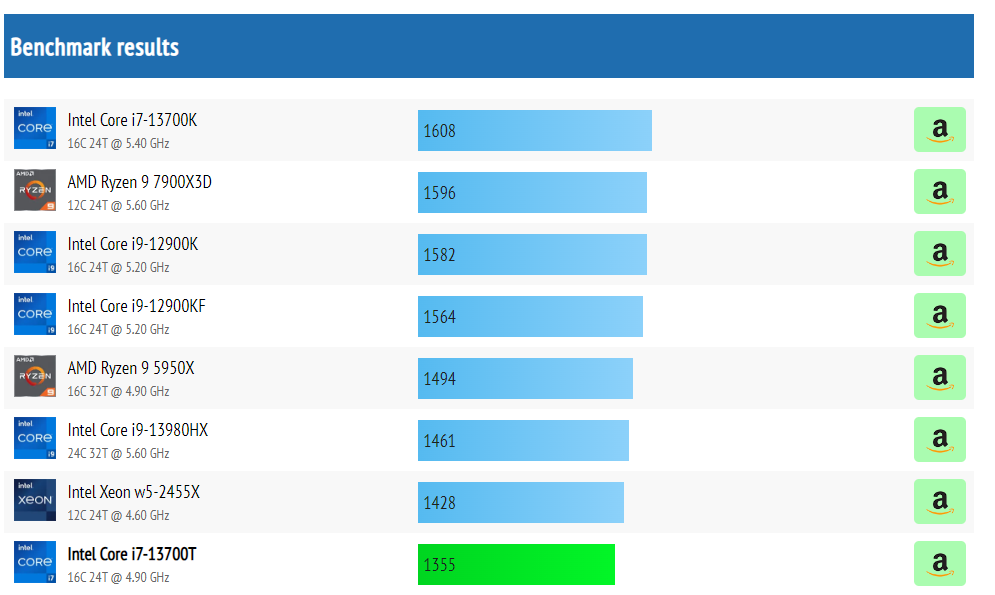
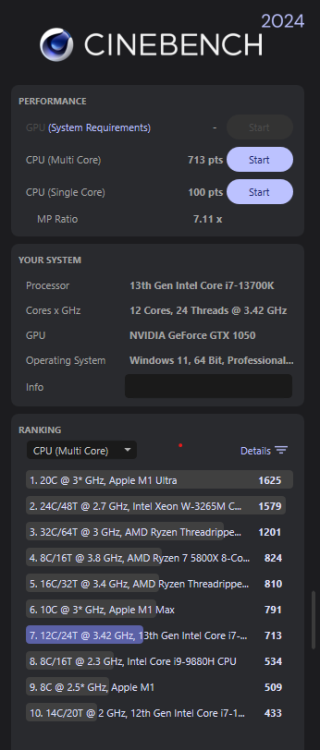
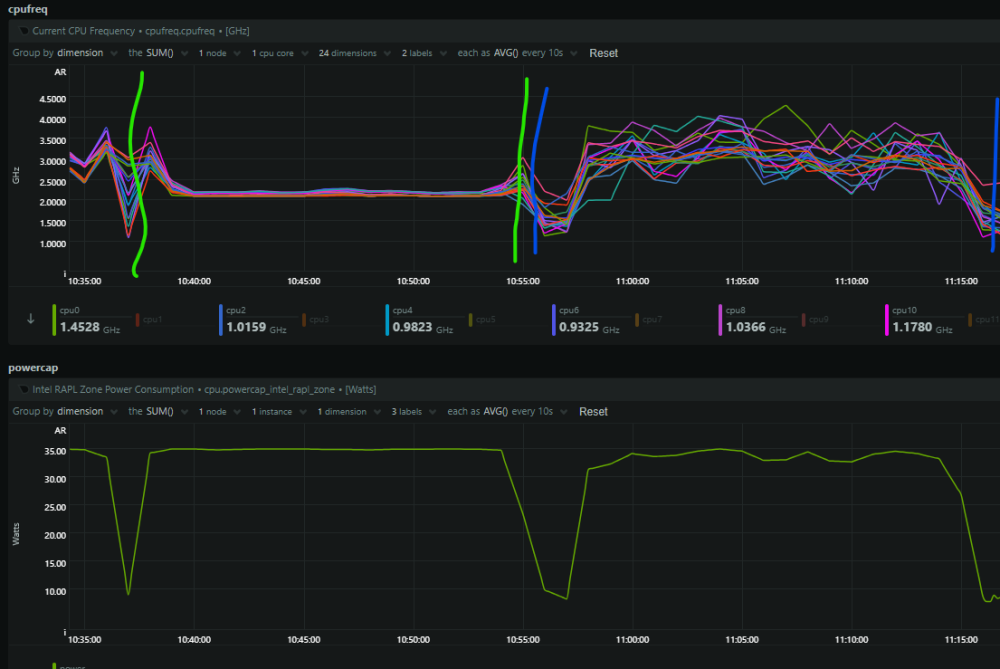
I tried to perform a first cineBench benchmark to test mostly stability and observed the behaviour during the benchmark. Environment: Windows 11 VM with all 24 cores dedicated Results: Single Core performance is pretty similar to i7 13700T Multi Core is basically half of the original i7 13700T counterpart (no good) Observations: During tests I checked netData and especially during multiCore (between green bars) bench the clock of all cores dropped and stabilised around 2.2 GHz (I guess because of the low TDP) Single Core test (between blue bars) returned to a stable and much better clock
-
Yeah I am not expert at all when talking about IOMMU. What I know is that you could try to isolate the devices "by hand, but I don't know how "properly" it will work out.

-
Yes they are all in the group 4, last three entries in the group are the NVME. I never tried to pass a whole SSD to a VM, but... can't you just have an ssd as an unassigned device and pass it through in that way?
-
Do you have the latest bios? 2703? Sure, I just need some time to do the screenshots but I will do that 👍
-
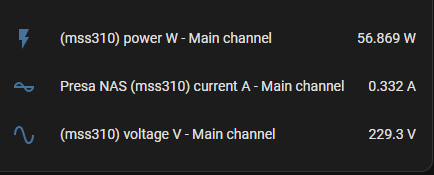
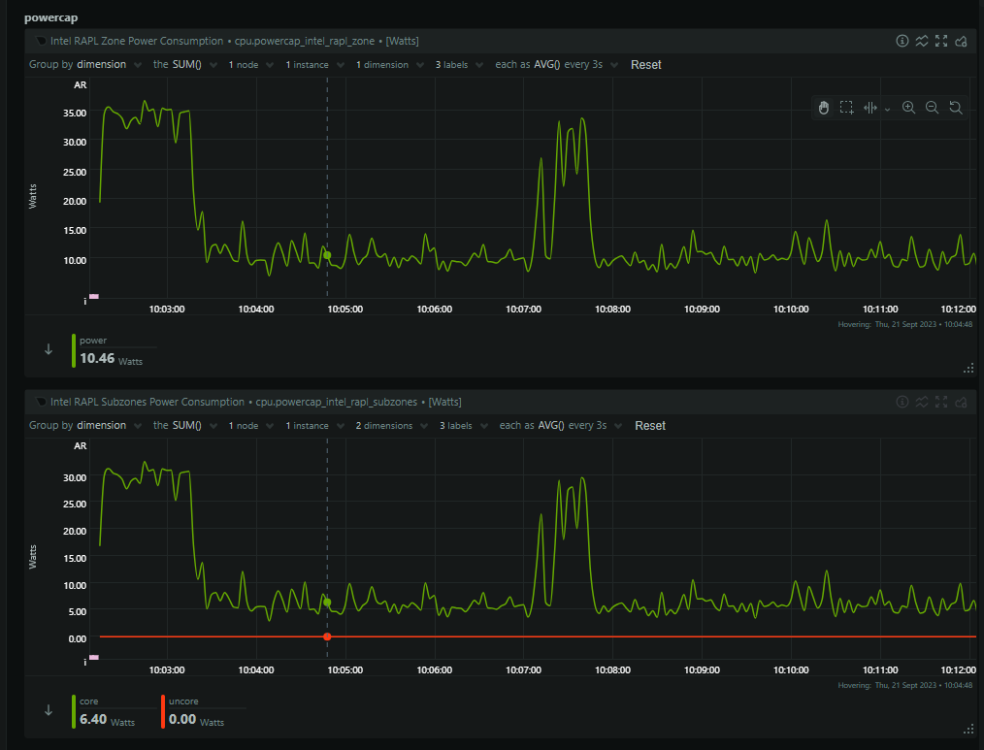
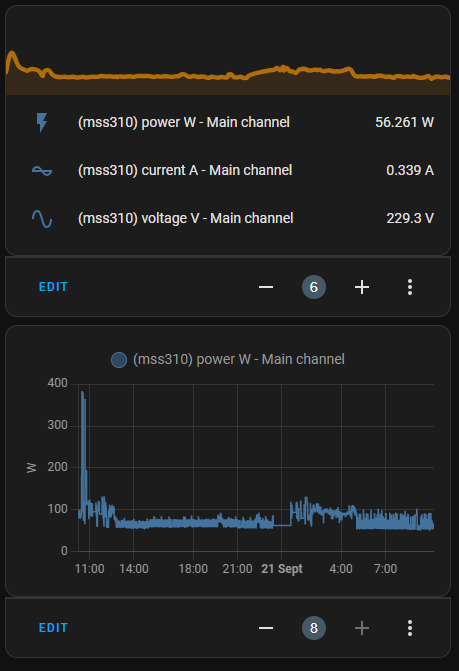
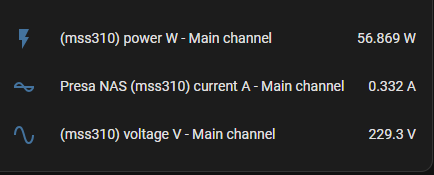
I post a little estimation of the wattage of each component (trying to be close enough): HDDs: 1w each (spin down) = 6w Sata SSD (idle): 0.5w NVME SSDs: 0.5w each (idle) = 1.5w HDD cages: each 5 blue led (not kept into consideration due to low power) + 80mm fan = 4 w Fans: 3x80mm = 6w IPMI: 6w Cooler fan: 120mm = 4w GPU: 1050 (P8 state) = 6-8w total of NON CPU consumption: 34w Idle reading at the moment from smart plug = 56w CPU consumption = 22w
-
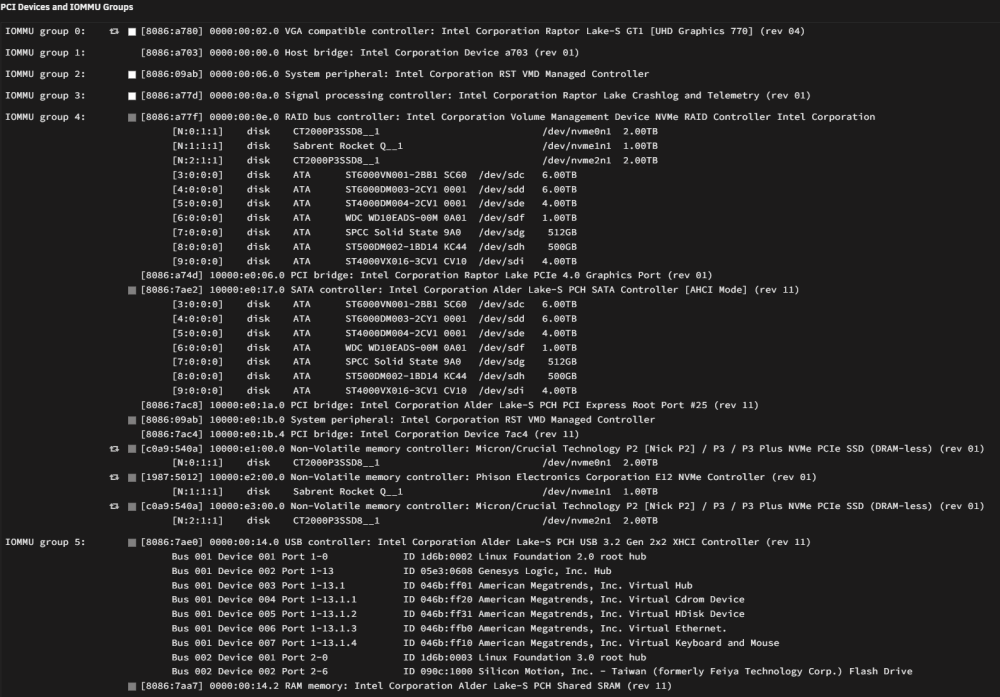
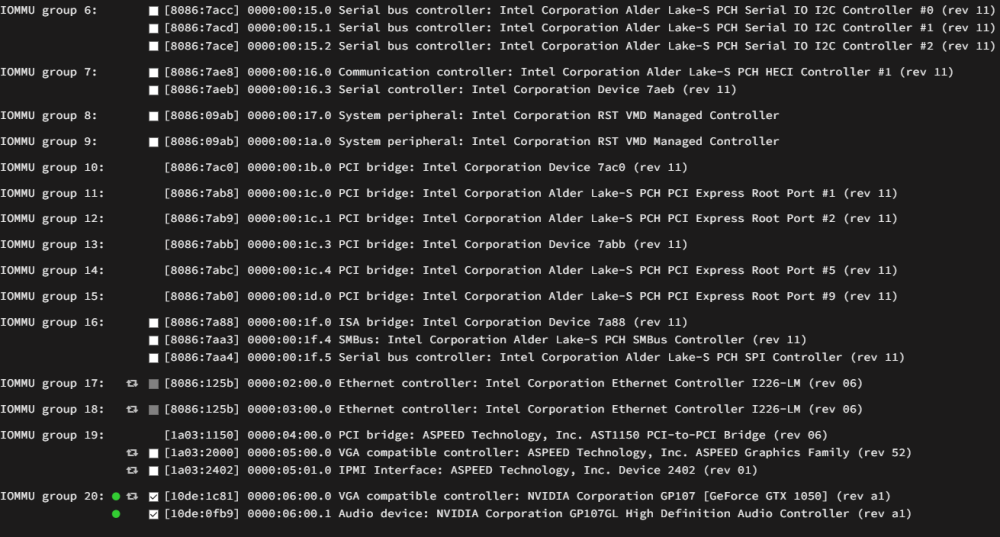
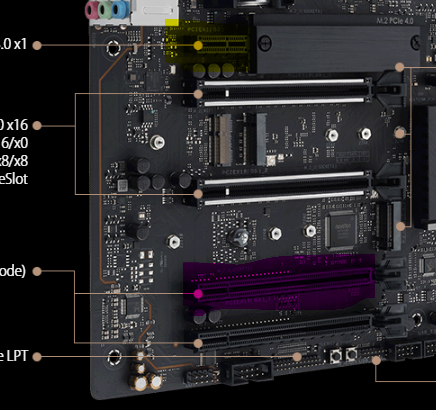
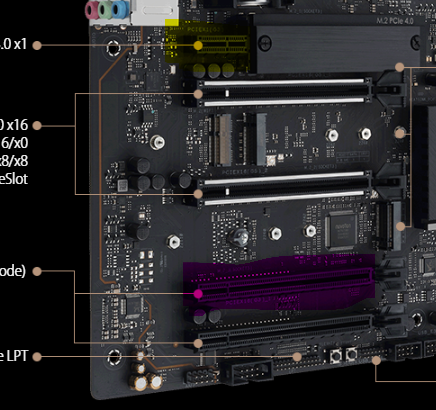
Here it is: The Nvidia GTX 1050 is mounted on the purple PCIE and IPMI is installed on the yellow one. NVME (starting from top to bottom, e.g from closest to the PCIE x1 slot) are the Crucial P3 mounted on first (with passive cooler) and second M.2 slots and the sabrent is mounted on the third one (near GTX 1050)
-
Sorry I am not into IOMMU mapping at the moment
-
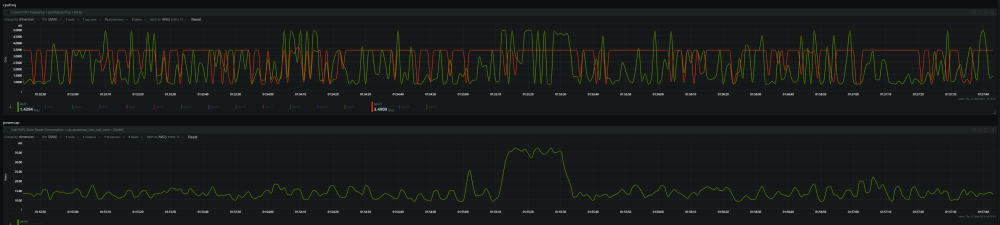
@Daniel15 Thanks for reporting this. At first I would like to consolidate the BIOS side and then keep fine tuning on Unraid side. The frequencies seem to be good though (4.6 GHz for Core 0 (P-Core) and an example of an E-Core that maxed at 3.6 GHz) Anyway actual consumption: at startup: 120W (6 HDDs + 3 NVME + 1 SSD sata + GPU + IPMI) idle: between 80W and 60W (with Unraid dashboard opened) Let's see how it will behave during the night when every client etc is closed PS: I noticed that reserving (core isolation) that last 4 E-Core (20, 21, 22, 23) to Unraid led them to stay maxed out at 3.6GHz so for the moment I left Unraid to use all cores.
-
@JimmyGerms And anyone interested I created a special thread for optimisations of this MB with a i7 13700k
-
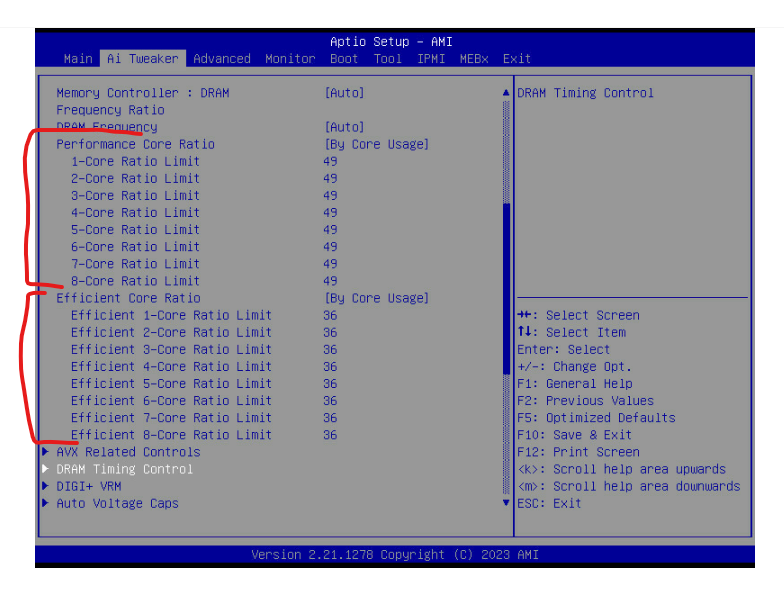
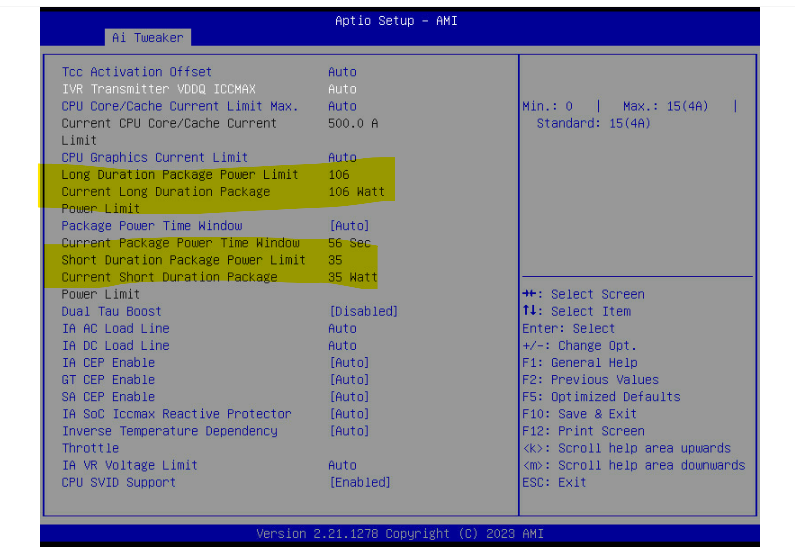
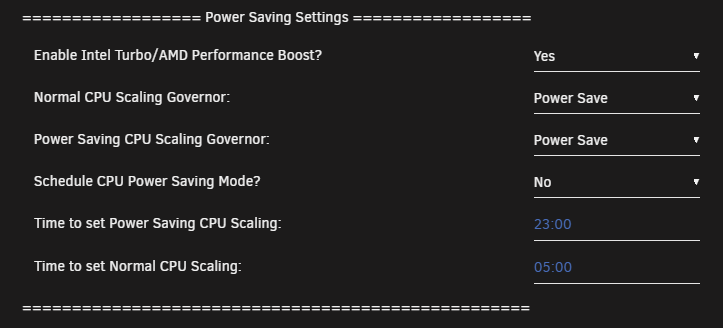
Hi guys, after long time and plenty of researches I finally built a new NAS. This is a system to built to last as much as it can with a balance between power and efficiency in mind. Here there is a list of "hardware" requirements I made before building. Quicksync (de facto, is the encoder/decoder for Plex) More than 1 RJ45 port IPMI for "wireless" monitoring/configuring Plenty of cores for VMs/containers Enough M.2 slots (in this MB there are 3 in total) After giving the main requirements points I will illustrate the build: CPU: Intel 13700K Case: Silverstone RM41-H08 Cooler: noctua nh-d12l MB: ASUS PRO WS W680-ACE IPMI PSU: Corsair RM850i RAM: 2x32GB DDR5 Crucial @4000Mhz 1.1V SSD: 2x2TB Crucial P3 + 1x1TB Sabrent HDD: A mix of 6 seagate Ironwolf and barracuda from 8TB to 1 ancient 500GB and 1 SATA no brand SSD GPU: ASUS GTX 1050 2GB (with P8 state enabled) Mix: 2x5bay hotswap cages Latest MB bios --> 2703 Now the good stuff about optimising this CPU: PS: This is STILL a work-in-progress first section is the BIOS side: I am trying to be as balanced/flexible as possible so that the CPU delivers good performance when needed, but always with energy efficiency in mind. As a starter I based myself on the specs of the cousin of this CPU the i7 13700 T model. From its cousin we are going to apply the same maximum frequency of both E-core and P-core 4.9 GHz for P-Cores and 3.6 GHz for E-cores. (screenshot 1) Since the cousin has a drop in the TDP (min 35W and max is 106W) I will apply the same (screenshot 2) Next thing we want to do is to enable the C-states so that the CPU can drop to lower consumption when it is in idle state. (screenshot 3) Other BIOS settings to experiment with: turbo boost max 3.0: enabled intel speedstep: disabled intel speedshift: enabled (speedshift is an improved version of speedstep) intel adaptive boost tech: enabled Second section Unraid side: Tips and tweaks plugin Turbo mode is still enabled and only powerSave or performance avaiable --> powersave is applied User script: I apply a non-optimised version of the script for powertop --> powertop --auto-tune &>/dev/null ------------------------------------------------------------------------------------------------------------------------------------------------------------------------------------------------------------------------------------------------------ That's it for the first post. I will keep this thread updated with new discoveries because I want to apply some undervolt and let's see how far can this CPU drop in consumption
-
Hi @spall23, check the couple of comments I made in this thread, I think I have the answer to your problem
-
@Daniel15 Yes, it took some time and experiments but I managed to solve the issue. Please keep in mind I have the following necessities: IGPU passed to Plex container Discrete passed to VM IPMI as FULL remote output I made the following experiments: The last result brought me the best solution and discrete GPU is also available in the list of /dev/dri

-
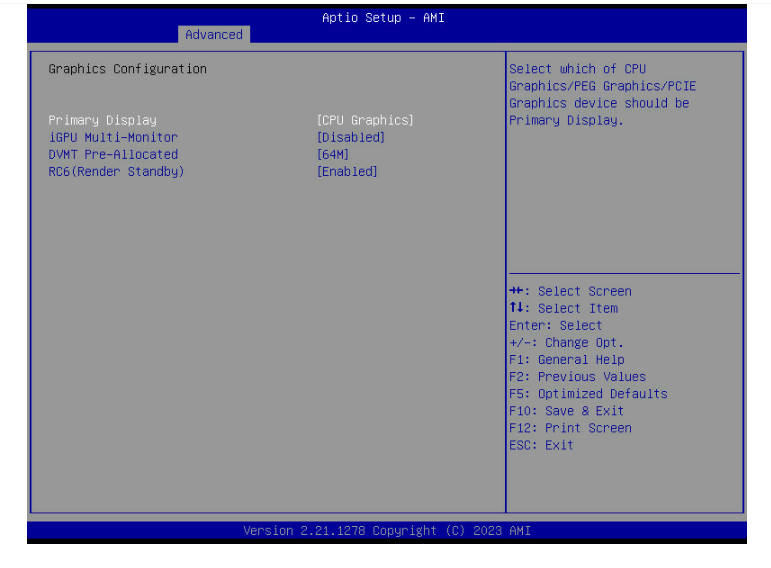
Hi guys, After a long afternoon of experimenting, if you have a discrete GPU, along with IPMI and IGPU you can follow this step to use the IPMI card as your main adapter: Advanced -> System Agent (SA) Configuration -> Graphics Configuration --> Primary Display you have to set the primary display to PCIE in order to have the IPMI card as "main" display. Also set IGPU-Multi-Monitor to Enabled Explanation: Before rebooting the first time, check that no cables or dummies are attached to both IGPU and Ext. GPU. If you forget this step, one of the two will be set as the primary adapter and when Unraid starts up it will output the first logs (in the remote window of the IPMI software) until any GPU driver is loaded. After that, any further output will be redirected to either IGPU or discrete GPU so you still have output but no refresh is sent to the IPMI card, e.g when Unraid is up and running any new output won't be displayed.
-
@Daniel15Thanks for your response, yeah I guessed that... At the moment I managed to have the IPMI working at least until the VGA is activated during Unraid bootup. Is it working with your system? Could you have a check in your BIOS maybe? The path is: Advanced -> System Agent (SA) Configuration -> Graphics Configuration Anyway what I wanted to achieve is: having full access (not limited like now) of the output through the IPMI Igpu passed to Plex container GTX 1050 passed to a Windows 11 VM The fact is that if I select either PEG or PCIE Graphics, the white led on the MB turns up and I can't access the BIOS at all I mounted the GTX 1050 at the purple Pcie and yellow one is for IPMI card of course
-
Hi guys, yesterday I became the owner of this MB (the full ATX one) and the IPMI card. I just added another GPU to my Unraid server, a old gtx 1050 but now I receive a no signal error when trying to access it remotely. Did this ever happened to you?
-
Hi guys, I need an HBA card because I my motherboard supports only 6 SATA ports. I found this card on ebay with IT firmware already preflashed but is it true that SMART attributes are not anymore avaiable for the HDDs attached to the card? How do you deal with this? Do you just hope that nothing happens to the disks 😄? HBA IBM M1015







