





firstTimer
Members
-
Joined
-
Last visited
Everything posted by firstTimer
-
@Vr2Io Yes all these vlans use same subnet mask 255.255.255.0 So to recap, in the end I will have a network like this: 3 VLANS: Unraid IoT InternalServices Physical connections: LAN1 of UnraidServer --> VLAN Unraid LAN2 of UnraidServer --> VLAN InternalServices VLAN Connections: HomeAssistant "phisically" connected on LAN2 but gets an IP from IoT VLAN 2 Win11 VMs "phisically" connected on LAN2 but get IPs from InternalServices Seems good to you? What confused me, I think is that even though each LAN port of the MB has a different MAC Address (just last octet changed) they are "recognized" badly
-
@Vr2Io This is what I meant: LAN1 (UnraidOnly) will go on VLAN Unraid with IP: 192.168.10.150 LAN2 (InternalServices and IoT) will go on VLAN Internal Services with IP: 192.168.20.160 Lan2 will eventually have an homeAssistant container which will be connected to IoT VLAN and 2 VMs which will be connected to the internalServices VLAN, this is possible right?
-
@Vr2Io So it means that I should assign LAN2 to a different VLAN by default?
-
I forgot to me mention that those custom docker networks are with macvlan type of driver (ipvlan is simply greyed out)
-
Hi guys, I have an issue with Ubiquiti UDM se and Unraid. Basically the motherboard of my Unraid server has 2 LAN ports and I decided to assign 1 of them for Unraid only and with untagged Unraid VLAN --> No bonding. no binding Second port (used for docker containers and VMs) has VLAN Unraid untagged and tagged as IoT and Internal Services. --> No bonding. no binding First port (Unraid only) is connected to port 8 and assigned on VLAN Unraid while port 7 is for VM and docker is also by default exposed on Unraid VLAN. The problem is that UDM SE doesn't "understand" the MAC Addresses and assigns them wrong IPs. I set port 8 to have a fix 192.168.10.150 and port 7 assigned to 192.1168.10.160 but while port 8 takes the correct IP, port 7 just gets an IP of the VLAN for IoT Devices. Can you help me to understand? Unraid Server: Lan1 assigned with IP: 192.168.10.150 (Static IP on UDM AND assigned statically on Unraid as well) Lan2 assigned with IP: 192.168.10.160 (Static IP on UDM AND assigned statically on Unraid as well) UDM PRO: LAN1 of Unraid on port 7 (gets correct static IP) LAN2 of Unraid on port 8 gets an Ip of IoT VLAN while homeAssistant container gets the fixed IP reserved for the LAN2 Issue: The issue is that I can only access Unraid interface with tailscale on. Strange thing that happens is --> if docker service is active when I start Unraid then I can't access it through a local IP, while if I disable docker and reboot Unraid then I can reach Unraid when it comes back online without using Tailscale
-
@HumanTechDesign the iGPU is used/assigned to Plex all the time
-
@HumanTechDesign I corrected the answer above. Anyway yes, 6.12.8 is installed and everything runs. For example now I can see the data about the dGPU (frequency temperature) because only docker containers use it. When I pass the dGPU to the VM then I get a message on the panel of the dGPU saying that it is bound VFIO or similar
-
@HumanTechDesign Actually I removed the dummy HDMI from the dGPU and from any other HDMI portns and everything works just fine. I can even passthrough the nivdia gpu to the VM, and when I turn the VM off I can restart the container (photoprism) that needs it straight away
-
Actually I am using Unraid 6.12.8 with ipmi card of this motherboard (Asus ace w680 but the ATX model) and everything is working just fine. I actually use the igpu for Plex a GTX 1050 for my VM and everything is fine
-
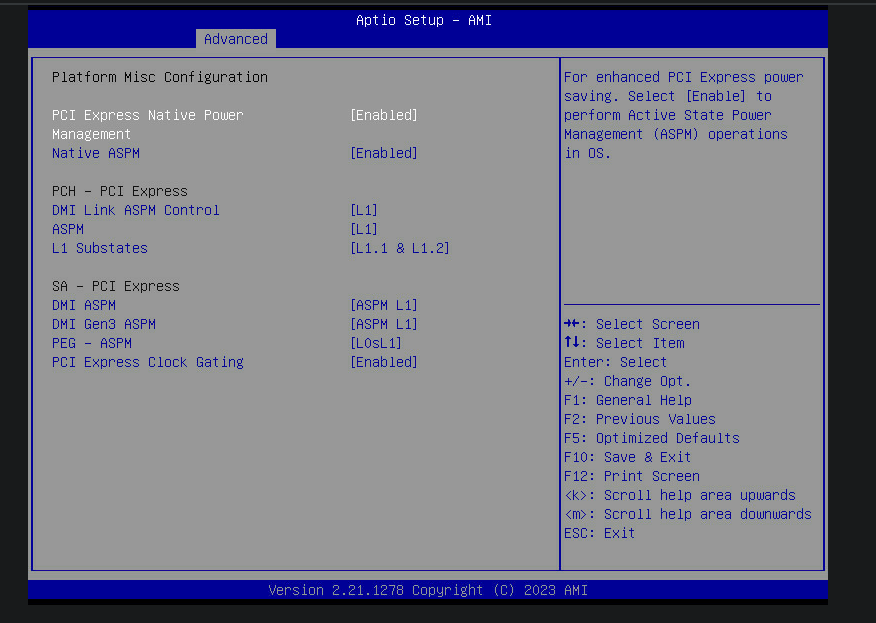
Do you guys have the same issue? every time I try to set Native ASPM to enabled, when I reboot and go inside bios again, it is always set to Auto. I even tried to set Disabled but when I come back the next reboot, it is set back to Auto, any clue? I am latest bios 3101
-
@Daniel15 Thanks for the confirmation So yeah, I guess that the IPMI card is the first thing to check on our MBs if we want to reach C10 or ACPI C3. 🤔
-
So @Daniel15 i guess that in our case the cause for inefficiency is to look elsewhere, either the IPMI card, or the ethernet controller (which has the cheapest Intel I226-V). Other things of course can be the NVME or HDD or anything attached to the MB really 😅 For you @dopeytree the issue is probably to look elsewhere as me and @Daniel15 then (so anything attached to the MB can cause the issue). @Limeth for you, accordingly to what @Jabberwoocky shows, it seems that you also can reach low c-states and therefore I would say that the issue is again, the MB or anything attached to it.
-
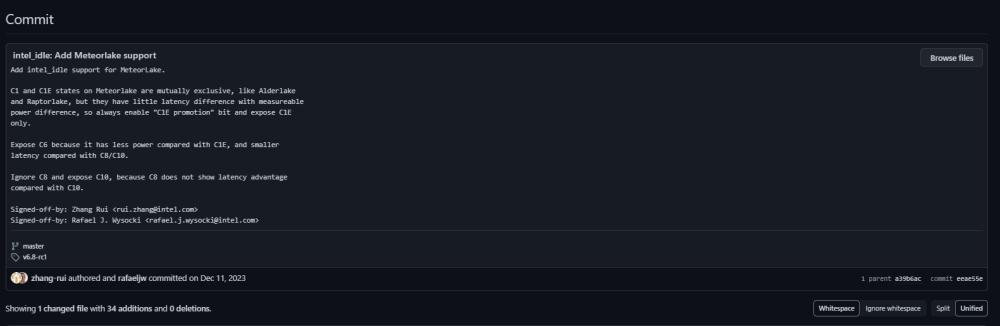
@Jabberwoocky I am quite confused then... looking at the git blame, it seems that the support to intel_idle was added for the 14th gen, because it is in master. So once Unraid updates the linux kernel to version 6.8.0 (as it seems in RC version) then powertop should remove the ACPI strings and show the correct values. BUT as we can see, even if Unraid is not using the latest kernel (therefore it is not using intel_idle, hence the reason why powertop shows ACPI strings) it seems the case that 14th can actually reach lower C-states nonetheless. So I guess that people with 13th gen CPUs can also reach lower states even without intel_idle (because we all have ACPI)
-
Thanks for the emails. Just 1 question is still opened then: Does it mean that with ACPI cstates we will only see a maximum c-state of 3, or is it just a powertop error to not interpret ACPI c-states correctly? Rant moment 🤣: There was a big scandal after the release of meteorlake that was just a rebranding of raptorlake with a maximum of 5% improvements over the previous gen, so how in the world is meteorlake getting supported in intel_idle when raptorlake is not present? It means they developed or they should have developed a custom table for meteorlake which IMHO should be compatible with raptorlake as well
-
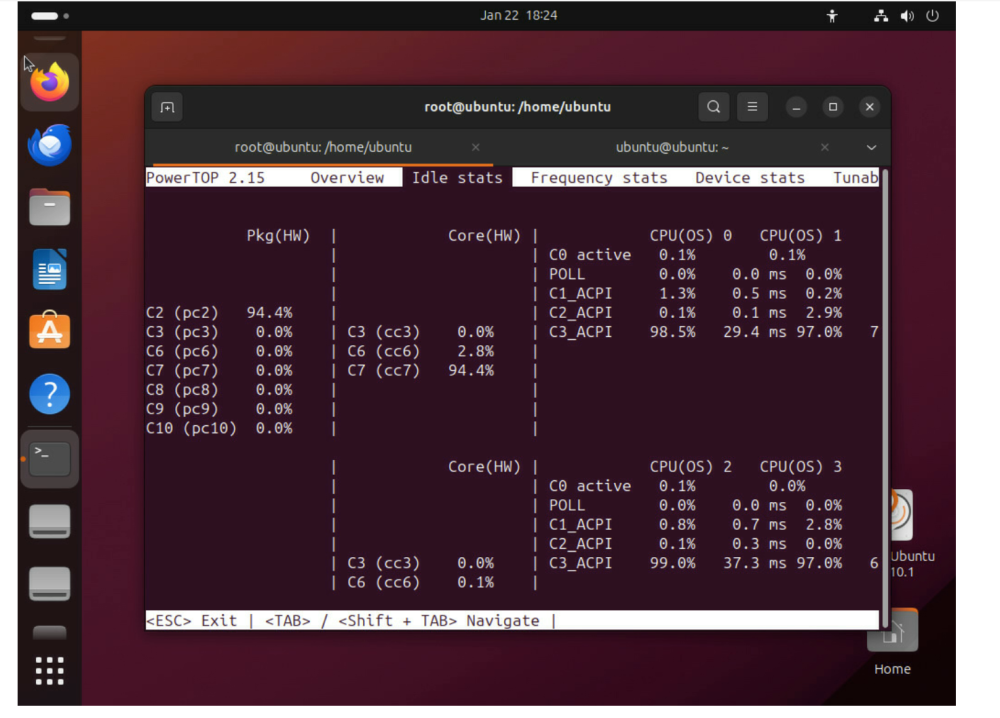
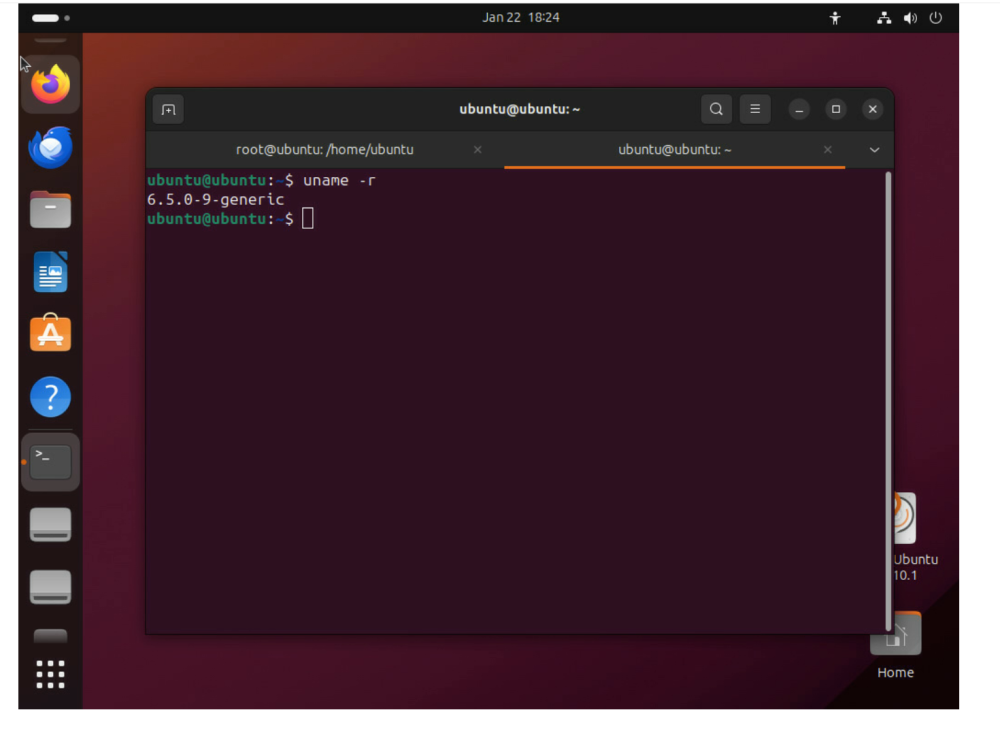
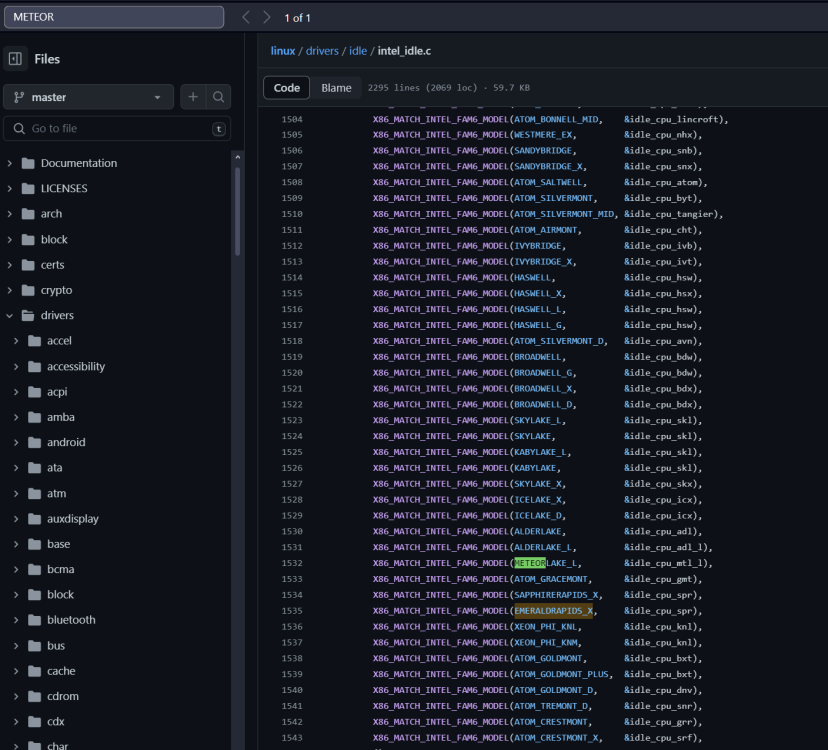
@Limeth@dopeytree @Daniel15 I made this experiment. I created an USB stick with an Ubuntu Live, then inside ubuntu, I installed powertop (with version 2.15) to see what happens there. I discovered that they behave exactly the same, in Ubuntu I don't see any C-state and I see the X_ACPI string. The linux kernel version inside ubuntu was 6.5.0.9 (which should support raptorlake fully now), and powertop is also 2.15 (see screenshot 1 and 2). So, to recap, looking at the intel_idle (master branch, screenshot 3) it seems that RAPTOR_LAKE is completely missing! but meteorlake is there! So as far as I understood, if 13th gen raptorlake is not in this list, it means that everyone running a 13th cpu under linux cannot take advantage of low c-states, or at least cannot reach and/or check their actual c_state. The only thing I would suggest at this point is that someone with a 14th gen cpu: installs linux on a disk (because the update of the kernel cannot be applied on USB key AFAIK) install a version of the linux kernel >= 6.6.0 Installs and runs powertop These are the expectations: The X_ACPI string should go away In a good scenario, C-states should appear correctly and in the best possible scenario, C-states could go lower than C2/C3 if any component/pcie does not create any problem with ASPM.
-
what version of powertop are you using? I am using the 2.15. I would say that maybe the "un-updated" linux kernel could be the reason why powertop is not behaving correctly. But I don't know, I can't understand well enough how each piece of software is related to the other. Maybe it would be interesting to know the tree of dependencies for powertop and know what version of each dependency is installed in Unraid
-
Yes, I am not into low-level coding as well. Anyway it means that with kernel we are not ok (at least for 14th that was supported from 6.6). BUT we still don't know/understand if intel_idle actually "applies" any low C-state to our 13th and 14th gen CPUs and/or powertop show or c-states correctly. Am I right?
-
Mmm... I actually suspected that. It would be nice if someone could confirm this, or otherwise I will test it myself when I have some time. So it means that buying this MB was a waste (for a c-state conscius user) because me and maybe other users chose this MB for the "seamless" IPMI card integration. Other features like 3xNVME is supported by other MBs as well (which cost less).
-
@Daniel15 I think a guy found out something interesting, it seems like Intel 13th gen and 14th are not "fully supported" that's why maybe also powertop is not helping us https://forums.unraid.net/topic/151632-unraid-power-inefficiency-on-14-series-intel-processors/#comment-1357238
-
Sorry, I found this article, where basically they were telling how kernel 6.0 should start a full support for Intel 13th gen. https://news.itsfoss.com/linux-6-0-release/
-
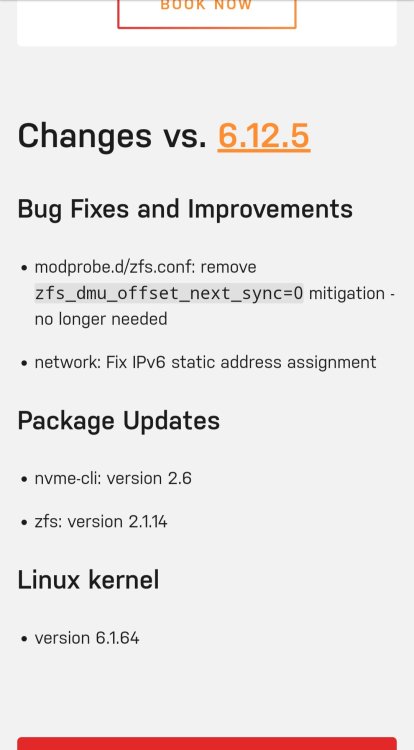
Thanks @Limeth Yes I think 14th is referred as raptor lake refresh, If I am not mistaken though, from 12th gen Intel CPU to 13th and 14th, there were no big changes so I think that the Linux kernel could be easily updated. Well actually it seems that the Linux kernel from 6.6.0 was updated to add support to Intel 14th gen. I don't what version of Linux Kernel we are on though on Unraid. https://www.phoronix.com/review/intel-14600k-14900k-linux I just looked at Unraid latest version and the kernel seems to be based on 6.1.4 which should mean that 13th gen is/should be supported but not the 14th.
-
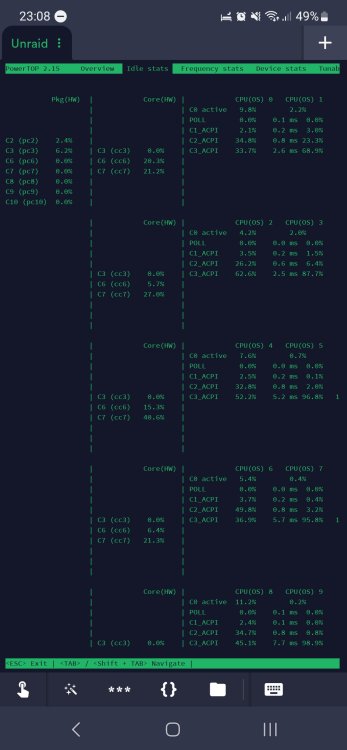
Do you think that also 13th gen is not supported by the current kernel? Because from powertop I see that I have ACPI_ as well and another user with my same motherboard does not get any pkg read at any time. See my attachment. In my case I can't get past C3
-
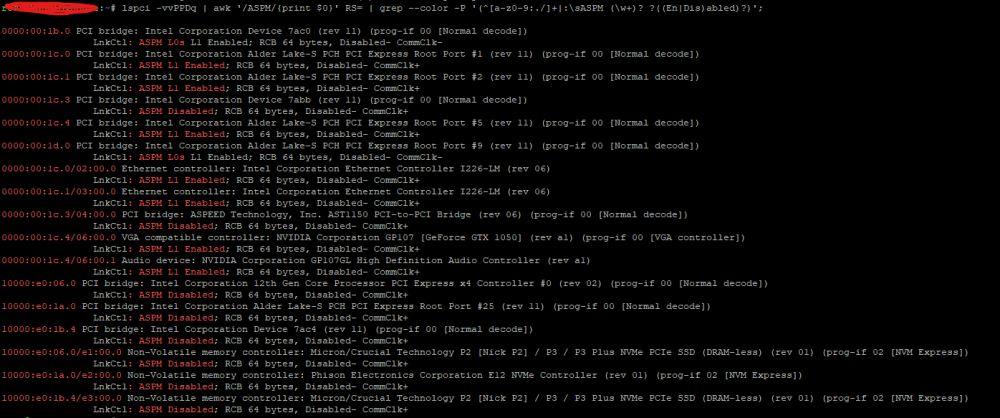
Hi guys, I just run this command and I just saw that a lot of stuff is disabled (mostly intel stuff) and I don't understand why. I enabled every possible ASPM key in the bios but nothing. I know I have a bad sata SSD, but other than that I can't reach a status lower than C3
-
The cpu is an intel i5-13400 and as PCIe devices I have the included IPMI card and a gtx 1050 (passed to a windows 11 VM). Anyway I don't reach any C-states in the Pkg as well and I thought it was the Powertop software not updated but I have the latest 2.15. Today though, 1 thing allowed the cpu to go to C3 state, it was after I removed the only sata SSD I have (Silicon Power that I have in signature). To be honest though, there wasn't sufficient difference in watt consumption (just a couple watt less) to justify the purchase of another ssd 😁Therefore, my suspicion now goes to the IPMI card now, or the on-board dual nic 🤔 but... in that case, I think I'll have to live with it.
-
Anyone has run powertop when running Unraid? The max (lowest c-state I get is C3)





