





zbryant91
Members
-
Joined
-
Last visited
-
Did a little more digging and this CPU doesn't support any overclocking so I believe It's running normally and is as much as I can push it without upgrading to a unlocked/newer cpu but i'm guessing that won't get me a ton more speed. Also ran across a few more threads that look to be in the same boat. Thanks @JorgeB for taking a look and verifying
-
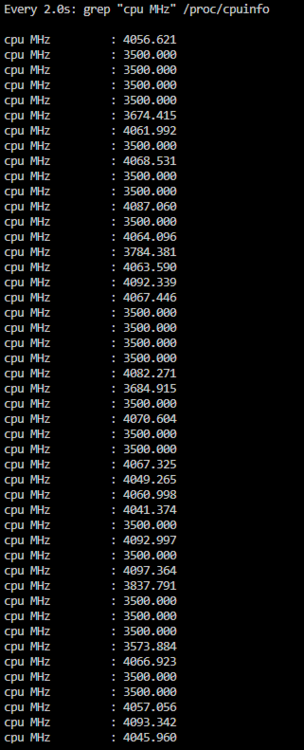
Well that's certainly not what I expected it to be. Thank you for taking a look, at least I have a place to look now. I'd noticed that 1 core was typically hitting 100% in the dashboard gui but wasn't sure if that was the cause. I'll have to check bios settings to see if there's anything else i can tweak CPU frequency is going over base clock of 3.5, boost is supposed to be 4.2 and I'm seeing cores over 4.1 so i'm assuming this is working as expected. also checked that it's set to performance mode in the tips and tweaks plugin.
-
Attached after letting it run for 5-10 minutes. let me know if that's okay or if I need to do something else. Thank you! tower-diagnostics-20241212-1853.zip
-
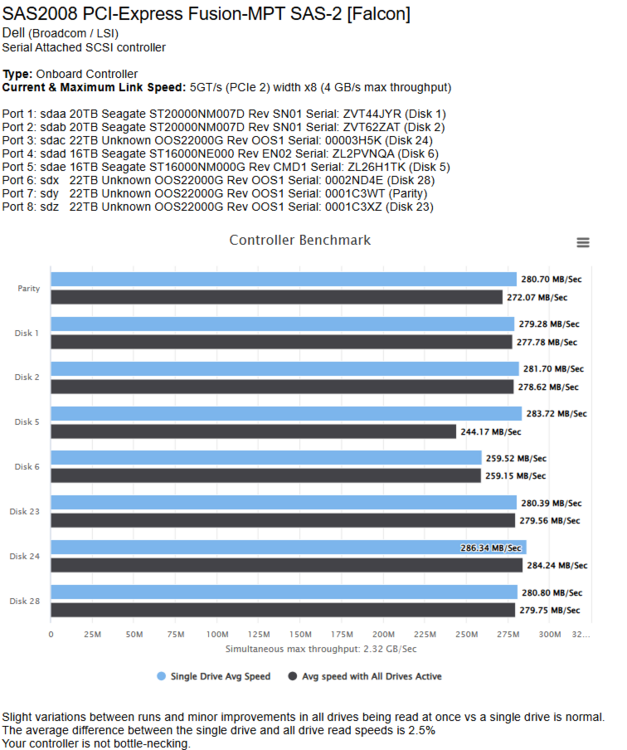
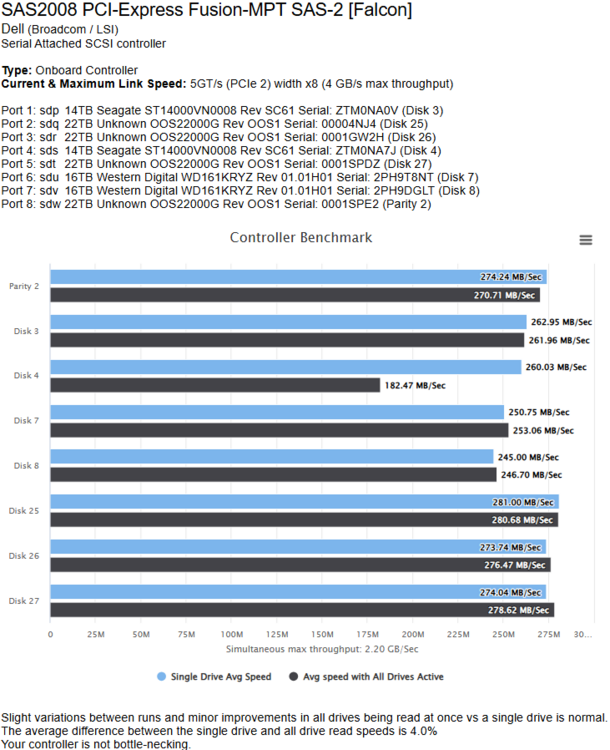
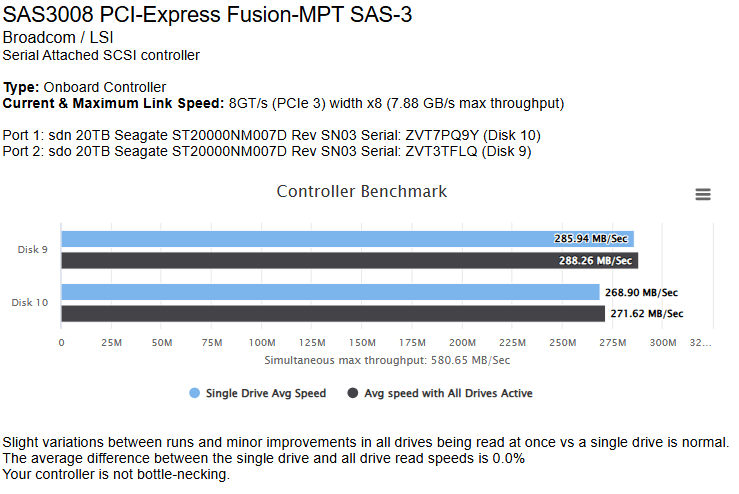
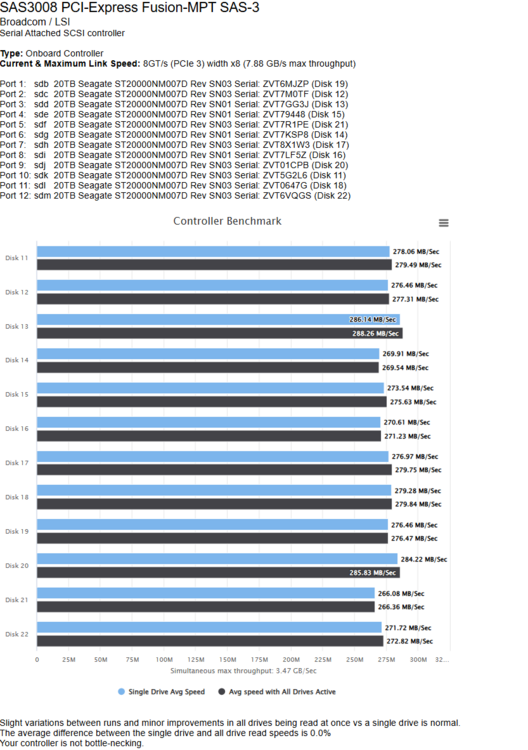
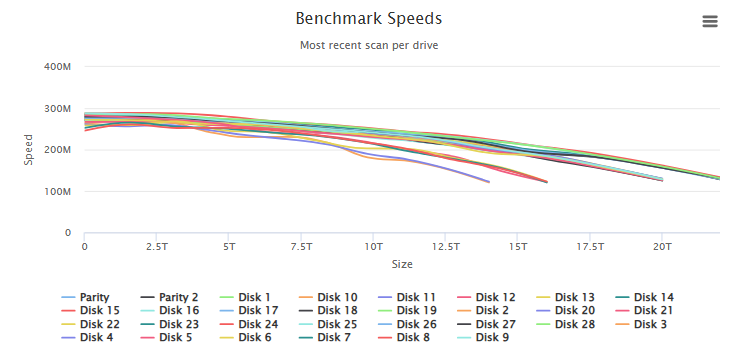
I've been reading through quite a few topics and have tried quite a few things, but i'm not able to get over ~105MBps during a parity check or mover operation and wanted to see if there is anything I'm overlooking or if this is just a unraid limitation with my setup. I've seen that a lot of the tunables do pretty little on latest versions though I have tried playing with a few but have them back to defaults now. I'm running 7.0 rc1 but this has been the same for quite a while (at least through the 6.12.x releases). mover tops out around the same speed when on reconstruct write. drops a bit to around 80MBps when on read/modify/write. I do believe my old netapp disk shelf was a bottleneck so i replaced some hardware but haven't seen an increase in speed which led me to doing all the disk speed testing below. My slowest drive has tested around 245-250MBps and the controller benchmark shows full drive speed (up to lowest drive speed) for all 4 of my hbas. The link speeds to the controllers all look correct, and I don't think it should be a pcie lane issue. Array has 30 drives (xfs) and I have 3 cache pools (all zfs) with a total of 8 nvme drives spread across those pools. I'm not that worried about mover speed and my overall system performance is good. I would really like to get the parity check time down if possible since I don't see a reason for it to be bottlenecked. Can anyone shed any light on if there are any other bottlenecks I can test for or anything else I should be checking? Threadripper 3975wx - asus Pro WS WRX80E-SAGE SE WIFI II - HBA's: 2x LSI 9300-8e connected to supermicro sas 3 backplanes. 2x LSI 9211-8i with breakout cables to those drives. Disk speed docker test results:
-
I'm running the official plex docker from the app store but I was set to beta instead of latest, so I tried latest and the scan completes. so seems to be an issue with that release.
-
Did a little experimenting this morning and it appears to be a issue with plex and a memory leak. When scanning my music folder, it gets hung on a file/folder and memory usage just goes through the roof. If I restart or stop plex, everything is fine, except the scan is never able to complete. Not sure what is causing the hangup, but I'll do some more searching on that. I let it get up to about 80GB of ram usage one time and stopped it. unraid hasn't had an issue since last night. I'll follow up if I find a fix
-
I’ve enabled it. I also tweaked some memory settings for Plex, increased transcoding cache size on ram and increased database cache size. Will rerun the music scan manually when no one is watching anything to see if it still crashes. main thing that’s throwing me for a loop is that the motherboard doesn’t detect the usb as a boot drive until it’s been reinserted. Not sure if this is an indication of the drive going bad or if it’s a weird thing with my motherboard.
-
2nd day in a row I've had this issue, but when plex tries to scan my music library files, unraid crashes. gui is inaccessible, I can ping the server still, and all the dockers are unreachable. I looked at the logs both times because it was still responsive for a few minutes, got a message in the logs both times that says plex service was forced to stop because it was out of memory. then a couple minutes later, nothing works. In the few minutes it is still up, the dashboard doesn't show that I am out of memory. 3975wx cpu, 256GB of ram, asus sage MB, rtx 5000 gpu, I suspect I may have a bad usb and have a new one coming, but want to see if anyone can take a look at my logs to see if they see anything else. I have been able to put the usb in my desktop and copy all the files. but both times this has happened, i hit the reset button on the tower, and it boots to bios and doesn't see the usb. reinsert the usb and it boots normally. I'll disable the plex scans if I can for a temporary fix, but would like any help anyone has to offer. latest diagnostics zip is attached after reseating the usb and rebooting. Thanks in advance! tower-diagnostics-20240113-1751.zip
-
Hyper card with all 4 slots filled, mixed with gen3 and 4 with the motherboard forced to gen 3 and it's working. I don't need the extra speed but it is frustrating that this is what caused the headache. The hyper card has gen3/4 compatibility all over the marketing so I either have a bad card or my setup just doesn't play nice. Either way, it's running and I feel better about all the new hardware not being too bad. bummer about the 1 slot, but I don't know that it's worth the trouble of getting a rma. Guess I'll ask them and maybe they'll point out if i'm missing a setting somewhere to enable it. Thank you for the help @JorgeB!
-
I was starting to think that; tried removing different configs of ram and in different slots, reseated the cpu last night Just narrowed it down to either 1 of 3 nvme drives or my hyper nvme card. 3rd slot on the motherboard still does not work but I'm back to being able to boot with those 4 removed. Now just trial and error to get each of my cache pools back up. Actually starting to wonder if it's because I have a mix of gen3 and gen 4 drives on the hyper card. Just now realized I was mixing them so maybe it's seeing the gen4 and setting them all can causing the issue. going to test forcing gen3 for the whole slot for now.
-
Can't find any settings that disable the slot so i'm guessing it's a bad slot. But. things have since gotten worse. now I can no longer get unraid to boot. most of the time I get to the unraid boot screen and it hangs on bzimage or bzroot. If I let it sit for 5-10 minutes it continues to either show a kernel panic, cannot mount fs error, or I just get a list of errors like the previous attachment. Have tried updating bios, tried a new flash drive with a backup, and new flash drive with fresh install of unraid. going to try removing all my pci devices and nvme drives to see if i can narrow down the issue to a device. little more context. new build is a 3975wx threadripper pro with 8x32gb 2666 ram, asus ws pro wrx80e sage.
-
upgraded my cpu, motherboard, and ram, and added a few more nvme drives. 1st boot, my VM cache drive was missing, and logs showed errors similar to the ones in the attached logs. Attached Logs are from today and are after I swapped the vm cache with a new drive. new drive does not show in unraid, vm cache is now visible so it appears to be specific to that motherboard slot. The new drive and the vm cache both appeared in the bios in both positions and all 7 of my drives pass the bios quick smart test. 3 of my drives are in the motherboard slots, 4 are in a asus hyper pcie card. I have a 2nd pcie card on the way so I'll pull the drive out of the slot that isn't working and put it in the pcie card when it arrives and all should be functional. Just wanted to see if anyone sees anything in the logs that I don't know how to interpret that could confirm a dead slot, or advise if I have missed something. 2 of my motherboard slots share pcie lanes with some u.2 slots but there's not settings to turn off the u.2, and I assume that both slots would not work if this was the issue. Just odd that it shows up in the bios normally and unraid just isn't loading it in. tower-diagnostics-20230703-1534.zip


