





Giorgio
Members
-
Joined
-
Last visited
Everything posted by Giorgio
-
TNX it works
-
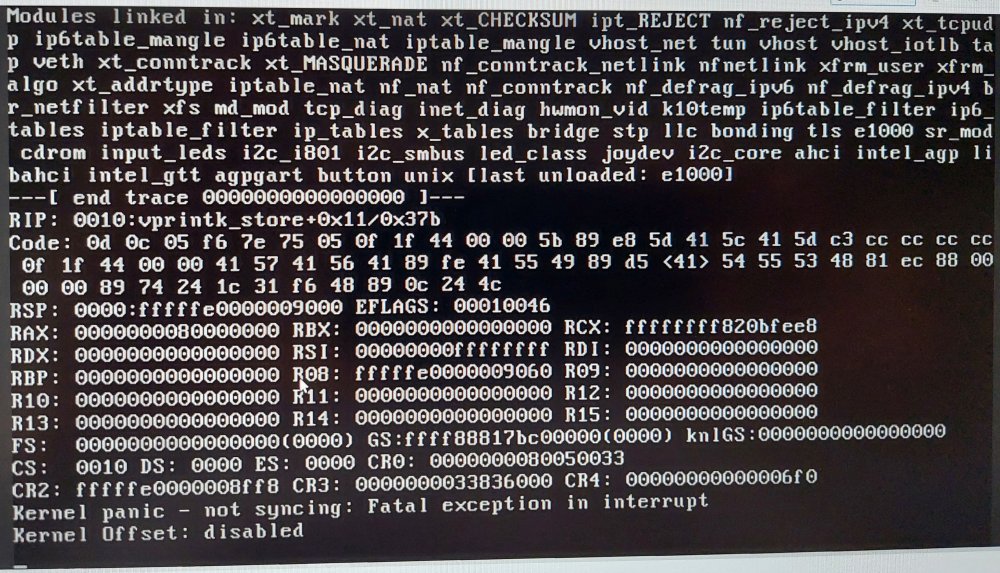
Hi Guys, I have an asustor lockerstor 6 gen2. I update the bios version to 1.21 and use it with proxmox and unraid in a VM. Previously I had unraid on a different system and I migrate the same USB key to this one without problem. I had only problem with HIGH TEMPERATURE of the CPU, about 70°C in idle condition and over 90°C at full. I already have changed the thermal paste because the standard one was a big messy of white paste, with the new one I lowered from 87 to 70°C the idle temperature, but still high. About this I read above that the FAN is not controlled (I also notice that). I think to replace the FAN supplying the new with 12V without throttling it. Do you think is a good idea? About the BIOS setting, how do you set the parameters, I didn't find information. In this condition UNRAID works well for a few days, but after that UNRAID stopped with a KERNEL PANIC error. I try to attach an image with the error. Any idea? It can depends to high cpu temperature?
-
I see the HDD listed in proxmox machine under disks (i.e. dev/sda, dev/sdb, ....) But I can't see them in Unraid VM (i.e. under hardware -> add -> hard disk) so I can't add them in the VM. I don't know if is it possible but I need to see my disks in unraid as I saw them before the migrating or as I see under unraid if I boot up with unraid USB key instead of boot up proxmox.
-
tnx, I'll try
-
Hi, I'm tring to migrate unraid from a standard configuration as single OS on pc to a VM created in proxmox. The configuration include 5 HD in one array and an other HD attached with unassigned device. I can boot unraid inside the VM and reach it via browser, but I can't see the 6 HD and I don't know how to setup proxmox to fix this issue. Anyone can help. Tnx
-
I finally did it. Now kodi database works on mariadb docker. I had installed mariadb official setting: Generate random password - yes (remember on the first run to read and save the password from the log) Database name: kodi Database User: kodi Database password: set a password after the installation I entered by mariadb console and copied all files in mariadb.conf.d to conf.d (cp not mv) then modified the path in the link from /etc/mysql/conf.d to /etc/mysql/mariadb.conf.d activating advanced settings (I had to copy the files because if i didn't the mariadb.conf.d after changing the link resulted empty, I don't know why) from UNRAID console I edited the 50-server.cnf setting the bind address to 0.0.0.0 from mariadb console: mysql -u root -p (entering the root random password) GRANT ALL ON *.* TO 'kodi'; remember to setting up kodi with proper advancedsettings.xml
-
no idea on what i'm doing wrong?
-
The situation now is: /var/lib/mysql <--> /mnt/user/appdata/mariadb-official/data /etc/mysql/conf.d <--> /mnt/user/appdata/mariadb-official/config Exploring /etc/mysql/conf.d with mariadb terminal results in empty directory while /etc/mysql/mariadb.conf.d contains 50-client.cnf 50-mysql-clients.cnf 50-mysqld_safe.cnf 50-server.cnf 60-galera.cnf 99-enable-encription.cnf.preset I need to edit 50-server.cnf so I tried to add the link /etc/mysql/mariadb.conf.d <--> /mnt/user/appdata/mariadb-official/config/ (modifing /etc/mysql/conf.d <--> /mnt/user/appdata/mariadb-official/ to avoid possible conflict). Connecting by unraid terminal the /mnt/user/appdata/mariadb-official/config directory still appear empty I don't understand why the link does't work. For example with snapshot container I don't have any issue and I can edit configuration file with nano using unraid terminal . Tnx for the support
-
Can't create new file in mariadb-official.conf.d because I can't find an editor using docker console. Don't see any file in /mnt/user/appdata/mariadb-official/config using unraid console.
-
Hello, I don't understand how to create a new file, since nano or other editor are not available and mariadb console is isolated from unraid console. I need to edit 50-server.cnf with kodi settings tnx for the help


