





scott2020
Members
-
Joined
-
Last visited
Everything posted by scott2020
-
I found it. I had some crypto syncing in from one of my accounts. It did not recognize the currency SHIB, so it was crashing the reports when I clicked on it. I went into the bank sync settings, unlinked the crypto account from the sync provider, and deleted it entirely. I can get into reports now. Can't track crypto but that isn't concerning for me.
-
The install was very smooth. It is much easier than the multiple containers of the standard install. Thank you! The only issue I have is when I click on reports I get an error. We're sorry, but something went wrong. If you are the application owner check the logs for more information. I can't seem to find much in the logs.
-
Saw this on reddit after I downloaded 3TB in about 10 days... Turn off Media analysis, Media Analysis. It's in Settings -> Scheduled Tasks. Also Video preview thumbnails & intro/credit detection If these are enabled in Plex, it will download the whole file. So I had 3TB of crap at RD and downloaded it all for analysis. If you are on a capped data ISP plan, this is bad. EDIT: A few more details. https://github.com/itsToggle/plex_debrid/wiki/Setup-Guides#2-setup-plex-2
-
Yep, and it works!
-
Just in case someone else notices with cli_debrid I was looking for older, obscure TV shows and even though there were legitimate results, the resolutions were not listed in the file or metedata. The search returned a 0 and said there were no good results. My preferences were less than or equal to 1080. I reported to godver3 and it appears to be a bug. I was wondering why so much stuff was getting blacklisted even though there were results and even could play in other things like stremio. common.py:detect_season_episode_info:56 - Raw episode info: [] 2025-03-27 19:14:52,559 - DEBUG - filter_results.py:filter_results:26 - Starting filter_results with 1 results 2025-03-27 19:14:52,559 - DEBUG - filter_results.py:filter_results:55 - Processing result: The Golden Palace S01 WEBRip AAC2 0 x264-WEBTUBE[rartv] 2025-03-27 19:14:52,560 - DEBUG - filter_results.py:resolution_filter:495 - Unknown resolution value: result=Unknown(0), max=1080p(1080) 2025-03-27 19:14:52,560 - DEBUG - filter_results.py:filter_results:131 - ❌ Failed: Resolution Unknown doesn't match criteria <= 1080p 2025-03-27 19:14:52,560 - filter_results.py:filter_results:464 - DEBUG - Filtering complete: 0/1 results passed
-
When I first saw this thread I thought, dang, this is way too much! But I followed all of the instructions and things are running great! Thank you! Where you have "Create and configure zurg in appdata" section, your path in the text has /mnt/cache/zurg but the screenshot shows /mnt/cache/appdata/zurg. Honestly I can't remember at this point what I set mine to, but I think it was the latter.
-
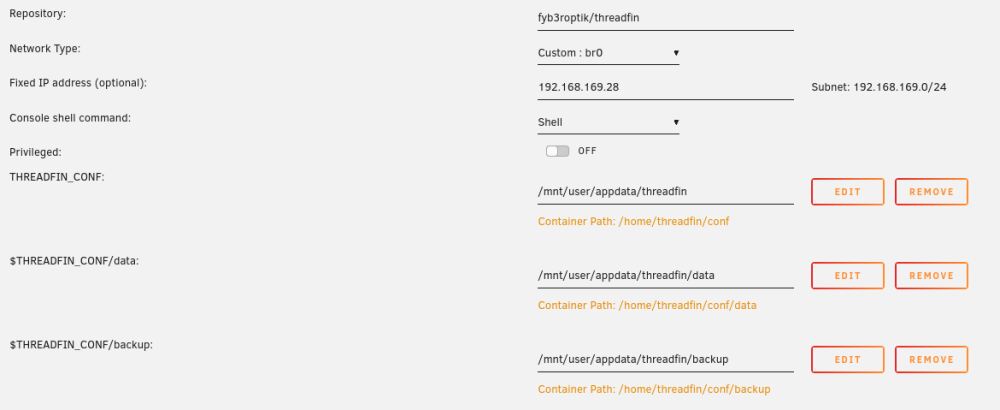
I created a Docker using the Docker hub. I added the path variables and it seems to work. I don't know if I need the dollar signs or not! I have stopped and started it a few times and the config saves. I also changed the advanced parameters WebUI to ipaddress:34400/web/
-
I ran through those steps and things look good. I had to re-do some docker specific settings con a couple of things but most everything was there. I'm very thankful almost all of the config settings were retained because I panicked a bit when all of my docker images disappeared! Thanks again.
-
Thanks. I have resolved those Feb 24th issues but I haven't re-ran the fix common problems lately.
-
I am trying to update Docker containers and started getting errors. Error: failed to register layer: Failed to create btrfs snapshot: read-only file system The next time I try to update a container I get: Server Error and Command Failed. It looks like the containers are running OK and things are working except for updating containers. I appreciate any assistance! sheinhardtwigs-diagnostics-20220318-0835.zip

