





Barnoe
Members
-
Joined
-
Last visited
Everything posted by Barnoe
-
I realised early on that Spaceinvaders video doesn't use the official Nextcloud or MariaDB apps which is different to setup. the differences are slight, but enough to make things difficult. Spaceinvaders version doesnt include. in MariaDB settings To clear the random password generator to drop down and show more setting to add your root password in the setting you can create your database name and password this means you have no need for the console commands SpaceInvader does. He also doesn't explain you need to stop your array while you edit the setting.... dockers (advanced view)..... Host access to custom networks: ENABLE Once you do that above your off and running Now no offence to Space Invader one, his tutorials are brilliant and we all thank him for them. but in this case the temptation people have when they see OFFICIAL on an app sends them on a different path when following his videos
-
Thats great, thank you
-
I have a script that's shuts my server down auto at 11pm then i have Alexa run a skill that wakes on lan at 3pm the following day. That's all working perfect. however, this will interrupt my monthly parity check which i usually start around 10pm and run for 20 hrs. is there a line i can add to the shutdown script, to ignore the shutdown if a parity check is underway? I really need to learn how to do scripts lol is there a dummy guide
-
Apologies ive no suggestions as im new to this, but i do feel for you, i hope you save your data. i lost data on another server (not Unraid) its an awful feeling. that lesson brought me to Unraid and also a back up hard drive. Good luck 🤞
-
After messing with that plug in, i couldnt get it working so made a workaround. I created a script that shuts down the server every night at 11pm Then i created a routine with Alexa, she wakes the server everyday at 3pm. (there is a skill available through the alexa app called wake on lan) after wake up the server adds any new files etc with Sonarr/Radarr ready for when I'm home from work. I need to find a way to edit the script so it doesn't shut down if there is a parity check active?
-
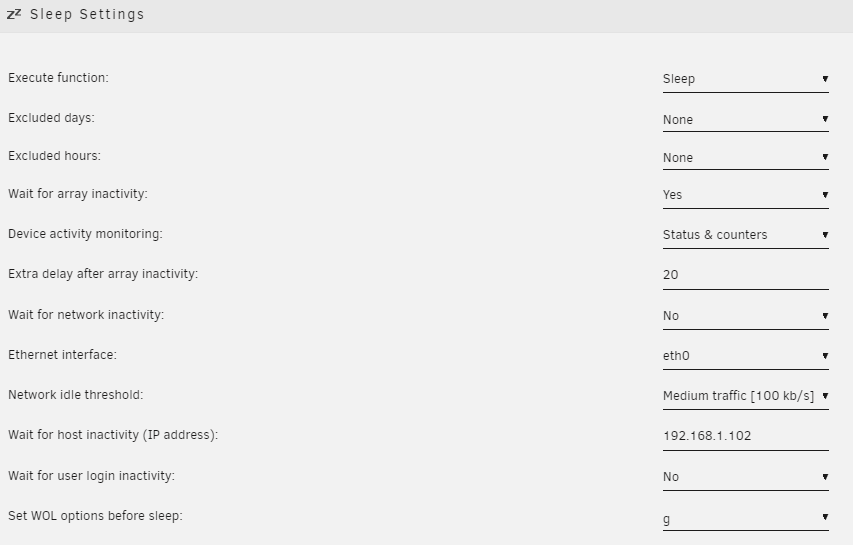
Ive installed Dynamix Sleep plugin and set it up. The system isn't sleeping? Ideally i would like it to sleep from 11pm until 4pm the following day. (sleep/work) but with the option to wake it remotely if needed.... ill worry about that once i get it working current settings below. Anyone that can point me in the right direction would be appreciated
-
Thanks Jorge, you was correct with it speeding up after 4tb Current position: 4.03 TB (50.4 %) Estimated speed: 196.7 MB/sec temps parity drive is 28c while others are 20 and 21c when i tried to log in from work initially i entered the wrong password....twice! would that cause a beep? i will test that theory when i get home in 4 hrs
-
Ahh ok, thats good then The wife has text me from home and said the server is beeping?? Ive logged into it from work and checked the log. not sure if this is why its beeping ..... Apr 10 17:48:50 Titan nginx: 2022/04/10 17:48:50 [error] 3911#3911: *295335 connect() to unix:/var/tmp/flaresolverr.sock failed (111: Connection refused) while connecting to upstream, client: 192.168.1.102, server: , request: "GET /dockerterminal/flaresolverr/token HTTP/1.1", upstream: "http://unix:/var/tmp/flaresolverr.sock:/token", host: "192.168.1.200", referrer: "http://192.168.1.200/dockerterminal/flaresolverr/" I installed the flaresolverr app to go with prowlerr but not set it up yet... looks like its not happy so i have stopped the docker for now. also need to sort the time out on the log, as its obviously the wrong time its 11am?
-
Morning all, I started a parity check as i went to bed last night (my first one on a new server) the parity HDD is an 8tb seagate ironwolf. 2x 4TB seagate ironwolf array drives server is a HP Proliant DL165 AMD Opteron™ 6212 @ 2600 MHz 24GiB DDR3 below is the status 8 TB Elapsed time: 8 hours, 17 minutes Current position: 2.42 TB (30.3 %) Estimated speed: 90.3 MB/sec Estimated finish: 17 hours, 9 minutes Sync errors corrected: 0 is this very slow, or is this about right?. Do i have to change a setting somewhere to speed this up? Or is it just this long because its the first check and its a lot of new data to go through? apologies for all the questions, I'm new to Unraid and just trying to learn
-
Just as an update for anyone reading this in the future, who may be setting up Unraid for the first time. Once past the initial 20 hrs setup. the server has no ill effects and is operating great, speeds are good and its stable 8 days in I've installed plenty of apps and plugins and added my old Synology over LAN and an external USB connected while i transferred all my data to the array. it actually transferred much quicker than i expected using Krusader. So if your new and reading this, don't be put off by the long setup time, its worth the wait
-
The parity drive is 8tb 2 of the 3 drives are plugged into the motherboard.... Inc parity The PCIe card only has one drive plugged into it and has 3 ports free atm I assume its best for the parity to plug into the main board? I did notice in my bios that the sata max transfer rate is 3gb My seaware ironwolf can do 6gb. Would this be better in the sata adapter or is it still limited by the motherboard? Sent from my phone
-
I rebooted the server into the BIOS and enabled IOMMU. I restarted and booted through the USB again, started the array and now its says 20 hrs Still a long time, but better than 3 days 7 hrs! is 20 hrs is ok for 3 new HDD?
-
i started the setup around 5pm, and its now just past 10pm so the time is wrong too? This is not starting as easy as i had hoped. I am going to stop the setup and do more reading up
-
The discs have not been formatted all 3 HDD are brand new out of the box
-
i grabbed the diagnostic 5 hours after starting up.
-
diagnostic attached let me know if i need to change something titan-diagnostics-20220402-2149.zip
-
if i knew how to do that i would. Im tempted to stop the set up, but if nothing changes, all i am doing is delaying the setup. which is why i asked the question. at this point the only thing i could have changed previous to what im doing is a setting in the bios? i dont mind waiting 3 days if thats what it needs, but if the server is going to run slow after this then i need to make the changes now. maybe unraid is slow and i need to find another OS, 3 days in 2022 is ridiculous tbh.
-
Hi everyone I'm new to Unraid. I'm using an HP DL165 and installed a 8tb parity with 2x 4tb storage. I've started setup and it says 3 days 7hrs. Is that normal? Sent from my SM-G998B using Tapatalk

