





Blueness
Members
-
Joined
-
Last visited
-
Ok, thanks for you help!
-
I know that the docker page cannot be upgraded and cannot display the update status correctly, so is there any other way to turn this "apply update" into "up-to-date"?
-
I get this WARNING This container build with docker compose,when I click "apply update" on the docker page, it prompts "Configuration not found. Was this container created using this plugin?" How to fix it? thanks
-
I changed my flash drive, Thanks for your Help
-
I tried to replace but it failed. What should I do?
-
Yes, The last backup date is March 3
-
Hi everyone, I got a warning about possible corruption on my Unraid flash drive at /boot/config/disk.cfg. Here's the exact message: I've already exported the diagnostics. Can someone guide me on what to do next? Thanks for any help you can offer! blueness-unraid-diagnostics-20240305-1936.zip
-
Sorry, I found the reason. I found the appdata folder in Array Devices. I deleted it and that solved it.
-
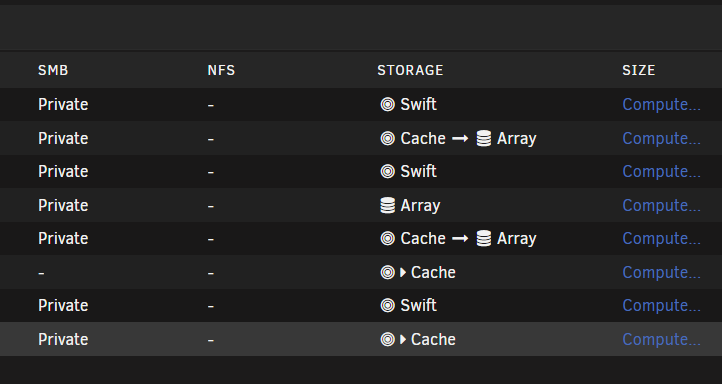
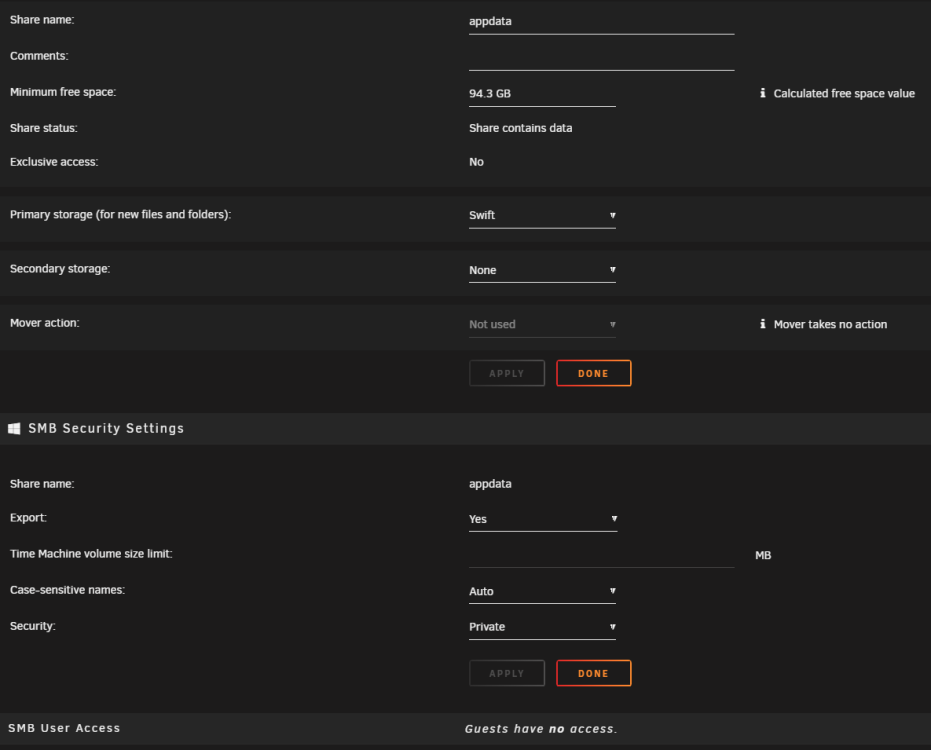
I am currently experiencing an issue with the "Permit exclusive shares" option in Unraid. I understand from the documentation that if this option is set to Yes, share directories under /mnt/user are actually symlinks to the share directory on a storage volume provided the following conditions are met: The Primary storage for a share is set to a pool. The Secondary storage for a share is set to none. The share exists on a single volume. The share is not exported over NFS. The advantage of exclusive shares is that transfers bypass the FUSE layer which may significantly increase I/O performance. I have several shared folders that fully meet these requirements. The primary storage for these shares is set to a swift pool, the secondary storage is set to none, they exist only on a single swift storage, and they are not shared over NFS. The documentation suggests that once these options are properly configured, a small arrow symbol should appear to indicate that transfers are bypassing the FUSE layer. However, I am not seeing this symbol in my swift pool, although it does appear in my cache pool. My swift pool is made up of two SSDs in a ZFS mirror configuration, while my cache is a single SSD formatted in BTRFS. I would greatly appreciate any insights or suggestions you can provide on this issue. Thank you in advance for your help.

-
Hello. I have created a container using the following command: However, I am unable to use the account sync feature in vscode. When I click on the "Accounts" button and select "Turn on cloud changes...", nothing happens. Currently, I am accessing the service through a Cloudflare tunnel. Thanks


