





Coolin72
Members
-
Joined
-
Last visited
-
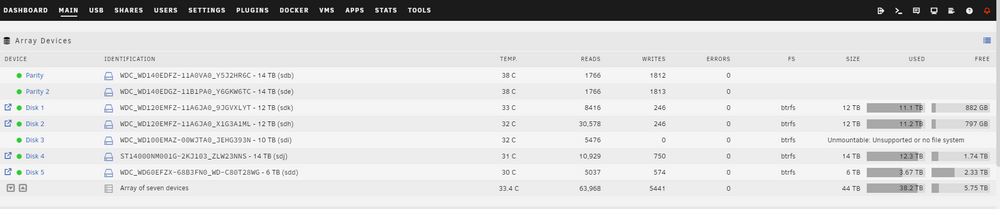
*Update* I ran sudo btrfs scrub start /dev/sdi1 and clicked Y to clear out log tree with the array offline. Result: No mapping for 10376300577106952192-10376300577106968576 Couldn't map the block 10376300577106952192 Couldn't map the block 10376300577106952192 bad tree block 10376300577106952192, bytenr mismatch, want=10376300577106952192, have=0 ERROR: failed to repair root items: Input/output error Started array and the drive is mounted and back online. Looks like clearing the log tree fixed the issue?
-
Hello, I am having an issue with one of my array drives showing up as UNMOUNTABLE: UNSUPPORTED OR NO FILE SYSTEM. I plugged in a usb device (Mig Switch Dumper) that may have caused this. I rebooted and skipped parity check only to find some of my data was missing a few days later. I checked the Array and found the error message. I stopped and restarted the array and also rebooted. Here are the diags. Please help
-
That worked. Thank you!
-
I am trying to repair a corrupt database on the latest version of Binhex-plex. 1. I am unable to stop plex from running inside the docker container. 2. I am not sure which file is the actual database. I am attempting to use https://github.com/ChuckPa/PlexDBRepair but I need to manually stop plex. I am newish to unraid and could use a little help. Thanks <a target="_blank" href="https://imageupload.io/kfoIuU1HTgiqkSd"><img src="https://imageupload.io/ib/uMNXNEaiiMKLKpL_1695770803.jpg" alt="Screenshot_20230926_190932_nzb360.jpg"/></a>

