





coppit
Community Developer
-
Joined
-
Last visited
Everything posted by coppit
-
Well, given that the line with the error is the line that specifies /input to FileBot, I think you'd better get those ducks in a row before worrying about why /input isn't being processed. Like I said, you're probably literally missing one character from the end of the previous line. If you're still having problems, paste your entire filebot command here, like I did with mine. Also, open the log, make note of the last line, then rename one of those files in the input folder. Wait a few minutes, then PM me the log lines that were added after the previous last line.
-
Did you configure the port, /archive path, and /config path? Bridge or host networking? Are you saying that when you click on the logs icon, you see that output? If so, are you sure you're using coppit/xeoma?
-
If you're only interested in the auto-convert functionality, you can ignore anything in the logs about guacamole or X11 or catalina. This seems suspicious: /files/filebot.sh: line 49: -non-strict: command not found Did you edit the filebot command in your filebot.sh? If so, are you missing the trailing "\" on the line above the one that starts "-non-strict"? Mine looks like this: filebot -script fn:amc -no-xattr --output /output --log-file /files/amc.log --action copy --conflict auto \ -non-strict --def ut_dir=/input ut_kind=multi music=y deleteAfterExtract=y clean=y \ excludeList=/config/amc-exclude-list.txt $SUBTITLE_OPTION \ movieFormat="$MOVIE_FORMAT" musicFormat="$MUSIC_FORMAT" seriesFormat="$SERIES_FORMAT" All but the last line should end with "\"
-
It thinks that you still have the default value of "foo.ddns.net" set. Most likely you didn't attach your data disk to /config properly.
-
Encoding is inherently CPU intensive. You can use one of the fast presets, which will shorten the encode time. You can also make sure that --cap-add=SYS_NICE is set under extra parameters. This will let other processes take priority over the encode, so that even if it's using 100% CPU you shouldn't notice any difference for other things.
-
Edit the USER_ID and GROUP_ID settings in the HandBrake.conf file. Setting them in the template might work, but I haven't tested it yet. Feel free to test it for me in the container config. :-) AFAIK PUID and PGID are not standard. But if I'm wrong, let me know. My implementation uses USER_ID and GROUP_ID. Yep. Sorry for the problem. Folks, yell if you're still having problems. AFAIK all known issues are fixed at this point. What does the log say about it? It should say something like "change detected, waiting for folder to settle". My guess is that something is constantly writing to the folder, so that the detector is waiting for 10 minutes to elapse before giving up. You can set 10:00 to something shorter, but be aware that HandBrake might try to convert an incomplete file when the "give up" time elapses, but there is still writing going on. One thing I could do is detect when the file is open, and skip conversion of it. When it sees new files, it looks at all of them. But it remembers files that were already processed before. (In the processed_files.dat file.) So if you want to reconvert a file, you have to either delete the processed_files.dat, or give it a different name. If it already processed the files, it won't do it again. Try renaming a file. There's a simpler answer. The good news is that it looks like the GUI is already saving the preset changes to a file in your /config folder. So just edit HandBrake.conf to add an extra argument: HANDBRAKE_COMMAND='HandBrakeCLI -i "$SRCDIR/$SUBDIR/$FILENAME" -o "$DESTDIR/$SUBDIR/$BASE.mp4" --preset-import-file /config/handbrake/presets.json -Z "Very Fast 1080p30"' No need to export it yourself.
-
I'm about to release a version that will auto-restart if it dies for some reason. Do you mean the subtitles? This is more of a filebot question. You can ask on the forums. From this post, maybe editing your filebot.sh in the config directory to add --def subtitles=en will work? It should be possible. Attach the 2 different shares to the container. Edit the filebot.sh file to make 2 different calls, and somehow restrict each call to only do tv shows or movies. Also have them target the output into the different shares. You'd have to do some research to find out how to restrict what files filebot will process.
-
I don't understand your question. Edit: Oh, you're referring to my warning that it might go away. Yeah. I would only get rid of this one if Sparklyballs was as good or better. :-)
-
3389 is for the RDP UI. 8080 is for the web UI. The RDP one is zippier but requires an RDP client. See the documentation linked in the first post for some clients you can use.
-
Yeah, looks like it. Just to rule out the obvious, you're mapping the port 8080 in the container to something like 8080 outside the container right? And that port is not already in use outside the container? I can try switching from hurricane/dockergui:x11rdp to hurricane/dockergui:xvnc, and see if that fixes it for you.
-
Yeah, I'm happy with Xeoma. Very low CPU, does the motion detect + pre- and post-motion recording I want, and doesn't require a VM. It's a little pricey, but I only have 2 cameras and just need the standard license so it's not too bad. (On par with Blue Iris.)
-
What do you get for the following, run at the command line? $ docker pull coppit/filebot-ui:latest latest: Pulling from coppit/filebot-ui Digest: sha256:de1bd034cb84ea1d9ed98ad6f9e1076dbe60142ff7c0277c073b7ef0a7a4ca5a Status: Image is up to date for coppit/filebot-ui:latest $ docker images coppit/filebot-ui:latest REPOSITORY TAG IMAGE ID CREATED SIZE coppit/filebot-ui latest ffee442f4a89 16 hours ago 1.6 GB
-
I just pushed a fix.
-
I guess try again. It could have taken some time for Docker hub's automated builds to rebuild. I ran a pull this morning and this was the output: $ docker pull coppit/filebot-ui Using default tag: latest latest: Pulling from coppit/filebot-ui a3ed95caeb02: Already exists a4656c904b12: Already exists d2ff49536f4d: Already exists f94adccdbb9c: Already exists ae857e8dd13c: Already exists 14a80386bcb6: Already exists e30c323fd43d: Already exists 92232aa16c9e: Already exists 5c5b2850790c: Pull complete 118133065f65: Pull complete c158f5fbd17a: Pull complete 37fef094f781: Pull complete Digest: sha256:de1bd034cb84ea1d9ed98ad6f9e1076dbe60142ff7c0277c073b7ef0a7a4ca5a Status: Downloaded newer image for coppit/filebot-ui:latest You could try to get help on the FileBot forums
-
Well, it's simple: Outside of the container, are the mapped directories in different file systems, like on a cache drive versus in the array? If so, it doesn't matter what stat says in the container (which may be untrustworthy due to docker directory mapping). Hard links are a file system concept, and do not extend across file system boundaries. There's no docker magic that can change that. Yeah, the container was broken. I just pushed an update that should fix it for you. I also updated the template, which incorrectly had the web UI at port 3389. It's actually at http://[IP]:[PORT:8080]/#/client/c/Filebot, where port 8080 is whatever you mapped it to on the host.
-
See the first post in the thread. It has a link to documentation that explains that and more.
-
Okay, I just pushed a new version. Hopefully folks will be able to connect now. I also verified that the cameras can be found with a search when in host mode. The "simple search" was very slow for me, and there was some message about not being able to automatically add the cameras due to system resources. But the search by IP and login worked really well. That's actually the last message when it starts. :-)
-
I started with trial, got it working, kicked the tires, then bought a license. Another bit of good news is that FelenaSoft gave me another license, so I can test host networking and camera search.
-
BOOM. Got the repro. Now I can work on a fix. :-) Stay tuned!
-
Hm... The only difference I see with my startup and yours is that I'm using the beta version, and mine is missing the libX11 error. I switched back to the stable version, and repro'd the symlink error. I'll fix that tomorrow. The workaround is to delete the "config" file in the config dir, then restart the container. (Not the entire config dir!) Unfortunately I was able to connect with the stable version too. The libX11 message is apparently harmless. I'm kinda out of ideas. There are only so many variables with docker containers... Grasping at straws now... docker -v says 1.12.6 on my server. Maybe you guys are running an older version of unraid/docker?
-
Can you stop the container and re-run the netstat command? If it still returns a line, then some other container is on that port.
-
Huh. I vaguely recall seeing that before, and thinking that it was harmless. Do you have any other errors below that? Feel free to upload the log. The server should be running "headless" without a UI. Looking in my log, I don't see that message now. It also makes me wonder if you're using the right version (see below). bokchoy, your server is advertising port 8090 according to netstat. So that makes me think the problem is on the client side. Try connecting from another device, like with the iOS or Android client. And double-check your firewall on your computer. Also, a longshot: Can you guys try something for me? Try updating the container. You might need to do it using the "force update" from the advanced view. My recent handbrake container had an issue where an update was needed.
-
And you're not using the free version of the client?
-
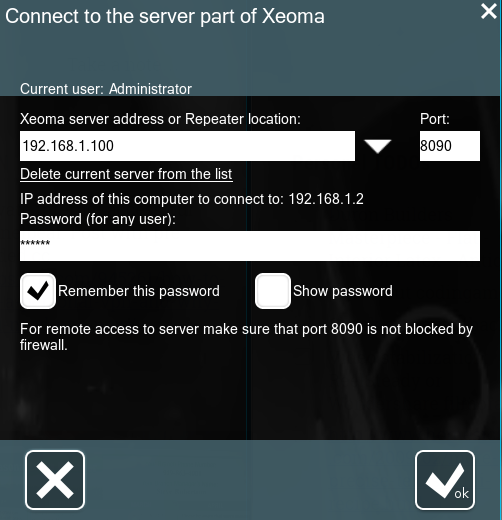
Just to be sure, you're putting the port into a separate field, like the attached picture? Also, if you're running a firewall locally, try disabling it temporarily. ssh to the server, and try running netstat, searching for port 8090. I'm running in bridged mode, so my output looks like this: $ netstat -a -n -p | grep 8090 tcp 0 0 0.0.0.0:8090 0.0.0.0:* LISTEN 21570/docker-proxy
-
Try using host networking instead of bridge. And to state the obvious, just in case... http://192.168.20.160 takes you to the unraid interface, right?


