





seyz
Members
-
Joined
-
Last visited
Everything posted by seyz
-
That would probably have been the better approach. Now I'm smarter. I had read my method here in the forum (German) and thought I'd give it a try. But now I've managed it with my method too. Thanks for your answers and support
-
Hi all, I want to replace two hard disks (1 and 2) from my array with larger ones. I have therefore used Unbalanced to copy the contents of the first hard disk (1) to another larger hard disk (3) in the array. This larger hard disk (3) already contained files in the same folder structure that are also embedded in the share. After copying, all files are now on the large hard disk (3) but the share does not recognize these files. Is there a way to force the share to recapture all files on a disk? And how can I do it better? Is it better to copy the files on the small disk (1 or 2) to a disk that is not yet assigned to a share? In order to include the complete disk in the share after the complete copying? Regards, seyz
-
Ich habe nun das Mainboard, die CPU und den RAM ausgetauscht. Der Sockel ist gleich geblieben. Ich hätte gerne den RAM noch getestet, aber das ist wegen Inkompatibilität nicht möglich. Die "alte" Hardware läuft einwandfrei in meinem täglich genutzen Arbeitsrechner. Ich kann somit festhalten, dass es ein Problem mit der hardware war. Kann aber ausschließen, dass es sich um einen "einfachen" Defekt der Hardware handelt. Weiter werde ich hier nicht kommen, da Tests immer ewig brauchen und ich diese Zeit nicht investieren will.
-
Update has worked. Since then I have been able to copy half a terrabyte without any problems. I assume it was due to the bug in the version. Thank you!
-
Thank you both. I was already afraid that I wouldn't be able to avoid an update. I will deal with it. Thanks again for the quick replies. I would wait with the solved status until I have performed an update, if that is ok?
-
Hi @itimpi the name of the share is "Serien". To be honest, I can't really say whether it also occurs with "Filme", as I copy much less here.
-
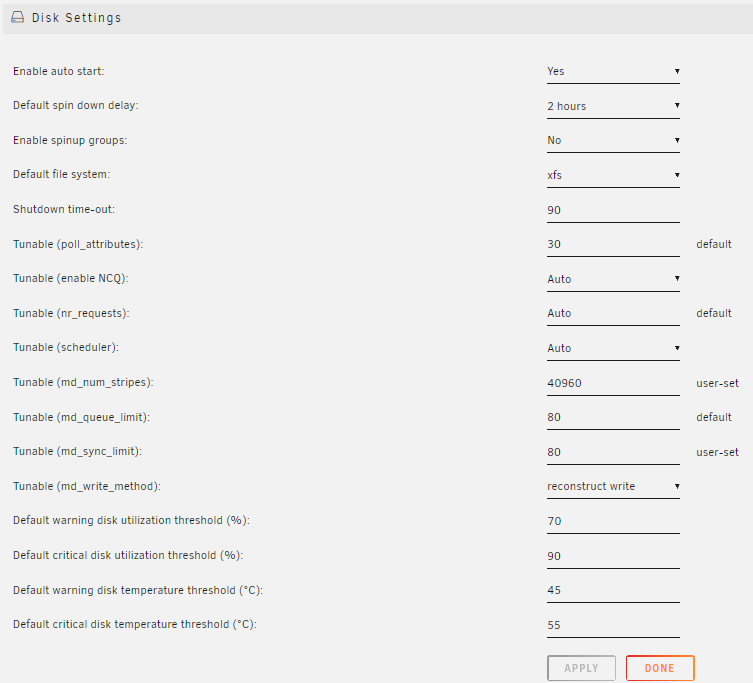
hello, I have and had several times now the error message during the copying process that it cannot be started because the share is full. It doesn't matter whether I try to copy via Krusader, the network or the console. The error message always remains the same: No space left on device. And exactly that is not correct. The share still has 20 TB free. I have tried to play with the configuration of the share, but without success. I can usually copy for a while after restarting the server until it stops again. Does anyone know the problem? Or does anyone know which settings cause this? raider-diagnostics-20240306-0213.zip
-
Maybe there was this error message at the beginning with the old disk and I just overlooked it? When I had the error message with the HDD, which then ran again with a SATA port, it looked the same in the GUI. In other words, Unraid reported an unformatted disk. But that was just a thought. I have no idea how I managed it and I'm sure you have much more experience.
-
I am quite sure. I also have screenshots of it. And without it, I wouldn't have been able to write any data to it. The HDD was empty and new when I inserted it into the server. The fact that hard disks lose their format is not entirely unknown. Unfortunately, the trick with the mainboard's Sata board only worked with one of two.
-
.Sorry, could not find valid secondary superblock Exiting now. This probably means that nothing more can be done. Unfortunately, the old disk could neither be mounted with UD nor could attempts to repair it be convinced. However, I believe that both have the same problem and are simply not formatted. However it just comes to that. I think I'll bite the bullet and use an unfortunately quite outdated backup. But not until I have formatted the disk ;-).
-
Ok. I'll wait. I don't know what exactly the problem with this hard drive is. I did a SMART test and found no errors. The hard drive was repeatedly deactivated and emulated by Unraid and no matter what I did (I swapped: controller, CPU, mainboard, RAM, cables; SATA from the MB didn't help either), the error messages kept coming. I kept having errors with other discs, but then they went away. However, the parity rebuild went through without any problems. Because of the endless story, I have now decided to have the hard drive tested by the manufacturer (guarantee). At the moment the disk is no longer in the Unraid server but is hanging on another computer for testing.
-
@JorgeB thanks for your answer. Has been running for a few hours. Should be ready tomorrow.
-
Hello, I had a defective hard disk and therefore removed it and inserted a new one. The new one has already been checked in the past, so I started the rebuild based on parity. After 3 days, the rebuild has now been successfully completed, but the hard disk cannot be mounted in the array because there is no file system. Is there a way to format the hard disk without having to rebuild it or can I at least start the rebuild again after formatting? Regards, Felix raider-diagnostics-20240124-2357.zip
-
here they are raider-diagnostics-20240111-2012.zip
-
Hello @JorgeB, thank you for your advice. Can you explain how this can happen? I had the same error and followed your recommendation. It actually helped. After a restart it worked again. With a second hard disk, it also worked without replugging, but it took several restarts. Described in more detail: I have various error messages from various hard disks and am looking for the cause (cables replaced, raid controller replaced, mainboard and CPU to follow). The hard disk in question had reported such errors in the dashboard before it failed.
-
Extra aktiviert. Nächster Schritt wäre dann ein Syslog-Server. Server ist auch da, aber sonst halt noch nichts. Probiert. Ich habs nicht hinbekommen. Stellenweise weiß ich halt nicht mal welcher Status gilt. Zum Beispiel bei der Pariätsprüfung. Von einige Platten wird gelesen, aber nicht von der Parität (auch nciht geschrieben), aber bei einigen Platten (auch sehr große) ist keine Aktivität zu erkennen. Check-Status hängt bei 0,5% seit fast einem Tag. Abbrechen nciht möglich. Pausieren ist ebenfalls nicht möglich. Und damit auch keine andere Aktion. Kann also nur warten und hoffen. Steht jetzt bei mir auch auf dem Plan. Ist aber eigentlich ein neues Board und neue CPU und Probleme mit den Temps, hatte ich nie. Aber ich konnte bisher noch keine Temperaturen von HBAs auslesen. Hört sich bei mir genau so an. Mal sehen was nach dem Mainboard-Tausch dann passiert. Würde mich freuen, wenn du berichtest.
-
Es ist wirklich auch frustrierend wie Unraid Error-Handling einfach nicht kann. Leeres Syslog, abbrechen von laufenden Prozessen geht nicht, genau so wenig wie welche zu starten. Informationen woran es hängt, bekommt man nicht und über die Konsole kann man auch nichts erreichen. Ich könnte das ja verstehen, wenn das bei einer besonderes schwierigen Konfig passiert, aber halt einfach nur bei einer Paritätsprüfung ohne aktiven Docker, ohne VM und ohne andere speziellere Sachen am Laufen. Dazu gibts keine Informationen, was genau Schreib- oder Lesefehler verursacht oder welche Dateien beschädigt sind. Ich hab zwei Platten und die Controller sowie Expander getauscht, das Mainboard kommt die nächsten Wochen. Mir fällt es aber wirklich schwer zu glauben, dass mehr als 4 Platten, die alle samt nicht älter als ein Jahr sind, auf einmal ausfallen. Vielleicht ja beim Beschreiben der Platten was schief gegangen, aber auch hier mal wieder keine Infos von Unraid über gescheiterte Schreibvorgänge beim Kopieren. Ich werde es weiter privat versuchen, aber meine Hoffnung im Konzern das evtl. zu etablieren, habe ich erst mal beerdigt.
-
also b) ist mir bewusst, deshlab habe ich einen Lüfter auch so montiert, dass er direkt auf die beiden Controller pustet. Wenn ich das ganze nach längerer Zeit anfasse, ist auch alles warm, aber nciht heiß. a) müsste ich in Unraid bei den Temps der HDD auch sehen. Da ist aber keine Platte über 50 °C. Die meisten weit drunter. Das halte ich alles für unkritisch. Dass die Controller abschmieren habe ich auch gelesen. Und wenn das so wäre, würde ich das zimlich schnell merken und davon wäre auch sicher nciht nur eine HDD betroffen. Ohne Controller komme ich bei mehr al 15 HDDs aber sihcer nciht aus. Egal wie viel Sata-Anschlüsse ich habe, denn die SSDs sind da noch nicht mal eingerechnet.
-
Kurzes Update: ich bin immer weniger überzeugt davon, dass das Problem von einer der Festplatten kommt. Ich habe die Erstellung der neuen Parität nun immer wieder unterbrochen und keine Fehler mehr gehabt. Weder bei Festplatten, bei denen schon mal ein Fehler auftrat, noch bei der, die in dieser Sync bereits betroffen war. Vielleicht überhitzt irgendwas oder "läuft voll" und führt dann zu diesen Aussetzern?
-
Ich bin mir eh unsicher, ob ich damit was finden würde. Ich hatte den Prozess jetzt ein paar Stunden pausiert und nun wieder gestartet. Läuft wieder einwandfrei und da Unraid offensichtlich Sektor für Sektor abklappert (Festplatten kleinerer Größer als die Parität steigen genau zum angegeben Prozentsatz der Parität aus) würde ich behaupten, dass das was anderes ist. Ich hatte die Überlegeung noch mal von vorne zu beginnen und nach x Stunden immer y Stunden Pause zu machen. Vielleicht hilft das. Evtl. läuft irgendwas heißt.
-
Noch eine Frage. Gibt es eine Möglichkeit herauszufinden welche Datei(en) auf dem betroffenen Sektoren liegt?
-
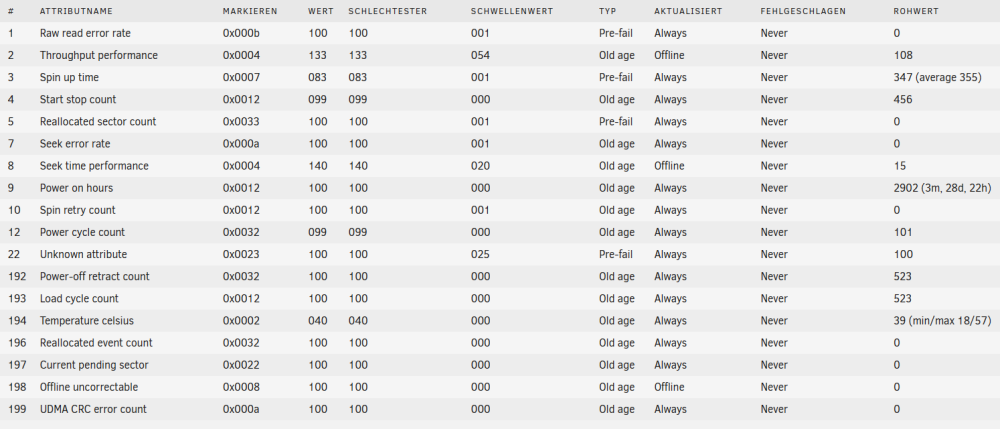
Ich bin mal das Problem angegangen und hab folgendes gemacht: Beide Parity-Platten an die Sata-Ports meines Mainboards LSI SAS 9200-16e entfernt SAS SFF-8087 SAS Kabel zu SFF-8088 PCBA Adapter entfernt LSI 9240-8i eingebaut 9217-8i eingebaut Einige (nicht alle, weil noch nicht da) Kabel getauscht Intel RES2SV240 und HP SAS EXPANDER sind geblieben Danach eine Paritäts-Synchronisierung durchgeführt. Siehe da, das Problem hat nun eine andere HDD und die Sync verharrt irgendwann bei 67 %, weil die Schreib- bzw. Leseraten komplett einbrechen. Vermutlich wegen der einen Platte mit Fehlern. Das interessante daran ist, dass diese Platte keine Fehler in den Smartwerten hat. Hätte das Kabel ein Problem, sollte ja eigentlich der UDMA CRC error count nach meinem Verständnis nicht 0 sein. Ich warte jetzt auf die neuen Kabel, aber habe nur geringe Hoffnungen. Wenn ich es richtig verstanden habe, würde mir jetzt ein Backup der Platte was bringen, das ich, weil ich den Server nie komplett aufsetzten konnte, nicht habe. Falls jemand noch eine andere Idee hat, wäre ich super dankbar, wenn er/sie sie mitteilen könnte.

-
Für mich war die Auflistung der Geschwindgkeit wirklich hilfreich. Vor allem bei viele Festplatten gleichzeitig an einem Expander, kann man das ja wirklich vergessen. Ich bin darauf gekommen, weil ich offensichtlich meine Konfig noch mal überdenken muss. Die Überlegung war zwei RES2CV360 an einen LSI 9240-8i. Aber somit nicht ;-). Wieder was gelernt. Ich wusste auch nicht, dass sich das in SAS Lines aufteilt. Aber bei genauere Betrachtung der Stecker und Kabel und etwas Überlegung ziemlich logisch.
-
Sorry, war schelcht formuliert von mir. Ich meinte die Verbindung zu einem Expander nur über ein SFF-8087 Kabel. Ich denke in dem Link oben ist das unter "Single Link" und "Dual Link" zu finden. Mir waren die Einschränkungen die sich aus einer Single-Anbindung ergeben nicht ganz klar. Aber nun sind sie es.
-
Wie vermutet, kann man nur ein Kabel an einen Expander anschließen, allerdings hat man dann eine Reduuktion der Übertragungsgeschwindigkeit zu erwarten.


