





DiniFarb
Members
-
Joined
-
Last visited
Everything posted by DiniFarb
-
You just need to set no tag at all (which will add "latest" by default) or you add latest yourself. But yeah I also see sometimes the "not available" on my containers. It comes and goes and it happens for container with images from variuos registries including dockerhub. If the problem does not go away you might find help with this post:
-
Hi @Etherion What docker command do you use when getting this error? And what use case do you have that your registry should act as a mirror? The Idea of a own registry is to store your own images. (It could be that I just misunderstand you)
-
Hello Tipika I assume that you are running those commands directly on the unraid server and given by the pushed name you should be abel to reference the image just by localhost:5000/nameofmydocker This is because you tagged the image with: docker image tag myname/nameofmydocker localhost:5000/nameofmydocker so the name of the image you pushed to the repo is just "nameofmydocker" if you want to include the "myname" path you can do so while tagging the image and then push it again: docker image tag myname/nameofmydocker localhost:5000/myname/nameofmydocker docker push localhost:5000/myname/nameofmydocker Then you should be able to use the image by: localhost:5000/myname/nameofmydocker And keep in mind that if you use no versioning (all that behind the :), docker applies automatically :latest. And if you reference the image not from the unRAID itself you need to replace localhost with your servers IP Address. As lang as you are in the same network as your unRAID it should work.
-
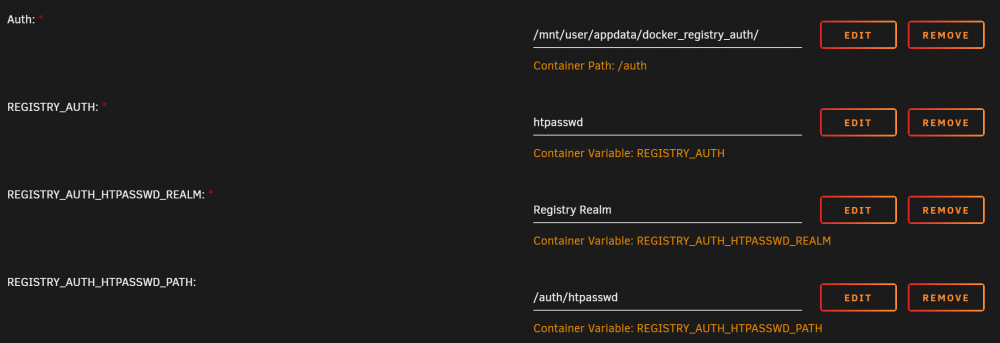
If you are still intrested I can share my approach: First I am using the Nginx Proxy Manager as entrypoint for ALL my services at my unraid server Therefor I have created there a entry which points my subdomain (mysub.mydomain.net) to the internal docker registry (f. e. 192.168.0.10:5000) After that I have created a directory for the htpasswd file on my unraid server: mkdir /mnt/user/appdata/docker_registry_auth Then I used this docker temporary container to create the htpasswd file: docker run \ --entrypoint htpasswd \ httpd:2 -Bbn USERNAME PASSWORD > /mnt/user/appdata/docker_registry_auth Of course replace USERNAME and PASSWORD by your choice. After that I have modified the docker template of DockerRegistry container and added the path to the htpasswd file and the needed Env's: Thats all, since the Nginx Proxy Manager will manage the certificate you don't have to do that in the docker registry itself
-
You can find the docker logs here as well: /var/lib/docker/containers/<container_id>/<container_id>-json.log For getting the container id just run docker ps which will list all your running container, first column is the "shortened" container id Just a other question, I faced today the same problem but not only for one container. The logs were not visiable for all containers. Did this happen to you as well or just the eclipse-mosquitto conatiner ?

