





gfjardim
Community Developer
-
Joined
-
Last visited
Everything posted by gfjardim
-
It's a new line markup from the Preclear script. I will remove them soon.
-
Ok, guys, just got back! I will catch up soon and start to launch updates. Thanks for your patience.
-
Pretty much.
-
Maybe, just maybe, the use of some versions of the script can unlock hidden features....
-
I think this was a wise decision. Hopefully JoeL will be happy with this. It would be a shame for two people who are both working so tirelessly for a common goal to disagree. Yep, that why I removed. Let's not poison the well.
-
Ok, done! ###2015.05.20 - Remove preclear script from package. It must be manually added to /boot/config/plugins/preclear.disk/ directory. No notifications yet and no fast post-read verification, but everything else is working.
-
Of course that's past, but those who cannot remember the past are condemned to repeat it, one said. I already have a way of making this work without distributing the script. Will release an update soon.
-
Guys, I've just being alerted of this: http://lime-technology.com/forum/index.php?topic=26121.0 So I removed the plugin link until I get a response from Joe L.
-
I STRONGLY recommend not modifying Joe. L's script without his direct permission and control. It got ugly the last time someone did. If you wish to rewrite the preclear script from scratch so it is your own work and name it something else, there will be no conflict. I'm not doing it by choice. I had to skip some of those prompts, and we can't use the unmenu's mail package with unRAID 6. He has being notified about this; I already told that if he has any problems, I'll shut this down. I'm not appropriating his code, only updating it to v6 notification system and make it proper to automation (which by the way is bjp999's work). The core functionality is untouched. bjp999 has actively agreed to let me use his version of the code with the fast post-read verification. EDIT: You were right, jonathanm. I didn't know about the previous attempt of making a plugin without his permission. Just removed the script from the plugin before any problems.
-
Thank you. Please note that as you started your preclears with screen sessions, you can't control them from the plugin, just see the progress. This plugin uses another program, called tmux, to run preclear script on background sessions. Tmux is a lot better than screen, mainly when we talk about scripting - we can easily start/stop processes and get a session's output. Therefore you can't stop your current preclear sessions, nor see it's output. The preclear_disk.sh script version I include in this plugin already has support for the new unRAID notification system. Right now, you will receive notifications through all configured channels, but in a future version I'll add the ability to set which channels to use (email, browser popup and agents).
-
Guys, I'be out for about two weeks without internet connection. Will catch up once I return. []'s
-
? Any problems with port 3838? I always map the used ports on my templates, so users can opt between the security of bridge network or the easiness of host network. Not a problem, but in the old versions of the docker is was only 5555 and 8888. Now I've noticed 3838 is added. Can you point me to an explanation about bridge vs host ? What is your recommendation ? If I use bridge with specific ports, should I port forward the relevant ports at my router to my unRAID box ? Thanks Port 3838 is LAN pear discovery. I run as bridge with port 5555 mapped on my router. I don't like UPnP because it's fundamentally insecure.
-
? Any problems with port 3838? I always map the used ports on my templates, so users can opt between the security of bridge network or the easiness of host network.
-
[glow=red,2,300]UPDATE:[/glow] - Logitech Media Server: added lame, faad, flac and sox. - pyLoad: fix permissions avoiding services updates. Saw your request on the other thread. See if nothing is missing, ok?
-
No, it didn't, no drivers I think. https://www.kernel.org/doc/Documentation/hwmon/jc42 Apparently, these are DRAM temperature sensors. PS: very nice bug report, phenomeus!
-
Please post the content of /etc/sensors.d/sensors.conf file.
-
Perl package: http://mirrors.slackware.com/slackware/slackware64-14.1/slackware64/d/perl-5.18.1-x86_64-1.txz
-
My bad. It wouldn't appear if it's the only plugin there. Fixed in 2015.05.18a
-
Can you post a screenshot of the Settings page?
-
Pretty much. Will update it soon. If you use the VM plugin, there's a known bug that render containers unreachable. I will update this container soon, just in case.
-
I contacted Joe, but no word yet. If he complains about this, I will withdraw the plugin. But honest, I don't see why he would do that, since I'm not stealing code or trying to take credit for his work. I never claimed this plugin do preclear disks, only that it is a frontend to his script. I'm hoping he will enjoy it.
-
Will try to add it, since I based this script on Joe L. version, not bjp999 one. Will run a diff and see what I need to change. Done. It was easier than I think. A good diff tool is capable of doing magical things... Thanks garycase! Hope you enjoy it.
-
Will try to add it, since I based this script on Joe L. version, not bjp999 one. Will run a diff and see what I need to change.
-
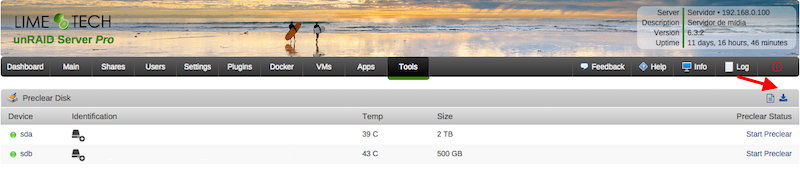
Hi guys, this is a simple plugin that allows users to clear their disks before add them to the array. The main characteristics of this plugin are: Modularity: can be used standalone or in conjunction with Joe L. or bjp999 scripts; Ease of use: with a few clicks you can start a clear session on your disk; Integration: you can always access the plugin under Tools > Preclear Disk menu. If you have Unassigned Devices installed, you can start/stop/view preclear sessions directly from Main > Unassigned Devices. All dependencies included: you don't need SCREEN to run a preclear session in the background; all jobs are executed in the background by default, so you can close your browser while the preclear runs. You can install it directly or via Community Apps. Q & A: Q) Why Joe L. or bjp999 scripts are not included? A) I'm not authorized by Joe L. to redistribute his script, so you need to download a copy from the topic above and put it under /boot/config/plugins/preclear.disk/ renaming it to preclear_disk.sh if necessary. bjp999 modifications are unofficial, so I decided not to include it by default. A) the bjp999 script is now included by default. Q) By default, I see a "gfjardim" script always available. Why? A) Since I'm not authorized to redistribute Joe L. script and the recent slow support by the author, I decided a major code rewrite in the script was needed. The new script is being actively supported, compatible with unRAID notifications, is faster than bjp999 script and has a cleaner output so users can easily visualizes what's going on with their disks. Q) I want to use one of the older scripts(Joe L. or bjp999) in conjunction with notifications. Is that possible? A) Yes. I've made some adjustments on both scripts so they become compatible with unRAID notifications; Joe L. version can be found here and bjp999 can be found here. A) the bjp999 script is now included by default; it includes support for Unraid notifications. Q) Is there any howtos available? A) gridrunner made a awesome video explaining why preclearig a hard disk is a good idea, and how you can accomplish that: Q) The plugin asked me to send some statistics information. How does the statistics report system work? Is it safe? Is it anonymous? A) To better track the usage of the plugin, a statistics report system was put in place. The main goals I intend to archive are: know number of disks that gets precleared; fix any silent bugs that gets reported on the logs; know average size of disks, their model, their average speed and elapsed time we should expect from that model; success rate; rate of disks with SMART problems; This system is totally optional and users will get prompted if they want to send each report. It is also safe and totally anonymous, since all data is sent to Google Forms and no identifying data is exported, like disks serial numbers. Detailed info can be found here. The statistics are public and can be found here. Q) How can I download a copy of the plugin log? A) Please go to Tools, then Pleclear Disk, and click on the Download icon: Q) Which are the differences between Erase and Clear? A) The Clear option uses zeroes to fill the drive; at the end, the drive can be added to the array the array immediately. The Erase All the Disk option uses random data to wipe out the drive; the resulting drive can't be quickly added to the array. If you want to add if after erase, you must select Erase and Clear the Disk. Troubleshooting: Q) After Zeroing the disk, the Post-Read operation fails saying my drive isn't zeroed. A) When zeroing the disk, the script uses a zero filled data stream produced by the pseudo-device /dev/zero. If a Post-Read fails just after a Zeroing operation, chances are that you have bad RAM memory, or less frequently bad PSU, bad cables or bad SAS/SATA card. Please run some rounds of MEMTEST on your machine to test your RAM modules. Q) A Pre-Read operation failed and I see Pending Sectors on the SMART report. A) Pending Sectors will lead to read errors, and the Pre-Read operation will fail. To force the hard drive firmware to remap those sectors, you have to run a Preclear session with the Skip Pre-Read option checked. Q) I've lost communication with the webgui, can I manage preclear sessions from the terminal? A) Yes, you can. If you lost communication with the webgui or want to use the command line interface to manage your preclear sessions, you just need to type preclear on your terminal to start/stop or observe a preclear session.
-
It depends of what services/steps you need your plugin to precede/supervene. LT just postponed VMs and Docker init from disks_mounted to started. I think I will do it for my VirtualBox plugin as well. What is the equivalent unmounting state? When does LT stop the VM and Docker? stopping_svcs event.

