heggico
Members
-
Joined
-
Last visited
-
So, I tried using the clear script to shrink my array. It found the correct disk and started clearing that. But it then runs the command: dd bs=1M if=/dev/zero of=/dev/md3 status=progress Which is correct, as I want to clear disk 3. However, clearing stops with an "No space left on device" after only 8.4MB. The disk is 3TB Running it manually in the console indeed shows the same: root@Tower:~# dd bs=1M if=/dev/zero of=/dev/md3 status=progress dd: error writing '/dev/md3': No space left on device 9+0 records in 8+0 records out 8388608 bytes (8.4 MB, 8.0 MiB) copied, 0.00286115 s, 2.9 GB/s Right now, I have a disk of only 15GB according to unraid, which is normal after using this script, as I did use it before. Right now I can only try to fix this, or just remove it and let it rebuild parity right? Parity wouldn't be valid by removing this disk. Strange thing is, I only see a /dev/md3, no /dev/md1 (disk 1). But I do have /dev/md1pl and /dev/md3pl Running on unraid 6.12.3 btw.
-
So, boot array devices (XFS) and cache (BTRFS) showed no error when running the check commands. (and scrub with BTRFS). This didn't seem to change anything. Also rebooted the server again afterwards. Suddenly, it works. So not sure what caused it and why it works now, but something fixed it. Thanks for the help!
-
I'll try that, but everything else is working fine. All dockers, the full *arr suite of containers. Plex etc. The only thing "wrong" is SMB access. I'll update when the check completes.
-
Don't really know either of those, but tailscale is a VPN? I do run wireguard. But not tailscale or zerotier. This issue occurred directly after the update. The only share that does seem to work is an unassigned drive share, so samba itself seems fine? However none of the ones on the array work.
-
Right, forgot about that. I've added it now tower-diagnostics-20230625-2026.zip
-
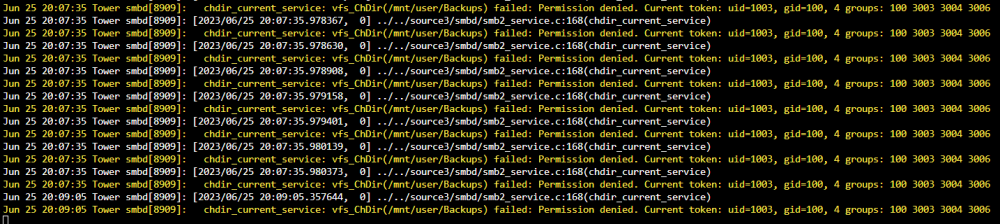
So, after updating from 6.9.x to 6.12. I can no longer acces my SMB shares. Syslog is filled with messages like these: I've run docker safe new permissions. No change. I checked ls -l /mnt and /mnt/user. All folders here are drwxrwxrwx with nobody:users as the owner. I've tried creating a new user. No change I've set the shares to public. No change. Trying to acces the share via windows shows "Windows cannot acces \\Tower\Backups" and "You do not have permission to acces \\tower\backups", but no error code or something. I've tried rebooting. Rebooting only samba. Removing all credentials in windows and rebooting that. Nothing seems to help. What else can I try?