




Skip to content
View in the app

A better way to browse. Learn more.

Unraid

A full-screen app on your home screen with push notifications, badges and more.

To install this app on iOS and iPadOS
  1. Tap the Share icon in Safari
  2. Scroll the menu and tap Add to Home Screen.
  3. Tap Add in the top-right corner.
To install this app on Android
  1. Tap the 3-dot menu (⋮) in the top-right corner of the browser.
  2. Tap Add to Home screen or Install app.
  3. Confirm by tapping Install.

CT_main1994

Members
  • Joined

  • Last visited

  1. 不行呢,还是一样错误值日狂飙
  2. 不行大佬,刚才看了下,还是开始有这个错误日志了
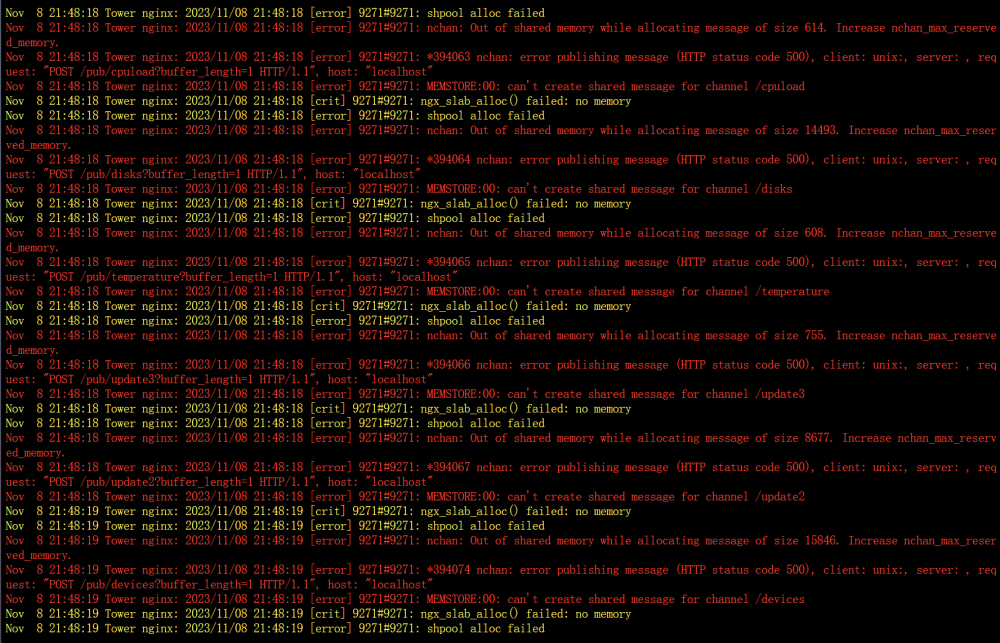
  3. 每隔一段时间这个nginx订阅发布组件都会轮询报错,提示ngx_slab_alloc() failed: no memory,shpool alloc failed,Increase nchan_max_reserved_memory.然后日志激增,需要如何解决
  4. 这些背景图可以打包给我一份吗
  5. 有可能掉盘了,反正重启或者关机重新插拔就好了,我这段时间经常这样
  6. 我半个月前才掉盘,只能格式化恢复硬盘,然后几百部电影全没了😂

Account

Navigation

Search

Search

Configure browser push notifications

Chrome (Android)
  1. Tap the lock icon next to the address bar.
  2. Tap Permissions → Notifications.
  3. Adjust your preference.
Chrome (Desktop)
  1. Click the padlock icon in the address bar.
  2. Select Site settings.
  3. Find Notifications and adjust your preference.