





Rockyranger
Members
-
Joined
-
Last visited
Everything posted by Rockyranger
-
I cannot get remote access to stay green. It holds up for around 10 seconds and then I lose it. I've tried everything that I can find online, hence now coming here. I have plex set up on unraid (official container).
-
I have another issue. I tried to add another cache drive as I wanted two separate cache. I added it as a pool by mistake, I then created a separate pool and added them separately so I had two cache pools now. As they were acting as one pool before, they had the same data on, I deleted the data off of the new one - it deleted from both! (even though they're separate pools). After I got over the fact that I have to install/set up everything again I restarted so that unraid could build the share folders again and both pools are acting as one, I have the shares on both caches but on the share tab they are only assigned to cache 1. diagnostics-20220904-1837.zip
-
Got it. Thanks.
-
All sorted Thank you for helping my fix a problem that I didn't even know I had. Just to confirm, the reason I had to turn off docker and vm was so that they would create new images in the right place? (that's what I did)
-
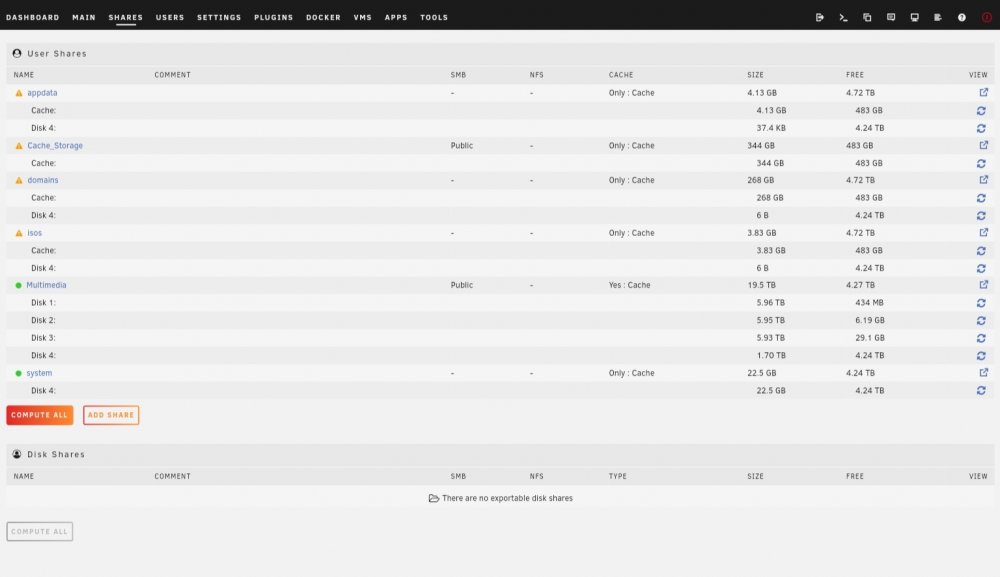
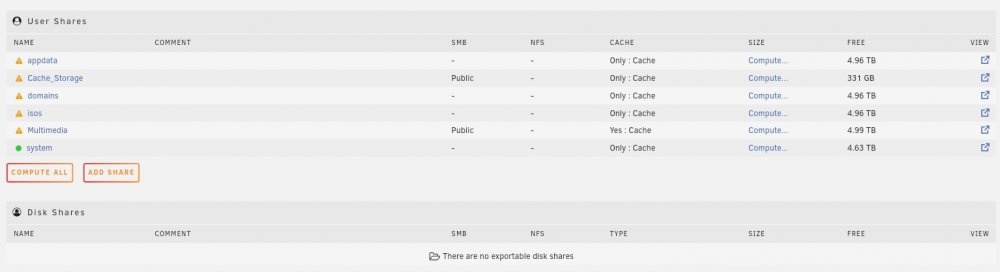
Appdata, domains, isos and system should all be on the cache drive only, I didn't want any of those on the array. When I completely reinstalled unraid I had those shares on my cache drive which were not touched, I then deleted the new versions of those shares from the new install of unraid so that I could use my existing shares... if that make sense. I messed up, didn't I?
-
What have I done wrong?
-
Done... diagnostics-20220829-2001.zip
-
I have completely reinstalled unraid now though... diagnostics-20220829-1441.zip
-
I didn't know I could do this. Although the problem is now solved it would be useful to look here in the future. Thank you.
-
I tried within unraid but something went wrong with the update (I guess) and it then wouldn't boot. I decided with that and my initial problem, just to start from scratch. So I updated using the usb creator and now everything is fine with the added benefit of support for 12th gen igpu. Probably not the right way to solve the problem but solved nonetheless. From now on I'll keep an eye on the disks to see if it happens again I'll know what I've recently changed. I'll also be keeping regular flash backups. Thanks for your help.
-
Hi, thank you so much for your reply. I would have come back to you sooner but I've been unable to boot in GUI mode and I thought it would be a quick fix but it's proving to be harder than I first thought, something must have changed with the 6.10 update. I have onboard graphics using igpu with 12600k, hence he issue (I think).
-
I really need some help with this please. I've been stuck on this problem for a few days now. The reads aren't letting my drives sleep. I don't have anything running and plex has been stopped. Does anyone have any ideas?
-
Hi, I'm new to Unraid and I'm trying to get it to recognise my CPU's onboard graphics. I get this message on the boot screen: "i915 0000:00:02.0: your graphics device 4680 is not properly supported by the driver in this module parameter or CONFIG_DRM_I915_FORCE_PROBE=4680 configuration option, or (recommended) check for kernel updates" I've spent a few hours looking for a solution and I'm starting to wonder if Unraid even supports onboard graphics for the 12600k yet, I've only seen drivers on Intel's website for Windows, not Linux. Just to let you know a few things: 1. I have set CPU in BIOS to primary graphics (not auto) 2. There is nothing in the modprobe.d file 3. A /dev/dri file dose not exist 4. I have installed Intel Top plugin I don't know if that's helpful but its what I came across when googling.
-
I’m just about purchase the hardware for the server, just a couple of questions about cache and plex. 1. If I have one cache drive, can I store my plex metadata on it? 2. If so, can I have said cache drive backed up onto the pool, periodically? 3. If not, can I add an SSD separate from the pool to hold the metadata? Thank you for any responses.
-
I have narrowed it down to two options that are working out to cost about the same: 1) Ryzen 5700G + Asus Pro WS X570 – ACE Pros: - Feels more like a server board (as in it doesn’t run too hot and looks like the better option to be left on 24/7) - PCI-E lanes are not shared (I can run two NVMEs @ 64Gbps as well as many other things) - Processor consumes less energy whilst idle (which it will be most of the time) - EEC ram support Cons: - See pro’s of other board 2) I7 11700k + Asrock Z590 Tachi Pros: - A lot of positivity towards this board and Unraid - A lot of positivity towards Intel from Unraid and Plex (which I will be using, but not transcoding) - Comes with everything I will need so won’t have to add on 2.5 Lan ports etc Cons: - See pro’s of other board I primarily will be using for plex but will also run a Windows VM to do audio converting and video remixing as well as other things in the future. I will be doing large transfers. I will not be installing a GPU for now as both options support onboard graphics. Any thoughts on which way would be the best way to go?
-
Thank you for your reply. Just to be clear, I could use an AMD CPU without built in graphics and use unraid and plex (natively) just fine? If the motherboard has video out, would I be able to setup unraid without a GPU?
-
I'm build a new unraid server, I haven't bought anything yet although I have done a couple of weeks research. The server will be primarily for plex 4k but I want it to be overly capable and future proof for other things I may use it for in the long run. 1) I will not be starting out with a graphics card, can anyone please suggest a good AMD processor up to £350 that has onboard graphics the equivalent to Intel's igpu/quick sync or would it be better just to go for Intel? It would be nice to be able to transcode 4k but not fundamental as I can add a GPU later. 2) Can anyone please suggest a mother board with ECC support, onboard graphics, PCI 4.0 supports and lanes that come from the CPU as I've been reading a lot about not being able to use m.2/sata ports all at the same time. I hope this make sense. 3) I've read that there may be issues with using onboard sata ports as the raid controller may conflict with unraid? Should I buy an HBA card flashed to IT mode as people have suggested, is there any way around this? Hopefully someone out there can help me out on these point so I can start buying the parts! Many thanks.
-
Hi, I have a few things I need help with and would appreciate some advice on any of the point below, whatever anyone feels they can advise on I’ll be happy to hear it. Just to give you an idea on myself, the last time I built a PC was circa 15 years ago. I've just spent the last few days deciding between unraid and truenas, unraid seems to be a better fit for me. Although I will primarily use this as a plex server (multiple users), I want something more powerful than I need right now as I need the flexibility to do what I want in the future, maybe run a VM and do some gaming etc. I could just buy a synology but I want the fun of building as well as getting back to grips with the hardware side of things, because there is an overwhelming choice of parts and I have no idea which way to go, I can't even decide on Intel or AMD which would be my first question! I have purchased just the case so far and already have the disks. The case is a Fractal Define XL, which gives me as much room as I’d like for whatever size board or up to 18 disks. I plan on using 6TB Ironwolfs (7200) for parity (one to start off with until I feel the need to have two) the rest of the disk will be 6TB barracudas (5400) which will allow me to expand and replace drives without worrying about cost. I have between £1000 and £2000 to spend on everything excluding disks, case or a GPU (don’t need right now). So, 1. Is there a benefit to either Intel or AMD based on the above? 2. Any recommendations on boards, I’d even be open to an SSI-CEB with two moderate processors if this was advised… 3. I have an old 500w PSU. If this wouldn’t be enough what would be comfortable? 4. At maybe 3 X 40/50GB transfers a day, would I see a benefit in 1TB cache SSD as opposed to 500GB? 5. I’ve seen many recommendations to use a SAS card instead of onboard, would that be advised? 6. Would an onboard raid controller be problematic as it would with truenas? 7. Once I’ve chosen the parity disk, can I then reallocate it if need be? 8. If I had 6 X 6TB and also 1 X 1TB and the 1TB fail, Would I need to replace it or would the data be saved on other disks assuming there was enough space? 9. Should I use Unraid’s encryption? I really appreciate input on any of the above or any advice relating that I may have missed. As you can tell I’m very open on which route to take so if there's any information that would be handy to know pre-build feel free to let me know as I’d be grateful to receive it. May thanks in advance!

