thatotherguy321
Members
-
Joined
-
Last visited
-
where can I find that information in the diag logs?
-
Thanks for the diagnosis! This is on a qnap ts-653a. So internally, they are using the same controller as those junk sata expansion cards? Now, I'm trying to figure out what controllers qnap uses in their other models, but they dont list it in their tech specs. I have a couple other qnap models from before I got tired of their software. I do like the form factor. I guess only way to find out is to pull the motherboard out.
-
sorry in the delay in getting new diags. I had to make sure I had backups intact. does this kind of controller issue mean mobo is bad? tower-diagnostics-20230808-1355.zip
-
I was trying to access some files on my shares, and getting file errors, fail to open files, files not in the directory I knew they were in. Went to check logs and found tons of disk read errors, from all disks simultaneously. Please help! What does this all mean? Diagnostics attached tower-diagnostics-20230803-2328.zip
-
Has anyone gotten the lcd to work? I have the ts453a. According to the GitHub repo linked earlier in this thread, the serial port is mapped to /dev/ttyS1. However, that's not listed, I only see /dev/ttyS0. Do I need to do something to help unRAID detect the serial port?
-
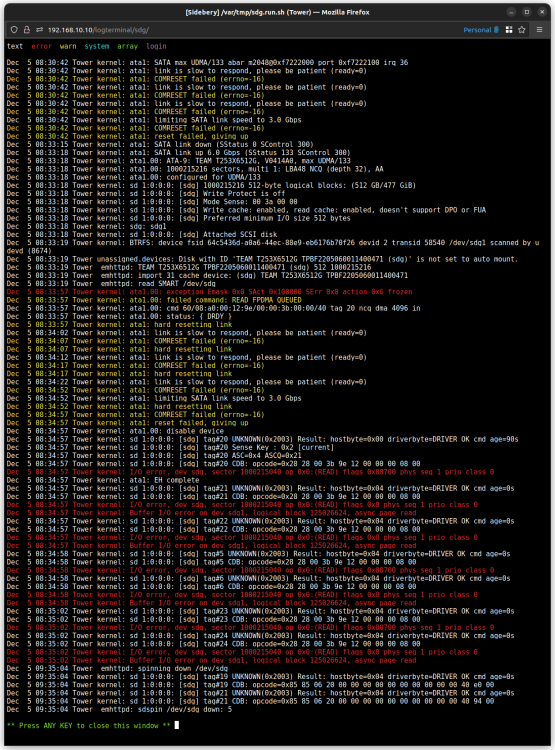
Conclusion: It was a bad SSD afterall. After lots of hardware swapping: several new sets of sata cables, swapping the positions of the working HHD with the non-working SSD, even moving all drives to a whole new computer (motherboard/ram/cpu) with new install of unRAID. I was still getting the same error. I had two Team Group SSDs in cache pool, so I tried reformatting both and using each as a single cache drive. In both configurations, I would still get the same error. Sometimes not right away, but 5-10min after bootup. So it's either both SSDs are bad, or they're incompatible with unRAID somehow. Anyhow, I didn't want to waste any more time on the cheap SSD. I bought an SSD of another better known brand, and everything is working fine now. Never buying Team Group SSDs again...
-
open console, type "curl ifconfig.me" will return your public ip address. ifconfig.me is one of many. if you're using mullvad vpn, "curl https://am.i.mullvad.net/connected" will be more relevant info.
-
Thanks! I will investigate the cabling. For my own knowledge and future ability to diagnose problems on my own, what were the message(s) that lead to that conclusion? Is it intermittently going offline-online like a loose cable might cause? I am still seeing sdg listed under /dev/, and the unraid UI shows a green dot on that drive. Should that happen on a drive that's dropped off?
-
I've been having lots of problems with my docker apps. Configs mysteriously become read-only, docker apps not starting up at all, database issues, possible corrupt docker image. After some digging, i see the following warning in syslogs repeating several times every 30sec. Tower kernel: program smartctl is using a deprecated SCSI ioctl, please convert it to SG_IO Since smartctl is used to read disks' SMART info, I suspected my drives, and found the attached disk log on one of my two cache SSDs. The two SSDs are identical brand new drives I recently bought. Previously was not using cache pools. Also using smartctl to read that drive returned: Short INQUIRY response, skip product id A mandatory SMART command failed: exiting. To continue, add one or more '-T permissive' options. Is this indication of a bad SSD? Also, possibly related info, whenever I've rebooted the server, I'd lose one of the cache SSDs. I have to manually unplug and replug the power to that drive for it to be detected. I don't reboot often, so didn't think much of it. Diag also attached. tower-diagnostics-20221205-1044.zip