





Sildenafil
Members
-
Joined
-
Last visited
-
Hi , I’m reaching out because I’m a bit confused about how my "Media" share is distributing files across my array. I have the allocation method set to High-Water, but I’ve noticed that Disk 1 is getting almost completely full while my other drives are barely being touched. I thought High-Water would eventually move on to the next disk once a certain capacity was reached, so I'm wondering why it’s sticking to Disk 1 so aggressively. For context, my folder structure looks like this: media/movies/movie_name.mkv media/series/show_name/season_01/episode.mkv One thing I’m trying to achieve is a good balance: I really want to keep an entire season of a TV show on the same physical drive to avoid spinning up multiple disks just to watch one series. However, I’m fine with different seasons or different movies being spread across the array. Lastly, I’m a bit lost on how to properly configure the Minimum Free Space. thx
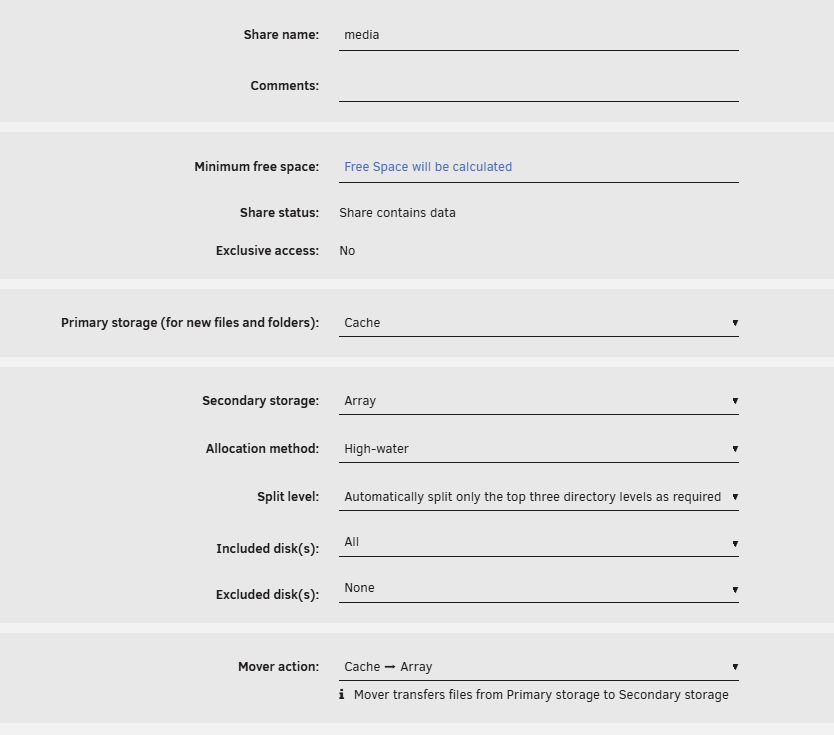
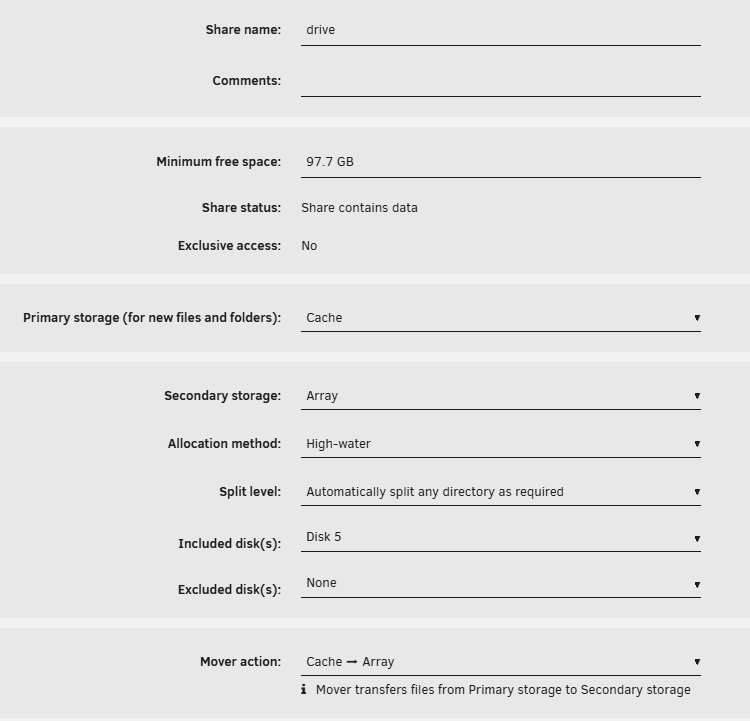
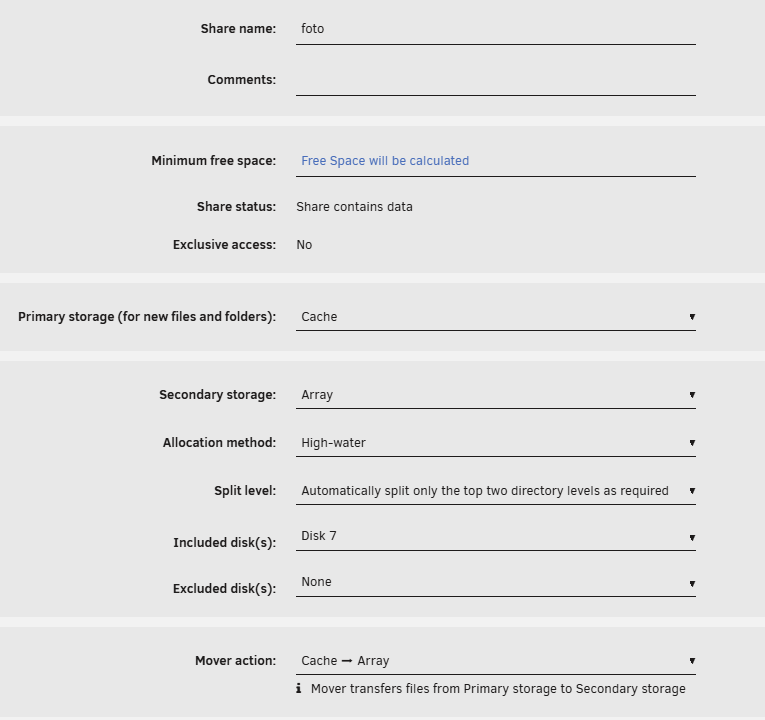
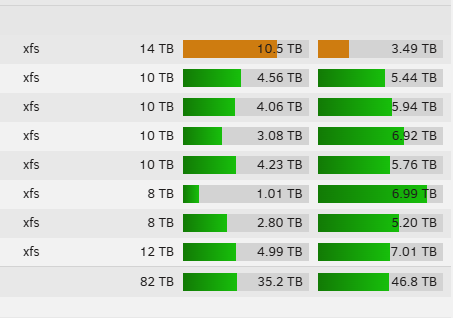
-
My media scanning isn’t working; I think I have a problem with a corrupted database. I ran DBRepair.sh and the database is OK, but I still have the same problem: when I start scanning a library, it stuck. EDIT: a reboot of server solve my problem
-
I tried to restart the VM and it seems to work but it can't get an IP address, it tells me: Requires guest agent installed
-
After installing and applying the unraid patch I rebooted the system and the Homeassistant VM doesn't want to restart. 2025-02-08T05:13:13.588438Z qemu-system-x86_64: can't read block backend for cfi.pflash01 device '/machine/system.flash1': Input/output error 2025-02-08 05:13:13.617+0000: shutting down, reason=failed
-
Hi everyone, The fix common problems plugin reports this error to me. Can you help me figure out how to fix it? Here's the diagnostics root@giannas:~# du -h /var/log 0 /var/log/pwfail 0 /var/log/preclear 0 /var/log/swtpm/libvirt/qemu 0 /var/log/swtpm/libvirt 0 /var/log/swtpm 0 /var/log/samba/cores/rpcd_winreg 0 /var/log/samba/cores/rpcd_classic 0 /var/log/samba/cores/rpcd_lsad 0 /var/log/samba/cores/samba-dcerpcd 0 /var/log/samba/cores/winbindd 0 /var/log/samba/cores/nmbd 0 /var/log/samba/cores/smbd 0 /var/log/samba/cores 15M /var/log/samba 0 /var/log/sa 0 /var/log/plugins 0 /var/log/pkgtools/removed_uninstall_scripts 20K /var/log/pkgtools/removed_scripts 52K /var/log/pkgtools/removed_packages 72K /var/log/pkgtools 4.0K /var/log/nginx 0 /var/log/nfsd 8.0K /var/log/libvirt/qemu 0 /var/log/libvirt/ch 12K /var/log/libvirt 115M /var/log root@giannas:~# ls -l /var/log total 102100 -rw------- 1 root root 0 Apr 3 23:35 btmp -rw-r--r-- 1 root root 0 Apr 28 2021 cron -rw-r--r-- 1 root root 0 Apr 28 2021 debug -rw-r--r-- 1 root root 593 Aug 27 03:24 dhcplog -rw-r--r-- 1 root root 68146 Jun 20 05:39 dmesg -rw-r--r-- 1 root root 0 Jun 26 04:40 docker.log -rw-r--r-- 1 root root 97447632 Sep 29 07:19 docker.log.1 -rw-r--r-- 1 root root 7008 Jun 20 05:39 faillog -rw-r--r-- 1 root root 63948 Jun 20 05:39 lastlog drwxr-xr-x 4 root root 140 Jun 20 05:40 libvirt/ -rw-r--r-- 1 root root 87708 Sep 29 04:30 maillog -rw-r--r-- 1 root root 0 Jun 20 05:39 mcelog -rw-r--r-- 1 root root 0 Apr 28 2021 messages drwxr-xr-x 2 root root 40 Aug 10 2022 nfsd/ drwxr-x--- 2 nobody root 60 Jun 20 05:40 nginx/ lrwxrwxrwx 1 root root 24 Apr 3 23:34 packages -> ../lib/pkgtools/packages/ -rw-r--r-- 1 root root 505 Sep 1 14:39 phplog drwxr-xr-x 5 root root 100 Jun 20 05:40 pkgtools/ drwxr-xr-x 2 root root 460 Sep 19 17:13 plugins/ drwxr-xr-x 2 root root 60 Jun 20 05:40 preclear/ drwxr-xr-x 2 root root 40 Sep 26 06:17 pwfail/ lrwxrwxrwx 1 root root 25 Apr 3 23:36 removed_packages -> pkgtools/removed_packages/ lrwxrwxrwx 1 root root 24 Apr 3 23:36 removed_scripts -> pkgtools/removed_scripts/ lrwxrwxrwx 1 root root 34 Jun 20 05:40 removed_uninstall_scripts -> pkgtools/removed_uninstall_scripts/ drwxr-xr-x 2 root root 40 Jan 30 2023 sa/ drwxr-xr-x 3 root root 320 Jun 20 05:39 samba/ lrwxrwxrwx 1 root root 23 Apr 3 23:34 scripts -> ../lib/pkgtools/scripts/ -rw-r--r-- 1 root root 0 Apr 28 2021 secure lrwxrwxrwx 1 root root 21 Apr 3 23:34 setup -> ../lib/pkgtools/setup/ -rw-r--r-- 1 root root 0 Apr 28 2021 spooler drwxr-xr-x 3 root root 60 Sep 27 2022 swtpm/ -rw-r--r-- 1 root root 365853 Sep 29 07:19 syslog -rw-r--r-- 1 root root 3269351 Sep 29 04:40 syslog.1 -rw-r--r-- 1 root root 3269850 Sep 28 04:39 syslog.2 -rw-r--r-- 1 root root 0 Jun 20 05:39 vfio-pci -rw-r--r-- 1 root root 0 Jun 20 05:39 vfio-pci-errors -rw-r--r-- 1 root root 647 Jun 20 05:39 wg-quick.log -rw-rw-r-- 1 root utmp 6912 Jun 20 05:40 wtmp giannas-diagnostics-20240929-0710.zip
-
Could anyone help me? Thank you
-
giannas-diagnostics-20231015-1926.zip
-
Hi everyone, Today I upgraded the cache pool from 2x1tb sata to 2x2tb nvme. I transferred all the files but I had problems restarting the dockers and the VMs. Even though all the files were in the right location, the docker services did not restart. So from the apps I reinstalled all the dockers I had and they all came back with the settings I had. Excellent, but the only VM I have (homeassistant) is not. So I restarted unraid and it came back up, but I lost all the dockers again and had to reinstall them once again. Now I'm afraid that at the next reboot I won't see all the dockers anymore. What could be the problem? Thank you
-
Same on eth0
-
Hi everyone. I'm trying to get wol working with a fresh install of unraid. The motherboard is compatible with Wol (it was from my previous Windows PC where I used it). I tried to follow the guide but I'm stuck here: root@GIANNAS-BACKUP:~# ifconfig bond0: flags=5187<UP,BROADCAST,RUNNING,MASTER,MULTICAST> mtu 1500 ether d8:cb:8a:c5:7c:dd txqueuelen 1000 (Ethernet) RX packets 21566 bytes 3596911 (3.4 MiB) RX errors 0 dropped 31 overruns 0 frame 0 TX packets 7860 bytes 7847314 (7.4 MiB) TX errors 0 dropped 0 overruns 0 carrier 0 collisions 0 br0: flags=4163<UP,BROADCAST,RUNNING,MULTICAST> mtu 1500 inet 192.168.1.249 netmask 255.255.255.0 broadcast 192.168.1.255 ether d8:cb:8a:c5:7c:dd txqueuelen 1000 (Ethernet) RX packets 20157 bytes 3140121 (2.9 MiB) RX errors 0 dropped 0 overruns 0 frame 0 TX packets 7853 bytes 7840489 (7.4 MiB) TX errors 0 dropped 0 overruns 0 carrier 0 collisions 0 docker0: flags=4099<UP,BROADCAST,MULTICAST> mtu 1500 inet 172.17.0.1 netmask 255.255.0.0 broadcast 172.17.255.255 ether 02:42:6b:49:52:27 txqueuelen 0 (Ethernet) RX packets 0 bytes 0 (0.0 B) RX errors 0 dropped 0 overruns 0 frame 0 TX packets 0 bytes 0 (0.0 B) TX errors 0 dropped 0 overruns 0 carrier 0 collisions 0 eth0: flags=6211<UP,BROADCAST,RUNNING,SLAVE,MULTICAST> mtu 1500 ether d8:cb:8a:c5:7c:dd txqueuelen 1000 (Ethernet) RX packets 21566 bytes 3596911 (3.4 MiB) RX errors 0 dropped 0 overruns 0 frame 0 TX packets 7860 bytes 7847314 (7.4 MiB) TX errors 0 dropped 0 overruns 0 carrier 0 collisions 0 device interrupt 19 lo: flags=73<UP,LOOPBACK,RUNNING> mtu 65536 inet 127.0.0.1 netmask 255.0.0.0 inet6 ::1 prefixlen 128 scopeid 0x10<host> loop txqueuelen 1000 (Local Loopback) RX packets 0 bytes 0 (0.0 B) RX errors 0 dropped 0 overruns 0 frame 0 TX packets 0 bytes 0 (0.0 B) TX errors 0 dropped 0 overruns 0 carrier 0 collisions 0 virbr0: flags=4099<UP,BROADCAST,MULTICAST> mtu 1500 inet 192.168.122.1 netmask 255.255.255.0 broadcast 192.168.122.255 ether 52:54:00:8c:1e:87 txqueuelen 1000 (Ethernet) RX packets 0 bytes 0 (0.0 B) RX errors 0 dropped 0 overruns 0 frame 0 TX packets 0 bytes 0 (0.0 B) TX errors 0 dropped 0 overruns 0 carrier 0 collisions 0 root@GIANNAS-BACKUP:~# ethtool br0 Settings for br0: Supported ports: [ ] Supported link modes: Not reported Supported pause frame use: No Supports auto-negotiation: No Supported FEC modes: Not reported Advertised link modes: Not reported Advertised pause frame use: No Advertised auto-negotiation: No Advertised FEC modes: Not reported Speed: 1000Mb/s Duplex: Unknown! (255) Auto-negotiation: off Port: Other PHYAD: 0 Transceiver: internal Link detected: yes root@GIANNAS-BACKUP:~# ethtool -s br0 wol g netlink error: Operation not supported
-
Hello everyone, Until now I have been using an asm1166 pci x1 chip board purchased on Aliexpress since I only had one x1 slot, now I have done a hardware upgrade and was thinking of replacing it with a x4 version. MZHOU is available on Amazon as a brand. I read that it is necessary to update the firmware to have it recognized by some motherboards ( mine is an asus b460 plus). How do I recognize the latest firmware available? is the one on https://www.silverstonetek.com/en/product/info/expansion-cards/ECS06/ - called "Fix compatibility issue and support Intel 600 series chipset motherboard" To perform the firmware upgrade do I need a Windows pc but with "old" hardware to have the board recognized?
-
I'm trying to get plex transcoding to work with my asrock j5005 but i can't. I created the i915.conf file with this comand: mkdir -p /boot/config/modprobe.d echo "options i915 enable_fbc=1 enable_guc=3" > /boot/config/modprobe.d/i915.conf I tried to change the guc=2 too, but still not working. What am I doing wrong? The gpu works fine with unmanic
-
no, I simply created a second NAS with old hardware and installed omv.
-
Ok, so how can the download continue in the background?
-
Are you using tidal-dl -g? I'm using tidal-dl comand and i'm finding a solution to keep going download even if i close the terminal
