Ninoslav
Members
-
Joined
-
Last visited
-
Getting network errors after update, UI is available and also jellyfin through nginx remotely but cant check for new apps, no community store and no Unraid connect. All these are are resolved with downgrade, attached are diagnostics. I have additional NIC, 10 gbit asus card rhea-diagnostics-20250622-1456.zip
-
Had to downgrade from 7.1.4 to 7.1.3, after upgrading Community apps or docker containers were unable to check for new versions and there was an error with NTP time... after downgrading it just works, so I don't think its my network equipment, found similar thread about changing dns but obviously if it works on 7.1.3 its not me
-
Looks like it won't be fixed anytime soon
-
I have 2 unraid servers running ddclient, and I have the same error on both, turned on verbose WARNING: '' is not a valid IPv4 or IPv6 address WARNING: found neither IPv4 nor IPv6 address WARNING: unraid: unable to determine IP address with strategy use=ip WARNING: Could not determine an IP for unraid Both are set up to push IP to namecheap and both are behind Ubiquiti router. Have not made any changes recently and it was working for several months flawlessly.
-
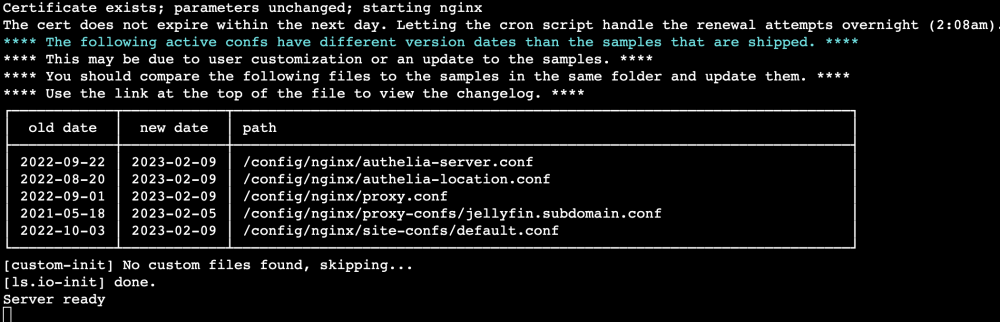
Any idea why each swag update breaks my remote jellyfin? Out of the 5 files mentioned in the screenshot, only one I edited was jellyfin.subdomain.conf I have 2 servers and both died so I tried this. On the first one I replaced all files with new ones starting from the bottom and it was dead until all 5 were replaced with samples and old ones renamed to old. On the second one I started from the top and as soon as I replaced first two authelia server was back online. On that 2nd server I still have warning about /config/nginx/proxy.conf, /config/nginx/proxy-confs/jellyfin.subdomain.conf and /config/nginx/site-confs/default.conf but jellyfin works just fine. Is there something I need to do so swag update doesnt mess it up each time?