





TheIlluminate
Members
-
Joined
-
Last visited
Everything posted by TheIlluminate
-
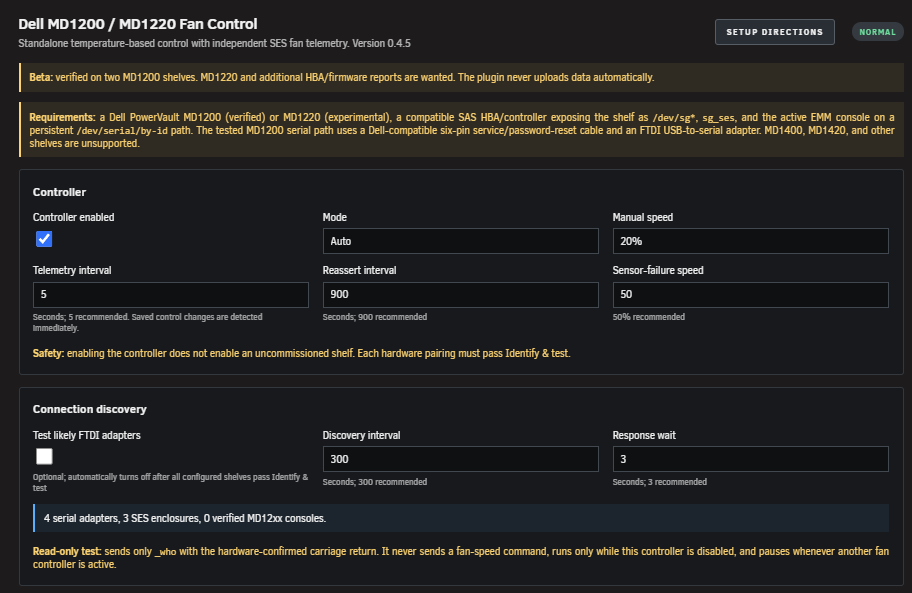
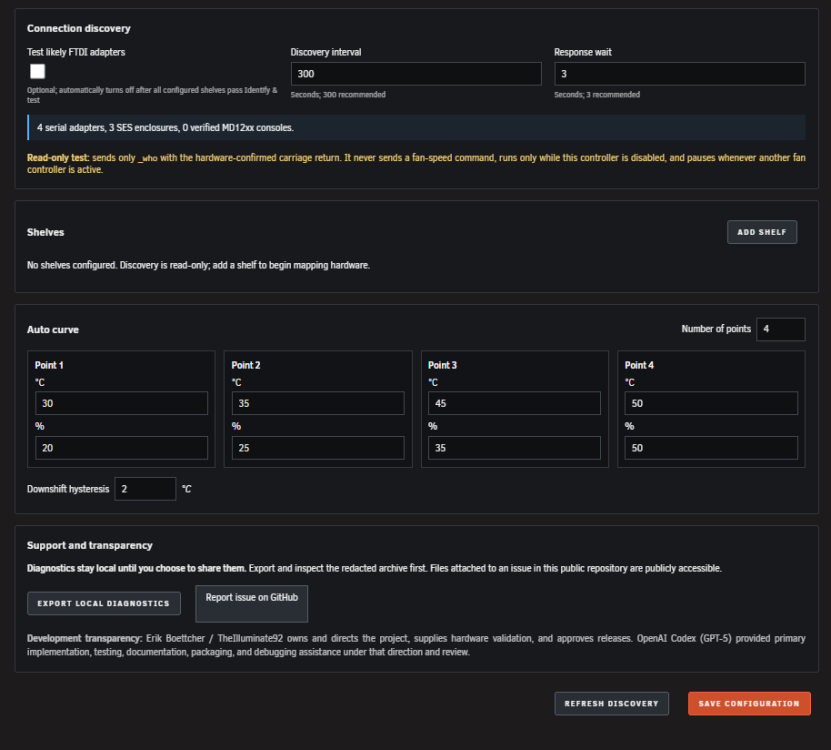
If this belongs in Plugin Support, please move it there. Creating a topic in that section was disabled for my account. MD12xx Fan Control for Unraid This started because my Docker-based MD1200 fan controller was not doing what I wanted. I wanted something native to Unraid, visible in the WebGUI, and careful enough that it would not blindly send commands to the wrong shelf. It got a little out of hand, so now it is a standalone plugin. This is currently a beta. It has been tested on two independently controlled Dell PowerVault MD1200 shelves. MD1220 support is included but remains experimental because I do not own one to test personally. Features Supports one or more independently controlled MD1200 or MD1220 shelves. Discovers persistent serial adapters, SES enclosures, and Unraid disks. Uses a guarded 20% → 50% → 20% test to prove which serial adapter controls which shelf. Verifies fan response independently through SES RPM telemetry. Automatically maps each shelf to its current Unraid disks. Controls each shelf from its hottest active assigned disk—not an average. Runs at 20% when all assigned disks are spun down. Provides configurable Auto curves and Manual speeds from 20% through 100%. Detects competing fan controllers and refuses to become a second writer. Supervises the controller and sends local Unraid failure/recovery notifications. Provides a documented local API for dashboards and other Unraid integrations. Requirements Unraid 7.3.2 or newer. Dell PowerVault MD1200, or MD1220 for experimental testing. A compatible SAS HBA/controller exposing the enclosure and an SES /dev/sg* device. Serial access to the active/primary EMM through a persistent /dev/serial/by-id path. The tested MD1200 setup uses a Dell-compatible six-pin service/password-reset cable and an FTDI USB-to-serial adapter. No other Docker container, script, or plugin controlling the same shelf. MD1400, MD1420, split-mode, daisy-chain, redundant-path, and other untested arrangements are not currently supported. I am interested in hardware reports, but I do not want to claim support before somebody proves it. The HBA connection is read-only. It is used to map disks and read SES fan telemetry. Fan-speed commands are sent only through the selected EMM serial console. Installation Until it appears in Community Applications, paste this URL into Plugins → Install Plugin: https://raw.githubusercontent.com/TheIlluminate92/unraid-md12xx-fan-control/main/releases/md12xx.fancontrol.plg Quick start Open Settings → Utilities → MD12xx Fan Control. Leave the controller disabled, add a shelf, and select its persistent serial adapter. Run Identify & test and wait for the complete 20% → 50% → 20% test to pass. Repeat for every shelf, then enable the controller and select Auto or Manual mode. Normal setup and commissioning are handled through the WebGUI. Terminal use is not required. Safety and privacy Commissioning only succeeds when exactly one SES enclosure produces the expected RPM response and the final return to 20% is independently verified. If mappings change, disks disappear, temperatures become unavailable, another fan writer is detected, or a command cannot be verified, the plugin fails closed or uses the configured fail-safe speed. Everything runs locally. There are no cloud services, analytics, automatic uploads, or GitHub credentials. Diagnostics stay on the server until the user exports them. Please inspect the redacted archive before attaching it to a public report. Documentation and support Project, releases, setup directions, safety details, and default Auto curve: https://github.com/TheIlluminate92/unraid-md12xx-fan-control Bug and hardware reports: https://github.com/TheIlluminate92/unraid-md12xx-fan-control/issues Local API documentation: https://github.com/TheIlluminate92/unraid-md12xx-fan-control/blob/main/docs/API.md Security problems should use the repository’s private vulnerability-reporting option instead of a public post. Development transparency I supplied the hardware, requirements, design decisions, testing, repeated opportunities to break things, and final release approval. I am not going to pretend I personally wrote all the code. OpenAI Codex provided the primary implementation, tests, documentation, packaging, and debugging assistance under my direction and review. That is disclosed in the plugin and repository because I would rather be completely transparent about what people are installing. Beta feedback wanted I am especially looking for: MD1200 reports from different HBAs, firmware, and Unraid versions. Real MD1220 commissioning results. Alternate FTDI adapters or service cables. Discovery or disk-mapping failures. Unexpected RPM behavior. Reboot and array stop/start results. Anything confusing, ugly, broken, or unsafe. Storage is awesome. Quiet is power.
-
ive seen the reason being heat and that shouldnt be concerned for this on as the usb 3.1 internal spot on a r360 is right in front of the pcie slots so it gets PLENTY of airflow. on a side note samsung doesn't even sell usb 2.0 drives anymore and the usb 2.0 slot on the server is technically for idrac access. I "could" plug it in there but i would like to put it on the internal slot if i can. appreciate the response im just looking for more information on why 3.x seems to fail more often.
-
I was afraid of that. Is there any indication of whether it's the flash drive failing? Even still Im about to pick up a Samsung FIT 64gb (they don't make any smaller anymore) and run it on the internal 3.1 usb port and see if that helps. Thanks as always I appreciate it.
-
And here's the syslogs. I also updated to 7.1.2 hoping that would help. syslog-Waz-Server.log
-
I'm back sorry it took so long. Got that docker taken care of and let it run for a few days. Still crashing roughly every 24 hours. waz-server-diagnostics-20250513-2030.zip
-
That would probably be Pelican-Wings. That should be unrelated to this as I just started messing with that today/yesterday. Its giving me trouble so and Im messing with its config file so I have to restart it every time i make a change.
-
just happened again and i had the syslog on for a bit before that. should have posted that as well. Sorry syslog-Waz-Server.log
-
Been a while since I last had a problem so here goes. Recently the server started becoming non responsive to connecting to the GUI but all the dockers kept working for at least a couple hours. After that even the dockers stop working and I can't connect to anything. Here's the diagnostics and i'll be on all day to try and figure this out. Only thing I changed recently was having to redo my network for a move but I simply gave it the same static IP address as before and set it up in unraid to have that IP address. Only weird thing I'm running on that end is that its in a link aggregation. Thank you ahead of time. Diag.zip
-
Sorry for posting in the UnRaid 6.0 section but it doesn't appear a 7.0 is up. Nor do I believe this is related to 7.0. My system keeps crashing due to a specific docker. Specifically Pterodactyl and is whats weird is it only crashes for a single game server i'm trying to run. If I could just get a pointer to go in the right direction that would be great. Specifically its the UbiSoft Foundry game server. I can run it for awhile and then it will crash the whole system not just the individual server. I also run a Palworld and satisfactory server just fine for long periods of time. Thanks Ahead of time waz-server-diagnostics-20240810-1143.zip
-
Seriously thank you for the reply. And double thank you for pointing me to someone who may help. Hope you have a good day.
-
Hello and good morning. I hope this is the right place to ask this and forgive me if its not but would it be possible for you to do a Foundry game server docker? It just came out last week on steam and they have a Foundry dedicated server for it. If it is possible thank you very much. If you are too busy then thank you for all you do otherwise and I guess i'll start to learn how to build a docker.
-
I don't think i can do that...its a dell r360 1u server. My question then would be why only the cache drives? the other 4 ssd drives are on the same backplane.
-
And the errors are back. New diags are posted. waz-server-diagnostics-20240416-1158.zip
-
So far so good. Just finished the scrub and balance and no errors and nothing in the log other then the balance and scrub. Guess I'll let it run for the day and then if its good figure out why that slot is giving me trouble as its a brand new server. Figures its something basic. Much appreciated and I'll mark as solution for now. Thanks
-
just swapped the drive to a different slot. can't really do another controller as its all an 8 device backplane on a dell 1u server. I'll let you know if the problem continues. im running a scrub and a balance just to get the drive going.
-
Keep getting this error every day and ive deleted the docker img file and rebuilt it already. Checked out the SSD that the cache is on and i keep getting write errors on the primary SSD Cache Drive. I pulled it and reseat it as well. I have it in Raid 1 so if i have to swap it out thats fine even more so as i have spares available. Just wanna make sure im not missing something but Im wondering if i have a bad drive. Thanks Diags.zip
-
Thanks for the reply. Sorry for taking so long to get back.
-
Got this error code from the fix common problems plugin and just making sure its all good. I'm pretty sure its the one in the syslog at Feb 21 15:39:43 so its just ECC RAM catching something and fixing it but do i need to be checking for ram errors or should I be good? Appreciate the help as always guys. waz-server-diagnostics-20240222-0824.zip
-
Personally I'm just waiting for 6.13. If you need it now then yeah id run it through a vm. I don't think it matters what VM but someone else could answer that better then me. I'd do what OS you are more comfortable with. Windows has ARC drivers and Linux has them built in now. So what ever is easiest for you.
-
Unless you are running and can confirm unraid 6.13 has linux kernel 6.2 or higher OR using Thors little kernel hack to run linux 6.2 or higher on unraid 6.12 then no it doesn't work natively. You would still need to pass it on through a VM.
-
Just kinda curious and I know this isn't going to be an easy answer if it is possible. But with AMD releasing a new media accelerator card that supports AV1 and is stupid fast. How would one go about loading the drivers into unraid? Is it even possible or is this gonna have to be something like whats been happening to load the Intel ARC drivers into unraid? Specifically i'm looking at an Alveo MA35D media accel card. It would be running on a Dell r730xd. But I have absolutely no idea how the software and driver side of things would work.
-
Honestly didn't even think to check for that...well crap. Sorry for the stupid question and thanks. You wouldn't happen to know a PCI to USB card that actually works would you?
-
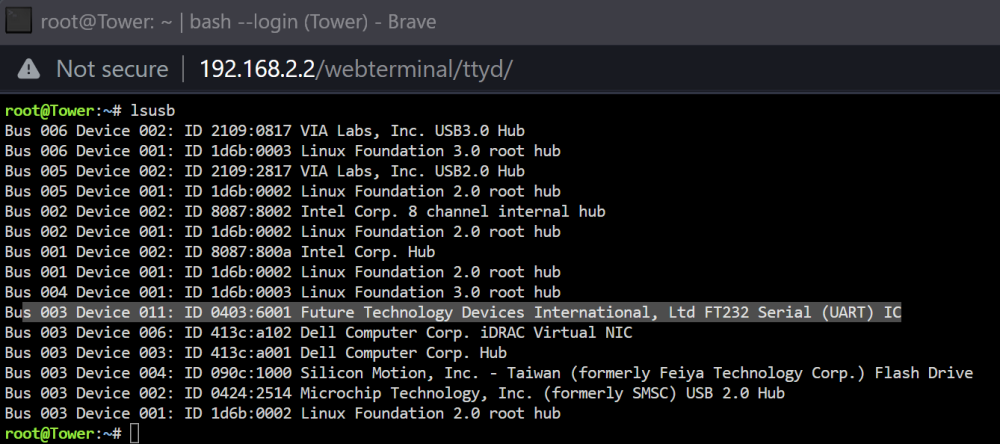
I think its that one. On a side note how do i translate info from that in to figuring out what goes here: /dev/ttyS1
-
I'm running 6.12.4. I can try real quick. Give me a minute
-



