AceBurn90
Members
-
Joined
-
Last visited
Everything posted by AceBurn90
-
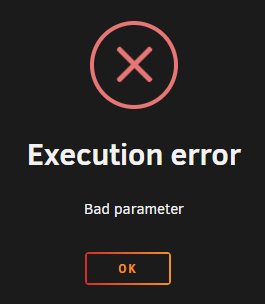
Hello dear community, I have the problem that I can't start my Docker containers. It does not matter which one I try to start. When starting I get the message "Execution error Bad parameter". In my example the problem occurs with Plex Media Server, duckdns, binhex-krusader, SABnzbd and so on I have already googled very, very much, searched here in the forum and tried some things. Unfortunately without a working solution. I have done several things of which I do not know if it was because of that. Among other things: - Moved data with unbalance - Rebooted the system - Unraid update from 6.10.3 to 6.11.5 (Can I see the update history somewhere?) - Executed New Permissions to restore the permissions I suspect that moving data with unBalance led to or at least triggered my problem. Perhaps the solution can be found here: https://www.reddit.com/r/unRAID/comments/hl3s68/folder_permissions_docker_pgid_puid_umask/ I'm not familiar enough with Unraid and Docker to be sure I'm doing the right thing. Better said, I prefer to discuss this here. I hope someone can help me with the anonymized diagnostic file attached. With kind regards AceBurn90 alent-diagnostics-20221127-2151.zip
-
Wie ich in meinem Eröffnungspost angemerkt habe, kann man mein Setup in meiner Signatur begutachten. Darin ist zu entnehmen, dass ich einen Ryzen 5700x habe der weder eine iGPU ist noch eine APU überhaupt integriert hat. Ich habe ja auch geschrieben, dass ich etwa 2-4 Streams Transcodieren möchte. Wenn ich mit der P2000 drei Streams packe wie im Artikel beschrieben ist, dann reicht mir das. Aber danke für dein Zutragen weiterer Informationen bezüglich der Performance der P2000.
-
Mega Großen Dank an dich @DataCollector, Du hast in der ersten Antwort so überaus Umfangreich auf meine Fragen und wünsche geantwortet, dass bereits dies alle meine Fragen abgedeckt hat. Du hast richtig erkannt, dass ich die Möglichkeit ausgelassen habe den M.2 Slot als SATA-Controller zu nutzen. Ich weiß gar nicht, warum ich nicht daran gedacht 👍 Aktuell habe ich einen der 12 TB Platten als Parity in Gebrauch. Ich weiß gar nicht ob ich überhaupt noch eine zweite brauchen werde. Ich sehe eine zweite als Verschwendung bei insgesamt nur 8 HDDs und 2 SSDs an. Was meinst du? eine Parity oder doch lieber zwei? Ich werde die Option nun mit der m.2 auf SATA Controller anwenden. Warum ich eine Quadro P2000 brauche liegt daran, dass ich gerne 2 bis 4 4K Filme Transcoden würde. In der Plex Szene wird diese sehr oft empfohlen. Außerdem konnte ich diese günstig auf Ebay schießen. ^^
-
Hallo zusammen, da ich mich als Gehäuse für ein Fractal Design Node 804 entschieden habe passt bei mir nur ein µATX Mainboard rein. Gehäuse: https://www.fractal-design.com/de/products/cases/node/node-804/black/ Mein Mainboard sit ein GIGABYTE B550M AORUS Pro-P: https://www.gigabyte.com/de/Motherboard/B550M-AORUS-PRO-P-rev-10#kf Dieses hat aber leider nur vier SATA Anschlüsse. Aus diesem Grund möchte ich upgraden. Am Ende möchte ich gerne in diesem System 8x SATA HHDs, 2x bis 4x SATA SSDs und als Cache eine M.2 NVme betreiben. Die 8 HDDs sollen dann alle an der Erweiterungs-Karte angeschlossen werden. Die Festplatten werden mit der High-Water Befüll-Option genutzt. Dass bei PCIe 3.0 x1 die Geschwindigkeit auf ungefähr 1GB/s begrenzt ist, ist mir bewusst. Dies reicht für die HDDs völlig aus um hin und wieder ein paar Filme zu verschieben. Die vier Mainboard SATA Anschlüsse sollen ausschließlich für SSD genutzt werden. - Im ersten PCIe 4.0 x16 Slot habe ich eine Nvidia Quadro P2000 stecken. (Plex only) - Im zweiten (darunter) PCIe 3.0 1x Slot möchte ich meine gewünschte Erweiterungskarte einbauen die ich hier diskutieren möchte. - Und die untere PCIe 3.0 16x Schnittstelle möchte ich erst einmal frei lassen, da ich in der Zukunft wünsche auf 10GBit zu gehen. Als NIC habe ich die Intel X550-T2 im Auge: https://geizhals.de/intel-x550-t2-x550t2-a1427968.html?hloc=at&hloc=de Als SATA Karte habe ich mir diese angeguckt: https://geizhals.de/3261937152 Das Dilemma ist, dass ich für eine PCIe 3.0 1x Schnittstelle einen Controller brauche der 8 Zusätzliche SATA Ports bieten soll. Ich habe natürlich hier und da geguckt und mich so gut ich konnte informiert und bin dann auf diese Seite gestoßen: https://unraid-guides.com/2020/12/07/dont-ever-use-cheap-pci-e-sata-expansion-cards-with-unraid/#get-a-cheap-hba-second-hand Darin wird von einer günstigen SATA Karte abgerate , da man doch lieber eine HBA kaufen solle. Ist dies überhaupt mit einer PCIe 3.0 x1 Schnittstelle möglich? Mit SAS habe ich bislang nur einmal auf der Arbeit kontakt gehabt und dass auch nun oberflächlich. Was sagt Ihr dazu und was könnte Ihr mir empfehlen sowie meine Kaufentscheidung leichter fällen lassen? PS. Mein System ist unten in der Signatur im Spoiler verborgen. Um dieses anzugucken bitte einblenden lassen.
-
Hey dlandon, thanks for your help. It was the authentication after all. I checked again in my Synology NAS and found that in the extended share, access rights must also be assigned for the folder. I thought that I had already done this. Possibly I have reset this in the past.... Sorry for this inconvenience and thanks again for your efforts. For all of you who also have this problem. 1. Check that you give the correct permissions to the user in "Users and Groups" -> "Users". 2. If you assign the permissions via groups, you should also check in the "Groups" tab, if the group has the necessary permissions. 3. Also check that under "Shared folders" -> "The folder you want to share" -> "Permissions", also has the appropriate permissions.
-
I use a password manager that generated a 100 characters long PW with many special characters. I tried to change my password to a 40 characters long one with only small, capitalized and numbers and it still dosn't work. (Also tested it with a 20 characters PW) What are the restrictions from SMB protocol side (if any) to choose a password. The username for login in m a Synology NAS is capitalized. Does this affect the login in any way?
-
Thanks for your reply. Here is my anonymized diagnostics. alent-diagnostics-20220821-1837.zip
-
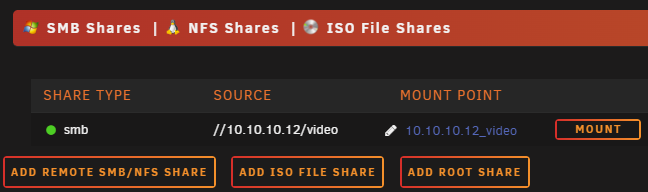
Hello, I have exactly the same problem as MacDingo had. My system: Unraid: 6.10.3 Synology NAS: DS215j When I add the share with SMB, then I can create it successfully. But when I click on Mount, the ICON rotates for a moment and nothing happens after that. I created an extra account on the NAS for this as MacDingo wrote. I have not shared a port -> Do I need to share a port? Does anyone have an idea?