





AceBurn90
Members
-
Joined
-
Last visited
Everything posted by AceBurn90
-
I have of course customized everything for my needs. The strict adherence was more related to the technology. I'm not finished with my current setup yet. I know it makes everything more complicated, but I have more plans for this, for which I want to create a separate thread. But this will be at a later time.
-
It's right the way it is. I have followed the instructions strictly according to SpaceInvader One. ->

-
Found my error -> in my "GAME_PARAMS:" One command was entered incorrectly. A minus sign was missing from "map" ->should be "-map" Thanks/danke ich77
-
I use dynDNS to realize a forwarding via Cloudflare. For this I have an SVR and a CNAME entry. This method previously worked with CS2 and currently works with some other services. Currently with TeamSpeak3, among others. I use port 27015 (Tried also the port in my domain to connect) -> Worked before The container starts automaticly until i stop it I have changed the .cfg to it´s original state (no entries) and deleted the mapcycle.txt (as no file was there before).
-
Hello everybody, 1. I have configured my "game\csgo\server.cfg" and "game\csgo\cfg\mapcycle.txt" Now when I try to connect to my server my cs2 client tells me that there is no server with my Domainname. Not even with internet and local IP. I could play on the several days ago. I already tried to validate my installation. I have undone the files. But this does not change the error. GAME_PARAMS: My GAME_ID is 730 From outside (my network) I can ping my server via my domain -> CS2.xxx.xxx. The only suspicious thing shown in the log is the following: 2. Does the CS2 container even load my server.cfg and mapcycle.txt? (Permission for the files are -rwxrwx---) Best regards Ace
-
How or where can I set a map rotation for CS2?
-
Hello everyone, I have set up my server. 1. Now I would like to pre-generate a certain chunk size before someone joins the server. -> 4000x4000 2. Is there a way to have a dynamic map via docker container? How can I accomplish this? I have not found a command and most other solutions are not suitable for the latest vanilla Minecraft version. Best regards Ace
-
Hello everyone, I am running a "Binhex-Minecraftserver" Docker container. I have almost everything set up. Now I would like to pre-generate a certain chunk size before someone joins the server. -> 4000x4000 How can I accomplish this? I have not found a command and most other solutions are not suitable for the latest vanilla Minecraft version. Best regards Ace
-
Hallo, Kurz und bündig Ich habe zwei Shares (hier ein Beispiel) -> 1. Share & 2. share Selber Name aber Großschreibung sind unterschiedlich. Die Korrektur an dem Betroffenen Dockereinstellungen ist schon vorgenommen und die Daten verschoben worden. Nun kann ich aber einen Ordner mit Unterordner nicht löschen. Jetzt muss ich nur noch die leeren Ordner löschen. Ich habe das Unraid System im abgesicherten Modus und das Array ist eingebunden. Wie kann ich mit der Command-Line zum Ordner in der Share navigieren und dann löschen -> Step-by-Step Die zu löschende Ordnerstruktur ist in /mnt/user/share Wie ich die Share anschließend lösche weiß ich bereits. Vielen dank für eure Hilfe.
-
I am now using you modifyed XML and it works. I can not tell exactly why. I have added the Registry URL: https://registry.hub.docker.com/r/frosty5689/hath And changed Network Type to Host Then I changed my file path from: cache - /mnt/user/hath/cache/ Data - /mnt/user/hath/data Downloads - /mnt/user//hath/download Logs - /mnt/user/hath/log Tmp - /mnt/user/hath/tmp to (see "appdata" changes) cache - /mnt/user/hath/cache/ Data - /mnt/user/appdata/hath/data Downloads - /mnt/user/appdata/hath/download Logs - /mnt/user/appdata/hath/log Tmp - /mnt/user/appdata/hath/tmp After that, it worked. Thanks for your effort
-
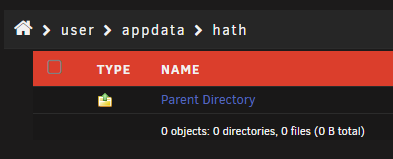
I have already written several times that the file is correctly saved and the content is also correct, because it has already worked like this for 3 years. Can you took a screenshot auf your appdata/hath folder and what it looks like?
-
I have swapped ID and KEY in the Text. In the Screenshot you can see that I have it right side up. Since the file was generated automatically by the program on my old Windows desktop "server" three years ago. This means that there must be some other problem. I also just noticed that there is nothing in my appdata folder in the hath folder.
-
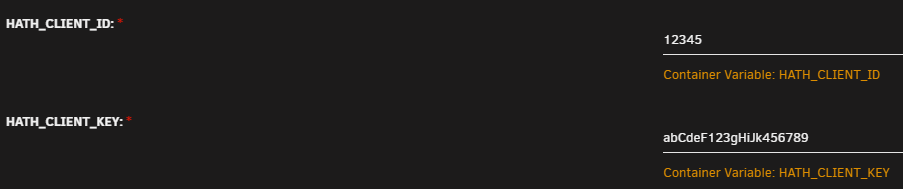
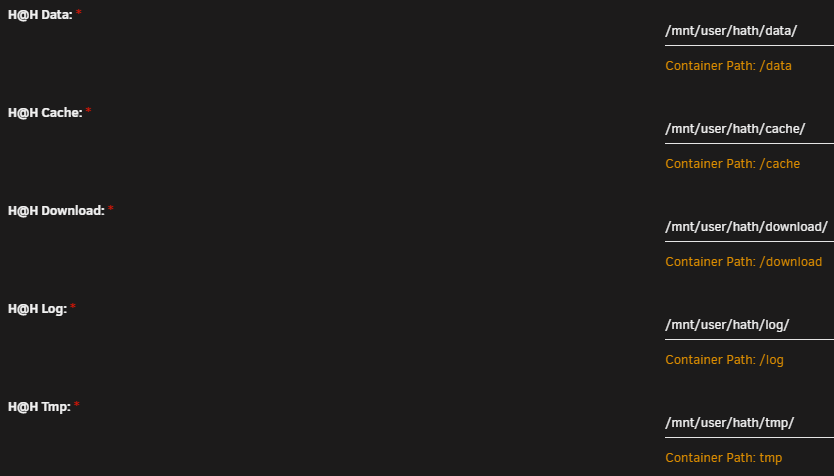
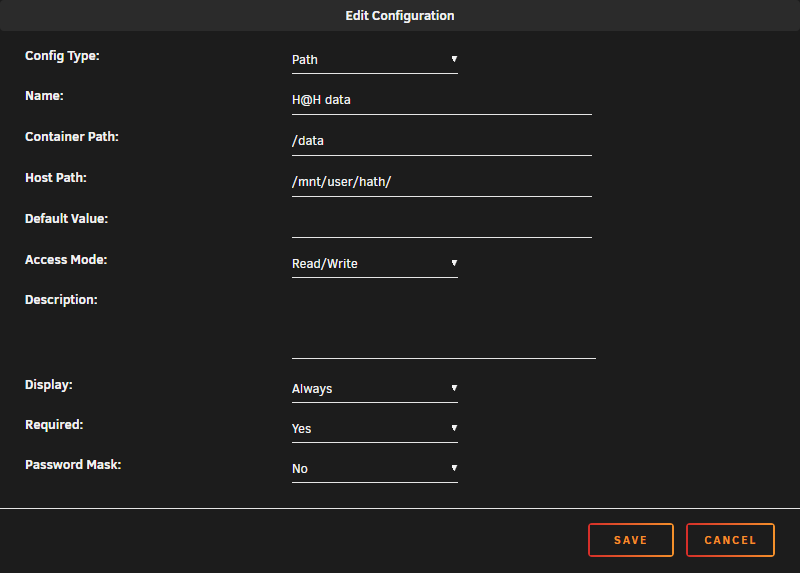
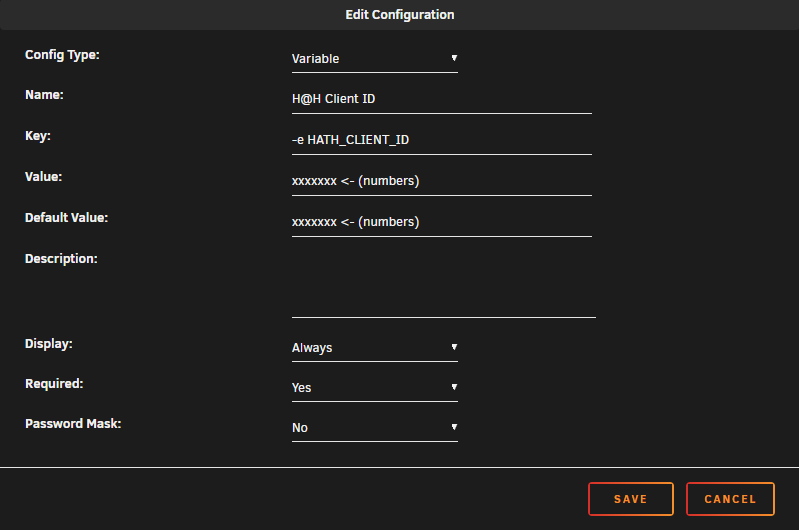
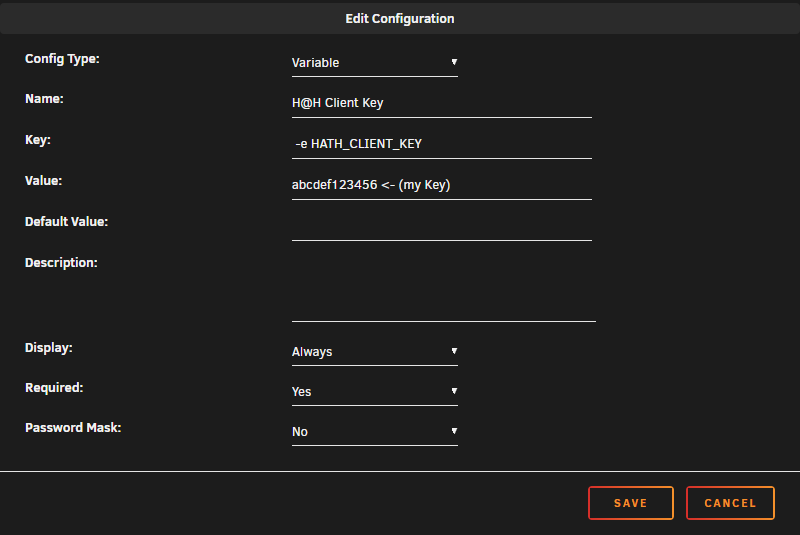
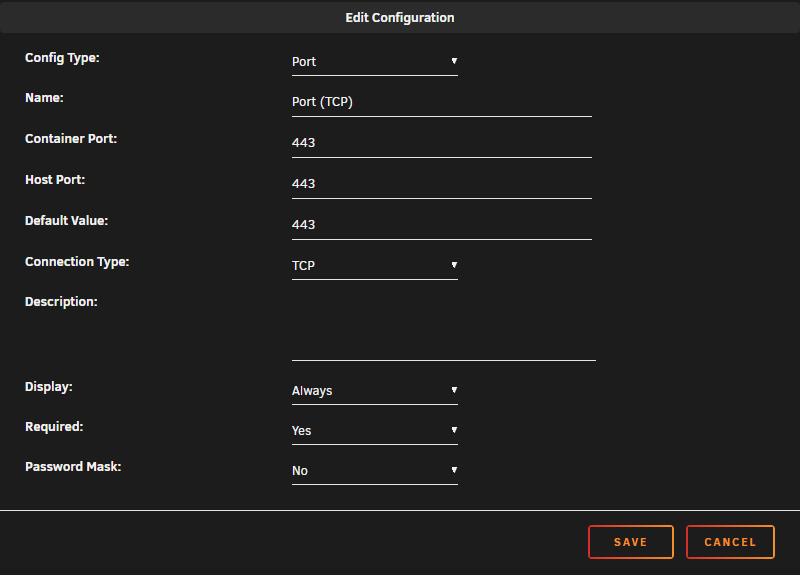
What do you mean by "youre missing the enviroment variables"? The HATH_CLIENT_KEY consists of 5 numbers which I have entered. The HATH_CLIENT_ID consists of capital and small letters and numbers, which I have also entered. HATH_CLIENT_KEY - 12345 (not my key) HATH_CLIENT_ID - abCdeF123gHiJk456789 (not my ID) In "/mnt/user/hath/data/" there is a file "client_login". In this file is the following text -> Note the dash after 12345 (adjusted): 12345-abCdeF123gHiJk456789 And while we're at it, in the second screenshot here, is the file location correct like this?
-
Now I have saved my files (took 2.5 days). After that I could start the Docker Container for the first time but I got this error:
-
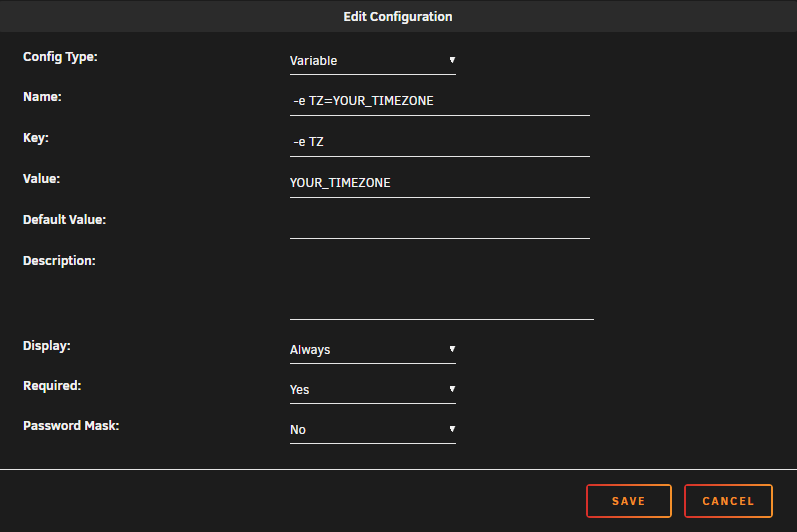
Thanks. I have changed this part. But what do I have to enter in the timezone (TZ) variable so that it gives my correct time? Is this the correct format? -> Europe/Berlin
-
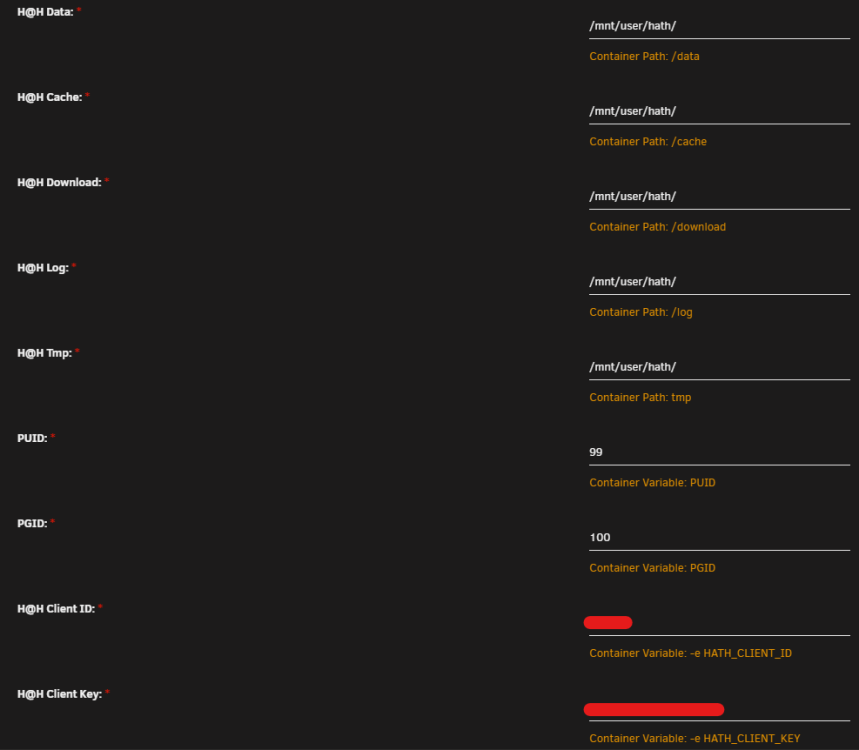
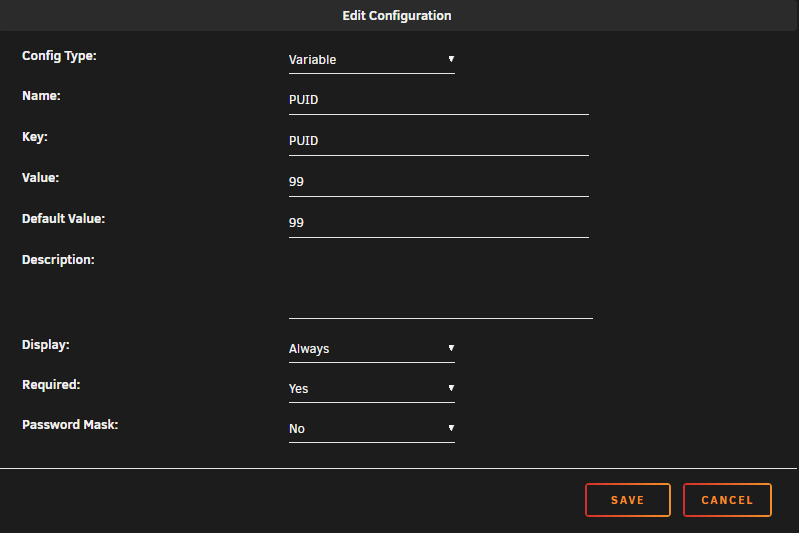
Hello my dear Unraid friends, I am in the process of creating the settings of a Docker container based on frosty5689's template. Template: https://hub.docker.com/r/frosty5689/hath My knowledge level: I am working in IT but am not a developer and have little experience with Docker. I have only used templates and at best adjusted some values and created shares. Actual state: - Repository: frosty5689/hath:latest - Network Type: Bridge - Nothing is entered in Extra Parameters & Post Arguments - The share is created: mnt/user/hath - The folders are created in the share: data, cache, download, log, temp - Port TCP 443 is enabled in the firewall (the tool currently works on a Windows machine) If I have forgotten something important, please notify me. My question: 1a. How exactly do I enter the values correctly, which I have specified in the given URL? 1b. How wrongly/correctly have I made the indications which are to be seen in the screenshot? 2. what else do I need to do to make the container work? 3. can you give me good tutorials that will gradually introduce me to Docker? Gladly videos but texts are also welcome. Thank you for your help Screenshots:
-
Sadly it dosn't work. Just tested it.
-
Any idea how to solve my problem? Could a log file help with troubleshooting? If so, which one do you need.
-
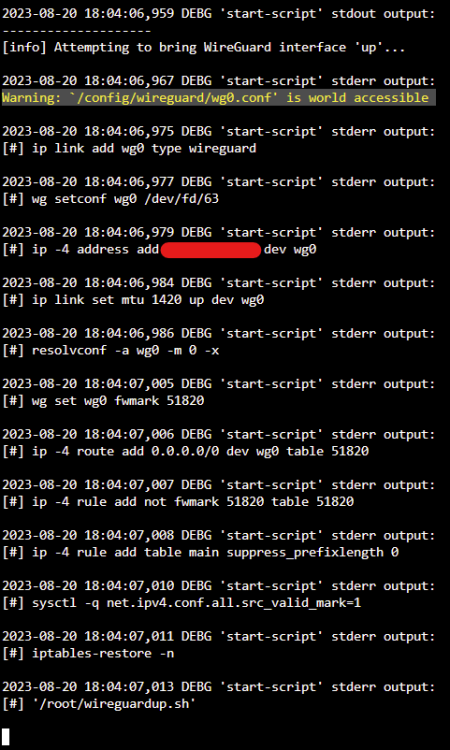
Hello together, I'm trying to get it to work with WireGuard but don't know what to put in VPN_USER & VPN_PASS. The WireGuard configuration of my provider I have stored as follows: /config/wireguard/wg0.conf I have adjusted the following setting: Extra Parameters: --privileged=true (<- nothing else; as described in Q21: https://github.com/binhex/documentation/blob/master/docker/faq/vpn.md) Container Path: /data/MYFOLDER VPN_USER: ?????? VPN_PASS ?????? VPN_PROV: custom VPN_CLIENT: wireguard LAN_NETWORK: MY.LOCAL.NET.WORK/xx At what point do I need the public and private key? In the log I have the following messages (Attachment) Would you be so kind and help me please. Thank you!
-
Hey @ich777, just a quick question. Is in 7DaysToDie version 21 available and how can I check what Version is installed? I already restartet the server but dont know if the old or new version is currently running. UPDATE: Nevermind... just got the update notification. Several minutes ago there was no update available. UPDATE 2: Hmm... was a Docker-update and not a game-update. UPDATE 3: My bad... In the Docker settings you (me) have to set the game id to "294420 -beta latest_experimental" for it to work.
-
The latest version should be available now. https://www.curseforge.com/minecraft/modpacks/vault-hunters-1-18-2/files/4557203 PS. Thanks for the docker container. ❤️
-
Does anyone know, when update 10 is available und how to update when its out?
-
How do I find out what/where my USB connected BluRay drive is called/connected? This is shown to me in the dashboard -> ASUS BW-16D1HT 3.10 /dev/sr0 1.07GB UPDATE: Everything you need can be found here: https://github.com/jlesage/docker-makemkv#access-to-optical-drives In my case I just had to start MakeMKV once and look in the log. At the beginning it states your detected optical drive which you can add in "Additional Requirements:"
-
Hello dear Unraid communiry, my server has crashed about 2 or 3 times already without me knowing why. I wanted to mention that I swapped my Ryzen 5700x for a Ryzen 3900x about two months ago. I don't know if this is the reason. I can't think of anything else that could be the cause. I also can't tell what is causing the failure and also when it occurs. Here is the Fix Common Problems error: The diagnostic file may give more information. I created it right after a reboot of the last failure. If you need more info I will answer as soon as possible. Best regards Ace alent-diagnostics-20221224-2259.zip

-
Problem solved by deleting my "/mnt/user/system/docker/installed/" folder and installing my docker again via previouis installed apps with my config.




