





Gothan
Members
-
Joined
-
Last visited
-
I finally changed the SSL/TLS setting from Yes to Strict and everything was back to normal.
-
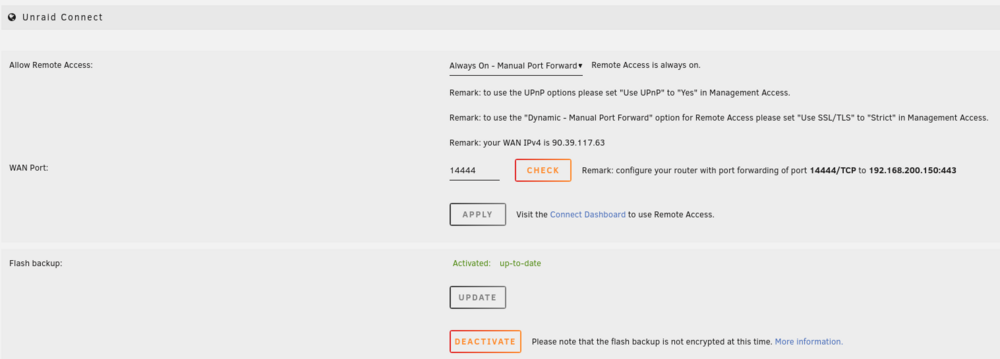
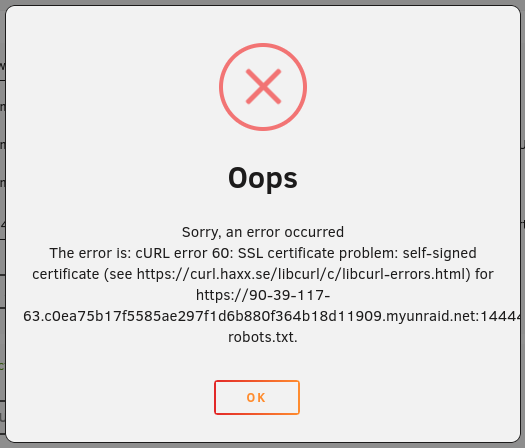
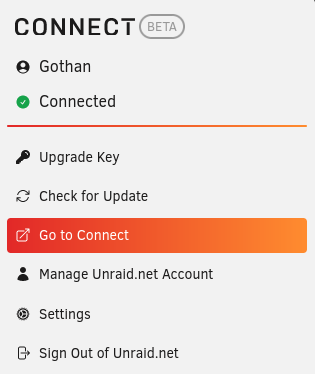
Hi everyone, Since a few days, my remote access to my Unraid server is not working. The remote access was OK previously and nothing was changed from my side in the configuration. Everything seems to be OK in the Unraid settings : Here is the error message displayed when i click on the check button : The configuration of the router seems to be OK : Can you please help me to understand what is happening ? Thanks in advance for your help. Regards,

-
Hi JorgeB, After a last reboot of my router, everything seems to be back to normal. Sorry for the disturbance.
-
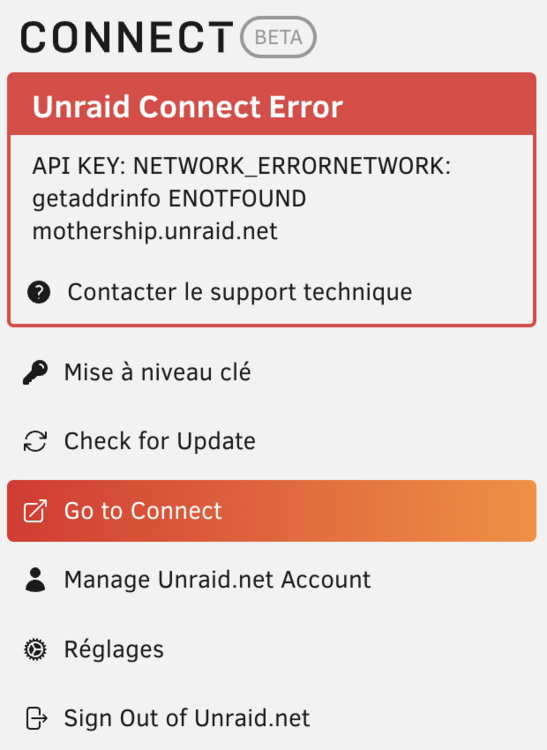
Hi everyone, Since this morning, Unraid Connect is facing an error : the server is not able to connect to internet. I've tried to change to DNS (which was running correctly until now) and set it to 8.8.8.8 but nothing changes and the server is still not able to be connected to internet (no update possible for plugins, docker container,...). Here is the error message : node-diagnostics-20240527-1034.zip Thanks in advance for your help.
-
Hi all, At the end, the issue was due to the Fan Auto Control plugin : the refresh interval was set to 0 minutes. I've reinstalled the system (the solution was not found at this time) and everything was fine and i was able to reproduce the problem. Regards,
-
i've stopped the array to test if the problem was also occuring when the array is stopped. I've installed Unraid some months ago and it was not working like this previously, especially since installing an SSD drive to manage the cache In fact, my problem is not exactly the same as pho because my disks are running all the time from the beginning : no spin down configured in the system because i think it is better for the disks to stay awake all the time. But since some days, there's a huge amount of disks access and i don't understand why. I have 3 disks for the storage (6 To + 6 To + 12 To) + 1 parity disk (12 To) and 1 SSD disk for the cache (1 To). Everything were working properly for months with some disks access per minute (the activity led was blinking time to time). Since some days from now, the disks access are really huge and i can hear and see this huge activity that i can't explain. (the activity led is stay on all the time)...
-
Hi, I am very interested in the solutions to implement or test to resolve the problem because for several days now I have had a problem that strongly resembles the one mentioned by pho. My disks are constantly spinning intensively for no reason, even when the array is stopped. No read/write appears in the Unraid interface but I see and hear the disks working. .... Feb 14 16:45:30 NODE emhttpd: Spinning up all drives... Feb 14 16:45:30 NODE emhttpd: read SMART /dev/sdd Feb 14 16:45:30 NODE emhttpd: read SMART /dev/sde Feb 14 16:45:30 NODE emhttpd: read SMART /dev/sdb Feb 14 16:45:30 NODE emhttpd: read SMART /dev/sdf Feb 14 16:45:30 NODE emhttpd: read SMART /dev/sdc Feb 14 16:45:30 NODE emhttpd: read SMART /dev/sda Feb 14 16:45:30 NODE emhttpd: read SMART /dev/sdg .... I am currently on vacation and I have exceptionally stopped my server while waiting to find a solution on the forum. When the problem appeared, my server was in version 6.12.6 and upgrading to version 6.12.8 did not change the problem. Thank you in advance for any help you can give me as I am far from being an expert on the subject. node-diagnostics-20240214-1647.zip
-
I've now deactived all the redirections, except the one for Unraid access. i'm pretty sure that i've not been hacked because even if the redirection configuration was awful, i have a stroing password on the serevr and most of my share are in private mode. Thinking about what Trurl says : 77.128.153.87 is pointing to SFR, my mobile phone provider. This can't be due to a connexion made from my phone through Unraid connect? I sometimes proceed like this when i'm not at home for my job. And how to explain the huge amount of disks access (even when the array is stopped)? Here is my configuration for the server : I have 3 disks for the storage (6 To + 6 To + 12 To connected to the SATA connectors on the motherboard) + 1 parity disk (12 To) and 1 SSD disk for the cache (1 To - connected through a PCI SATA controller card because there's only 4 SATA ports on the motherboard). Could this be a physical problem (the SATA controller card for example) Everything were working properly for months with some disks access per minute (the activity led was blinking time to time). Since some days from now, the disks access are really huge and i can hear and see this huge activity that i can't explain. (the activity led is stay on all the time)... Thank you once again for any help you can give me to resolve this issue.

-
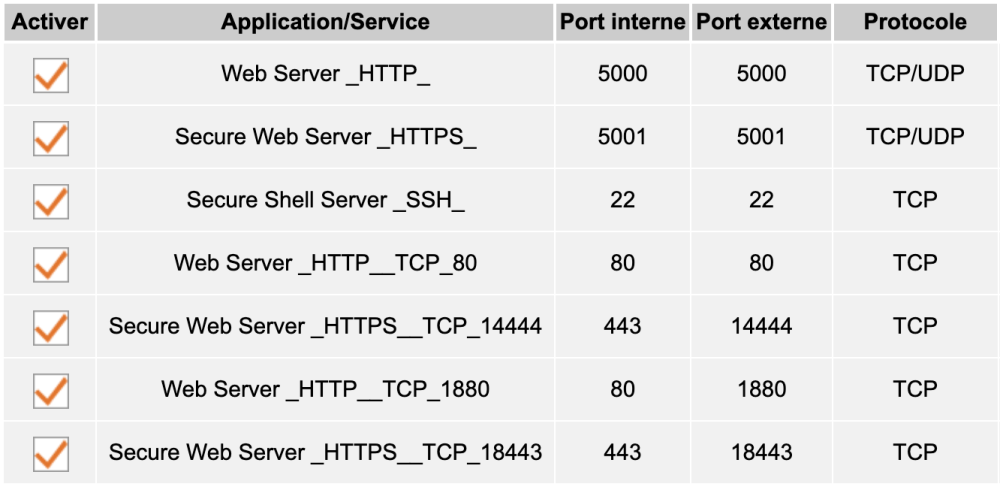
OK, not a good news... As previously said, I'm not knowledgeable on this point : what is your suggestion ? The redirections regarding the Secure Web Server (Secure Web Server _HTTPS__TCP_14444) is not needed for Unraid Connect ? I really appreciate any advice or any changes to make to secure my connection but also to understand why one of the disks (or several) has these accesses which I cannot explain.
-
I've checked the configuration done in my router and here are the redirections regsrding the ports : I'm not very knowledgeable about networks and redirections but after reading the document mentioned above I don't think my NAS is connected to the internet. Please let me know if you think the setup is wrong. If the problem is not external, what can explain these permanent disk accesses which are not seen in the disk activities page on the user interface and which occur even when the array is stopped ? Thank you once again for any help you can give me.
-
I'm going to check but i'm pretty sure that my NAS is not connected to internet. How you can explain that the HDD drives are working but nothing is visible on the HDD activity on the main page of the UI ? The activity on the HDD(s) is going on even when the array is stopped. I really don't know what to do at the moment and i really don't understand what is going on.....
-
Hi, I don't think that my NAS is connected to internet. Can you help me to check if it is really the case because I don't recognize those IP addresses ? Thanks for your help.
-
Hi everyone, I've been having a problem for a few days with my Unraid server. For several days, my Unraid server has been constantly accessing disks and I don't understand why. The activity of one or more hard drives is not visible on the main UI page which is supposed to show reads/writes to the drives. I also notice that all my photos have disappeared from the disk on which they were stored: only the main directory is visible but all the subdirectories containing the photos have disappeared! I don't know what is happening on the server and 2 or 3 restarts have not fixed the problem. So I ran the diagnostic on the NAS and I attached the result file in the hope that someone can enlighten me on what happens when reading the files. I sincerely hope that I haven't lost all of my personal photos.... Thank you in advance for your help. node-diagnostics-20240214-1647.zip
-
Bonjour à tous, Je rencontre un souci depuis quelques jours avec mon serveur Unraid. Depuis quelques jours, mon serveur Unraid fait des accès disque en permanence et je ne comprends pourquoi. L'activité d'un ou plusieurs disques durs n'est pas visible sur la page principale de l'interface utilisateur qui est censée montrer les lectures/écritures sur les disques. Je constate également que toutes mes photos ont disparu du disque sur lequel elles étaient stockées : seul le répertoire principal est visible mais tous les sous-répertoires contenant les photos ont disparus ! Je ne sais pas ce qui se passe sur le serveur et 2 ou 3 redémarrage n'ont pas réglé le problème. J'ai donc lancé le diagnostic sur le NAS et je joins le fichier du résultat en espérant que quelqu'un pourra m'éclairer sur ce qui se passe à la lecture des fichiers lors. J'espère sincèrement que je n'ai pas perdu l'ensemble des mes photos personnelles.... Merci d'avance pour votre aide. node-diagnostics-20240214-1647.zip
-
Gothan changed their profile photo
-
Hi everyone, I have a question regarding the new possibility to unlock the items on the amin dashboard in order to sort them. This is a nice new feature but when there's a new release of the software, the dashboard is back to standard after the reboot and all the changes have to be done again. Is there any possibility to keep the changes even after a software upgrade ? Thanks.


