





Gaeroce
Members
-
Joined
-
Last visited
Everything posted by Gaeroce
-
i think its a BUG

-
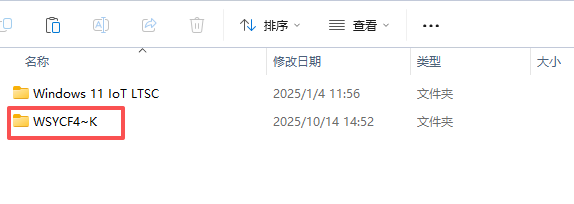
In my virtual machine folder directory, there is a directory named Windows, which still cannot be deleted using the RM command. It prompts that it is occupied, but it is an empty folder. When I share this directory on Windows, it displays as messy code. After I delete it from Windows and refresh, it automatically appears again. What kind of folder is this? Why can't it be deleted? This problem has been bothering me for a long time. Shortly after I try some commands to force deletion, it will reappear.

-
When I installed the Intel GPU TOP plugin, I can now display GPU work normally. thank you.
-
It doesn't seem to work in Unriad7.0RC-1
-
Do I need to compile OpenCore to enable kernel display after successfully completing the installation? Otherwise, his interface cannot perform basic operations
-
全新安装的unRaid7.0 硬盘全部格式化重新安装部署的,装完发现共享设置里面有个错误。逼死强迫症啊

