





RodWorks
Members
-
Joined
-
Last visited
Everything posted by RodWorks
-
Where do I send the bug report?
-
2020/03/05 19:49:00.742649 apps.go:51: [Sonarr] Updated (http://192.168.1.50:8989/): 1 Items Queued 2020/03/05 19:49:00.742895 apps.go:71: [Radarr] Updated (http://192.168.1.50:7878/): 0 Items Queued 2020/03/05 19:49:00.743181 apps.go:89: [DEBUG] Sonarr (http://192.168.1.50:8989/): Item Waiting for Import: Star.Trek.Picard.S01E07.iNTERNAL.1080p.WEB.H264-AMRAP 2020/03/05 19:49:00.743378 pollers.go:121: [DEBUG] Sonarr: Status: Star.Trek.Picard.S01E07.iNTERNAL.1080p.WEB.H264-AMRAP (Extracted, Awaiting Import, elapsed: 16h7m36s, found: true) 2020/03/05 19:49:00.743527 logs.go:57: [Unpackerr] Queue: [0 waiting] [0 queued] [0 extracting] [1 extracted] [0 imported] [0 failed] [0 deleted], Totals: [0 restarts] [1 finished] Was working for a week or so, no changes except for the docker updates. Seems to be unpacking and Sonarr is importing, but then unpackerr doesn't know it's been imported and it sits. Same issue is happening with Radarr also.

-
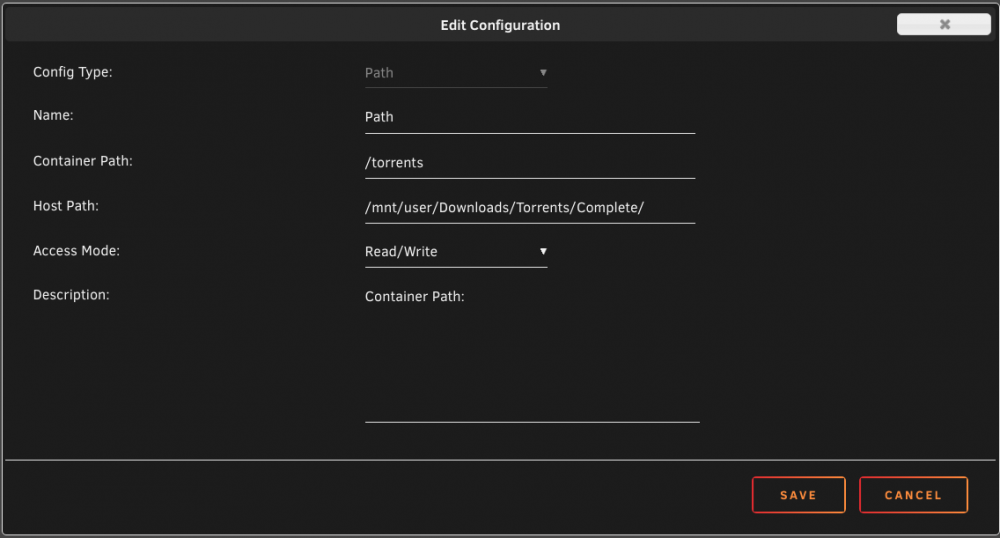
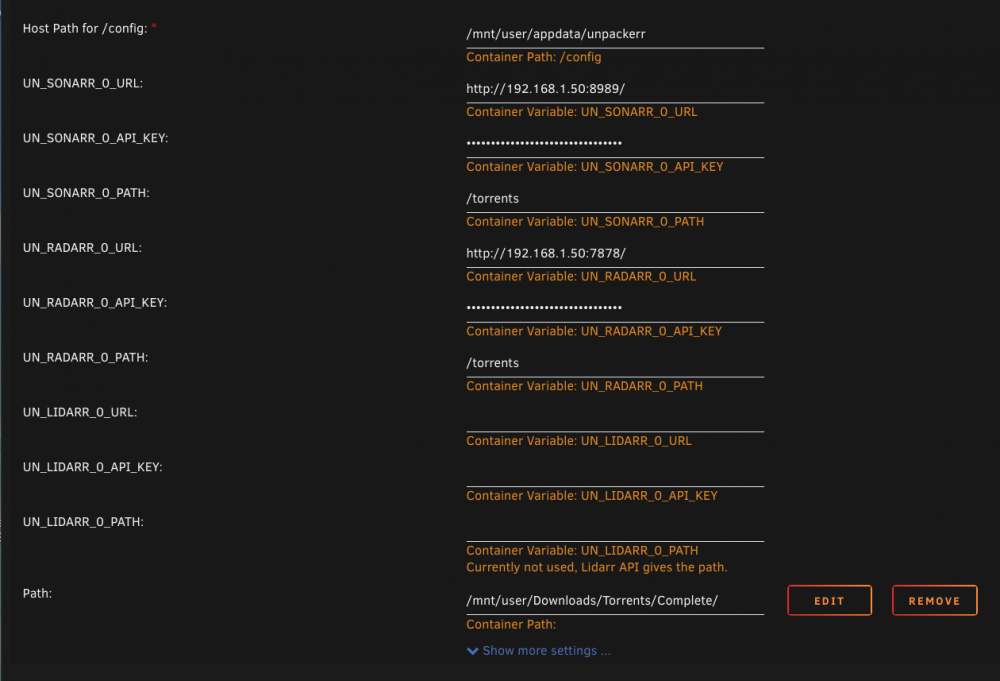
Well, I'd make the "host path" a mandatory field at the top of the template not a hidden section at the bottom. Then. if "/torrents" is all that needs to be in the *arr path fields they don't seem to be necessary and could just be default values. I think most people are going to assume that the path is the completed directory which doesn't seem to be the case in the template.
-
You're welcome. It's not you, the container setup is very confusing.
-
I did the same thing as you did in my first attempt to set this up. Here's what you need to do: Add a path like below, except use "/mnt/user/Download/complete/" Change your Sonarr and Radarr paths to "/torrents".
-
Thanks, got it working.
-
Got it thanks, I was trying to run the command in the unpackerr CLI not the general Unraid CLI. Here's my log, seems it can't find extractable files in the two folders? Linux 4.19.98-Unraid. root@Unraid:~# docker logs unpackerr [s6-init] making user provided files available at /var/run/s6/etc...exited 0. [s6-init] ensuring user provided files have correct perms...exited 0. [fix-attrs.d] applying ownership & permissions fixes... [fix-attrs.d] done. [cont-init.d] executing container initialization scripts... [cont-init.d] 00-start-container: executing... ---------------------------------------------------------------------- ENVIRONMENT ---------------------------------------------------------------------- PUID=99 PGID=100 UMASK=002 TZ=America/New_York ARGS= DEBUG=no|yes ---------------------------------------------------------------------- Executing usermod... [cont-init.d] 00-start-container: exited 0. [cont-init.d] 01-configure-app: executing... No custom "unpackerr.conf" found. Using defaults. [cont-init.d] 01-configure-app: exited 0. [cont-init.d] done. [services.d] starting services [services.d] done. 2020/02/21 08:52:26 [INFO] Unpackerr v0.7.0-beta3-89 Starting! (PID: 215) 2020/02/21 08:52:26 ==> Startup Settings <== 2020/02/21 08:52:26 => Sonarr Config: 1 server: http://192.168.1.50:8989/ @ /mnt/user/Downloads/Torrents/Complete/ (apikey: true, timeout: 10s) 2020/02/21 08:52:26 => Radarr Config: 1 server: http://192.168.1.50:7878/ @ /mnt/user/Downloads/Torrents/Complete/ (apikey: true, timeout: 10s) 2020/02/21 08:52:26 => Lidarr Config: 0 servers 2020/02/21 08:52:26 => Folder Config: 0 paths 2020/02/21 08:52:26 => Parallel: 1 2020/02/21 08:52:26 => Interval: 2m0s 2020/02/21 08:52:26 => Delete Delay: 5m0s 2020/02/21 08:52:26 => Start Delay: 1m0s 2020/02/21 08:52:26 => Retry Delay: 5m0s 2020/02/21 08:52:26 => Debug Logs: true 2020/02/21 08:52:29.335323 apps.go:50: [Sonarr] Updated (http://192.168.1.50:8989/): 1 Items Queued 2020/02/21 08:52:29.336547 apps.go:70: [Radarr] Updated (http://192.168.1.50:7878/): 1 Items Queued 2020/02/21 08:52:29.336603 handlers.go:52: [DEBUG] Sonarr: Item Waiting for Start Delay: Star.Trek.Picard.S01E05.REPACK.iNTERNAL.1080p.WEB.H264-AMRAP 2020/02/21 08:52:29.336616 handlers.go:52: [DEBUG] Radarr: Item Waiting for Start Delay: Queen.and.Slim.2019.1080p.BluRay.x264-YOL0W 2020/02/21 08:53:29.328900 helpers.go:65: [Unpackerr] Queue: [2 waiting] [0 queued] [0 extracting] [0 extracted] [0 imported] [0 failed] [0 deleted], Totals: [0 restarts] [0 finished] 2020/02/21 08:54:29.334189 apps.go:50: [Sonarr] Updated (http://192.168.1.50:8989/): 1 Items Queued 2020/02/21 08:54:29.335699 apps.go:70: [Radarr] Updated (http://192.168.1.50:7878/): 1 Items Queued 2020/02/21 08:54:29.335815 handlers.go:58: [Sonarr] Completed item still waiting: Star.Trek.Picard.S01E05.REPACK.iNTERNAL.1080p.WEB.H264-AMRAP, no extractable files found at: /mnt/user/Downloads/Torrents/Complete/Star.Trek.Picard.S01E05.REPACK.iNTERNAL.1080p.WEB.H264-AMRAP 2020/02/21 08:54:29.335845 handlers.go:58: [Radarr] Completed item still waiting: Queen.and.Slim.2019.1080p.BluRay.x264-YOL0W, no extractable files found at: /mnt/user/Downloads/Torrents/Complete/Queen.and.Slim.2019.1080p.BluRay.x264-YOL0W 2020/02/21 08:54:29.335861 pollers.go:116: [DEBUG] Sonarr: Status: Star.Trek.Picard.S01E05.REPACK.iNTERNAL.1080p.WEB.H264-AMRAP (status: Waiting, pre-Queue, elapsed: 2m0s) 2020/02/21 08:54:29.335873 pollers.go:116: [DEBUG] Radarr: Status: Queen.and.Slim.2019.1080p.BluRay.x264-YOL0W (status: Waiting, pre-Queue, elapsed: 2m0s) 2020/02/21 08:54:29.335898 helpers.go:65: [Unpackerr] Queue: [2 waiting] [0 queued] [0 extracting] [0 extracted] [0 imported] [0 failed] [0 deleted], Totals: [0 restarts] [0 finished] 2020/02/21 08:55:29.328943 helpers.go:65: [Unpackerr] Queue: [2 waiting] [0 queued] [0 extracting] [0 extracted] [0 imported] [0 failed] [0 deleted], Totals: [0 restarts] [0 finished] 2020/02/21 08:56:29.334021 apps.go:50: [Sonarr] Updated (http://192.168.1.50:8989/): 1 Items Queued 2020/02/21 08:56:29.335660 apps.go:70: [Radarr] Updated (http://192.168.1.50:7878/): 1 Items Queued 2020/02/21 08:56:29.335735 handlers.go:58: [Sonarr] Completed item still waiting: Star.Trek.Picard.S01E05.REPACK.iNTERNAL.1080p.WEB.H264-AMRAP, no extractable files found at: /mnt/user/Downloads/Torrents/Complete/Star.Trek.Picard.S01E05.REPACK.iNTERNAL.1080p.WEB.H264-AMRAP 2020/02/21 08:56:29.335757 handlers.go:58: [Radarr] Completed item still waiting: Queen.and.Slim.2019.1080p.BluRay.x264-YOL0W, no extractable files found at: /mnt/user/Downloads/Torrents/Complete/Queen.and.Slim.2019.1080p.BluRay.x264-YOL0W 2020/02/21 08:56:29.335781 pollers.go:116: [DEBUG] Sonarr: Status: Star.Trek.Picard.S01E05.REPACK.iNTERNAL.1080p.WEB.H264-AMRAP (status: Waiting, pre-Queue, elapsed: 4m0s) 2020/02/21 08:56:29.335792 pollers.go:116: [DEBUG] Radarr: Status: Queen.and.Slim.2019.1080p.BluRay.x264-YOL0W (status: Waiting, pre-Queue, elapsed: 4m0s) 2020/02/21 08:56:29.335806 helpers.go:65: [Unpackerr] Queue: [2 waiting] [0 queued] [0 extracting] [0 extracted] [0 imported] [0 failed] [0 deleted], Totals: [0 restarts] [0 finished] 2020/02/21 08:57:29.328823 helpers.go:65: [Unpackerr] Queue: [2 waiting] [0 queued] [0 extracting] [0 extracted] [0 imported] [0 failed] [0 deleted], Totals: [0 restarts] [0 finished] 2020/02/21 08:58:29.334088 apps.go:50: [Sonarr] Updated (http://192.168.1.50:8989/): 1 Items Queued 2020/02/21 08:58:29.335818 apps.go:70: [Radarr] Updated (http://192.168.1.50:7878/): 1 Items Queued 2020/02/21 08:58:29.335864 handlers.go:58: [Sonarr] Completed item still waiting: Star.Trek.Picard.S01E05.REPACK.iNTERNAL.1080p.WEB.H264-AMRAP, no extractable files found at: /mnt/user/Downloads/Torrents/Complete/Star.Trek.Picard.S01E05.REPACK.iNTERNAL.1080p.WEB.H264-AMRAP 2020/02/21 08:58:29.335907 handlers.go:58: [Radarr] Completed item still waiting: Queen.and.Slim.2019.1080p.BluRay.x264-YOL0W, no extractable files found at: /mnt/user/Downloads/Torrents/Complete/Queen.and.Slim.2019.1080p.BluRay.x264-YOL0W 2020/02/21 08:58:29.335921 pollers.go:116: [DEBUG] Radarr: Status: Queen.and.Slim.2019.1080p.BluRay.x264-YOL0W (status: Waiting, pre-Queue, elapsed: 6m0s) 2020/02/21 08:58:29.335931 pollers.go:116: [DEBUG] Sonarr: Status: Star.Trek.Picard.S01E05.REPACK.iNTERNAL.1080p.WEB.H264-AMRAP (status: Waiting, pre-Queue, elapsed: 6m0s) 2020/02/21 08:58:29.336324 helpers.go:65: [Unpackerr] Queue: [2 waiting] [0 queued] [0 extracting] [0 extracted] [0 imported] [0 failed] [0 deleted], Totals: [0 restarts] [0 finished] 2020/02/21 08:59:29.328834 helpers.go:65: [Unpackerr] Queue: [2 waiting] [0 queued] [0 extracting] [0 extracted] [0 imported] [0 failed] [0 deleted], Totals: [0 restarts] [0 finished] 2020/02/21 09:00:29.333942 apps.go:50: [Sonarr] Updated (http://192.168.1.50:8989/): 1 Items Queued 2020/02/21 09:00:29.335358 apps.go:70: [Radarr] Updated (http://192.168.1.50:7878/): 1 Items Queued 2020/02/21 09:00:29.335418 handlers.go:58: [Sonarr] Completed item still waiting: Star.Trek.Picard.S01E05.REPACK.iNTERNAL.1080p.WEB.H264-AMRAP, no extractable files found at: /mnt/user/Downloads/Torrents/Complete/Star.Trek.Picard.S01E05.REPACK.iNTERNAL.1080p.WEB.H264-AMRAP 2020/02/21 09:00:29.335436 handlers.go:58: [Radarr] Completed item still waiting: Queen.and.Slim.2019.1080p.BluRay.x264-YOL0W, no extractable files found at: /mnt/user/Downloads/Torrents/Complete/Queen.and.Slim.2019.1080p.BluRay.x264-YOL0W 2020/02/21 09:00:29.335468 pollers.go:116: [DEBUG] Sonarr: Status: Star.Trek.Picard.S01E05.REPACK.iNTERNAL.1080p.WEB.H264-AMRAP (status: Waiting, pre-Queue, elapsed: 8m0s) 2020/02/21 09:00:29.335479 pollers.go:116: [DEBUG] Radarr: Status: Queen.and.Slim.2019.1080p.BluRay.x264-YOL0W (status: Waiting, pre-Queue, elapsed: 8m0s) 2020/02/21 09:00:29.335497 helpers.go:65: [Unpackerr] Queue: [2 waiting] [0 queued] [0 extracting] [0 extracted] [0 imported] [0 failed] [0 deleted], Totals: [0 restarts] [0 finished] 2020/02/21 09:01:29.328871 helpers.go:65: [Unpackerr] Queue: [2 waiting] [0 queued] [0 extracting] [0 extracted] [0 imported] [0 failed] [0 deleted], Totals: [0 restarts] [0 finished] 2020/02/21 09:02:29.334039 apps.go:50: [Sonarr] Updated (http://192.168.1.50:8989/): 1 Items Queued 2020/02/21 09:02:29.335278 apps.go:70: [Radarr] Updated (http://192.168.1.50:7878/): 1 Items Queued 2020/02/21 09:02:29.335323 handlers.go:58: [Sonarr] Completed item still waiting: Star.Trek.Picard.S01E05.REPACK.iNTERNAL.1080p.WEB.H264-AMRAP, no extractable files found at: /mnt/user/Downloads/Torrents/Complete/Star.Trek.Picard.S01E05.REPACK.iNTERNAL.1080p.WEB.H264-AMRAP 2020/02/21 09:02:29.335364 handlers.go:58: [Radarr] Completed item still waiting: Queen.and.Slim.2019.1080p.BluRay.x264-YOL0W, no extractable files found at: /mnt/user/Downloads/Torrents/Complete/Queen.and.Slim.2019.1080p.BluRay.x264-YOL0W 2020/02/21 09:02:29.335379 pollers.go:116: [DEBUG] Sonarr: Status: Star.Trek.Picard.S01E05.REPACK.iNTERNAL.1080p.WEB.H264-AMRAP (status: Waiting, pre-Queue, elapsed: 10m0s) 2020/02/21 09:02:29.335401 pollers.go:116: [DEBUG] Radarr: Status: Queen.and.Slim.2019.1080p.BluRay.x264-YOL0W (status: Waiting, pre-Queue, elapsed: 10m0s) 2020/02/21 09:02:29.335424 helpers.go:65: [Unpackerr] Queue: [2 waiting] [0 queued] [0 extracting] [0 extracted] [0 imported] [0 failed] [0 deleted], Totals: [0 restarts] [0 finished] 2020/02/21 09:03:29.328789 helpers.go:65: [Unpackerr] Queue: [2 waiting] [0 queued] [0 extracting] [0 extracted] [0 imported] [0 failed] [0 deleted], Totals: [0 restarts] [0 finished] 2020/02/21 09:04:29.333799 apps.go:50: [Sonarr] Updated (http://192.168.1.50:8989/): 1 Items Queued 2020/02/21 09:04:29.335699 apps.go:70: [Radarr] Updated (http://192.168.1.50:7878/): 1 Items Queued 2020/02/21 09:04:29.335756 handlers.go:58: [Sonarr] Completed item still waiting: Star.Trek.Picard.S01E05.REPACK.iNTERNAL.1080p.WEB.H264-AMRAP, no extractable files found at: /mnt/user/Downloads/Torrents/Complete/Star.Trek.Picard.S01E05.REPACK.iNTERNAL.1080p.WEB.H264-AMRAP 2020/02/21 09:04:29.335774 handlers.go:58: [Radarr] Completed item still waiting: Queen.and.Slim.2019.1080p.BluRay.x264-YOL0W, no extractable files found at: /mnt/user/Downloads/Torrents/Complete/Queen.and.Slim.2019.1080p.BluRay.x264-YOL0W 2020/02/21 09:04:29.335788 pollers.go:116: [DEBUG] Radarr: Status: Queen.and.Slim.2019.1080p.BluRay.x264-YOL0W (status: Waiting, pre-Queue, elapsed: 12m0s) 2020/02/21 09:04:29.335806 pollers.go:116: [DEBUG] Sonarr: Status: Star.Trek.Picard.S01E05.REPACK.iNTERNAL.1080p.WEB.H264-AMRAP (status: Waiting, pre-Queue, elapsed: 12m0s) 2020/02/21 09:04:29.335818 helpers.go:65: [Unpackerr] Queue: [2 waiting] [0 queued] [0 extracting] [0 extracted] [0 imported] [0 failed] [0 deleted], Totals: [0 restarts] [0 finished] 2020/02/21 09:05:29.328813 helpers.go:65: [Unpackerr] Queue: [2 waiting] [0 queued] [0 extracting] [0 extracted] [0 imported] [0 failed] [0 deleted], Totals: [0 restarts] [0 finished] 2020/02/21 09:06:29.333989 apps.go:50: [Sonarr] Updated (http://192.168.1.50:8989/): 1 Items Queued 2020/02/21 09:06:29.335260 apps.go:70: [Radarr] Updated (http://192.168.1.50:7878/): 1 Items Queued 2020/02/21 09:06:29.335316 handlers.go:58: [Sonarr] Completed item still waiting: Star.Trek.Picard.S01E05.REPACK.iNTERNAL.1080p.WEB.H264-AMRAP, no extractable files found at: /mnt/user/Downloads/Torrents/Complete/Star.Trek.Picard.S01E05.REPACK.iNTERNAL.1080p.WEB.H264-AMRAP 2020/02/21 09:06:29.335342 handlers.go:58: [Radarr] Completed item still waiting: Queen.and.Slim.2019.1080p.BluRay.x264-YOL0W, no extractable files found at: /mnt/user/Downloads/Torrents/Complete/Queen.and.Slim.2019.1080p.BluRay.x264-YOL0W 2020/02/21 09:06:29.335354 pollers.go:116: [DEBUG] Radarr: Status: Queen.and.Slim.2019.1080p.BluRay.x264-YOL0W (status: Waiting, pre-Queue, elapsed: 14m0s) 2020/02/21 09:06:29.335363 pollers.go:116: [DEBUG] Sonarr: Status: Star.Trek.Picard.S01E05.REPACK.iNTERNAL.1080p.WEB.H264-AMRAP (status: Waiting, pre-Queue, elapsed: 14m0s) 2020/02/21 09:06:29.335373 helpers.go:65: [Unpackerr] Queue: [2 waiting] [0 queued] [0 extracting] [0 extracted] [0 imported] [0 failed] [0 deleted], Totals: [0 restarts] [0 finished] 2020/02/21 09:07:29.328778 helpers.go:65: [Unpackerr] Queue: [2 waiting] [0 queued] [0 extracting] [0 extracted] [0 imported] [0 failed] [0 deleted], Totals: [0 restarts] [0 finished] 2020/02/21 09:08:29.333857 apps.go:50: [Sonarr] Updated (http://192.168.1.50:8989/): 1 Items Queued 2020/02/21 09:08:29.335837 apps.go:70: [Radarr] Updated (http://192.168.1.50:7878/): 1 Items Queued 2020/02/21 09:08:29.335899 handlers.go:58: [Sonarr] Completed item still waiting: Star.Trek.Picard.S01E05.REPACK.iNTERNAL.1080p.WEB.H264-AMRAP, no extractable files found at: /mnt/user/Downloads/Torrents/Complete/Star.Trek.Picard.S01E05.REPACK.iNTERNAL.1080p.WEB.H264-AMRAP 2020/02/21 09:08:29.335926 handlers.go:58: [Radarr] Completed item still waiting: Queen.and.Slim.2019.1080p.BluRay.x264-YOL0W, no extractable files found at: /mnt/user/Downloads/Torrents/Complete/Queen.and.Slim.2019.1080p.BluRay.x264-YOL0W 2020/02/21 09:08:29.335941 pollers.go:116: [DEBUG] Sonarr: Status: Star.Trek.Picard.S01E05.REPACK.iNTERNAL.1080p.WEB.H264-AMRAP (status: Waiting, pre-Queue, elapsed: 16m0s) 2020/02/21 09:08:29.335962 pollers.go:116: [DEBUG] Radarr: Status: Queen.and.Slim.2019.1080p.BluRay.x264-YOL0W (status: Waiting, pre-Queue, elapsed: 16m0s) 2020/02/21 09:08:29.335973 helpers.go:65: [Unpackerr] Queue: [2 waiting] [0 queued] [0 extracting] [0 extracted] [0 imported] [0 failed] [0 deleted], Totals: [0 restarts] [0 finished] 2020/02/21 09:09:29.328787 helpers.go:65: [Unpackerr] Queue: [2 waiting] [0 queued] [0 extracting] [0 extracted] [0 imported] [0 failed] [0 deleted], Totals: [0 restarts] [0 finished] root@Unraid:~#
-
Firstly, thank you for the app. It's really the last step I need for a perfect setup. However, I can't seem to get it to work either. Can you please explain how to find the log, I can't make any sense of your post below. I have the paths set to the completed monitored location for both Sonarr and Radarr, but files are just sitting and not getting unpacked.
-
Nope, may have to if I can't find a workaround.
-
The instructions in that link worked thanks. Little sketchy having it turned off all the time though. Wish there was a setting to just ignore a single address.
-
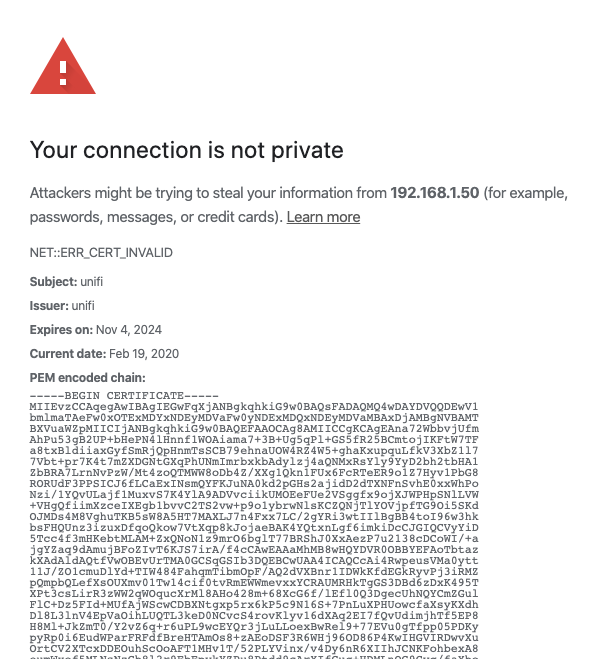
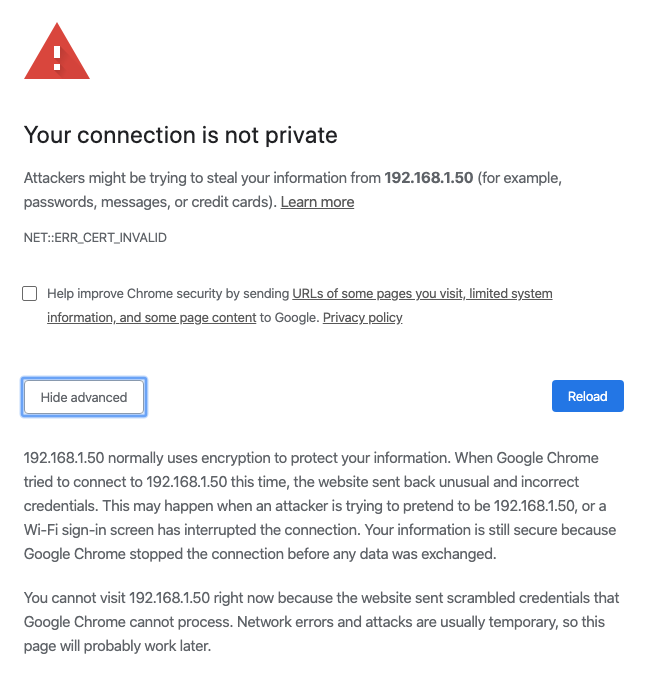
I used to get the proceed anyway option but something changed a few weeks ago.
-
I've always got the SSL Cert Error when loading the Unifi Controller web UI and I would just click Advanced and Proceed Anyway. However, Lately I'm getting a different error in Chrome and can't proceed. Still loads fine in Safari and Firefox. Any ideas on how to fix?
-
So, I would disable the unpacking feature in ruTorrent and let this program handle it? I'm assuming you point this program at your completed downloads folder and it watches for files and unpacks into the same directory? Any setting changes necessary in Radarr or Sonarr?
-
Thanks, I see where they explain the differences between the versions, but don't see how to apply them or change them in an existing setup.
-
Is there a way to change from running the Latest version to LTS?
-
Got it. Thanks Hopefully this solves my issue.
-
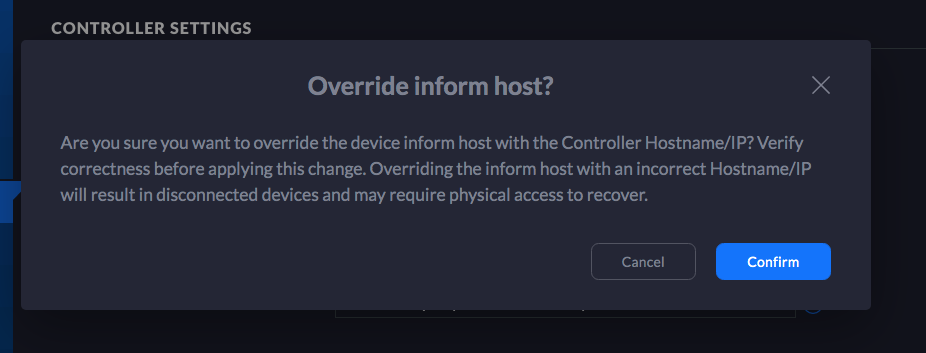
Ok, but it gives me a warning saying I need to make sure that host name is correct or I won't be able to connect. By default it has unifi.yourdomain.com . Do I need to change that or just check the box and leave the default address?
-
No I did not, so I need to put in the ip address of my server:8443 above that?
-
Hi everyone, I decided to move Unifi Controller from my Mac to my existing Unraid server and initially had issues connecting to my two AP's. I figured out it was an port 8080 issue, I think, and changed the port to 8089 in the template. Setup went smoothly and everything worked perfectly for a week until last night, when one of my two AP's started looping between adopted/disconnected. Odd thing was that AP was still connected and wifi working, just not connecting to the Controller. Talked with tech support and we couldn't ssh into either AP and support felt like it was a port issue as well. So, I migrated back to the Mac Controller and everything worked perfectly. Then, later today I decided to try a different port (8083) and had a successful migration back to the Unraid Docker and all is running well again for now. So, just wondering if anyone has experienced this kind of issue or if anyone has any idea what I'm doing wrong? Why would the initial setup work but then lose connection days later with the AP's? Thanks, Matt
-
Been using unraid for 10 years. Such a great product backed by a great community and constant innovation. Thanks.



