





ArveVM
Members
-
Joined
-
Last visited
-
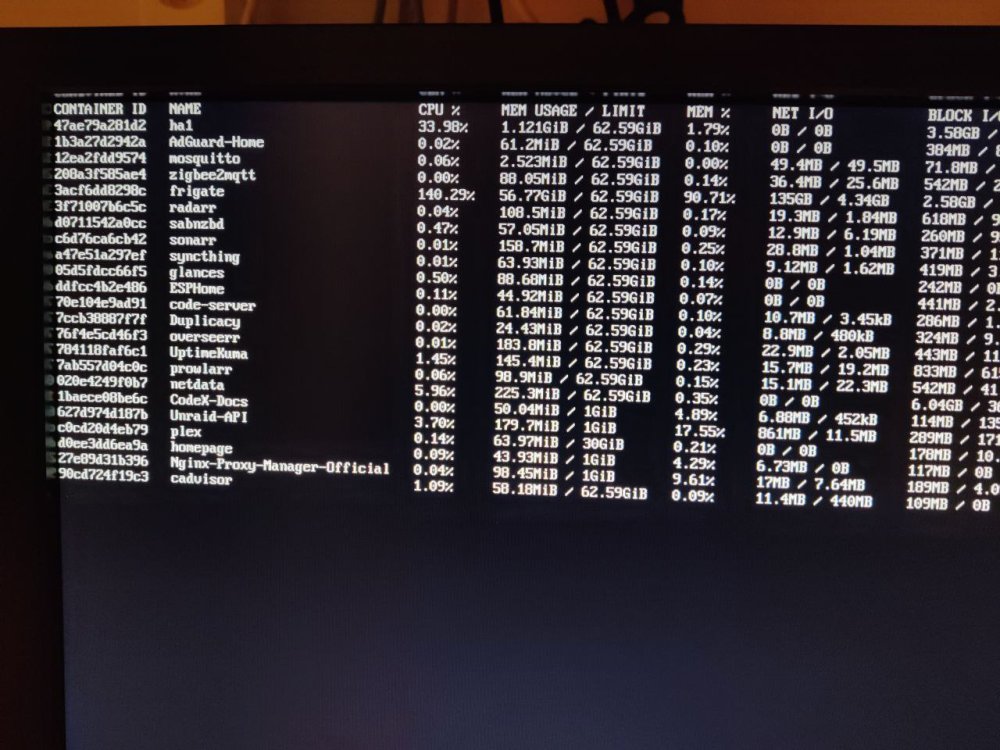
new server-freeze,,, restarted at Oct 26 23:15:58,, Same status,, no ssh, no terminal-login,, but this time I actually had "docker stats" running ,, and it was showing some hefty ram-usage for Frigate !! so rebooted server and set a cap on Frigate (ExtraParameter; --memory=10G ) Attaching syslog if anyone would be so kind to see if there is some useful info - now that we (at least I) suspect Frigate as the ram-hog that is freezing/crashing the server,,, syslog-192.168.2.141.log
-
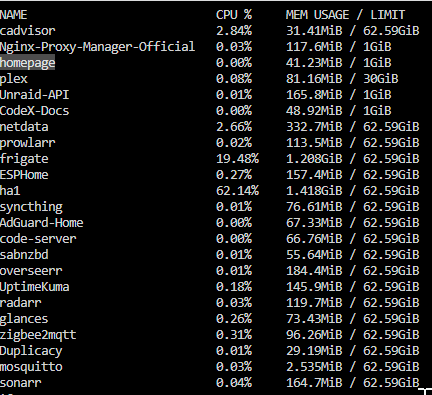
so no crash for 5 days after reconfiguring plex-transcode-limit,, perhaps that was the root-cause?? Looking into avoid this going forward,, and would like to limit some dockers ability "to go rogue", and stumbled upon this DockerFAQ-post from @Squid it seems like it would be a good idea to limit the max ram for most of my dockers?? Anyone who have done this and have seen bad things happen because ram was limitied for a docker? For me it is HA and Plex that is user-centric,, so they should have first priority. Nginx was already limited by the template, so added that for homepage, codex-docs and unraid-api for test... 30gb for plex with the 18gb transcode-limit in that,, Any other good advice on this side-topic? -
-
no vm's (vm function disabled) no zfs,, MB/CPU/ram is relatively new,, so strange it should malfunction after working for about half a year?? Ram was upgraded about a month ago,, but worked good for a few weeks at least before the freeze-issues started
-
so,, got a couple of crashes again yesterday,, and posted on fb-forum for guidance,, Have now setup htop to run both on server-terminal and one on PC to see if it can freeze with the actual proceess(es) consuming most ram at freeze-time,,, did also try the Netdata-docker,, but it (as the docker-tab) is not updating data unless asked to,, so suppose it will not reveal any consumers that create the actual ram-spike Did get a tip to check the ram-transcode on plex,, and noticed that I'd probably counted wrong and allocated a whopping 186gb ram for transcoding with only 64gb installed in server.... Not seeing how that can crash the server at points of no plex playback,, but perhaps plex is using that resource for other purposes which escalates into a spike which crashes the server FB-post if any interrest in the different guidance from them: https://www.facebook.com/groups/217132562182318/permalink/1439348673294028/ syslog-192.168.2.141.log
-
did experience +71 days on 6.11,, are now on 6.12.4 and it (6.12) was stable at first,, but then starting to act up. PS; not at all saying it is unraid-version-related,, most likely it is some docker/malconfiguration??? I'm not able to log in when it freezes,, some of the cases had enabled me try login by write username in server-console,, but times out 60sec later (not getting to prompt for pwd) Don't see the timing of freezes to correlate with any intencive jobs,, mover run at 00:05 and duplicacy are finished early in the morning and chrashes has been later in the morning,, and now more random,,, (time-settings updated now,, https://github.com/ArveVM/MyAssistedHome/wiki/unRaid-general#unraid-jobs )
-
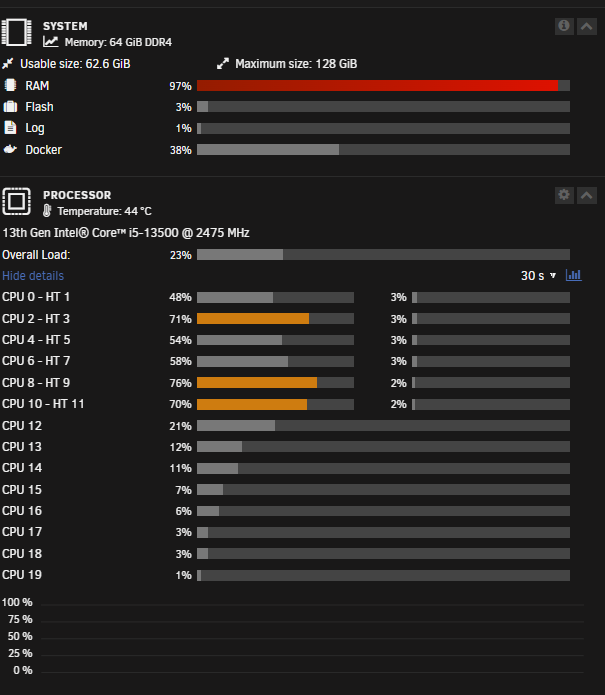
and again,,, list of restart-times: - Oct 6 08:38:04 - server ping OK, SSH unresponsive from outside, console on server unresponsive -flash unbootable - fixedd in win->makeBootable - Oct 12 12:11:14 - server ping OK, SSH unresponsive from outside, console on server unresponsive Oct 15 20:09:49 - server ping OK, SSH unresponsive from outside, console on server unresponsive -flash unbootable - fixedd in win->makeBootable Oct 19 20:23:26 - server ping OK, SSH unresponsive from outside, console on server responsive, but timeout 60sec so no login Oct 21 11:48:07 - server ping OK, SSH unresponsive from outside, console on server responsive, but timeout 60sec so no login Oct 21 15:45:50 - server ping OK, SSH unresponsive from outside, console on server responsive, but timeout 60sec so no login then after a copule of hours it froze again,, this time with the gui open on my laptop it seems like something is eating my RAM,,, how can I test what it is?? Need to step out for a few hours,, will await guiding before restarting server again,, syslog-192.168.2.141.log
-
oops it did-it again,,, restart-times: - Oct 6 08:38:04 - server ping OK, SSH unresponsive from outside, console on server unresponsive -flash unbootable - fixedd in win->makeBootable - Oct 12 12:11:14 - server ping OK, SSH unresponsive from outside, console on server unresponsive Oct 15 20:09:49 - server ping OK, SSH unresponsive from outside, console on server unresponsive -flash unbootable - fixedd in win->makeBootable Oct 19 20:23:26 - server ping OK, SSH unresponsive from outside, console on server responsive, but timeout 60sec so no login Oct 21 11:48:07 - server ping OK, SSH unresponsive from outside, console on server responsive, but timeout 60sec so no login Did disable tailscale plugin last time,,, will try to un-install plugin this time. Have also updated all dockers and plugins to latest version,,, syslog-192.168.2.141.log
-
so it happened again,,, just keeping the log here to keep track of times restart-times: Oct 6 08:38:04 Oct 12 12:11:14 Oct 15 20:09:49 Oct 19 20:23:26 reduced pluigins and running dockers since last time,, but still no cigar. this time the server-console was "responsive" (could write username), but no success in logging in (timeout after 60sec) Hard restart and server is running again,, attaching latest syslog,, will disable tailscale-plugin and a few more dockers syslog-192.168.2.141.log
-
server freeze is one thing,, but any idea why is the flash-drive is ending up as unbootable after some crash?? - that also seems a bit perculiar - but what do I know? The first and third of theese logged crashes the flashdrive became unbootable,,, (after hard shutdown and power-on the server booted into bios and it stated "no bootable device present" Took the flash-drive a trip to my laptop and run the "make bootable.bat" made it good again,,,,,
-
unfortunately the server is no good as just a NAS,, it's hosting HomeAssistant and some media-server stuff that is kind of essential. VM's are disabled, but there are a few dockers I can turn off - and some plugins that are "nice to have" - so I'll start disabling them,, Perhaps the tailscale-plugin was one of the last to enter,,, and would be most likely to be invasive ?
-
Apriciate you getting back to me,, went through the syslog and removed full-names of users (stupid me), attached the syslog with three freezes where server console was not responding, no ssh-ability,, but server answer ping,, time to look for restart after crash; Oct 6 08:38:04 Oct 12 12:11:14 Oct 15 20:09:49 are there other settings for syslog or other tools I should enable to assist in the troubleshooting ?? (have adjusted syslog to 1mb files and to keep 4 files from now on) syslog-192.168.2.141_3.log
-
had another freeze today (or earlier this week),, was taking a few days off,, and ofcourse the server decided to misbehave ;( after a hard shutdown the server came onto bios-settings and stated "no bootable device" Took the usb into my pc and ran "make bootable" as administrator,, and plugged into server and it booted just fine,,, so what is making my server crash? and why is it making the flashdrive unbootable?? Where should I start looking for issues?? here is the part of the syslog where the server started misbehaving ( no Homeassistant yesterday 14th when I wake up) and a few random entries during the day unitl I came back and rebooted at 20:09 today (15th) There was no dockers running/accessible (HA, homepage, z2m etc) No SSH, no unraid webinterface - Oct 14 04:47:50 unraid1 emhttpd: read SMART /dev/sdi Oct 14 04:48:01 unraid1 monitor: Stop running nchan processes Oct 14 04:48:34 unraid1 monitor: Stop running nchan processes Oct 14 04:49:07 unraid1 monitor: Stop running nchan processes Oct 14 04:49:40 unraid1 monitor: Stop running nchan processes Oct 14 04:50:13 unraid1 monitor: Stop running nchan processes Oct 14 04:50:46 unraid1 monitor: Stop running nchan processes Oct 14 04:51:20 unraid1 monitor: Stop running nchan processes Oct 14 04:51:53 unraid1 monitor: Stop running nchan processes Oct 14 04:52:26 unraid1 monitor: Stop running nchan processes Oct 14 04:52:59 unraid1 monitor: Stop running nchan processes Oct 14 04:53:27 unraid1 php-fpm[13516]: [WARNING] [pool www] child 19857 exited on signal 9 (SIGKILL) after 13.953488 seconds from start Oct 14 06:27:05 unraid1 emhttpd: read SMART /dev/sde Oct 14 19:54:22 unraid1 kernel: CIFS: VFS: \\100.95.188.85\arve Close unmatched open for MID:2748 Oct 15 01:33:26 unraid1 kernel: TCP: request_sock_TCP: Possible SYN flooding on port 1883. Sending cookies. Check SNMP counters. Oct 15 01:34:30 unraid1 kernel: TCP: request_sock_TCP: Possible SYN flooding on port 8080. Sending cookies. Check SNMP counters. Oct 15 20:09:49 unraid1 cache_dirs: Arguments=-u -e appdata -e bck_staging -e domains -l off unraid1-diagnostics-20231015-2037.zip
-
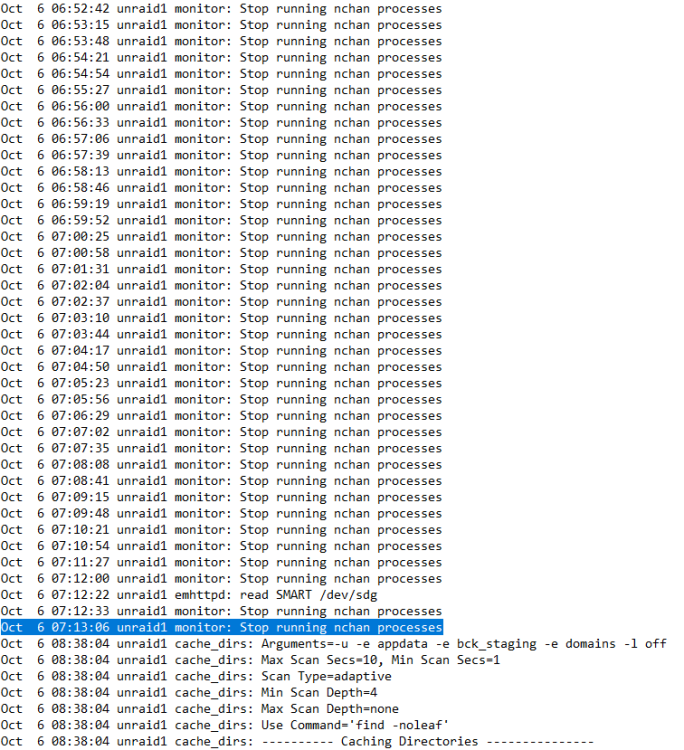
Hi Unraid have been running stable for over a month now,, so obviously I had to do something Started adding it to Tailscale, via tailscale-plugin, and sharing some data with a friend (have no idea if it's related - but worth mentioning) Server is used for HA/download etc,, only dockers. Have a few backup-scripts and duplicacy-backup around 03-05 at night,, but nothing special happening around the time of the crash(es) I've just had two server-freeze,,,, one last night at 07:01, and one today at 07:13. Last night i tried ping and got answer,, then to reach server with ssh but no luck. Also console on server did not let me log in,, so hard off/on,, and server was back running fine. Did actually bother to install syslog-server so that syslog is added to a cashe-drive - so now I have syslog from before/aftert crash today So lots of personal data included names of shares created,, so just cutting the last minutes before crash and after startup: the 'stop runnin nchan' seems to be browser sleep/wakeup from my many open chrome-tabs (pc obviously not sleeping!)? Today when trying to connect to server it was same as yesterday,, no ssh or console on server that is responding,,, Hard restart and then boot into bios - with message "no boot device present",,,, - unplugged flash and plugged into windows-laptop and (run as admin:)"make bootable" and plug into server and voila,, boot again. Have no clue what have caused this,, adding diagnostics so you can see my setup can go through the syslog and remove any personal data if that could give more info on how to avoid dayily crashes,,, unraid1-diagnostics-20231006-1033.zip
-
HA-naming: Since I also integrate my unraid-server with MonitorDocker-integration,, I'd like naming of devices as the integration So entities from monitordocker is called like sensor.monitordocker_adguard_home and the unraid-api one could b DeviceName=unraidAPI Server-level sensors: binary_sensor.unraidapi_server button.unraidapi_server_mover button.unraidapi_server_partitycheck button.unraidapi_server_power_off button.unraidapi_server_reboot switch.unraidapi_server_array Docker; button.unraidapi_docker_adguard_home_restart switch.unraidapi_docker_adguard_home (i have no VM's) So for me the logical choice is to have UnraidAPI (integration) as device name But then how about the advanced guys with mulitple servers?? perhaps a combination of integration-name and server-name just to get the full -full length entity-id's
-
I would normally not use any space in names,, and I believe it is not even allowed in unraid-server-name,,, but thanks for having me verify, - its not like I haven't done stupid rookie mistakes if you are refering to the Theme Engine plugin then NO, that is not installed. I use dark mode and DockerFolder in unraid, get my docker-overview/jump-points in Homepage,, and performance should be logged/visible in HA




