





scytherswings
Members
-
Joined
-
Last visited
-
I'm unable to copy files with winSCP, writing via SMB also fails. I am usually able to write individual files in the terminal using vim, however. This is not a new issue with my unraid server. I'm posting these diagnostics in the hopes that this error is related to that very frustrating behavior for a NAS. hathor-diagnostics-20240223-2352.zip
-
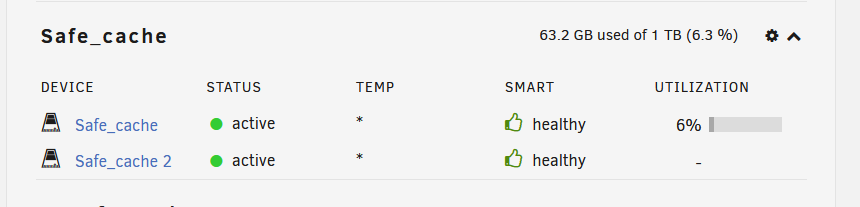
26 days and no issues with any drive dropping offline yet, I'm hopeful still that the system will be stable with this configuration but only time will tell. Edit: 55 days and no issues!
-
To sum up, the issue happened about three more times and I've decided to give up on btrfs for cache drives. I decided to run memtest86+ for 40 hours or so and found no issues, so I am relatively confident that the drive issues were not caused by memory corruption. I have since reformatted each ssd with xfs and made each one its own cache drive, losing my redundancy. So far no issues but it has only been about a week.
-
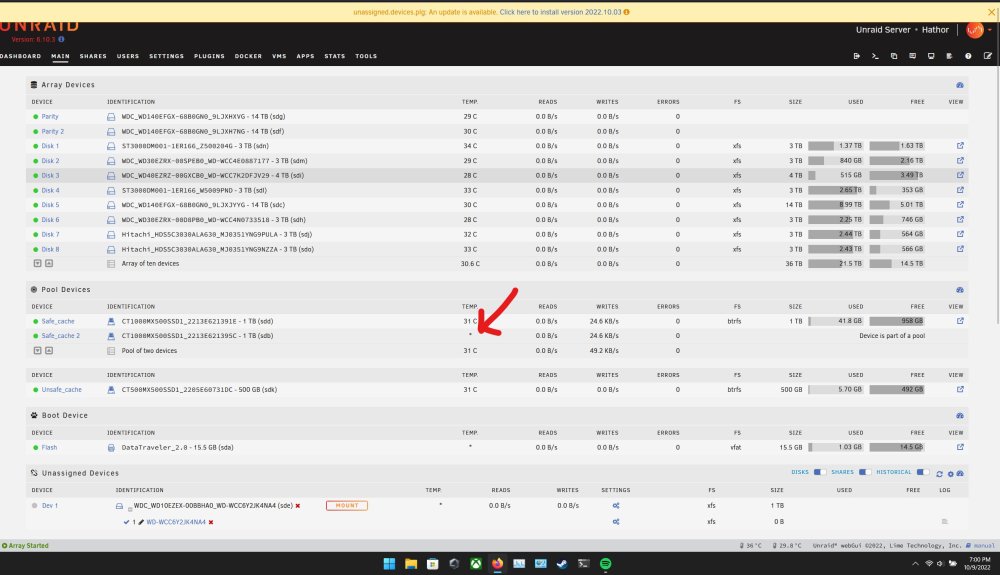
After the last incident I had decided not to replace my cables (I've already done this a few times throughout this process) and instead removed the Dynamix SSD TRIM plugin which I had thought was causing issues by running the SET MANAGEMENT command. Unfortunately that looks like it was a red herring (I believe Unraid natively supports TRIM stuff nowadays, so this was not going to change anything). To nobody's surprise I've had both my drives drop off again today after updating my docker images. What's frustrating is that Unraid actually doesn't mark these drives as offline, even though they have been disabled per the logs: Oct 24 08:41:39 Hathor kernel: ata5: COMRESET failed (errno=-16) Oct 24 08:41:39 Hathor kernel: ata5: hard resetting link Oct 24 08:41:44 Hathor kernel: ata5: link is slow to respond, please be patient (ready=0) Oct 24 08:42:08 Hathor kernel: ata3: COMRESET failed (errno=-16) Oct 24 08:42:08 Hathor kernel: ata3: limiting SATA link speed to 3.0 Gbps Oct 24 08:42:08 Hathor kernel: ata3: hard resetting link Oct 24 08:42:13 Hathor kernel: ata3: COMRESET failed (errno=-16) Oct 24 08:42:13 Hathor kernel: ata3: reset failed, giving up Oct 24 08:42:13 Hathor kernel: ata3.00: disabled Oct 24 08:42:13 Hathor kernel: ata3: EH complete Oct 24 08:42:13 Hathor kernel: sd 3:0:0:0: [sdb] tag#16 UNKNOWN(0x2003) Result: hostbyte=0x04 driverbyte=DRIVER_OK cmd_age=90s Oct 24 08:42:13 Hathor kernel: sd 3:0:0:0: [sdb] tag#16 CDB: opcode=0x2a 2a 00 00 1a 80 80 00 00 40 00 See the attached image - the temperature being an * is the only indication that something is wrong. I'm going to actually swap the cables as requested again and put the SSDs on my PCIe HBA instead of the motherboard controller. I'm running out of ideas and I'm reasonably convinced there's some sort of latent bug in the MX500 series firmware or the drivers unraid uses to control these drives is faulty. ..1 day later.. After swapping my SATA cables, controllers, and even power cables I have yet again had one of my cache drives drop offline. I connected my safe_cache drives, one to my motherboard controller and the other to my SAS2008 HBA and the mothboard connected drive has dropped. I'm going to swap the sata cable on that one again and see what happens. I have a hard time believing this issue is cable related as I've already used about 6 different SATA cables at this point for these drives, but I have more I can try.
-
If I had to guess, this is where it happens?
-
Huzzah! Your monitoring suggestion has paid off! I just got a notification and was able to capture these diagnostics! I haven't read any logs files yet myself so I'll be doing that now. Also I'm lucky that only one of the drives has knocked offline, it's a real pain when its both. hathor-diagnostics-20221013-2048.zip
-
After about an hour or so it looks like my docker service has had an issue now too - guess i'm forced to reboot. hathor-diagnostics-20221009-2009.zip
-
Ok it's happened again, unfortunately it seems to have happened a few days ago and I wasn't able to get logs right away and /var/log seems to be full, regardless I've captured these diagnostic logs and plan to install the update to 6.11.0 and reboot after. I've included a screenshot that highlights that one of my two cache drives have gone offline - the easiest way to see that this has happened is that the temperature readout shows * instead of an actual reading. Thanks much! hathor-diagnostics-20221009-1859.zip
-
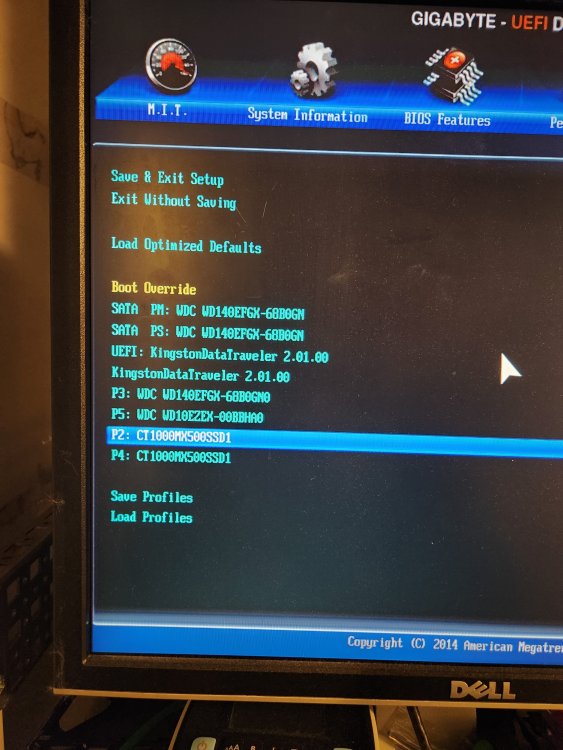
First, thank you for your quick response! Yes they were online before rebooting and had been running for about 12 days - in my frustration I rebooted and got this diag. I then shut the machine down, changed the sata cables and the motherboard ports they were plugged into, and rebooted. The drives came online and my containers started up successfully, then I got a warning from the fix common problems plugin for this: Event: Fix Common Problems - Hathor Subject: Errors have been found with your server (Hathor). Description: Investigate at Settings / User Utilities / Fix Common Problems Importance: alert * **Unable to write to safe_cache** * **Unable to write to Docker Image** And I noticed that my docker services were unresponsive or crashing. I rebooted again and the drives presented as offline and the array did not start. I went to bed. This morning, after shutting down and then booting to the bios, I can see that the bios does see the drives. I exited the bios and let unraid boot and everything mounted without any issues. I'll be keeping an eye on how long it stays up and get diags before rebooting if the drives drop off again. I find it surprising that both drives went offline at the same time, but I know that without better diagnostic information it'll be difficult to establish a root cause. I will update here once I'm able to produce diag information.
-
I've been running Unraid for a handful of months now, and I can't for the life of me figure out why it is that my cache drives randomly go offline/unresponsive after a period of time. Here's what I've tried: Use 1 500GB Samsung cache drive. Use 2 500GB samsung/crucial cache drives. Upgrade to 2 1TB brand new crucial cache drives with same old cables. Change ancient power supply to brand new one. Swap sata cables to different ones. Change ports on motherboard. I am about to crack open the server once again to try and replace these cables, but I'm at my wits end for getting this server stable. I never had issues with this hardware running ubuntu, but I guess it is getting old. What strikes me as odd is that it's only the cache drives I'm having trouble with. I have had absolutely 0 problems with my spinning disks, they just work - which is great. I've attached a diagnostic file after rebooting this evening once I found my docker service unable to start (this is a new one!). After rebooting, both cache drives were offline even though nothing has physically changed with the machine. Thanks much! hathor-diagnostics-20220927-2048.zip


