





FlexibleToast
Members
-
Joined
-
Last visited
Everything posted by FlexibleToast
-
The Nvidia plugin is up to date. I have the auto update plugin and set it to update every Friday any update that is over 3 days old. I travel for work every week, so I'm not going to attempt the reboot until Friday. I'll report back if I have any issues.
-
I just upgraded from Unraid 7 beta 2 to Unraid 7 beta 3 and received this warning: I don't know why it's saying to add a screenshot without giving any additional useful information. Anyway, why is it trying to download such an old driver version? The current "production" version is v550.120 and the current installed version is v550.107.02. Is this error legit or am I safe to reboot into the new version?
-
I'm thinking it might be proxy related. I'm using a cloudflare tunnel to expose it.
-
Okay, I tried using docker compose on Unraid using the 'Docker Compose Manager' plugin to get docker compose at the cli. I installed a fresh copy and it had the same issue. So, I tried just starting up my nextcloud containers on my OMV machine. They haven't been modified, only copied from so they should work as they did. It has the same issue. So, this must not be related to the way I'm doing things with Unraid at all. What's weird is the same/similar compose file and cloudflare tunnels are what I use at my dad's house and that instance works as expected. I think I'm going to do a fresh install on Unraid using the built in docker tools and go to Nextcloud forums or github and troubleshoot from there.
-
Yep, I did that. I copied them over from my compose file from OMV Yep, I created a docker network for nextcloud and added both containers to it so that I didn't have to expose the DB port and the app could refer to it by container name. That part all works as expected.
-
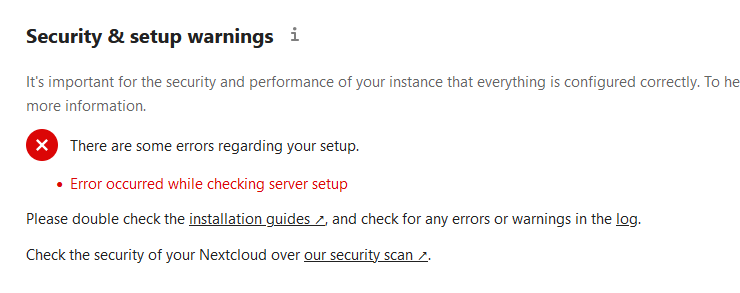
I'm migrating from OMV to Unraid and after migrating my Nextcloud install if I go to the 'Administration settings' it tries to do the install checkup but fails every time. I've tried the official Nextcloud container (not the AIO) and the Linuxserver.io container. They both have the same issue. The only real differences between how I did it in OMV and how I do it here is the owner is 99:100 here where I used www-data on OMV, also on OMV I used docker compose and linked the app container with the database (the official MariaDB container). Using the Unraid builtin docker tools I don't see anyway of adding that link. Does anyone else have this issue? Are you using MariaDB or SQLite?
-
Yes, I've been working with Linux/Unix for years. I actually work as a consultant for Red Hat and have my RHCA. I work with Ansible and OpenShift though so occasionally something like the sticky bit can throw me off still. When you say 777 or 666 you're implying 0777 and 0666. I know for sure on my OMV setup I set at least the SUID and GUID. Looking at my OMV it looks as though I actually set the permissions as '7770'. I wanted the SUID and GUID in order to make sure newly created files inherit the proper group and ACLs don't work with ZFS. On OMV I should have set the permissions to '6770'... Anyway when I rsync'ed it to the new Unraid it preserved those permissions and the 'New Permissions' tool doesn't touch the SUID, GUID, or sticky bit. Instead that tool uses the method I normally never use; this output was another piece to solving that puzzle: Processing: /mnt/user/media ... chmod -R u-x,go-rwx,go+u,ugo+X /mnt/user/media ... chown -R nobody:users /mnt/user/media ... sync Completed, elapsed time: 00:00:32 It is adding and removing permissions instead of resetting them to something like '0777' or '0666', which might be a touch more difficult because you would have to make a distinction between a directory and a file. Find could do it easy enough, but it would take longer. TLDR: The issue was copying faulty permissions and the permissions tool not acting the way I assumed it would. Everything with those permissions should be good now. Now the next problem is Nextcloud.
-
1. No, just one copy that is now on the cache drive because I copy/pasted it as part of a test so it is a 'new' file that hasn't been moved by mover yet. 2. Doing this walk I did find the problem. The difference is the mode of the directory. Notice for the one I can't rename it is '7777' the one I can rename is '0777'. It was the sticky bit doing its job preventing any user that isn't the owner or root from deleting or renaming the files in the directory. I have no idea how that got set... Neither 'New Permissions' or the 'Docker Safe New Permissions' seems to set the sticky bit. With all the rsync'ing and what not I've been doing I guess it's not too surprising something weird got set though. Even after years of being a linux admin sometimes something basic will bite you, lol. Thanks for the help. root@kerbol-next:/mnt/user/media/Movies# ls -l | grep Rebel drwxrwsrwt 1 nobody users 3 Aug 13 20:20 Rebel\ Moon\ -\ Part\ One\ A\ Child\ of\ Fire\ (2023)/ drwxrwsrwt 1 nobody users 3 Aug 7 00:26 Rebel\ Moon\ -\ Part\ Two\ The\ Scargiver\ (2024)/ root@kerbol-next:/mnt/user/media/Movies# cd ..; ls -l | grep media drwsrwsrwx 1 nobody users 4 Aug 13 19:56 media/ root@kerbol-next:/mnt/user# ls -l | grep downloads drwxrwxrwx 1 nobody users 6 Aug 8 14:09 downloads/ root@kerbol-next:/mnt/user# cd downloads/; ls -l | grep complete drwsrwsrwt 1 nobody users 10 Aug 13 14:36 complete/ drwsrwsrwt 1 nobody users 2 Aug 13 14:36 incomplete/ root@kerbol-next:/mnt/user/downloads# cd complete; ls -l | grep movies drwsrwsrwt 1 nobody users 3 Aug 13 00:19 movies/ root@kerbol-next:/mnt/user/downloads/complete# cd movies; ls -l total 33 drwxrwxrwx 1 nobody users 3 Aug 13 19:55 The.Voyeurs.2021.1080p.UHD.WEBRip.HDR.x265.DDP5.1-SM737/ I've fixed this issue by running `chmod -R ug-s,-t /mnt/user/*` and then running the 'Docker Safe New Permissions' tool. This will remove the SUID, GUID, and sticky bit from every file and directory managed by Unraid.
-
I've been using file shares and samba for many years at this point, but I'm new to Unraid. I've copied over everything from my old OMV based NAS and I'm trying to set things up now. For some reason my different shares have the exact same settings and permissions, but they have different behaviors and it doesn't make any sense to me. Unraid has a user that is the same name as my Windows 11 username. I have two shares, one is 'download' the other is 'media.' They both have a file in them that I've tried to rename. On the media share I get an error saying I need permission from nobody to make changes to the file. The media share is set to 'Secure' and my user has 'Read/Write' access. The file has the following permissions: root@kerbol-next:/mnt/user/media/Movies/Rebel Moon - Part One A Child of Fire (2023)# ls -l total 1825733 -rw-rw-rw- 1 nobody users 1882551183 Dec 14 2023 Rebel\ Moon\ -\ Part\ One\ A\ Child\ of\ Fire\ [WEBRip-1080p].mkv The read/write seems to work because I can create and delete a file in that same directory, but I can't rename that file. On the download share I can rename a file without any issues. The download share is also set to 'Secure' and my user has 'Read/Write' access. The file has the following permissions: root@kerbol-next:/mnt/user/downloads/complete/movies/The.Voyeurs.2021.1080p.UHD.WEBRip.HDR.x265.DDP5.1-SM737# ls -l total 3543540 -rw-rw-rw- 1 nobody users 3631161077 Jul 6 03:58 The.Voyeurs.2021.1080p.UHD.WEBRip.HDR.x265.DDP5.1-SM737.mkv The biggest difference I can think of is that the media share is on the array and downloads is on my cache pool. I made a copy of the file in media so that way it would be in cache pre-move and set the same permissions; that file also would not let me rename it... What else could be different between the two shares that allows me to rename the file on one but not the other? I suppose I should mention this is Unraid 7.0.0-beta.2.
-
I'm new to Unraid and just had to look this up. Glad this came up, but this really should be a feature. Now I get my Kuma and Unraid notifications in the same chat.
-
It might have been because my array was still building the initial parity? I'm not sure but it works as expected now.
-
I'm looking to move from OMV to unRAID and I'm just trialing unRAID in a VM on my Proxmox cluster right now. I'm trying to setup encryption with an auto unlock. Instead of using smb, wget, or ftp, I'm using rsync so that it is ssh encrypted. My keyfile transfers just fine, but for some reason the array doesn't start. I have to log in to the web UI and click start. From that point it "just works" I don't have to enter a password. I have `Settings > Disk Settings > Enable auto start` set to yes. Is there something I'm missing?

