





guyola
Members
-
Joined
-
Last visited
Everything posted by guyola
-
The cron job I try to create with luckbackup to run on a daily basis does not seem to work. I created a cron job with, as instructed, the console checkbox marked - yet it doesnt seem to be working Can anyone suggest a solution?
-
I just saw the email with the instruction Thanks
-
I did not know I had to... My server was working with the basic and I just paid and upgraded - do you have any instruction how to download it and where to put it?
-
Hi The cron job I try to create with luckbackup on a daily basis does not seem to work. I created a cron job with as instructed with console checkbox marked - yet it doesn seen to be working Can anyone suggest a solution? Thank you
-
Hi I just upgraded to plus but the system shows me as basic. Can you fix this? Thank you
-
THANK YOU VERY MUCH CAPLAM! - I am new here and just learning - your tip helped me 👍🙂
-
No - it is an hot swap disk connected via SATA connected to the server. Any idea how I can fix this?
-
I have an unassigned disk mounted and recognized by unraid. I want to use luckybackup to backup a share to this unassigned disk. But I cant find it as destination in luckybackup. Anyone has an idea how to solve this? Thank you
-
Thank you Michael.... Can you explain how do I use this script? Why use these long scripts instead of a container like LUCYBACKUP OR DUPLICATI etc? I'm asking to learn why you think it is better because I'm new at this... Thank you
-
Hello Is it possible to backup to an unnassigned disk which will be placed in a removable disk bay and create another copy? Or to external USB...? Thanks
-
Yes it does? Do you know how I can resolve this ? thank you...
-
Hi Does anyone know how do I get rid of the warning yellow error in the unraid log? Jan 25 18:46:42 TOWER nginx: 2023/01/25 18:46:42 [error] 2749#2749: *754828 open() "/usr/local/emhttp/cart.json" failed (2: No such file or directory) while sending to client, client: 192.168.0.90, server: , request: "GET /cart.json HTTP/1.1", host: "192.168.0.102" Thanks
-
Yes I stopped the docker service and it still showed this same error... I have swag installed as a reverse proxy accordin the spave invader one video for next cloud... What could be the problem??? Thanks
-
I'm getting this error in the Unraid LOG multiple times: Jan 20 18:00:54 TOWER nginx: 2023/01/20 18:00:54 [error] 2749#2749: *10839 open() "/usr/local/emhttp/cart.json" failed (2: No such file or directory) while sending to client, client: 192.168.0.24, server: , request: "GET /cart.json HTTP/1.1", host: "tower.local" Jan 20 18:01:14 TOWER nginx: 2023/01/20 18:01:14 [error] 2749#2749: *10822 open() "/usr/local/emhttp/cart.json" failed (2: No such file or directory) while sending to client, client: 192.168.0.24, server: , request: "GET /cart.json HTTP/1.1", host: "tower.local" Jan 20 18:01:27 TOWER nginx: 2023/01/20 18:01:27 [error] 2749#2749: *10839 open() "/usr/local/emhttp/cart.json" failed (2: No such file or directory) while sending to client, client: 192.168.0.24, server: , request: "GET /cart.json HTTP/1.1", host: "tower.local" Jan 20 18:02:26 TOWER nginx: 2023/01/20 18:02:26 [error] 2749#2749: *10839 open() "/usr/local/emhttp/cart.json" failed (2: No such file or directory) while sending to client, client: 192.168.0.24, server: , request: "GET /cart.json HTTP/1.1", host: "tower.local" Jan 20 18:05:01 TOWER nginx: 2023/01/20 18:05:01 [error] 2749#2749: *10839 open() "/usr/local/emhttp/cart.json" failed (2: No such file or directory) while sending to client, client: 192.168.0.24, server: , request: "GET /cart.json HTTP/1.1", host: "tower.local" Can anyone help explain/resolve this issue? Thanks
-
THANK YOU VERY MUCH KILRAH FOR YOUR HELP AND PATIENCE. I have updated the config file and its working 👍 Thanks 🙂👍
-
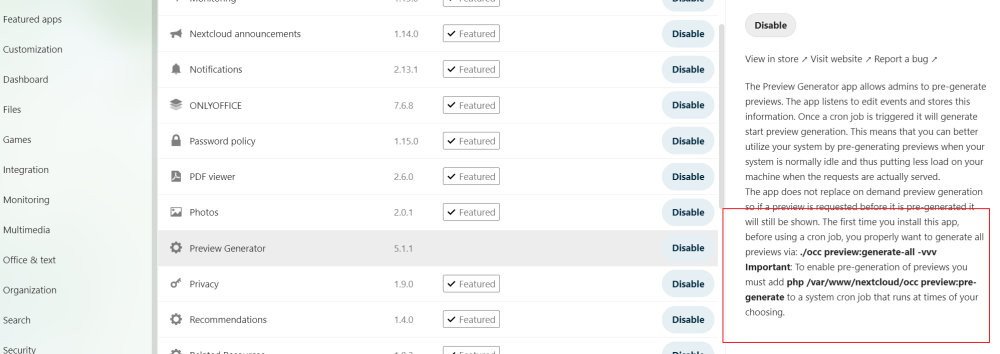
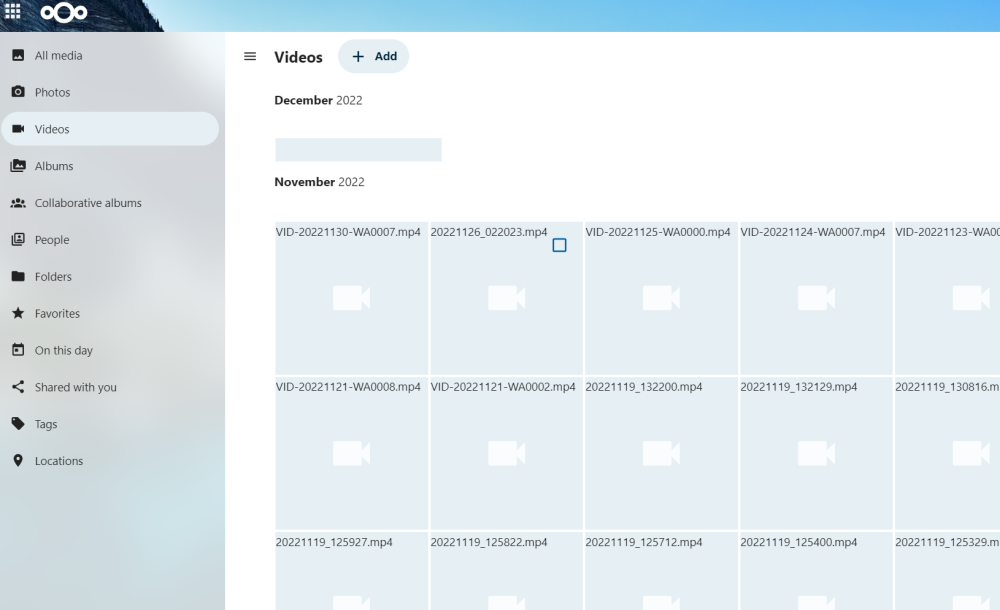
pls see the attached screen shots - they say you need to run commands and create a cron job for preview generator to create previews for the videos: The first is the instructions in nextcloud when installing preview generatot The second is a screenshot of how I see the videos previews in my Nextcloud... Thanks
-
Thanks for your answer. I really appreciate it - but i am new to Linux etc - can you be more specific where and how do I run these commands? and which file do i update with the above commands? and do I need ffmpeg ? I still do not know how to make this work and I reinstalled Nextcloud from scratch according to spaceinvader one videos.... but the videos still have no previews....
-
Can you show how? BTW - What is the reason it is not automatically setup to show video thumbnails previews? Thanks
-
Hi I have installed Nextcloud on my new Unraid servers according the Spaceinvader one's videos - Thanks very much to Spaceinvader one. Nextcloud seems to work just great but I cannot seem to solve the video previews issue. I have searched the forums and found that I need that I apparently need to run some commands as follows: "The first time you install this app, before using a cron job, you properly want to generate all previews via: ./occ preview:generate-all -vvv Important: To enable pre-generation of previews you must add php /var/www/nextcloud/occ preview:pre-generate to a system cron job that runs at times of your choosing." I am knew to unraid and command lines - can anyone help me with the following: 1. Where do I run the preview generator command on Unraid Nextcloud? (I have the appdata running on a cache disk). 2. How do I setup the cron job for this? Thanks for your help
-
Hi How can I enable thumbnails for videos on nextcloud? Thanks
-
Hello I would like to setup a vpn on unraid. I understood that wireguard is recommended. I have Nextcloud installed according to spaceinvader one's youtube with cloudflare and duckdns and swag. Since I am new at Unraid etc, I would appreciate your help with instuctions how to setup vpn wireguard in this environment: Do I need to setup another subdomain on duckdns and/or cloudflare or can I you the one that is configured for nextcloud.? If I use the same subdomain on duckdns how does unraid know to direct the vpn client through wireguard? Sorry if I mixed up the various issues - I'm new to all this... Thanks
-
Hello I cannot see the video preview thumbnails on Nextcloud on my new Unraid server. Sorry, I'm new at unraid and Nextcloud - so I searched the forum and found that I need to run the following commands: "The first time you install this app, before using a cron job, you properly want to generate all previews via: ./occ preview:generate-all -vvv Important: To enable pre-generation of previews you must add php /var/www/nextcloud/occ preview:pre-generate to a system cron job that runs at times of your choosing." Can anyone help me with the following: Where do I run the preview generator command on Unraid Nextcloud? and how do I setup the cron job for this? Thank you
-
I am new here so wasn't sure how to reinstall anyway - I uninstalled and reinstalled - thanks
-
This plugin has been deprecated and should no longer be used due to the following reason(s): Deprecated by the author. Suggested to use instead the forked version from KluthR While this plugin should still be functional, it is no recommended to continue to use it.
-
You are responsible for managing the certificate. Upload it to /boot/config/ssl/certs/[servername]_unraid_bundle.pem Where do I update this and what is this issue?


