





Farid
Members
-
Joined
Everything posted by Farid
-
I hope this is the right place to get help for unmanic running on unraid: As long as unmanic is running, it is generating 5 messages every hour as can be seen below. Can anybody help with this? Thanks, 2025-09-03T18:20:36:INFO:Unmanic.ScheduledTasksManager - Updating session data 2025-09-03T18:20:37:INFO:Unmanic.Session - Failed to get access token. 2025-09-03T18:20:37:INFO:Unmanic.Session - Remote Message: Application token invalid. 2025-09-03T18:20:37:INFO:Unmanic - Remote logging disabled. 2025-09-03T18:20:38:INFO:Unmanic - Remote logging disabled. 2025-09-03T19:20:38:INFO:Unmanic.ScheduledTasksManager - Updating session data 2025-09-03T19:20:39:INFO:Unmanic.Session - Failed to get access token. 2025-09-03T19:20:39:INFO:Unmanic.Session - Remote Message: Application token invalid. 2025-09-03T19:20:39:INFO:Unmanic - Remote logging disabled. 2025-09-03T19:20:39:INFO:Unmanic - Remote logging disabled.
-
Followed your suggestions above and that RESOLVED the problem. Thank you very much
-
I stopped the array then restarted it and it did exactly what you said. It deleted the appdata.cfg
-
When I shut down the system about half an hour ago, the appdata.cfg was on the flash drive. Once I rebooted, it got deleted from the flash drive and got created again once I changed the share on UNRAID and applied the changes. I compared the parameters of appdata share on the flash against the system share. They are both on the same pool and both have identical parameters except for the shareCOW= where it is "no" on the system share and "auto" on appdata. Not sure what this parameter is.It gets created on the flash drive only when I modify the share on unraid and apply the changesAfter the reboot and before modifying the appdata share, on UNRAID, I noticed that the appdata share does not exist on the flash drive !!!!!. Perhaps this can give you a clue on what is happening.So, I shutdown the server, took the flash drive out and viewed the file .cfg file on my laptop. The first image is from the flash drive and the second is from the appdata share after reboot. Notice how the primary stoarage has been changed to "Array" !!!!
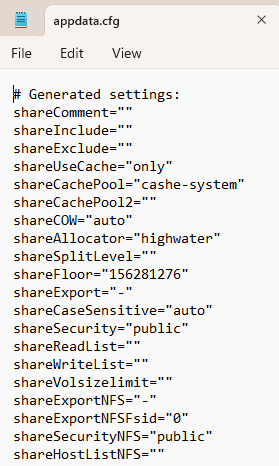
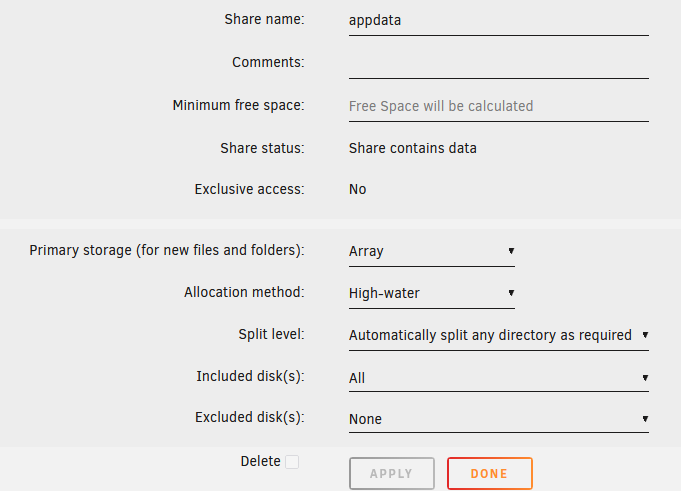 I definitely applied the changes then hit the done key. The image above is from the config/shares/appdata.cfg from the flash drive and contains the change to the primary storage which was "Array" after the reboot and the date on the .cfg file also reflects that 14/5/2025.This is what I see now accessing the flash drive from within UNRAID. It looks fine to me. Is it possible that the changes I did to the share after the reboot are cashed and are not being written to the flash drive? I can shut down the server and check the flash drive on another computer just to make sure.
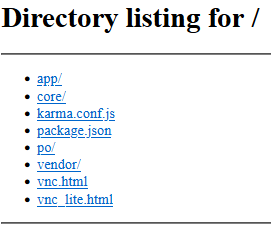
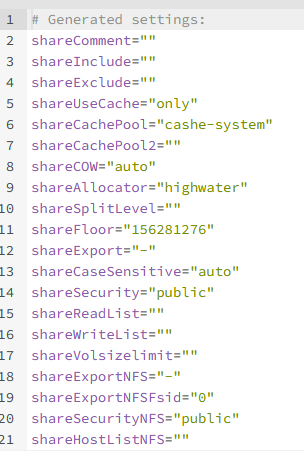 Yes. After a reboot, I change the primary storage on the share to "Cashe-system" then start the docker containers.The appdate share primary storage is set to "Cashe-system" which is a pool of two mirrored (RAID1) SSD 1.6TB drives, however, every time I reboot the system, the primary storage changes to "Array". This has been going on for a few months but I can't tell exactly for how long. Your help will be appreciated. unraid-diagnostics-20250514-0430.zipDid not see filesystem errors. Anyway, I reinstalled Krusader along with the other 6 apps that would not allow starting the webUI and had them reconfigured. A couple gave me problems such as sonarr with permissions (can't understand why as it was the exact same version I had b4 and I had it set exactly as it was b4 using screen shots of the settings I had saved of the one that was installed) and nzbget with TLS. Finally, I now have 6.11.5 installed and all apps working perfectly. Thanks for your helpI have not had the time to rebuild the flash as of yet but will soon. Honestly, I am a little afraid that If things don't work well and I loose my apps settings. I am not worried about re-configuring the ARRAY and POOL drives. Meanwhile, I installed v6.11.5 and did the following and found out something interesting that may give you a clue as to how to resolve this problem: 1) All the auto-start apps started properly. I was able to get the GUI for 6 of them (Plex, Wireguard, Jellyfin, Nginx, Jellyseerr and Speedtest). The GUI would not start for 7 apps (Radarr, Sonarr, Nzbget, Unmanic, Krusader, Ombi and Handbrake) 2) I deleted Handbrake (I hardly use it) and removed the container completely and then reinstalled it. All went well and the GUI started. 3) I tried to start Krusader but as mentioned above, the GUI screen is unable to connect. Normally the url is something like this http://10.0.0.74:6080/vnc.html?resize=remote&host=10.0.0.74&port=6080&autoconnect=1. I changed it to 10.0.0.74:6080 and got the screen below. I restarted Krusader GUI again and I got the message that it is the first time I am starting Krusader and started the configuration. However, at one stage I got the following message "Krusader's configuration file is in READ ONLY mode (why is that!?) Changed values will not be saved". I hope that the above message will help you figure the cause of the problem. Regards,
 Thank you for a super fast response. Problem resolved.A while ago I installed My Servers and was able to login remotely to my server through My Servers on unraid.net. A few days ago I removed this feature , removed the 10443 port routing from my router, signed out and rebooted my router and server. However, every time I enter the server IP address 10.0.0.74 in my browser, it changes automatically to "https://---- my certificate ----.unraid.net:10443". I am still able to login though. I installed "wireguard" on my laptop and cell phone and am now able to login to the server remotely with either devices, however, it still converts my server local ip address to go through unraid.net and still allows me to log in. Can anybody help? ThanksThanks for the reply. Since your first reply, I have been looking at the content of the flash drive trying to comprehend what I need to do. I have also located one of your posts about rebuilding a flash drive. Will try to rebuild the flash and see how it goes.Should I do this while at the current version I am on (6.9.2) or after I upgrade to 6.11.5?After upgrading from 6.9.2 to 6.11.5, the server, pool and all auto-start containers started. However, the webUI for all containers will not work except for Jellyfin. So I reverted back to 6.9.2. A while ago I tried to upgrade then to 6.10 and later to 6.11.2 but faced the same problem on both counts. Your help will be greatly appreciated. unraid-diagnostics-20221204-1656.zipunraid-diagnostics-20221108-0226-V6.11.2.zipThanks. I Attached the file to the original postAfter upgrading from 6.9.2 to 6.11.2, the server, pool and all auto-start containers started. However, the webUI for all containers will not work except for Jellyfin. So I reverted back to 6.9.2. I have the diagnostic ZIP file after installing the 6.11.2 but not sure how to attach it. Several months ago I tried to upgrade then to 6.10 and faced the same problem. unraid-diagnostics-20221108-0226-V6.11.2.zip


