zoller
Members
-
Joined
-
Last visited
-
I had the same problem, updated to latest today and no wg connection. After reverting back to 5.1.0-1-01 it works.
-
Hi, can someone please help me with my lsio nextcloud container? I think after a recent update(s?) I get internal server error 500, and can't login to nextcloud (my mobile app seems to stay connected to the nextcloud server, I can browse but can't upload files). I'm trying various things now for 3 days to fix it: I have configs and logs: config.php /mnt/user/nextcloud/nextcloud.log pw: MbtNuJXPWK /mnt/user/appdata/swag/log/nginx/access.log <-- nothing, only tokens /mnt/user/appdata/nextcloud/log/nginx/error.log <-- this is empty nothing suspicious in redis and in mariadb logs I tried the following things so far: - force reinstall nextcloud docker - reinstalling nextcloud with specific version tags (by the way the linuxserver dockers are updating and installing extremely slowly for me) - using sample swag subdomain config for nextcloud - trying out two differently setup cloudflared tunnel (locally managed "cloudflared" container and the newer one guided by Spaceinvader One, where the public host names are set up on the web ui of cloudflare: "Unraid-Cloudflared-Tunnel"). At the moment the latter one is active and recorded some logs on cloudflare web ui (clicked on Connector details, and started a log stream). Here I only see the Internal server error 500 - removed all of the swag mods from booting and from the conf files - I don't want to open a port on my router, so I haven't checked what happens if I turn off the proxy on cloudflare and put my real IP in DNS settings I'm really frustrated, because I didn't change anything on mariadb or nextcloud config, "just updated" nextcloud container and nothing else. I have appdata backups of all dockers, from 09-14. Should I do a restore (with appdata backup) for nextcloud and mariadb? I already set up zfs datasets on my appdata. If I would have done snapshots before the crash, maybe restoring would be even easier...? I appreciate any help, Thanks So finally I restored mariadb and nextcloud from my appdata backp and installed nextcloud:29.0.7-ls339 from CA. Now it works, but I'm not sure about upgrading now.. 😅
-
zoller changed their profile photo
-
Clear, I'll do a backup and convert drives to btrfs, then change to RAID1 and restore. Thanks for your prompt replies.
-
They are both xfs
-
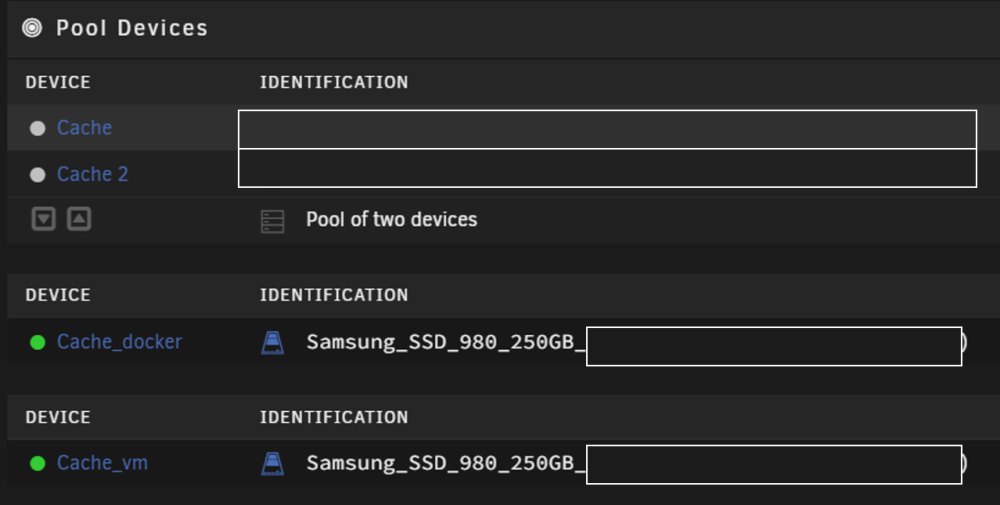
Hello Everyone, I'm pretty new to UNRAID. I have chosen this system because of its versatility. I'm very satisfied so far, but I'm still in the discovery phase. Therefore I would need some help and an optimal solution for converting my two nvme pool devices into RAID1. The main purpose of this is keeping my appdata safe(r). Currently one drive is used for docker appdata, the other one is dedicated to VM (attached please see the structure of devices). I know how to make a backup of appdata with "Appdata Backup/Restore v3". I have two questions: 1. Would you recommend to use a RAID1 pool for both docker's appdata and VM? 2. If yes, how can I safely convert the two separate pools into RAID1 without loosing appdata and the VM? If I initiate a RAID1 conversion, is it going to wipe everything, so that I have to restore them from a backup? Is there a simpler solution (to keep both docker appdata and VM)? I would appreciate your help This is my first post here by the way Cheers